
AI Slop Canvas vs Mediasaur
Side-by-side comparison to help you choose the right tool.

AI Slop Canvas
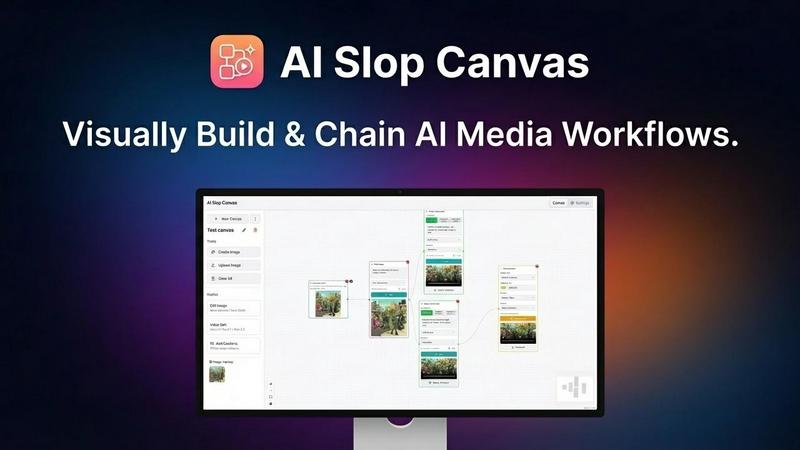
AI Slop Canvas is my favorite free Chrome extension for visually creating AI images and videos.
Last updated: March 1, 2026

Mediasaur
Mediasaur is my top AI tool for effortlessly creating stunning product photos and videos from your existing media.
Last updated: March 1, 2026
Visual Comparison
AI Slop Canvas
Mediasaur

Feature Comparison
AI Slop Canvas
Visual Workflow Editor
This is the heart and soul of AI Slop Canvas, and what sets it apart from simple prompt boxes. You build generation pipelines by visually connecting nodes on a canvas. Want to take a found image, upscale it, then use it as a base for a Sora video? You can literally drag, drop, and connect the nodes to make it happen. It turns complex, multi-step AI processes into an intuitive and almost playful diagram, making advanced creativity accessible to everyone.
Multiple Integrated AI Models
The extension doesn't force you into one model's style. It acts as a unified gateway to some of the most exciting models available via Fal.ai. You get access to image generators like Nano Banana and Reve Edit, plus the headline-grabbing video power of Sora 2, Sora 2 Pro, and Veo 3.1. This variety is crucial—it means you can pick the perfect tool for each job within a single, consistent interface, which is a massive time-saver.
Uncompromising Privacy-First Design
In an era of data harvesting, this feature is my personal favorite. AI Slop Canvas stores everything locally in your browser. Your Fal.ai API key is encrypted with AES-256 right on your device. The developers explicitly state there is no tracking, no analytics, and no data sent to their servers. Your creative experiments remain truly yours, which is a level of trust and security rarely found in free AI tools.
Instant Web Integration
The workflow starts where your inspiration does: on the web. The ability to right-click any image, meme, or artwork and send it directly to your canvas is a game-changer for iteration. It removes the tedious download-upload cycle, letting you capture inspiration and begin remixing or transforming it with AI in under two seconds. This seamless bridge between browsing and creating is brilliantly executed.
Mediasaur
AI-Powered Visual Transformation Engine
This is the beating heart of Mediasaur. You feed it a single asset—a product on a white background, a logo, a simple description—and its AI doesn't just tweak it; it completely reimagines it. Want to see your skincare product in a sunny bathroom, held by a diverse set of hands, or placed on a marble countertop? The engine generates these high-fidelity variants in seconds, maintaining product consistency while changing everything else. It’s the difference between having one photo and having an entire photoshoot's worth of angles and settings instantly.
UGC & Lifestyle Scene Generation
This is, hands down, my favorite feature for driving authentic engagement. Mediasaur excels at creating images that look like they were snapped by real customers in real life. It can generate people (in various styles) interacting with your product in believable environments—coffee shops, living rooms, offices. This capability is pure gold for social proof in ads and social media, as this style of content consistently outperforms sterile studio shots. It builds trust and relatability at a fraction of the cost of a real UGC campaign.
Intuitive Creative Workspace
Mediasaur understands that creation is just the first step; organization is key. Their workspace allows you to easily categorize, tag, and manage all your generated assets. You can create different projects for campaigns, experiment with applying various artistic styles to a batch of images, and compare variations side-by-side. This isn't a chaotic output folder; it's a streamlined dashboard where you can refine, select, and prepare your visuals for export, making the entire workflow from idea to asset library seamless.
Multi-Format & Platform-Ready Export
Once you've crafted the perfect image, Mediasaur ensures it's ready for prime time. You can export visuals optimized for specific platforms—think Instagram square posts, TikTok vertical videos, Facebook ad banners, or high-res website assets. This eliminates the final, often tedious step of manually resizing and reformatting content for each channel. It’s a small feature that saves an immense amount of time and ensures brand consistency across every touchpoint.
Use Cases
AI Slop Canvas
Rapid Meme Creation & Remixing
For meme creators, speed is currency. See a viral template? Right-click, send to canvas, and use the image-to-image or inpainting nodes to insert your own twist. You can iterate on visual jokes in minutes, testing different AI-generated alterations until you land on the funniest version, all without ever opening a separate editing program.
Agile Social Media Content Production
Social media managers can create eye-catching visuals and short videos directly within their browser. Need to turn a product screenshot into an engaging video clip for a post? Chain it through Sora 2. Want to generate a series of themed images for a campaign? Set up a reusable workflow. It eliminates app switching and makes producing platform-specific content incredibly efficient.
Experimental Content Creation
For YouTubers, bloggers, and digital artists, this tool is a sandbox for transformation. The standout use case is converting static images into dynamic videos. Imagine taking a book cover or a piece of concept art and bringing it to life with Sora 2 Pro. It opens up entirely new avenues for storytelling, channel intros, and visual effects that were previously reserved for high-end production.
Learning & Experimenting with AI
If you're curious about how AI models work together but are intimidated by code, this is your perfect starting point. The visual canvas allows you to experiment with chaining different models and parameters in a low-risk, intuitive environment. You learn the cause and effect of AI workflows by seeing the connections literally drawn out in front of you.
Mediasaur
Rapid Social Media Content Creation
For social media managers drowning in the need for daily content, Mediasaur is a lifeline. You can take one core product and generate a week's worth of unique, platform-optimized posts—lifestyle shots, UGC-style testimonials, close-up details, and festive seasonal variations—all in one sitting. It kills creative block and keeps your feed looking active and professionally curated without constant photoshoots.
Cost-Effective E-commerce Product Imagery
Small and medium e-commerce brands can now compete with the visual firepower of giants. Instead of a single expensive studio shot, use Mediasaur to create dozens of product variants: different colors in context, the product in use, or against various backdrops. This dramatically enriches product pages, reduces return rates by setting better expectations, and provides ample assets for email marketing and retargeting ads.
Agile Advertising & Creative Testing
Marketers can move at the speed of data. Need to test ten different ad concepts for a new campaign? With Mediasaur, you can prototype visual concepts—different models, settings, and value propositions—in minutes, not weeks. This allows for true data-driven creative optimization, letting you invest ad spend behind the visuals that are proven to resonate, all while keeping your testing cycles incredibly lean and fast.
Brand Content Pipeline Diversification
Even large brands with in-house studios can benefit. Mediasaur acts as a fantastic supplement for ideation and filling content gaps. Use it to quickly mock up concepts for approval, generate supplemental blog post imagery, or create unique visuals for one-off promotions where a full-scale shoot isn't justified. It keeps the overall content pipeline diverse, fresh, and surprisingly cost-effective.
Overview
About AI Slop Canvas
Let's cut through the noise: AI Slop Canvas is the most liberating and practical AI art tool I've used in a long time. It's not another subscription-based web app that locks your creations in the cloud. Instead, it's a completely free Chrome extension that brings a powerful, node-based visual editor directly into your browser, where everything—your workflows, your images, your API keys—stays securely on your own machine. The core idea is genius in its simplicity: you right-click any image on the web, send it to the canvas, and instantly begin remixing it with top-tier AI models like Sora 2 for video or Nano Banana for images. This tool is a dream for creators, marketers, and curious tinkerers who are tired of jumping between complicated interfaces. It democratizes advanced AI workflows, allowing you to chain operations like image-to-image and text-to-video without writing a single line of code. If you value privacy, speed, and a genuinely creative sandbox, this is your new playground.
About Mediasaur
Let's cut through the noise: Mediasaur is one of the most practical and potent AI visual engines I've seen for modern content teams. It solves a very specific, very expensive problem: the endless, soul-crushing need for fresh, high-quality visuals. Forget about the vague "AI art generators." Mediasaur is a professional-grade creative studio that intelligently transforms your single product photo, concept sketch, or text prompt into a vast library of ready-to-use content. Its core genius is in its focus on commercial-grade output—think authentic user-generated content (UGC) style images, pristine studio product shots, and vibrant lifestyle scenes that don't look like generic AI slop. It's built for the trenches, serving marketers, e-commerce entrepreneurs, designers, and content creators who need to move fast without sacrificing polish. The value proposition is undeniable: scale. It enables endless creative variation, letting you A/B test ad creatives in minutes, keep social feeds perpetually fresh, and completely bypass the traditional bottlenecks of photoshoots, models, and graphic design queues. For anyone serious about visual branding at speed, Mediasaur isn't just a tool; it's a strategic advantage.
Frequently Asked Questions
AI Slop Canvas FAQ
Is AI Slop Canvas really free?
Yes, the Chrome extension itself is 100% free. You install it at no cost and pay nothing to the developers of AI Slop Canvas. The only potential cost is for the AI model credits you use through Fal.ai. Fal.ai offers free initial credits, so you can start generating immediately, and then operates on a pay-as-you-go basis for continued heavy use.
How do I get started with the AI models?
You need a free API key from Fal.ai. Simply go to fal.ai/dashboard/keys, create an account if needed, and copy your key. Then, paste this key into the settings within the AI Slop Canvas extension. This key is your secure gateway to the models, and it's encrypted and stored locally on your computer, not on any external server.
Where are my images and videos saved?
All your generated content and workflow designs are stored locally within your browser's storage. Nothing is uploaded to AI Slop Canvas's servers. This means your creations are private and instantly accessible as long as you're using the same browser and device. You can also download your final outputs to your computer's hard drive.
What if I'm not technical? Is it hard to use?
Not at all. The visual node-based interface is designed to be intuitive. Instead of writing code, you drag, drop, and connect boxes. There's a low barrier to entry: start by right-clicking an image and using a simple "image to video" node. The complexity is optional—you can build more advanced chains as you become more comfortable.
Mediasaur FAQ
What kind of input does Mediasaur need to work?
Mediasaur is incredibly flexible with inputs. The most powerful starting point is a clean product photo on a neutral background, as this gives the AI a clear subject to work with. However, you can also start from a simple text prompt describing your concept, a sketch, or even an existing marketing image you want to remix. The better and clearer the input, the more accurate and stunning the output will be.
Are the generated images royalty-free for commercial use?
Absolutely, and this is critical. Once you generate an image using Mediasaur, you own the full commercial rights to use it. You can deploy them on your website, in paid advertising, on social media, in print materials—anywhere you need to promote your brand. There are no hidden royalties or usage fees, which makes it a predictable and scalable asset creation tool.
How does Mediasaur handle brand consistency?
This is where its transformation engine shines. When you upload a branded product, the AI is trained to keep that product recognizable and consistent across all variations. It changes the environment, the context, and the styling, but your core product remains accurate. You can also develop and save custom "styles" to apply across batches of images, ensuring a cohesive look and feel that aligns with your brand guidelines.
Can Mediasaur create videos as well as images?
Yes! Beyond static images, Mediasaur's capabilities extend into motion. It can generate short, engaging video clips from your inputs—think a product spinning on a pedestal, a lifestyle scene with subtle movement, or a UGC-style video clip. This is perfect for creating thumb-stopping content for Reels, TikTok, and video ads, making it a truly all-in-one visual content solution.
Alternatives
AI Slop Canvas Alternatives
AI Slop Canvas is a free Chrome extension that sits at the exciting intersection of content creation and design tools. It’s a browser-based playground for AI image and video generation, letting you build visual workflows and experiment with models like Sora 2 and Veo 3.1 directly from your right-click menu. It’s a fantastic entry point for anyone wanting to dip their toes into AI-powered creativity without a complex setup. Users often seek alternatives for a few key reasons. Some need more advanced features or professional-grade outputs that a free tool might not offer. Others might require a desktop application instead of a browser extension, or they may be looking for a specific AI model that isn't supported. The need for collaborative features, different pricing models, or integration with other software can also drive the search for other options. When evaluating alternatives, focus on what matters most for your workflow. Consider the core AI models available and the quality of their output. Assess the user interface—is it a visual node-based editor like Slop Canvas, or something more traditional? Crucially, examine the privacy policy and data handling practices, as well as the total cost of ownership, including any subscription fees or credit systems.
Mediasaur Alternatives
Mediasaur is a powerful AI content creation tool designed to help brands generate visuals and marketing materials at scale. It sits squarely in the competitive and fast-evolving category of AI-powered creative suites, where new features and models are constantly emerging. Users often explore alternatives for a variety of practical reasons. Budget is a primary driver, as pricing models and subscription tiers can vary significantly. Others might seek a platform with a specific AI model strength, like more photorealistic outputs or better text generation. Some need deeper integration with existing workflows, such as direct plugins for design software or e-commerce platforms. When evaluating other options, focus on what matters most for your output. Consider the quality and style of the generated images, the flexibility of the editing workspace, and the efficiency of the asset management system. The best tool isn't necessarily the most famous one; it's the one that seamlessly fits into your creative process and delivers the specific visual language your brand requires.