AI Slop Canvas vs Seedance 2 AI Video Generator
Side-by-side comparison to help you choose the right tool.

AI Slop Canvas
AI Slop Canvas is my favorite free Chrome extension for visually creating AI images and videos.
Last updated: March 1, 2026

Seedance 2 AI Video Generator
Seedance 2.0 instantly creates cinematic videos from your text, images, or clips with stunning consistency and control.
Last updated: March 1, 2026
Visual Comparison
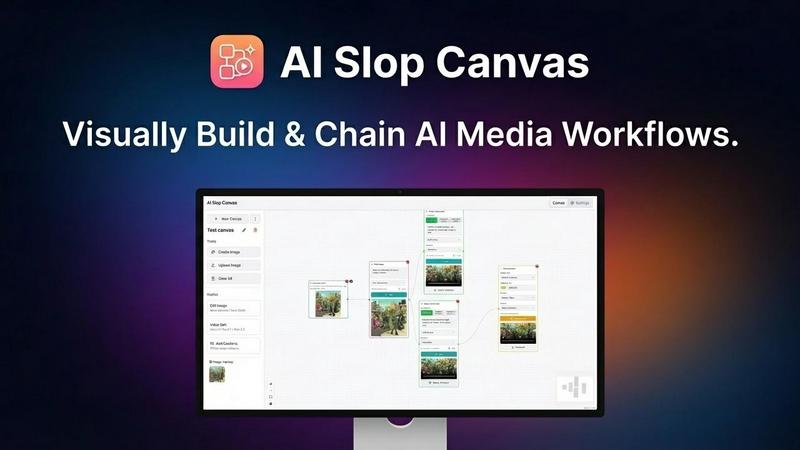
AI Slop Canvas
Seedance 2 AI Video Generator

Feature Comparison
AI Slop Canvas
Visual Workflow Editor
This is the heart and soul of AI Slop Canvas, and what sets it apart from simple prompt boxes. You build generation pipelines by visually connecting nodes on a canvas. Want to take a found image, upscale it, then use it as a base for a Sora video? You can literally drag, drop, and connect the nodes to make it happen. It turns complex, multi-step AI processes into an intuitive and almost playful diagram, making advanced creativity accessible to everyone.
Multiple Integrated AI Models
The extension doesn't force you into one model's style. It acts as a unified gateway to some of the most exciting models available via Fal.ai. You get access to image generators like Nano Banana and Reve Edit, plus the headline-grabbing video power of Sora 2, Sora 2 Pro, and Veo 3.1. This variety is crucial—it means you can pick the perfect tool for each job within a single, consistent interface, which is a massive time-saver.
Uncompromising Privacy-First Design
In an era of data harvesting, this feature is my personal favorite. AI Slop Canvas stores everything locally in your browser. Your Fal.ai API key is encrypted with AES-256 right on your device. The developers explicitly state there is no tracking, no analytics, and no data sent to their servers. Your creative experiments remain truly yours, which is a level of trust and security rarely found in free AI tools.
Instant Web Integration
The workflow starts where your inspiration does: on the web. The ability to right-click any image, meme, or artwork and send it directly to your canvas is a game-changer for iteration. It removes the tedious download-upload cycle, letting you capture inspiration and begin remixing or transforming it with AI in under two seconds. This seamless bridge between browsing and creating is brilliantly executed.
Seedance 2 AI Video Generator
Multimodal Generation Engine
Seedance 2.0 doesn't force you down a single creative path. It offers three distinct modes: Text-to-Video for pure ideation, Image-to-Video for maintaining strict style consistency from a reference, and Video-to-Video for restyling or extending existing footage. This flexibility is a game-changer, allowing you to choose the perfect starting point for any project, whether you're brainstorming from scratch or iterating on an established visual.
Reference-First Creative Control
This is, in my opinion, the killer feature. Instead of relying solely on the black box of prompt engineering, you can upload reference images or videos to guide the AI. This dramatically reduces guesswork, ensuring the generated video maintains the desired character likeness, color palette, composition, and overall aesthetic. It's the difference between hoping for a specific look and actively directing it.
Integrated Audio-Video Synthesis
Unlike many competitors that treat audio as an afterthought, Seedance 2.0 can generate synchronized audio in a single pass. This includes sound effects, background music, and even voice with multilingual lip-sync support for over 10 languages. Having coherent audio generated alongside the video is a massive time-saver and elevates the production value instantly, making clips feel complete right out of the gate.
Production-Ready Output Specifications
The tool is built for real-world use, not just experimentation. It supports outputs up to 1080p resolution at a cinema-standard 24fps for smooth motion, in aspect ratios (16:9, 9:16, 1:1) optimized for every platform from YouTube to TikTok. With video durations of 5-10 seconds per generation (and extension capabilities) and universal MP4 (H.264) formatting, the content you create is immediately ready for publishing or integration into larger edits.
Use Cases
AI Slop Canvas
Rapid Meme Creation & Remixing
For meme creators, speed is currency. See a viral template? Right-click, send to canvas, and use the image-to-image or inpainting nodes to insert your own twist. You can iterate on visual jokes in minutes, testing different AI-generated alterations until you land on the funniest version, all without ever opening a separate editing program.
Agile Social Media Content Production
Social media managers can create eye-catching visuals and short videos directly within their browser. Need to turn a product screenshot into an engaging video clip for a post? Chain it through Sora 2. Want to generate a series of themed images for a campaign? Set up a reusable workflow. It eliminates app switching and makes producing platform-specific content incredibly efficient.
Experimental Content Creation
For YouTubers, bloggers, and digital artists, this tool is a sandbox for transformation. The standout use case is converting static images into dynamic videos. Imagine taking a book cover or a piece of concept art and bringing it to life with Sora 2 Pro. It opens up entirely new avenues for storytelling, channel intros, and visual effects that were previously reserved for high-end production.
Learning & Experimenting with AI
If you're curious about how AI models work together but are intimidated by code, this is your perfect starting point. The visual canvas allows you to experiment with chaining different models and parameters in a low-risk, intuitive environment. You learn the cause and effect of AI workflows by seeing the connections literally drawn out in front of you.
Seedance 2 AI Video Generator
Rapid Social Media Ad Creation
Marketers and social media managers can generate dozens of A/B test variants for ads in minutes. Feed the AI a product image and a text prompt describing the desired mood and call-to-action, and get multiple, platform-optimized video ads. The speed allows for rapid iteration based on performance data without blowing the budget on live-action shoots for every concept.
Consistent Brand Content Series
For agencies and content teams, maintaining visual consistency across a video series is paramount. By using a master brand style image as a reference in the Image-to-Video mode, you can generate an entire suite of explainer videos, product highlights, or brand story clips that all share the same cohesive look and feel, strengthening brand identity.
Dynamic Product Demonstrations
E-commerce brands can bring static product photos to life. Upload an image of your product and prompt for a 360-degree spin, a close-up highlighting key features, or a scene showing it in use. This creates engaging, cinematic demo videos that can significantly boost conversion rates compared to static imagery alone.
Creative Storyboarding and Pitch Visualization
Filmmakers and creative directors can use Seedance 2.0 to quickly visualize concepts. Turn a written scene description or a mood board image into a short, moving clip to pitch ideas to clients or team members. The Video-to-Video mode also allows for restyling existing footage to explore different cinematic looks before committing to a full production.
Overview
About AI Slop Canvas
Let's cut through the noise: AI Slop Canvas is the most liberating and practical AI art tool I've used in a long time. It's not another subscription-based web app that locks your creations in the cloud. Instead, it's a completely free Chrome extension that brings a powerful, node-based visual editor directly into your browser, where everything—your workflows, your images, your API keys—stays securely on your own machine. The core idea is genius in its simplicity: you right-click any image on the web, send it to the canvas, and instantly begin remixing it with top-tier AI models like Sora 2 for video or Nano Banana for images. This tool is a dream for creators, marketers, and curious tinkerers who are tired of jumping between complicated interfaces. It democratizes advanced AI workflows, allowing you to chain operations like image-to-image and text-to-video without writing a single line of code. If you value privacy, speed, and a genuinely creative sandbox, this is your new playground.
About Seedance 2 AI Video Generator
Seedance 2.0 isn't just another AI video tool; it's a full-throttle creative engine designed to obliterate the barriers between your ideas and polished, cinematic output. Forget wrestling with complex editing suites or waiting days for renders. This platform is built for speed and control, offering a fast, all-in-one workflow that transforms text prompts, reference images, or existing source footage into professional-grade video clips. What truly sets Seedance 2.0 apart in a crowded market is its obsessive focus on consistency and controllability. While other generators leave you guessing with each prompt, Seedance 2.0 uses your references to anchor character design, visual style, and camera movement, delivering more predictable and coherent results. It's explicitly crafted for creators, marketers, and agencies who need to produce high volumes of video content—think social ads, product demos, or concept pitches—without the heavy overhead of traditional production. The value proposition is crystal clear: achieve cinematic quality with a fraction of the time, cost, and technical headache.
Frequently Asked Questions
AI Slop Canvas FAQ
Is AI Slop Canvas really free?
Yes, the Chrome extension itself is 100% free. You install it at no cost and pay nothing to the developers of AI Slop Canvas. The only potential cost is for the AI model credits you use through Fal.ai. Fal.ai offers free initial credits, so you can start generating immediately, and then operates on a pay-as-you-go basis for continued heavy use.
How do I get started with the AI models?
You need a free API key from Fal.ai. Simply go to fal.ai/dashboard/keys, create an account if needed, and copy your key. Then, paste this key into the settings within the AI Slop Canvas extension. This key is your secure gateway to the models, and it's encrypted and stored locally on your computer, not on any external server.
Where are my images and videos saved?
All your generated content and workflow designs are stored locally within your browser's storage. Nothing is uploaded to AI Slop Canvas's servers. This means your creations are private and instantly accessible as long as you're using the same browser and device. You can also download your final outputs to your computer's hard drive.
What if I'm not technical? Is it hard to use?
Not at all. The visual node-based interface is designed to be intuitive. Instead of writing code, you drag, drop, and connect boxes. There's a low barrier to entry: start by right-clicking an image and using a simple "image to video" node. The complexity is optional—you can build more advanced chains as you become more comfortable.
Seedance 2 AI Video Generator FAQ
What is the maximum video length I can generate?
You can generate videos between 5 to 10 seconds in a single operation. The platform also offers extension capabilities, allowing you to build upon an existing clip to create longer sequences. For extended narratives, you would generate multiple clips and edit them together.
How does the reference image feature work?
When you upload a reference image in Image-to-Video mode, the AI analyzes its core elements—such as characters, art style, color grading, and composition—and uses that as the foundational blueprint for your video. This gives you much greater control over the final output's aesthetic compared to relying on text prompts alone, leading to more consistent and intended results.
Does Seedance 2.0 include audio generation?
Yes, and this is a standout feature. Seedance 2.0 can jointly generate synchronized audio alongside your video. This includes ambient sound effects, background music scores, and even voiceover with accurate lip-sync for over 10 languages, creating a complete, polished clip in one step without needing separate audio editing tools.
What formats and resolutions are supported for output?
Seedance 2.0 is designed for professional use, offering output up to 1080p High Definition. Videos are rendered at a smooth 24 frames per second and delivered in the universally compatible MP4 (H.264) format. You can choose from standard aspect ratios like 16:9 (landscape), 9:16 (vertical), and 1:1 (square) to fit any platform.
Alternatives
AI Slop Canvas Alternatives
AI Slop Canvas is a free Chrome extension that sits at the exciting intersection of content creation and design tools. It’s a browser-based playground for AI image and video generation, letting you build visual workflows and experiment with models like Sora 2 and Veo 3.1 directly from your right-click menu. It’s a fantastic entry point for anyone wanting to dip their toes into AI-powered creativity without a complex setup. Users often seek alternatives for a few key reasons. Some need more advanced features or professional-grade outputs that a free tool might not offer. Others might require a desktop application instead of a browser extension, or they may be looking for a specific AI model that isn't supported. The need for collaborative features, different pricing models, or integration with other software can also drive the search for other options. When evaluating alternatives, focus on what matters most for your workflow. Consider the core AI models available and the quality of their output. Assess the user interface—is it a visual node-based editor like Slop Canvas, or something more traditional? Crucially, examine the privacy policy and data handling practices, as well as the total cost of ownership, including any subscription fees or credit systems.
Seedance 2 AI Video Generator Alternatives
Seedance 2 AI Video Generator is a powerful tool in the AI video creation space, designed to transform text prompts, images, and existing clips into cinematic-quality videos. It stands out for its promise of consistent character references, smooth scene extensions, and an intuitive, all-in-one workflow that appeals to creators who need polished results quickly. Users often seek alternatives for a variety of practical reasons. Budget is a major factor, as subscription costs can add up. Others might need specific features like more advanced motion control, different artistic styles, or integration with other editing platforms that their current tool lacks. The quest often boils down to finding the right balance of power, ease-of-use, and value for their unique projects. When evaluating other options, focus on what matters most for your workflow. Consider the quality and consistency of the AI-generated footage, the learning curve, and how well it handles your primary inputs, whether that's text, images, or video clips. Also, pay close attention to the pricing structure and output limitations, as these can significantly impact long-term usability and cost.