AI Slop Canvas vs XreplyAI
Side-by-side comparison to help you choose the right tool.

AI Slop Canvas
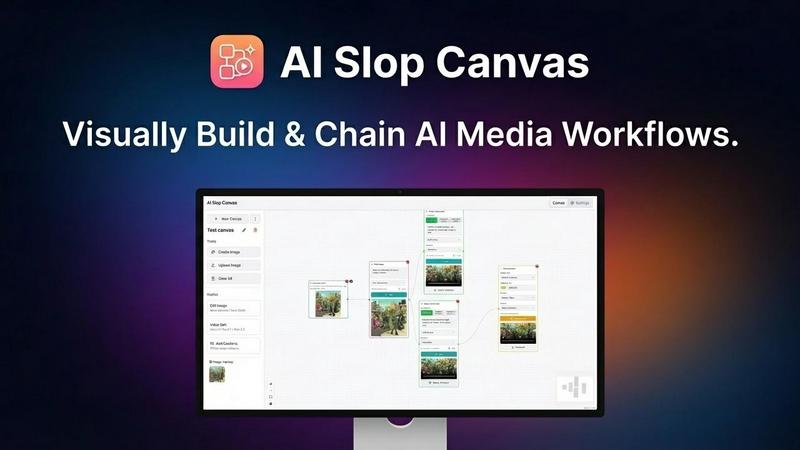
AI Slop Canvas is my favorite free Chrome extension for visually creating AI images and videos.
Last updated: March 1, 2026

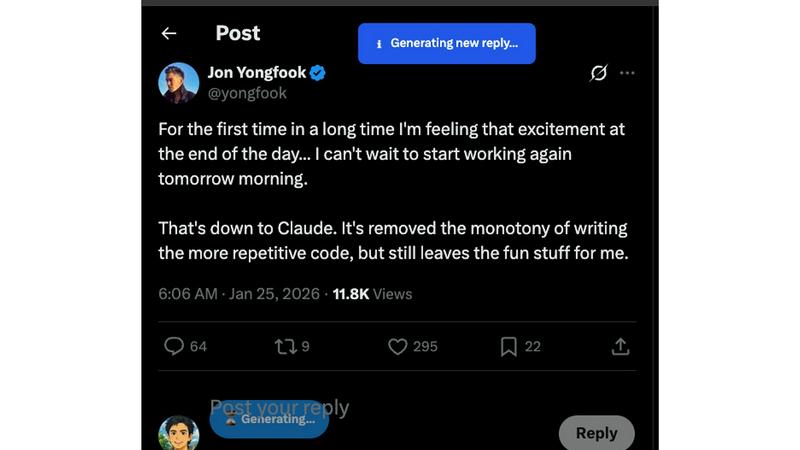
XreplyAI generates authentic, on-brand tweet replies to turn conversations into inbound leads for you.
Last updated: February 27, 2026
Visual Comparison
AI Slop Canvas
XreplyAI
Feature Comparison
AI Slop Canvas
Visual Workflow Editor
This is the heart and soul of AI Slop Canvas, and what sets it apart from simple prompt boxes. You build generation pipelines by visually connecting nodes on a canvas. Want to take a found image, upscale it, then use it as a base for a Sora video? You can literally drag, drop, and connect the nodes to make it happen. It turns complex, multi-step AI processes into an intuitive and almost playful diagram, making advanced creativity accessible to everyone.
Multiple Integrated AI Models
The extension doesn't force you into one model's style. It acts as a unified gateway to some of the most exciting models available via Fal.ai. You get access to image generators like Nano Banana and Reve Edit, plus the headline-grabbing video power of Sora 2, Sora 2 Pro, and Veo 3.1. This variety is crucial—it means you can pick the perfect tool for each job within a single, consistent interface, which is a massive time-saver.
Uncompromising Privacy-First Design
In an era of data harvesting, this feature is my personal favorite. AI Slop Canvas stores everything locally in your browser. Your Fal.ai API key is encrypted with AES-256 right on your device. The developers explicitly state there is no tracking, no analytics, and no data sent to their servers. Your creative experiments remain truly yours, which is a level of trust and security rarely found in free AI tools.
Instant Web Integration
The workflow starts where your inspiration does: on the web. The ability to right-click any image, meme, or artwork and send it directly to your canvas is a game-changer for iteration. It removes the tedious download-upload cycle, letting you capture inspiration and begin remixing or transforming it with AI in under two seconds. This seamless bridge between browsing and creating is brilliantly executed.
XreplyAI
Voice Profile Training
This is the killer feature that sets XreplyAI apart. Instead of generating generic, robotic text, the tool first analyzes your historical tweets. It learns the nuances of your personal brand—your specific tone, whether it's professional, witty, or casual, your frequently used phrases, and even your sense of humor. This creates a unique voice profile that ensures every AI-generated reply is an authentic extension of you, protecting and enhancing your credibility rather than damaging it.
Seamless Chrome Extension
Accessibility is key for consistent use. XreplyAI operates as a lightweight Chrome extension, meaning it integrates directly into your existing X browsing experience. There's no need to switch between tabs or copy-paste. You simply browse X as normal, click on any tweet you want to engage with, and the tool is right there with a contextual, voice-matched reply suggestion. This frictionless integration is what makes replying at scale actually practical.
Multi-AI Model Integration
XreplyAI doesn't lock you into one potentially subpar AI model. It offers flexibility by working with top-tier services like Google's Gemini, OpenAI's ChatGPT, and Anthropic's Claude. The Pro plan handles all the API costs and complexity for you, while the BYOK (Bring Your Own Key) plan gives you ultimate control and cost efficiency. This means you can choose the AI that you trust most or that performs best for your specific style of communication.
One-Click Review & Post
The workflow is optimized for speed without sacrificing quality. When you find a conversation to join, XreplyAI generates a tailored reply in seconds. You are then presented with this suggestion for a quick review. This crucial step allows you to add a personal touch, adjust the tone, or ensure perfect relevance before posting. The entire process—from selection to posting—takes about 5 seconds, enabling you to engage at an unprecedented volume.
Use Cases
AI Slop Canvas
Rapid Meme Creation & Remixing
For meme creators, speed is currency. See a viral template? Right-click, send to canvas, and use the image-to-image or inpainting nodes to insert your own twist. You can iterate on visual jokes in minutes, testing different AI-generated alterations until you land on the funniest version, all without ever opening a separate editing program.
Agile Social Media Content Production
Social media managers can create eye-catching visuals and short videos directly within their browser. Need to turn a product screenshot into an engaging video clip for a post? Chain it through Sora 2. Want to generate a series of themed images for a campaign? Set up a reusable workflow. It eliminates app switching and makes producing platform-specific content incredibly efficient.
Experimental Content Creation
For YouTubers, bloggers, and digital artists, this tool is a sandbox for transformation. The standout use case is converting static images into dynamic videos. Imagine taking a book cover or a piece of concept art and bringing it to life with Sora 2 Pro. It opens up entirely new avenues for storytelling, channel intros, and visual effects that were previously reserved for high-end production.
Learning & Experimenting with AI
If you're curious about how AI models work together but are intimidated by code, this is your perfect starting point. The visual canvas allows you to experiment with chaining different models and parameters in a low-risk, intuitive environment. You learn the cause and effect of AI workflows by seeing the connections literally drawn out in front of you.
XreplyAI
For Founders Generating Leads
Busy founders can't afford to miss conversations where their potential clients are talking. XreplyAI allows you to strategically show up in dozens of relevant discussions in your target market daily. By providing valuable, authentic commentary, you get your name and expertise in front of the right people consistently, turning scrollers into profile visitors and, ultimately, into inbound DM leads without manual hustle.
For Content Creators Building Audience
Creators know that engagement is the engine of growth, often more valuable than just posting. XreplyAI empowers creators to be the "reply guy" at scale, fostering community and building genuine relationships. By consistently and authentically engaging with followers and peers, you deepen audience connection, increase your visibility in algorithmic feeds, and compound your reach far beyond your own follower count.
For Experts Establishing Authority
Professionals looking to be seen as thought leaders can use XreplyAI to participate in key industry conversations consistently. By adding insightful, voice-authentic comments to trending threads and questions, you demonstrate expertise and build trust. This consistent, valuable presence positions you as a go-to authority, leading to speaking opportunities, partnership requests, and client referrals.
For Solopreneurs Avoiding Burnout
Solopreneurs wear every hat and time is their most scarce resource. The manual effort of community engagement is a major time-sink that leads to burnout. XreplyAI automates the heavy lifting of crafting replies, freeing up hours each week. This allows the solopreneur to maintain a powerful, consistent presence on X for lead generation while focusing their energy on actually running and delivering their service.
Overview
About AI Slop Canvas
Let's cut through the noise: AI Slop Canvas is the most liberating and practical AI art tool I've used in a long time. It's not another subscription-based web app that locks your creations in the cloud. Instead, it's a completely free Chrome extension that brings a powerful, node-based visual editor directly into your browser, where everything—your workflows, your images, your API keys—stays securely on your own machine. The core idea is genius in its simplicity: you right-click any image on the web, send it to the canvas, and instantly begin remixing it with top-tier AI models like Sora 2 for video or Nano Banana for images. This tool is a dream for creators, marketers, and curious tinkerers who are tired of jumping between complicated interfaces. It democratizes advanced AI workflows, allowing you to chain operations like image-to-image and text-to-video without writing a single line of code. If you value privacy, speed, and a genuinely creative sandbox, this is your new playground.
About XreplyAI
Let's be brutally honest: building a real audience on X (formerly Twitter) is a grind. The golden rule from legends like Naval Ravikant is to "reply to everyone," but who has the time? You're a founder or creator with a business to run, not hours to spend scrolling and crafting perfect replies. This is the core problem XreplyAI solves. It's not just another AI reply bot; it's a sophisticated Chrome extension that learns your unique writing style—your tone, humor, and vocabulary—from your past tweets. Then, it generates personalized replies that actually sound like you. This is the critical difference. Generic ChatGPT replies are a credibility killer; they're obvious and robotic. XreplyAI is about authentic amplification. It allows you to show up consistently in 50+ conversations a day in your niche, turning those engagements into inbound leads and loyal clients, all without the burnout. The setup is a 5-minute process, it works seamlessly on X, and it integrates with the AI models you already trust. If you're serious about leveraging X for growth but refuse to live on the app, this tool is a non-negotiable.
Frequently Asked Questions
AI Slop Canvas FAQ
Is AI Slop Canvas really free?
Yes, the Chrome extension itself is 100% free. You install it at no cost and pay nothing to the developers of AI Slop Canvas. The only potential cost is for the AI model credits you use through Fal.ai. Fal.ai offers free initial credits, so you can start generating immediately, and then operates on a pay-as-you-go basis for continued heavy use.
How do I get started with the AI models?
You need a free API key from Fal.ai. Simply go to fal.ai/dashboard/keys, create an account if needed, and copy your key. Then, paste this key into the settings within the AI Slop Canvas extension. This key is your secure gateway to the models, and it's encrypted and stored locally on your computer, not on any external server.
Where are my images and videos saved?
All your generated content and workflow designs are stored locally within your browser's storage. Nothing is uploaded to AI Slop Canvas's servers. This means your creations are private and instantly accessible as long as you're using the same browser and device. You can also download your final outputs to your computer's hard drive.
What if I'm not technical? Is it hard to use?
Not at all. The visual node-based interface is designed to be intuitive. Instead of writing code, you drag, drop, and connect boxes. There's a low barrier to entry: start by right-clicking an image and using a simple "image to video" node. The complexity is optional—you can build more advanced chains as you become more comfortable.
XreplyAI FAQ
How does XreplyAI learn my voice?
XreplyAI analyzes a sample of your past tweets from your public X profile. It uses advanced natural language processing to identify patterns in your writing, including your sentence structure, commonly used words, tonal preferences (formal, casual, humorous), and overall communication style. It doesn't store or use your private data; it simply creates a model to mimic your authentic public persona.
Is it obvious that I'm using an AI tool?
With generic AI tools, yes, it's often painfully obvious. The magic of XreplyAI is its voice training. Because replies are generated based on your unique style, they read as authentic and human. The tool is designed to augment your personality, not replace it with a robotic tone. The final one-click review also ensures you can always add a personal touch.
What's the difference between the Pro and BYOK plans?
The Pro plan is the full-service, hassle-free option at a flat monthly fee. XreplyAI covers all AI API costs (using Gemini, ChatGPT, or Claude) for up to 100 replies per day. The BYOK (Bring Your Own Key) plan is a cost-saver for power users. You provide your own OpenAI API key, pay only for the AI usage you incur directly to OpenAI, and get unlimited replies through XreplyAI's platform for a low platform access fee.
Can I try XreplyAI for free?
Absolutely, and you should. The Free plan requires no credit card and gives you 5 AI replies per day to test the core functionality. This allows you to install the Chrome extension, train your voice profile, and see firsthand how it generates replies that sound like you. It's the perfect way to validate the tool's value before upgrading to a paid plan for serious volume.
Alternatives
AI Slop Canvas Alternatives
AI Slop Canvas is a free Chrome extension that sits at the exciting intersection of content creation and design tools. It’s a browser-based playground for AI image and video generation, letting you build visual workflows and experiment with models like Sora 2 and Veo 3.1 directly from your right-click menu. It’s a fantastic entry point for anyone wanting to dip their toes into AI-powered creativity without a complex setup. Users often seek alternatives for a few key reasons. Some need more advanced features or professional-grade outputs that a free tool might not offer. Others might require a desktop application instead of a browser extension, or they may be looking for a specific AI model that isn't supported. The need for collaborative features, different pricing models, or integration with other software can also drive the search for other options. When evaluating alternatives, focus on what matters most for your workflow. Consider the core AI models available and the quality of their output. Assess the user interface—is it a visual node-based editor like Slop Canvas, or something more traditional? Crucially, examine the privacy policy and data handling practices, as well as the total cost of ownership, including any subscription fees or credit systems.
XreplyAI Alternatives
XreplyAI is a specialized tool in the social media automation category, designed to help founders and creators generate authentic, personalized replies on X. It learns your unique voice to craft responses that boost visibility and nurture leads, all through a convenient Chrome extension. Users often explore alternatives for various reasons. Some need a different pricing model or a feature set that includes scheduling or analytics. Others might require a tool that works on mobile or integrates with platforms beyond X. It's a common step to find the perfect fit for one's workflow and budget. When evaluating other options, prioritize authenticity. The best tools should adapt to your tone, not force a generic one. Look for seamless integration with your preferred AI model and consider ease of use. Ultimately, you want a solution that saves time while genuinely enhancing your engagement, not undermining it.