AISeedance2 vs JoyFlix AI
Side-by-side comparison to help you choose the right tool.

Seedance 2.0 is my top pick for creating stunning, cinematic AI videos from text or images in seconds.
Last updated: February 27, 2026

JoyFlix AI
JoyFlix AI is my top pick for effortlessly turning your text and images into stunning, professional videos.
Last updated: March 2, 2026
Visual Comparison
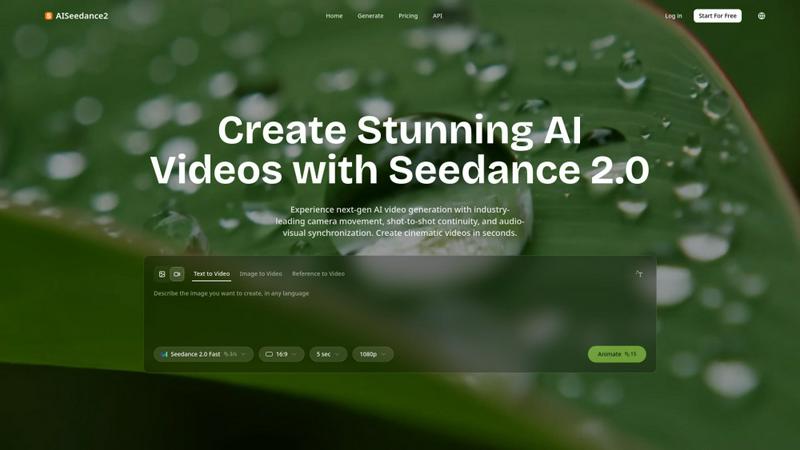
AISeedance2
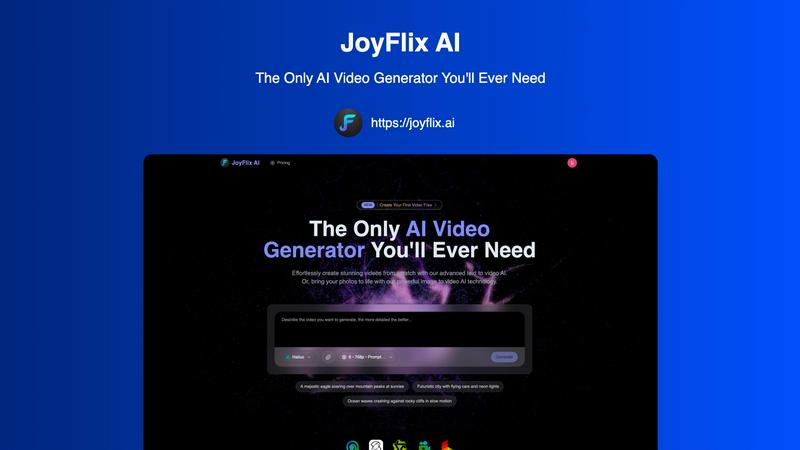
JoyFlix AI
Feature Comparison
AISeedance2
Wide-Range Cinematic Camera Movement
This is the feature that will blow your mind. Forget static shots or simple pans. Seedance 2.0 executes complex, large-scale camera choreography like sweeping crane shots, dynamic tracking around subjects, and immersive drone-like aerial perspectives directly from a text prompt. It brings a director's eye to AI generation, creating smooth, natural motion with depth-of-field transitions that make your videos feel professionally shot, not artificially generated.
Shot-to-Shot Continuity
This solves the single biggest headache in AI video: the jarring jump between scenes. Seedance 2.0 maintains perfect visual coherence across different shots, ensuring lighting, style, and scene composition flow naturally. It allows you to build multi-shot sequences—like a character walking from an interior to an exterior—without the disorienting visual reset that plagues other generators, making actual short films possible.
Precision Audio-Visual Synchronization
Finally, an AI that listens! This breakthrough ensures the on-screen action matches the beat, rhythm, and mood of your audio track. Whether it's a punch landing on a drumbeat or a serene landscape matching ambient music, the synchronization creates a profoundly more professional and engaging viewer experience, elevating your content from a slideshow to a sensory story.
Character Identity Lock
Consistent characters are non-negotiable for storytelling, and Seedance 2.0 delivers. Its identity lock feature maintains a character's facial features, hairstyle, clothing, and body type across multiple shots and scenes, even during intense action sequences. This allows you to craft narratives around specific protagonists, making your videos infinitely more credible and compelling for your audience.
JoyFlix AI
Advanced Text-to-Video AI
This is where the magic of pure imagination happens. You describe a scene—"a majestic eagle soaring over mountain peaks at sunrise"—and JoyFlix AI's models render it into a coherent, visually captivating video. The platform supports detailed prompting for camera angles and motion, allowing you to direct the AI like a cinematographer. It’s incredibly powerful for generating original content from scratch, perfect for conceptual visuals, story scenes, or abstract marketing concepts that don't have existing footage.
Powerful Image-to-Video AI
For me, this is the sleeper-hit feature. Upload a static photo, and JoyFlix AI intelligently animates it with realistic motion. The examples on their site, like rotating a shoe or bringing a dystopian Venice scene to life with a slow camera tilt, are frankly mind-blowing. It adds cinematic depth to product shots, landscapes, and portraits, turning a simple image into a dynamic story. This is an absolute game-changer for e-commerce and photographers looking to create engaging content from their existing galleries.
Multi-Model Video Generation
JoyFlix AI doesn't lock you into one AI model. It provides access to top-tier models like Hailuo, Kling, Wan, Pixverse, and Luma. This is a curator's dream because different models have different strengths—some are better at realism, others at stylized animation. Having this choice lets you experiment and select the engine that best matches the specific style and quality you need for each project, ensuring you get the best possible output.
Fast Generation & Commercial Licensing
Speed and ownership are critical. With an average creation time of 60 seconds, JoyFlix AI is built for iteration and rapid content production. Even better, all paid plans include videos with no watermarks and grant full commercial use rights. This means you can confidently use the generated videos in client projects, ads, or on your monetized channels without worrying about licensing fees or awkward branding, which is a non-negotiable for serious creators.
Use Cases
AISeedance2
Short Film & Indie Film Production
For indie filmmakers, Seedance 2.0 is a revolutionary pre-visualization and production tool. You can rapidly prototype complex scenes with dynamic camera work, test narrative continuity, and produce entire short films with a consistent visual style and characters, all at a fraction of the traditional cost and time, unlocking new creative possibilities.
Marketing & Advertisement Creatives
Marketing teams can leap ahead of the competition by producing high-concept, cinematic adverts in-house. Imagine creating a product launch video with sweeping shots, consistent brand ambassadors, and perfectly synced music—all tailored for social media or websites—without needing a full production crew, enabling faster, more agile campaign rollouts.
Educational & Explainer Content
Educators and course creators can transform dry information into engaging visual stories. The shot continuity and character lock are perfect for creating a persistent host or animated narrator who guides viewers through complex topics, while cinematic movement keeps the visuals dynamic and attention-grabbing, improving knowledge retention.
Social Media & Viral Content Production
Content creators needing to stand out on TikTok, Instagram, or YouTube will find Seedance 2.0 indispensable. Its ability to quickly generate eye-catching, professionally-styled clips with trending audio sync means you can produce platform-ready, viral-worthy content that looks like it was made by a major studio, not on a tight deadline.
JoyFlix AI
Social Media Content Creation
For influencers and social media managers, JoyFlix AI is a content goldmine. Instantly generate eye-catching, original video clips for Reels, TikTok, and YouTube Shorts. Describe a trending concept or animate a behind-the-scenes photo to produce daily content that stands out in crowded feeds, all without spending hours filming or editing.
Marketing & Advertising
Create compelling ad creatives, product demos, and promotional videos in minutes. The image-to-video feature is perfect for animating product shots, while text-to-video can build entire narrative commercials from a script. The professional quality and commercial license make it safe and effective for paid advertising campaigns across all platforms.
Storytelling & Concept Visualization
Writers, filmmakers, and game developers can use JoyFlix AI to visualize scenes, characters, and settings. It’s an incredible tool for creating mood boards, storyboards, or concept trailers. Bringing a written description to life helps in pitching ideas, refining creative direction, and sharing a tangible vision with collaborators or backers.
Educational & Explainer Content
Educators and trainers can transform static lessons into engaging video explanations. Animate diagrams, illustrate historical events with generated scenes, or create visual summaries of complex topics. This dynamic form of content significantly boosts comprehension and retention compared to text or still images alone.
Pricing Comparison
AISeedance2
The provided context does not include specific pricing information, tiers, or plans. The website mentions a "Start For Free" option, suggesting a freemium or free trial model is available. For detailed and current pricing on subscription plans or credit packs, you should visit the official AISeedance2 website and navigate to its Pricing section.
JoyFlix AI
JoyFlix AI offers tiered subscription plans designed to scale with your needs. Opting for annual billing saves you 29%. All paid plans include key features like Cross-Video Character Consistency, access to top-quality video models (Hailuo, Kling, etc.), both Image & Text-to-Video generation, Fast Generation Mode, private creation, no watermarks, and full commercial use rights.
Lite Plan ($14/month): Ideal for beginners and casual creators. It includes 200 credits per month (approx. 40 videos) and covers all the core features.
Pro Plan ($35/month): The popular choice for serious creators and marketers needing higher output. It provides 600 credits per month (approx. 120 videos), offering a great balance of capacity and value.
Premium Plan ($159/month): Built for high-volume professional users and agencies. With 3000 credits monthly (approx. 600 videos), it maximizes efficiency and includes the added benefit of priority support. You can also purchase extra credit packs on any plan if you need more.
Overview
About AISeedance2
AISeedance2, also known as Seedance 2.0, is not just another AI video generator; it's a paradigm shift for creators who are tired of stiff, disjointed, and amateur-looking AI clips. Developed by ByteDance, this tool is built for a new era of AI filmmaking, specifically targeting indie filmmakers, marketing teams, educators, and social media producers who demand cinematic quality without a Hollywood budget. Its core value proposition is breathtakingly simple: to give you professional-grade cinematography and narrative coherence at the speed of AI. While other tools give you moving pictures, Seedance 2.0 gives you a scene—with intentional camera work, characters that remain consistent, and audio that actually syncs with the visuals. It’s the first AI video platform I've seen that genuinely understands the language of film, making it the go-to choice for anyone serious about producing cohesive, multi-shot video narratives for short films, dynamic ad creatives, educational explainers, or viral social content.
About JoyFlix AI
Let's cut through the noise: the AI video generation space is crowded, but JoyFlix AI genuinely stands out as a workhorse for creators who value quality and simplicity. This isn't just another text-to-video toy; it's a comprehensive platform that transforms both text prompts and static images into professional-grade, stunning videos in about 60 seconds. What truly impresses me is its dual-engine approach. Whether you're a writer with a vivid scene in your head or a marketer with a perfect product photo, JoyFlix AI has a dedicated pathway to animate your vision. It's built for the real world—content creators, social media marketers, small business owners, and storytellers who need to produce engaging video content regularly without a Hollywood budget or a degree in editing. The core value proposition is its powerful yet accessible technology, offering extensive customization through detailed prompting, a choice of cutting-edge models like Hailuo and Kling, and outputs free of watermarks for full commercial use. In my opinion, its biggest win is democratizing high-quality video production, making what was once a complex technical task as simple as typing a sentence.
Frequently Asked Questions
AISeedance2 FAQ
What makes Seedance 2.0 different from other AI video generators?
Seedance 2.0 isn't just an incremental update; it's a foundational leap with three industry-first capabilities. Its wide-range cinematic camera movement, true shot-to-shot continuity, and precision audio-visual sync work together to produce videos with a level of professional narrative cohesion and filmic quality that other tools simply cannot match. It's built for storytelling, not just clip generation.
What video quality and format does it support?
The platform supports generation in stunning 2K cinematic resolution, providing exceptional detail and clarity for professional use. Videos are rendered in standard formats suitable for web and social media platforms, with a default 16:9 aspect ratio, ensuring your content looks great everywhere.
Is it suitable for beginners with no video editing experience?
Absolutely. While its output is professional-grade, the interface is designed for simplicity. You can start with basic text-to-video prompts and still achieve impressive results. The AI handles the complex cinematography and continuity automatically, lowering the barrier to creating amazing videos.
Can I use my own images or audio with Seedance 2.0?
Yes, the platform offers multiple input methods. Alongside text-to-video, you can use the "Image to Video" and "Reference to Video" features to animate your own visuals. Most importantly, its precision audio-sync feature is built to work with your uploaded audio tracks, matching the generated video frames to your specific music or voiceover.
JoyFlix AI FAQ
What is the quality of the videos generated by JoyFlix AI?
JoyFlix AI produces high-definition videos (like 768p as shown with Hailuo) that are suitable for professional use. The quality is consistently impressive, especially when using detailed prompts. By leveraging top models like Kling and Hailuo, it achieves a level of realism and coherence that rivals more expensive and complex tools, making it ideal for social media, marketing, and other digital content.
How many videos can I create with the credits system?
Credits are consumed per video generation. The Lite plan offers 200 credits monthly, which translates to approximately 40 videos, depending on length and model used. The Pro and Premium plans offer 600 and 3000 credits, respectively. You can also purchase additional credit packs as needed, providing flexibility for both casual and high-volume creators.
Can I use JoyFlix AI videos for commercial purposes?
Absolutely, and this is a major advantage. All paid subscription plans (Lite, Pro, Premium) grant you full commercial use rights to the videos you generate. This means you can use them in client work, advertisements, on your website, or on monetized social channels. The videos also come with no JoyFlix AI watermark, presenting a clean, professional product.
What is the difference between the Text-to-Video and Image-to-Video features?
Text-to-Video generates entirely new video scenes from a written description, creating something from nothing. Image-to-Video starts with your uploaded photo and animates it, adding motion like pans, zooms, or object movement. The first is for original concepts; the second is for enhancing and bringing life to your existing visuals. Both are incredibly powerful for different creative needs.
Alternatives
AISeedance2 Alternatives
AISeedance2 is a web-based AI video generator that specializes in creating cinematic, multi-shot videos from text or images. It falls squarely into the category of advanced text-to-video and image-to-video tools, distinguishing itself with features like character consistency and professional camera movements. Users often explore alternatives for various practical reasons. Maybe the pricing model doesn't fit their budget, or they need a tool that integrates with a specific platform like their existing editing suite. Others might be looking for different artistic styles, simpler interfaces, or more flexible usage terms. When choosing an alternative, focus on what matters most for your projects. Consider the quality of motion and visual coherence, the ease of achieving consistent characters across shots, and whether the tool supports the resolution and format you need for your final output. The right fit balances power with your specific creative workflow.
JoyFlix AI Alternatives
JoyFlix AI is a powerful AI video generator that transforms text prompts and static images into professional, cinematic videos in seconds. It sits squarely in the burgeoning category of AI-powered creative tools designed to democratize video production for marketers, content creators, and storytellers. Even with a great tool like JoyFlix, users often explore alternatives for various reasons. Some may be on a tight budget and need a different pricing model, while others might require a specific feature, like more granular editing controls or integration with other platforms. The search often comes down to finding the perfect balance between creative power, ease of use, and cost. When evaluating other options, focus on what matters most for your projects. Consider the quality and realism of the AI-generated video, the flexibility of customization, the range of export formats and resolutions, and of course, the overall value for your investment. The right tool should feel like an extension of your creative process, not a limitation.