
Ayn8n vs Hush Touch | Voice-to-Text for MacOS
Side-by-side comparison to help you choose the right tool.

Ayn8n
Ayn8n delivers 5,000+ AI-powered automation templates to enhance your workflows and skyrocket your productivity.
Last updated: February 28, 2026

Hush Touch | Voice-to-Text for MacOS
Hush Touch is the smart, private, and affordable offline voice-to-text app for Mac that learns your vocabulary.
Last updated: February 28, 2026
Visual Comparison
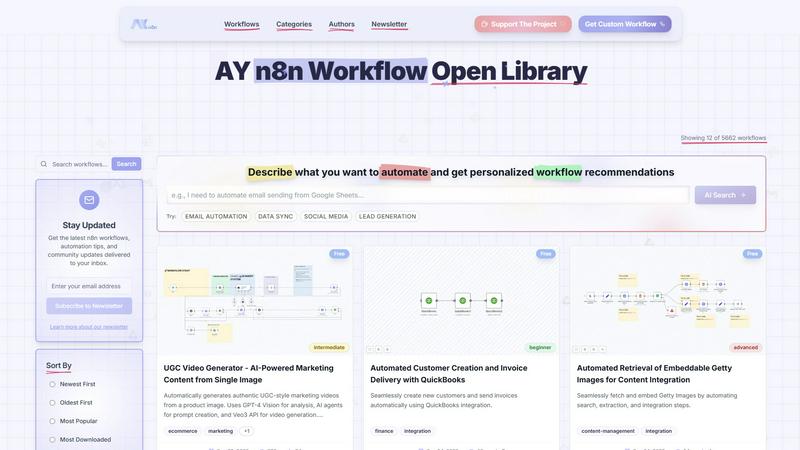
Ayn8n
Hush Touch | Voice-to-Text for MacOS

Feature Comparison
Ayn8n
Extensive Workflow Library
Ayn8n boasts an impressive library of over 5,000 prebuilt workflows, covering diverse categories such as marketing, sales, data processing, and more. This extensive collection allows users to find automation solutions tailored to their unique requirements without the need for extensive coding knowledge.
User-Friendly Search and Filter Options
The platform includes intuitive search and filtering capabilities, enabling users to quickly locate workflows by complexity, category, or popularity. This feature enhances user experience by making it easy to find the right solutions for specific automation needs.
Custom Workflow Recommendations
Ayn8n offers personalized workflow recommendations based on user input. By simply describing the tasks users wish to automate, the platform intelligently suggests workflows that best suit their requirements, making it easier to get started with automation.
Community Support and Collaboration
Ayn8n fosters a community-driven environment where users can share their custom workflows and tips. This collaborative atmosphere not only helps users learn from each other but also encourages the continuous improvement of existing workflows through shared ideas and feedback.
Hush Touch | Voice-to-Text for MacOS
Dual-Engine On-Device Recognition
Hush Touch doesn't rely on a single method. It intelligently blends Apple's DictationTranscriber for natural flow and punctuation with SFSpeechRecognizer to spot custom vocabulary. This dual-input is then refined with an Apple Intelligence final pass. The magic? Every step of this process happens on your Mac. This means no lag waiting for a cloud server and, crucially, your private conversations and drafts never leave your device, setting a new bar for local processing power.
Adaptive Custom Vocabulary & Learning
This is where Hush Touch moves from a simple transcriber to a smart writing assistant. You can manually add up to 500 terms—perfect for technical jargon, brand names, or medical terminology. Even better, it learns automatically. When you correct a transcription mistake, Hush Touch detects it and adds the right word to your personal vocabulary. It even creates per-app profiles, boosting relevant terms whether you're in your code editor or email client.
Smart Text Processing & Hands-Free Commands
The app actively cleans up your spoken word in real-time. It strips out filler words ("um," "like," "you know"), auto-corrects common flubs, and can format numbered lists from your speech. For true hands-free operation, use a Siri shortcut or say "Okay send message" to dispatch an email. It auto-inserts text after a pause and supports a double-tap hotkey to stop listening, making the entire dictation-to-insertion flow seamless.
Lightweight Design & Context Modes
Weighing in at just 5.5 MB, Hush Touch is a marvel of efficiency. It launches in a flash and runs without bogging down your system. To further enhance accuracy, it offers four distinct context modes: General, Email, Code, and Notes. Switching modes tailors the engine's focus, helping it better predict punctuation and vocabulary relevant to the task at hand, from writing a formal email to commenting code.
Use Cases
Ayn8n
Streamlining Marketing Campaigns
Businesses can utilize Ayn8n to automate their marketing campaigns by integrating various tools and platforms. For instance, users can set up workflows that automatically post content to social media, track engagement metrics, and gather leads—all while minimizing manual effort.
Enhancing CRM Processes
Ayn8n can be employed to automate customer relationship management (CRM) processes. By creating workflows that manage customer data, send follow-up emails, and generate reports, businesses can improve their customer engagement and operational efficiency significantly.
Simplifying Data Processing Tasks
Data processing can be time-consuming, but Ayn8n simplifies this with workflows that automate data extraction, transformation, and loading (ETL). Users can set up processes that seamlessly migrate data between platforms or analyze datasets without manual intervention.
Innovating Content Management
Ayn8n is perfect for content creators looking to streamline their content management processes. With workflows that automate content posting, image sourcing, and SEO audits, users can focus more on creativity and strategy rather than repetitive tasks.
Hush Touch | Voice-to-Text for MacOS
Drafting Long-Form Content and Reports
For writers, researchers, and students, speaking ideas is often faster than typing them. Hush Touch allows you to dictate drafts of articles, essays, or reports naturally. Its smart punctuation and paragraph formatting let you speak in complete thoughts, while the on-device privacy ensures your unpublished ideas and sensitive research data remain completely confidential throughout the creative process.
Managing Professional Communication
Tackle an overflowing inbox hands-free. Dictate emails and messages with tone-appropriate phrasing aided by the Email context mode. The ability to say "Okay send message" allows you to compose and send replies without ever touching the keyboard, perfect for when you're multitasking, on the move, or dealing with repetitive communication throughout a busy workday.
Technical and Specialized Documentation
Software engineers, doctors, lawyers, and academics finally have a dictation tool that understands their language. By learning complex terms like "Kubernetes," "metatarsophalangeal," or legal citations, Hush Touch accurately transcribes technical notes, patient observations, code comments, and research summaries that would stump generic cloud-based services, saving immense time on corrections.
Accessible and Ergonomic Computer Use
For individuals with RSI, carpal tunnel, or other conditions that make typing painful, Hush Touch provides a robust, private alternative for controlling their Mac. The fully hands-free operation via Siri integration and voice commands enables full participation in digital work and communication without strain, all maintained with the dignity of complete data privacy.
Overview
About Ayn8n
Ayn8n is an innovative workflow library developed by AY Automate LLC, designed to enhance automation capabilities for users of the n8n platform. It acts as a centralized hub, enabling users to explore, share, and customize automation workflows tailored to their specific needs. With a staggering collection of over 5,000 prebuilt workflows across various domains such as marketing, CRM, data processing, integrations, and content management, Ayn8n simplifies the automation of intricate processes. This platform is particularly advantageous for both developers and casual users, often referred to as "vibe coders," who wish to elevate their productivity effortlessly. By allowing users to automate repetitive tasks and customize workflows, Ayn8n not only boosts efficiency but also inspires creativity, making it an essential tool for small business owners and developers alike who aim to optimize their operational workflows.
About Hush Touch | Voice-to-Text for MacOS
Let's be honest: most dictation software is a compromise. You either sacrifice privacy by sending your voice to the cloud, deal with clunky, inaccurate transcription, or get locked into a draining monthly subscription. Hush Touch is the Mac app that finally ends that compromise. This is a purpose-built, voice-to-text powerhouse that runs entirely on your Mac. It combines not one, but two of Apple's own transcription engines, then applies a final polish with Apple Intelligence—all processed locally. The result is shockingly fast, accurate, and private dictation that learns your personal vocabulary over time. At a featherlight 5.5 MB, it launches instantly and fits into your workflow without the bloat or the privacy anxiety. It's built for anyone who writes on a Mac—from professionals drafting complex emails and reports to students taking notes—and values a one-time payment over a subscription leash. Its core promise is simple: get cleaner, smarter text from your voice, with zero data ever leaving your computer.
Frequently Asked Questions
Ayn8n FAQ
What types of workflows can I find on Ayn8n?
Ayn8n features a vast array of workflows across multiple categories, including marketing, CRM, data processing, content management, and integrations, ensuring that users can find solutions for various automation needs.
Is Ayn8n suitable for beginners?
Yes, Ayn8n is designed to cater to users of all skill levels. With a user-friendly interface, extensive documentation, and a range of beginner-friendly workflows, new users can easily navigate the platform and start automating tasks.
Can I customize the workflows I find on Ayn8n?
Absolutely! Users are encouraged to customize the workflows available on Ayn8n to better fit their specific needs. The platform allows for easy adjustments, enabling users to tweak and create workflows that align with their operational goals.
How do I stay updated with new workflows and features?
By subscribing to the Ayn8n newsletter, users can receive the latest updates, tips, and community insights directly in their inbox. This ensures you never miss out on new workflows or features that can enhance your automation experience.
Hush Touch | Voice-to-Text for MacOS FAQ
Is Hush Touch really 100% offline and private?
Yes, absolutely. This is its cornerstone feature. Every component—from the two Apple speech recognition engines to the Apple Intelligence final pass—processes your audio directly on your Mac. No audio or transcript data is ever sent to external servers. Your voice input and the resulting text never leave your computer, ensuring total privacy.
How does the vocabulary learning actually work?
Hush Touch employs adaptive learning. When you manually correct a word in the transcribed text, the app detects this correction and automatically adds the intended word to your personal vocabulary list. It also uses frequency weighting, so terms you use often in specific apps (like "diagnosis" in your notes app) become prioritized, making the engine smarter with each use.
Can I use Hush Touch completely hands-free?
You can. You can activate dictation using a Siri voice command ("Hey Siri, start touch"). Once listening, it will automatically insert the transcribed text after a short pause (roughly 2 seconds of silence). You can also use voice commands like "Okay send message" to send an email or message, and configure a hotkey to stop listening with a double-click.
What happens after the 7-day free trial?
The free trial gives you full access to all features for 7 days. After that, you need to purchase a lifetime license to continue using the app. There is no subscription. It's a single, one-time payment of $20 that grants you permanent access to the app and all its current features, with no recurring fees.
Alternatives
Ayn8n Alternatives
Ayn8n is a robust platform that falls within the category of AI-powered automation tools. It offers an extensive library of over 5,000 prebuilt workflows designed to streamline various business processes, from marketing to data integration. Users frequently seek alternatives to Ayn8n for a variety of reasons, including pricing concerns, the need for specific features, or compatibility with their existing tech stack. When choosing an alternative, it's essential to consider factors such as the breadth of workflow options available, ease of use, and the level of customization offered. Additionally, look for platforms that provide robust support and a community-driven approach, which can significantly enhance your automation journey.
Hush Touch | Voice-to-Text for MacOS Alternatives
Hush Touch is a standout in the niche of on-device voice-to-text software for macOS. It’s built for users who prioritize privacy, offline functionality, and a seamless, native Mac experience, leveraging Apple's own powerful transcription and intelligence engines to deliver clean, accurate dictation without ever sending your data to the cloud. People often seek alternatives for a variety of reasons. Some might be looking for a free tier or subscription model instead of a one-time purchase. Others may need cross-platform compatibility with Windows or mobile devices, or require specific integrations with certain apps that a focused tool like Hush Touch doesn't provide. The search usually comes down to balancing cost, privacy, accuracy, and workflow fit. When evaluating other options, your key considerations should be privacy policy (on-device vs. cloud processing), cost structure, accuracy in your primary language, and how well the tool integrates into your daily routine. The best choice isn't always the most feature-packed; it's the one that disappears into your workflow, letting you think out loud and get words on the screen effortlessly.