BudgetSheet vs PipBack
Side-by-side comparison to help you choose the right tool.

BudgetSheet
BudgetSheet is my top pick for automatically syncing live bank data into Google Sheets.
Last updated: February 28, 2026

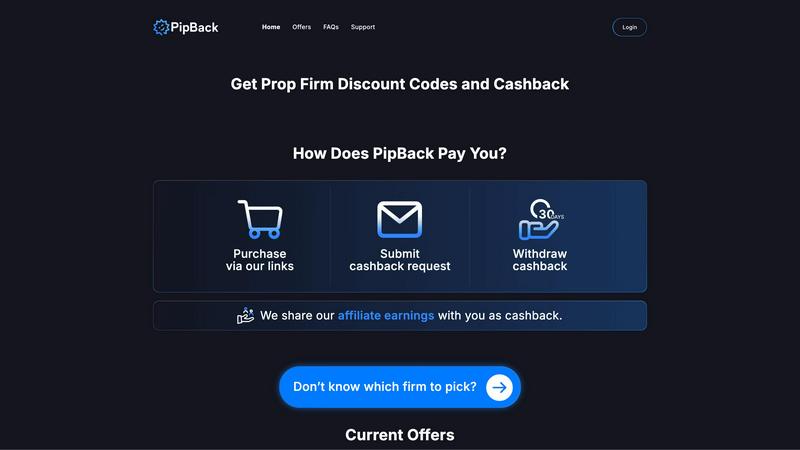
PipBack gets you the best prop firm discounts and pays you real cashback, saving you serious money.
Last updated: February 28, 2026
Visual Comparison
BudgetSheet

PipBack
Feature Comparison
BudgetSheet
Direct Bank-to-Sheet Automation
This is the killer feature. BudgetSheet completely eliminates the soul-crushing cycle of logging into multiple bank portals, downloading CSV files, and wrestling with formatting to paste data into your spreadsheet. With a few clicks, you can connect your accounts and import fresh transactions directly. This automation saves hours per month and ensures your financial data is always current, which is the absolute foundation for any useful budgeting or expense tracking system.
Unparalleled Customization & Control
Unlike closed-platform apps, BudgetSheet doesn't tell you how to budget. It simply delivers clean transaction data—with details like date, merchant, amount, and category—into your specified sheet. This means you have complete freedom. You can build complex formulas, design custom charts, set up conditional formatting rules, or integrate with other tools via Zapier. Your spreadsheet is the source of truth, and you have the power to analyze your finances exactly the way you want.
Robust Security via Plaid Integration
Security is non-negotiable with financial data, and BudgetSheet gets this right. It uses Plaid, the industry-leading financial data network, to handle all bank connections. This means your login credentials never touch BudgetSheet's servers. The add-on only stores an encrypted, read-only access token. Furthermore, BudgetSheet itself doesn't warehouse your transaction history; data flows securely from your bank, through Plaid, and directly into your Google Sheet, minimizing data exposure.
"Autofetch" for Hands-Off Operation
For those who want a truly set-and-forget system, the Autofetch feature is a game-changer. Once enabled, it automatically retrieves your latest transactions every night. You can wake up to a perfectly updated spreadsheet without lifting a finger. This transforms your custom budget from a periodic chore into a living, always-accurate financial dashboard that provides real-time insight into your cash flow and spending habits.
PipBack
Direct Cashback Rewards
This is the flagship feature that sets PipBack leagues apart from the competition. Instead of keeping 100% of the affiliate commission like every other review site, PipBack shares a substantial portion directly with you. After purchasing a challenge through their link, you simply submit a cashback request. Once verified, that money is yours to withdraw. It's a genuine rebate on your trading costs, turning a routine expense into a rewarding transaction.
Aggregated Highest-Tier Discounts
Forget wasting time scouring forums for expired codes. PipBack does the heavy lifting, negotiating and aggregating only the best available discounts for top-rated prop firms. We're talking about the maximum possible savings—like 80% off Apex or 50% off multiple other firms—all verified and accessible in one dashboard. They ensure the code "PIP" is your key to unlocking the lowest possible entry price, guaranteed.
Curated Prop Firm Discovery & Tool
Choosing the right firm is critical. PipBack's platform acts as a curated discovery hub, presenting firms with ratings, key details, and their best offers side-by-side. For those unsure, their recommendation tool is a genius addition. It helps you cut through the noise and find a firm that matches your trading style and goals, all while ensuring you get the best financial deal available.
Trader-First Support System
PipBack is built by traders, for traders. This is evident in their dedicated support channel. Whether you have a question about a cashback claim or a discount code, their team prioritizes fast and reliable assistance. In an industry rife with poor communication, having a responsive support team focused on resolving your financial queries is a feature that provides immense practical and psychological value.
Use Cases
BudgetSheet
For the Custom Budget Architect
You've outgrown generic budgeting templates and have a specific, detailed system in mind—perhaps using zero-based budgeting or the 50/30/20 rule with your own twists. BudgetSheet is your data pipeline. It feeds raw transaction data into your meticulously crafted Sheets, allowing your formulas and dashboards to work with live data, giving you a powerful, personalized financial command center that no off-the-shelf app can match.
For the Freelancer or Business Owner
Tracking business expenses, client payments, and tax deductions across multiple accounts is a nightmare with manual entry. BudgetSheet can pull transactions from business checking accounts, credit cards, and PayPal into a dedicated sheet. You can then categorize expenses by project, flag tax-deductible items, and generate profit & loss statements, all within a familiar Google Sheets environment that you control.
For the Investment & Net Worth Tracker
Beyond daily spending, BudgetSheet supports investment and loan accounts. You can automatically import portfolio transactions or loan balances alongside your banking data. This allows you to build a comprehensive net worth tracker that updates regularly, giving you a holistic view of your financial health—from your daily coffee spend to your mortgage and retirement accounts—in one unified place.
For the Data Analyst & Automation Enthusiast
If you live in spreadsheets and love automation, BudgetSheet opens a world of possibilities. With transaction data flowing into Sheets, you can use Google Apps Script to create custom alerts, build advanced predictive models, or automatically generate email reports. You can connect your sheet to data visualization tools or other business systems, creating a truly bespoke financial data hub.
PipBack
The New Trader Starting Their First Challenge
A new trader is naturally cautious about upfront costs. Using PipBack, they can access a massive discount on their first evaluation, significantly lowering the financial barrier to entry. Then, receiving cashback after the purchase acts as a risk-mitigating cushion. It’s the smartest way to begin a funded trading journey, preserving more capital for the actual trading.
The Seasoned Pro Scaling with Multiple Accounts
An experienced trader scaling up by purchasing several evaluations or funded accounts stands to save an absolute fortune. Applying top-tier discounts across multiple purchases at firms like MyFundedFutures or FundedNext, and then stacking cashback on each one, results in exponential savings. This directly improves their overall profit margin and scalability.
The Discount-Savvy Shopper Comparing Firms
A trader researching their next prop firm home can use PipBack as their one-stop comparison shop. Instead of visiting 10 different sites, they see all the discounts, cashback offers, and firm ratings in a single, transparent view. This allows for an efficient, cost-based comparison, ensuring they never overpay for a challenge again.
The Strategic Trader Re-investing Savings
For the disciplined trader, every dollar saved is a dollar to be compounded. The combined savings from PipBack's discounts and cashback create a tangible pool of capital. This trader strategically withdraws these savings and re-injects them directly into paying for additional evaluations or covering trading-related expenses, creating a virtuous cycle of growth.
Overview
About BudgetSheet
If you're a spreadsheet power user who's tired of the clunky, manual process of updating your financial tracker, BudgetSheet is about to become your new best friend. This isn't just another budgeting app that locks you into its rigid templates and opaque algorithms. Instead, BudgetSheet is a brilliantly simple Google Sheets add-on that gives you the raw power of your financial data, right inside the spreadsheet canvas you already know and love. Its core value proposition is liberation: it automates the tedious task of importing transactions from over 10,000 banks and financial institutions directly into your Sheets, so you can finally build the perfect, custom financial system you've always wanted. It's built for the tinkerers, the analysts, and the control-seekers who find tools like Mint too restrictive and manual CSV downloads too archaic. By leveraging Plaid for secure, read-only connections, BudgetSheet fetches your checking, savings, credit card, and even investment transactions, putting you in the driver's seat to create dynamic budgets, insightful dashboards, and automated reports that truly fit your life.
About PipBack
Let's be brutally honest: the prop trading world is expensive. Between evaluations, monthly fees, and data costs, your capital can bleed dry before you even get a funded account. Most "discount" sites are just affiliate middlemen, pocketing hefty commissions while offering you a measly 5% off code they found on Twitter. PipBack is the refreshing, trader-centric antidote to all that nonsense. This platform isn't just another coupon aggregator; it's a strategic financial tool built exclusively for futures and CFD prop firm traders. Its core mission is beautifully simple and devastatingly effective: to drastically lower your cost of doing business. PipBack operates on a radical principle of profit-sharing. While others hoard affiliate revenue, PipBack shares a significant chunk of it directly back with you as cashback. This is on top of already securing the highest publicly available discounts for elite firms like Apex Trader Funding and TakeProfitTrader. Imagine slashing 80% off your evaluation with a code, and then getting an additional cash rebate deposited back to you. That's the PipBack edge. It's designed for the savvy, capital-efficient trader who understands that every dollar saved on overhead is a dollar that can be compounded in their trading account, directly reducing risk and amplifying potential returns. In a game where margins are everything, PipBack isn't just a website; it's your indispensable financial co-pilot.
Frequently Asked Questions
BudgetSheet FAQ
Is BudgetSheet secure and how does it connect to my bank?
Absolutely. Security is paramount. BudgetSheet uses Plaid to connect to your financial institutions. This means you log in directly through Plaid's secure interface, and your bank credentials are never shared with or stored by BudgetSheet. The add-on only retains an encrypted, read-only token to fetch transaction data. Your actual transaction data passes directly to your spreadsheet and is not stored on BudgetSheet's servers. You can read more on Plaid's own safety page for added reassurance.
Which banks and financial institutions are supported?
BudgetSheet supports over 10,000 institutions in the US and Canada through its integration with Plaid. This includes all major national banks (like Chase, Bank of America, Wells Fargo), countless credit unions, brokerages (like Fidelity and Vanguard), and credit card providers. It's always best to check the official "List of Supported Banks" linked in their documentation to confirm your specific institution is covered before signing up.
What happens after the 15-day free trial?
The trial requires no credit card and gives you full access to all features for 15 days. If you find it invaluable, you can upgrade directly from within the add-on menu in Google Sheets. The paid plan starts at $59 per year (billed annually), which is a straightforward, affordable subscription for unlimited account connections and automated fetching. There are no confusing tiers or feature gates.
Can I automate the data import so I don't have to click "fetch" every day?
Yes, and this is one of its best features! Once your accounts are linked, you can enable "Autofetch" within the add-on. This tells BudgetSheet to automatically retrieve new transactions from all your connected accounts every night. It's the ultimate way to keep your financial spreadsheet perpetually up-to-date without any manual intervention.
PipBack FAQ
How does PipBack work?
PipBack operates on a dual-value model. First, it provides exclusive, high-potency discount codes (like "PIP") to save you money at checkout with partnered prop firms. Second, and most importantly, it shares a portion of the affiliate commission it earns from your purchase back with you as a cashback reward. You buy via their link, submit proof, and get paid.
What’s the minimum withdrawal amount?
While the exact figure isn't listed on the snippet, platforms like this typically have a low minimum threshold (e.g., $10-$50) to ensure traders can access their funds easily. You should check the official PipBack website or their support for the most current and specific withdrawal policy.
What are the supported payment methods?
Based on industry standards for cashback services, PipBack likely supports popular, trader-friendly withdrawal methods such as PayPal, Wise (TransferWise), and potentially cryptocurrency options like USDT. Always confirm the available methods directly in your PipBack account dashboard.
How long till my withdrawal is processed?
Processing times are usually efficient but can vary. Typically, after you submit a cashback request and it's verified, withdrawals can be processed within a few business days. For the most accurate timeline, refer to PipBack's official FAQs or contact their support team, which is noted for being responsive.
Alternatives
BudgetSheet Alternatives
BudgetSheet is a personal finance tool that automatically imports live bank transaction data directly into Google Sheets. It eliminates the tedious manual work of downloading and uploading CSV files, positioning itself as a powerful bridge between your banking data and the flexibility of a spreadsheet. People often seek alternatives for a few key reasons. Budgeting needs vary widely—some users require more robust forecasting tools, while others need a simpler, cheaper solution. Platform preference is another factor, as not everyone wants to be locked into the Google ecosystem. Finally, specific feature requirements like investment tracking, receipt scanning, or multi-user collaboration can drive the search for a different tool. When evaluating alternatives, focus on what matters most for your workflow. Consider the core platform (web app, mobile app, or spreadsheet integration), the depth of financial analysis offered, and the overall cost structure. The best choice seamlessly fits into your existing habits rather than forcing you to adopt a completely new system.
PipBack Alternatives
PipBack is a specialized discount and cashback platform built for proprietary trading firm traders. It operates in the niche of financial tools and affiliate marketplaces, specifically designed to reduce the cost of purchasing trading evaluations and challenges. Traders might look for alternatives for a few key reasons. Some may prioritize different features, like a broader marketplace beyond prop firms or a different reward structure. Others might simply want to compare the specific discount percentages or cashback rates available on their preferred firm to ensure they're getting the absolute best deal. When evaluating any alternative, focus on the core value. Look for transparency in how discounts are sourced and how rebates are paid. The most trustworthy platforms partner directly with reputable firms and clearly explain their process. Ultimately, you want a service that demonstrably puts more of your capital back into your own pocket, not just one that collects affiliate fees.