BudgetSheet vs Portfolio Genius
Side-by-side comparison to help you choose the right tool.

BudgetSheet
BudgetSheet is my top pick for automatically syncing live bank data into Google Sheets.
Last updated: February 28, 2026

Portfolio Genius
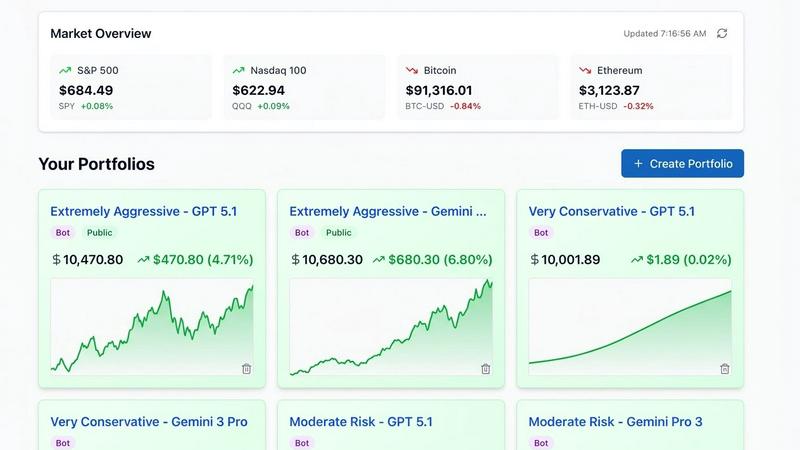
Transform your investment strategy with Portfolio Genius, the AI tool that offers smart trades and real-time analytics.
Last updated: March 1, 2026
Visual Comparison
BudgetSheet

Portfolio Genius
Feature Comparison
BudgetSheet
Direct Bank-to-Sheet Automation
This is the killer feature. BudgetSheet completely eliminates the soul-crushing cycle of logging into multiple bank portals, downloading CSV files, and wrestling with formatting to paste data into your spreadsheet. With a few clicks, you can connect your accounts and import fresh transactions directly. This automation saves hours per month and ensures your financial data is always current, which is the absolute foundation for any useful budgeting or expense tracking system.
Unparalleled Customization & Control
Unlike closed-platform apps, BudgetSheet doesn't tell you how to budget. It simply delivers clean transaction data—with details like date, merchant, amount, and category—into your specified sheet. This means you have complete freedom. You can build complex formulas, design custom charts, set up conditional formatting rules, or integrate with other tools via Zapier. Your spreadsheet is the source of truth, and you have the power to analyze your finances exactly the way you want.
Robust Security via Plaid Integration
Security is non-negotiable with financial data, and BudgetSheet gets this right. It uses Plaid, the industry-leading financial data network, to handle all bank connections. This means your login credentials never touch BudgetSheet's servers. The add-on only stores an encrypted, read-only access token. Furthermore, BudgetSheet itself doesn't warehouse your transaction history; data flows securely from your bank, through Plaid, and directly into your Google Sheet, minimizing data exposure.
"Autofetch" for Hands-Off Operation
For those who want a truly set-and-forget system, the Autofetch feature is a game-changer. Once enabled, it automatically retrieves your latest transactions every night. You can wake up to a perfectly updated spreadsheet without lifting a finger. This transforms your custom budget from a periodic chore into a living, always-accurate financial dashboard that provides real-time insight into your cash flow and spending habits.
Portfolio Genius
Real-Time Analytics
Stay informed with live market data and comprehensive performance metrics updated in real-time. This feature ensures that you are always aware of how your investments are performing, allowing for timely decision-making.
Smart Trade Management
Easily log and track your trades with this user-friendly feature. Analyze your trading patterns and win rates to improve your strategies, enabling you to make data-driven decisions with confidence.
AI-Powered Portfolio Analysis
This feature leverages artificial intelligence to provide data-driven insights tailored to your risk profile and current market conditions. It helps you understand how to optimize your portfolio for better returns while managing risks effectively.
Portfolio Diversification
Visualize your asset allocation to ensure a balanced and healthy portfolio. This feature provides insights into how your investments are distributed across various asset classes, helping you mitigate risk and achieve your financial goals.
Use Cases
BudgetSheet
For the Custom Budget Architect
You've outgrown generic budgeting templates and have a specific, detailed system in mind—perhaps using zero-based budgeting or the 50/30/20 rule with your own twists. BudgetSheet is your data pipeline. It feeds raw transaction data into your meticulously crafted Sheets, allowing your formulas and dashboards to work with live data, giving you a powerful, personalized financial command center that no off-the-shelf app can match.
For the Freelancer or Business Owner
Tracking business expenses, client payments, and tax deductions across multiple accounts is a nightmare with manual entry. BudgetSheet can pull transactions from business checking accounts, credit cards, and PayPal into a dedicated sheet. You can then categorize expenses by project, flag tax-deductible items, and generate profit & loss statements, all within a familiar Google Sheets environment that you control.
For the Investment & Net Worth Tracker
Beyond daily spending, BudgetSheet supports investment and loan accounts. You can automatically import portfolio transactions or loan balances alongside your banking data. This allows you to build a comprehensive net worth tracker that updates regularly, giving you a holistic view of your financial health—from your daily coffee spend to your mortgage and retirement accounts—in one unified place.
For the Data Analyst & Automation Enthusiast
If you live in spreadsheets and love automation, BudgetSheet opens a world of possibilities. With transaction data flowing into Sheets, you can use Google Apps Script to create custom alerts, build advanced predictive models, or automatically generate email reports. You can connect your sheet to data visualization tools or other business systems, creating a truly bespoke financial data hub.
Portfolio Genius
Novice Investors
For those new to investing, Portfolio Genius offers a straightforward introduction to portfolio management. It provides essential insights and recommendations to help beginners navigate the complexities of the stock market confidently.
Busy Professionals
Time-strapped individuals can rely on Portfolio Genius to manage their investment portfolios efficiently. With automated features and real-time analytics, busy professionals can stay updated on their investments without dedicating extensive time.
Seasoned Traders
Experienced investors can utilize Portfolio Genius to refine their strategies. The platform's advanced AI capabilities allow seasoned traders to analyze market conditions and trends, enabling them to make more informed trading decisions.
Educational Tool for Students
Portfolio Genius can serve as an educational resource for students and aspiring investors. By demonstrating AI-driven portfolio management, it provides valuable insights into investment strategies and market dynamics.
Overview
About BudgetSheet
If you're a spreadsheet power user who's tired of the clunky, manual process of updating your financial tracker, BudgetSheet is about to become your new best friend. This isn't just another budgeting app that locks you into its rigid templates and opaque algorithms. Instead, BudgetSheet is a brilliantly simple Google Sheets add-on that gives you the raw power of your financial data, right inside the spreadsheet canvas you already know and love. Its core value proposition is liberation: it automates the tedious task of importing transactions from over 10,000 banks and financial institutions directly into your Sheets, so you can finally build the perfect, custom financial system you've always wanted. It's built for the tinkerers, the analysts, and the control-seekers who find tools like Mint too restrictive and manual CSV downloads too archaic. By leveraging Plaid for secure, read-only connections, BudgetSheet fetches your checking, savings, credit card, and even investment transactions, putting you in the driver's seat to create dynamic budgets, insightful dashboards, and automated reports that truly fit your life.
About Portfolio Genius
Portfolio Genius is an advanced AI-powered investment advisor engineered to transform how individuals manage their investment portfolios. It harnesses the power of artificial intelligence to analyze real-time market trends, relevant news, and your existing financial holdings, delivering personalized trade suggestions that align with your investment strategy. Whether you're just starting out as a novice investor or possess the expertise of a seasoned trader, Portfolio Genius adapts to your unique needs, providing tailored insights and recommendations. The platform's primary value proposition is its ability to simplify complex portfolio management tasks, enabling users to make informed decisions swiftly. With features like real-time analytics, automated trading options, and an intuitive conversational interface, Portfolio Genius empowers individual investors and busy professionals alike, helping them to optimize their investment strategies with cutting-edge AI-driven insights.
Frequently Asked Questions
BudgetSheet FAQ
Is BudgetSheet secure and how does it connect to my bank?
Absolutely. Security is paramount. BudgetSheet uses Plaid to connect to your financial institutions. This means you log in directly through Plaid's secure interface, and your bank credentials are never shared with or stored by BudgetSheet. The add-on only retains an encrypted, read-only token to fetch transaction data. Your actual transaction data passes directly to your spreadsheet and is not stored on BudgetSheet's servers. You can read more on Plaid's own safety page for added reassurance.
Which banks and financial institutions are supported?
BudgetSheet supports over 10,000 institutions in the US and Canada through its integration with Plaid. This includes all major national banks (like Chase, Bank of America, Wells Fargo), countless credit unions, brokerages (like Fidelity and Vanguard), and credit card providers. It's always best to check the official "List of Supported Banks" linked in their documentation to confirm your specific institution is covered before signing up.
What happens after the 15-day free trial?
The trial requires no credit card and gives you full access to all features for 15 days. If you find it invaluable, you can upgrade directly from within the add-on menu in Google Sheets. The paid plan starts at $59 per year (billed annually), which is a straightforward, affordable subscription for unlimited account connections and automated fetching. There are no confusing tiers or feature gates.
Can I automate the data import so I don't have to click "fetch" every day?
Yes, and this is one of its best features! Once your accounts are linked, you can enable "Autofetch" within the add-on. This tells BudgetSheet to automatically retrieve new transactions from all your connected accounts every night. It's the ultimate way to keep your financial spreadsheet perpetually up-to-date without any manual intervention.
Portfolio Genius FAQ
Does Portfolio Genius provide investment advice?
No, Portfolio Genius is primarily a portfolio tracking and analytics platform. It offers educational and informational analysis to enhance your understanding of investment strategies but does not provide personalized investment advice.
How does Portfolio Genius ensure data security?
Portfolio Genius employs bank-grade security measures to protect your data. Your information is encrypted and safeguarded with enterprise-level security standards, ensuring your portfolio data remains confidential and secure.
Can I create a portfolio without signing up?
Yes, you can create a hypothetical portfolio without needing to sign up. This allows users to explore how Portfolio Genius analyzes different portfolio compositions based on their investment interests.
What kind of assets can I track with Portfolio Genius?
Portfolio Genius allows users to track a variety of assets, including stocks, ETFs, and cryptocurrencies from major exchanges worldwide, all within a single unified dashboard for comprehensive portfolio management.
Alternatives
BudgetSheet Alternatives
BudgetSheet is a personal finance tool that automatically imports live bank transaction data directly into Google Sheets. It eliminates the tedious manual work of downloading and uploading CSV files, positioning itself as a powerful bridge between your banking data and the flexibility of a spreadsheet. People often seek alternatives for a few key reasons. Budgeting needs vary widely—some users require more robust forecasting tools, while others need a simpler, cheaper solution. Platform preference is another factor, as not everyone wants to be locked into the Google ecosystem. Finally, specific feature requirements like investment tracking, receipt scanning, or multi-user collaboration can drive the search for a different tool. When evaluating alternatives, focus on what matters most for your workflow. Consider the core platform (web app, mobile app, or spreadsheet integration), the depth of financial analysis offered, and the overall cost structure. The best choice seamlessly fits into your existing habits rather than forcing you to adopt a completely new system.
Portfolio Genius Alternatives
Portfolio Genius is an AI-driven investment advisor that simplifies portfolio management through intelligent trade suggestions and real-time analytics. As a tool designed for both novice investors and seasoned traders, it leverages advanced technology to analyze market trends and individual holdings, providing personalized insights to enhance the investment experience. Users often seek alternatives to Portfolio Genius for various reasons, including pricing, specific feature needs, or preferences regarding user interface and functionality. When choosing an alternative, it's essential to consider factors such as the types of investment strategies supported, the flexibility of trading options, and the overall user experience to ensure that it aligns with your personal investing goals.