Dokta vs Local Tools
Side-by-side comparison to help you choose the right tool.

Dokta is my top pick for freelancers to automate invoices, track cash flow, and chase payments effortlessly.
Last updated: April 4, 2026

Local Tools
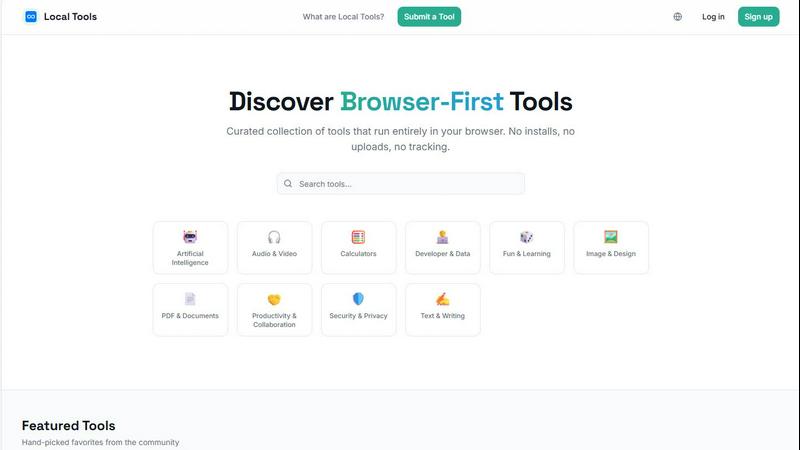
Local Tools is your curated directory for thousands of powerful, private tools that run instantly in your browser with no installs or uploads.
Last updated: April 4, 2026
Visual Comparison
Dokta

Local Tools
Feature Comparison
Dokta
Instant AI Document Analysis
This is the brilliant core of Dokta. Forget manual data entry. You drag and drop a photo, scan, or PDF of any invoice, quote, or contract, and in under 60 seconds, the AI performs OCR and intelligent classification. It doesn't just read text; it understands the document type, extracts the amount, due date, client or supplier details, and populates your system. This feature alone can save hours per week and eliminates the risk of human error from manual transcription.
Automated Invoicing & Quote-to-Invoice Workflow
Dokta moves beyond analysis into creation. You can generate professional invoices and quotes in clicks. For freelancers on day-rate contracts, it offers automatic monthly invoicing. But my favorite part is the online quote acceptance: send a quote with a link, the client accepts it online, and you can convert it to a finalized invoice with a single click. This seamless flow from proposal to payment is a game-changer for project-based work.
Real-Time Cash Flow & Anomaly Detection
Dokta provides a crystal-clear, visual dashboard of your financial health—invoiced revenue, collected revenue, unpaid amounts, and VAT—with a 12-month graph. More impressively, its AI acts as a guardian. It proactively detects anomalies like changed IBAN numbers, duplicate invoices, inconsistent VAT, or missing numbering. This protective layer is invaluable for avoiding costly mistakes or fraud.
Intelligent Client Database & Automated Reminders
Every document you process automatically enriches a centralized client and supplier database, complete with SIRET-based information. Dokta assigns payment behavior scores, giving you insight at a glance. Crucially, it automates the awkward but necessary task of chasing late payments by sending polite, professional payment reminders for you, saving you the stress and preserving client relationships.
Local Tools
Curated, Cross-Source Aggregation
Local Tools doesn't create its own utilities; it performs the vital service of discovery and comparison. It aggregates tools from multiple established "on-device" platforms, allowing you to see all your options side-by-side. This means you can find a specific PDF editor available on Site A but not Site B, or compare the output quality between two different image converters. It turns a collection of separate websites into a unified, competitive marketplace for the best browser-based tool for any given task.
Strictly Browser-First & Private Operation
This is the foundational ethos. Every tool listed is vetted to ensure it operates client-side in your browser. Your files are processed locally on your machine using JavaScript and WebAssembly—they are never uploaded to a remote server for processing. This architecture guarantees superior privacy, eliminates concerns about data retention policies, and often results in faster performance since there's no network latency for the core computation.
Functional, Intuitive Organization
Navigating thousands of tools could be chaos, but Local Tools employs a smart, category-driven structure. You won't just find a monolithic list. Tools are organized into intuitive categories like Image & Design, Developer & Data, PDF & Documents, and Security & Privacy. This functional grouping lets you drill down to exactly what you need, whether it's a text diff checker, a color palette generator, or an audio trimmer, without wading through irrelevant options.
Community-Driven Curation & Discovery
The directory is built to evolve with the web. It features a "Submit a Tool" function, allowing the community of privacy-conscious users and developers to contribute new finds. This, combined with user ratings and featured tool sections, creates a living resource. You're not just using a static list; you're tapping into a collective effort to surface the most powerful, efficient, and well-loved tools that respect user privacy.
Use Cases
Dokta
The Freelance Developer or IT Consultant
For a freelance developer on a TJM (daily rate) contract, Dokta is a dream. Set up the contract once, and the system automatically generates and sends monthly invoices. It tracks payments, chases late ones, and provides a real-time view of earnings versus expenses. This allows the developer to focus entirely on coding while knowing the business admin is handled flawlessly and automatically.
The Creative Freelance Designer or Photographer
Managing the project lifecycle from proposal to final payment is chaotic for creatives. Dokta streamlines this: create a beautiful quote, send it for online acceptance, and with one click after approval, convert it to an invoice. It then manages the payment timeline and reminders. This professional workflow impresses clients and ensures the creative spends time designing, not chasing paperwork.
The Auto-Entrepreneur / Micro-Entrepreneur
Simplicity and compliance are key here. Dokta generates compliant invoices, tracks collections against the URSSAF ceiling (a critical feature in France), and sends alerts for contribution deadlines. It demystifies financial tracking for the solo operator, eliminating the stress of manual calculations and potential errors come declaration time.
The Growing Small Business or Agency
As a small business scales, document chaos multiplies. Dokta becomes the central source of truth for all financial documents. It automates accounts payable (reading supplier invoices) and receivable (creating and chasing invoices), provides a real-time cash flow picture for decision-making, and exports clean CSV data for an accountant, saving significant reconciliation time and cost.
Local Tools
The Privacy-Consensitive Professional
A freelance graphic designer receives a client's logo draft on a public library computer. Using Local Tools, they find Photopea—a full-featured, Photoshop-like editor that runs in the browser. They can make crucial edits and adjustments without installing software or risking the client's intellectual property by uploading it to an unknown server. The work is done securely, locally, and with professional-grade results.
The Developer Seeking the Right Utility
A software engineer is debugging a complex API response. Instead of struggling with a dense JSON blob, they search Local Tools and find JSON Crack. They instantly visualize the data structure as an interactive graph, right in their tab, making it trivial to spot anomalies. Later, they might use a separate tool from the directory to minify their CSS, all without leaving the browser or compromising proprietary code.
The Student or Researcher Processing Data
A student working on a thesis needs to analyze survey data stored in a CSV file. They use Local Tools to find a browser-based chart generator and a statistical calculator. They can clean, visualize, and calculate metrics from their dataset entirely on their laptop, even without an internet connection after the tools are loaded. This ensures their research data remains completely confidential and accessible.
The Everyday User Solving Quick Problems
Someone needs to compress a batch of vacation photos to email to family, combine several PDFs into one document, and calculate a tip at a restaurant. Instead of searching separately and risking sketchy download links, they visit Local Tools. They quickly find Squoosh for image optimization, a PDF merger, and a calculator—solving all three tasks in minutes with tools that are fast, safe, and require no sign-ups.
Overview
About Dokta
If you're a freelancer, solo entrepreneur, or small business owner, you already know the dirty secret: the "freedom" of being your own boss is often buried under hours of soul-crushing administrative work. Chasing invoices, manually creating quotes, and trying to remember contract deadlines isn't just tedious; it's time stolen from your actual craft and revenue-generating work. This is the profound problem Dokta solves. It's not just another document scanner; it's an AI-powered command center that puts your entire document lifecycle on autopilot. You simply drop any document—a PDF invoice from a supplier, a scanned receipt, a client contract—and Dokta's engine (powered by Anthropic's Claude AI) reads, classifies, and extracts all the key data in under 60 seconds. From there, it builds your client database, tracks your cash flow in real-time, generates tasks like "pay this" or "follow up on that," and even automates payment reminders. What truly sets it apart is its deep understanding of the European, particularly French, freelance ecosystem, with features tailored for auto-entrepreneurs and SIRET-based business info enrichment. With a generous free tier, GDPR-compliant European hosting, and plans starting at a very accessible €9/month, Dokta is the proactive business partner every independent professional wishes they had from day one.
About Local Tools
Local Tools is a game-changing answer to a modern digital headache: the scattered, overwhelming world of online utilities. Forget juggling a dozen bookmarked sites that all promise similar tools. Local Tools is a meticulously curated, searchable directory that aggregates thousands of browser-first tools from across the web, all in one intelligent hub. The core, non-negotiable principle? Every single tool runs entirely on your device. This means zero installations, no uploading your sensitive files to mysterious servers, and absolutely no tracking. Your data stays with you, making every action fast, private, and refreshingly simple.
What truly sets it apart is its curatorial approach. Instead of just dumping hundreds of near-identical tools on you, Local Tools organizes by genuine functionality. Want to compare three different in-browser image compressors or find a niche JSON visualizer that one popular site doesn't offer? This is your destination. It's designed for the pragmatist: the developer who needs a quick code formatter, the designer editing a mockup on a public computer, the student processing data for a project, or anyone who just wants to calculate something without the privacy anxiety. Local Tools cuts through the noise, transforming a fragmented ecosystem into a single, powerful, and private resource for getting things done.
Frequently Asked Questions
Dokta FAQ
How accurate is Dokta's AI document reading?
The AI, powered by Claude from Anthropic, is highly accurate for standard document formats like invoices, quotes, and contracts. It's trained on a vast dataset and excels at extracting key fields like dates, amounts, and parties. The system includes a validation step where you can quickly review and correct any extracted data, ensuring 100% accuracy while still saving the bulk of the manual work.
Is my data secure and compliant with European regulations?
Absolutely. This is a major strength of Dokta. Your data is 100% GDPR compliant and hosted on Amazon Web Services (AWS) servers in Paris, Europe. It uses AES-256 encryption for data at rest and in transit. For European freelancers and businesses concerned about data sovereignty, Dokta's infrastructure is a significant trust and compliance advantage.
What happens if I exceed my document limit on my plan?
If you exceed your monthly document limit (e.g., 15 on the free tier, 50 on Starter), you will be notified. You will likely have the option to upgrade your plan for the remainder of the billing cycle or purchase a top-up pack of additional documents. It's designed to be flexible so your workflow isn't interrupted.
Can I connect Dokta to my accounting software or bank?
Currently, Dokta focuses on being a powerful, standalone source of truth. It offers robust CSV export functionality, allowing you to generate perfectly formatted files to import into any accounting software (like Sage, QuickBooks, or local solutions). While direct bank integrations aren't highlighted, the export feature ensures smooth compatibility with your existing financial stack.
Local Tools FAQ
Is Local Tools really free to use?
Yes, the Local Tools directory website itself is free to access and use. The individual tools listed within the directory are also typically free, as they are primarily browser-based utilities provided by their respective developers. There is no subscription or fee for browsing, searching, and accessing the links to these external tools through the Local Tools platform.
How do you ensure the tools are truly private and run locally?
The curation team prioritizes and verifies tools that are known to operate on client-side technology. This is often evident in the tool's own description (stating "no uploads" or "runs in your browser") and can be technically observed. Tools that require file uploads to a server for processing are excluded. The focus is on tools leveraging modern web capabilities like HTML5, JavaScript, and WebAssembly to perform computations directly on the user's device.
Can I request or submit a tool to be added?
Absolutely! Local Tools has a "Submit a Tool" feature because the web is vast. If you've found an excellent browser-based, privacy-respecting utility that isn't yet in the directory, you are encouraged to submit it for review. This community-driven approach is key to keeping the resource comprehensive and up-to-date with the best available tools.
What if a linked tool stops working or changes its policy?
Local Tools is an aggregator and directory, not the host of these external tools. While efforts are made to maintain link integrity and monitor for significant changes, the operation and policies of each individual tool are managed by their original creators. Users are always advised to check the specific tool's website for its latest terms of service and privacy policy before use.
Alternatives
Dokta Alternatives
Dokta is a sharp, AI-driven document management platform squarely in the business automation category. It’s designed to take the administrative grind out of running a solo practice or small business by reading, organizing, and acting on your documents automatically. For freelancers and SMBs drowning in paperwork, it’s a compelling central hub. People explore alternatives for all sorts of reasons. Maybe Dokta’s pricing or document limit doesn’t fit a specific workflow, or perhaps they need deeper integrations with other software. Some might prioritize a different platform or require features outside Dokta’s core focus on document lifecycle automation. When evaluating other options, think about what truly matters for your operation. Prioritize the core pain point: is it invoice tracking, contract management, or simply reducing manual data entry? Scrutinize the AI’s accuracy, the transparency of pricing, and where your data is stored. The goal is to find a tool that disappears into your workflow, not adds to it.
Local Tools Alternatives
Local Tools is a curated directory that falls into the category of on-device, browser-first utility platforms. It aggregates thousands of tools that run entirely in your browser, eliminating the need for installs or risky file uploads. The goal is to organize a fragmented ecosystem into a single, searchable hub for privacy-focused tasks. People explore alternatives for a few key reasons. They might be looking for a platform with a different organizational structure or a more specialized focus on a particular niche, like advanced developer utilities or creative design tools. Others might prioritize a different user experience or discoverability method beyond a curated directory. When evaluating other options, your north star should be the core principle of local execution. Ensure the tools genuinely run in your browser without hidden uploads. Look for a clean, intuitive interface that matches your workflow, and consider the depth and quality of curation in your most-used categories, whether that's data conversion, image editing, or text processing.