Dubvid vs Melograph
Side-by-side comparison to help you choose the right tool.

Dubvid
Dubvid dubs your audio and video into multiple languages with natural voices and optional lip-sync in minutes.
Last updated: February 27, 2026

Melograph
Melograph transforms your music tracks into eye-catching videos with customizable templates in just minutes.
Last updated: February 28, 2026
Visual Comparison
Dubvid
Melograph

Feature Comparison
Dubvid
Seamless Upload Process
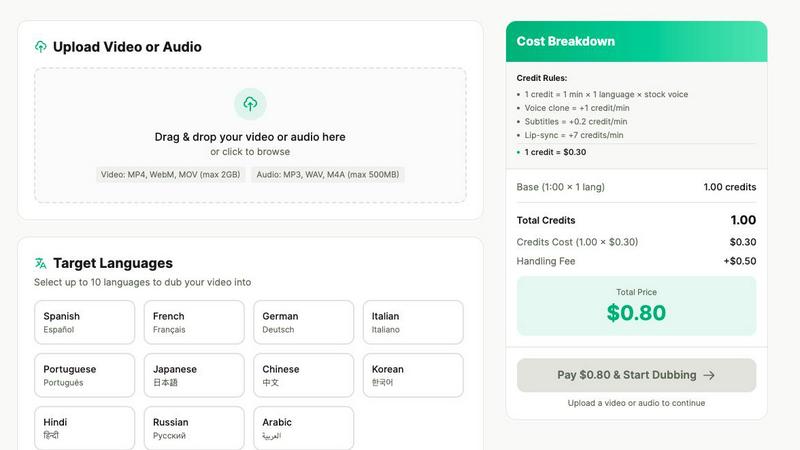
Dubvid offers a straightforward upload interface that supports various video formats, including MP4, MOV, and WebM. Users can simply drag and drop their files, making the initial step quick and hassle-free.
AI-Powered Voice Options
Users can choose from a range of natural AI voices or even opt to clone their own voice for a personalized touch. This feature ensures that the dubbed audio maintains the original's characteristics, making the final product feel authentic.
Flexible Language Selection
Dubvid supports over 10 languages, allowing users to select multiple target languages for their videos. This feature is crucial for content creators who want to reach a wider audience across different regions and demographics.
Optional Lip-Sync Capability
For content that requires a higher level of realism, Dubvid offers an optional lip-sync feature. This enhances the viewing experience by matching the dubbed audio with the speaker's mouth movements, making it ideal for talking-head videos and presentations.
Melograph
Intuitive Template Selection
Melograph's template library is designed for ease and speed. Musicians can select from a variety of high-quality templates that resonate with different vibes, allowing for a seamless match between the visual and audio elements of their work.
Audio-Reactive Visuals
The platform excels in generating visuals that react dynamically to your music. As soon as you upload your track, Melograph instantly visualizes the waveform and creates a stunning representation of the audio, making your video more engaging and appealing.
Quick Export Formats
With Melograph, you can export your video in 1080p MP4 format optimized for various platforms like TikTok, Instagram, and YouTube. This ensures that your visuals are ready to post without the need for additional editing, making it incredibly convenient for busy creators.
Customizable Text and Branding
Users can easily add their artist name, song title, and even their logo or album cover on selected templates. This feature allows for branding consistency across all your visuals, enhancing your professional image as a musician or creator.
Use Cases
Dubvid
Expanding YouTube Reach
YouTube creators can leverage Dubvid to dub their videos into multiple languages, significantly increasing their potential audience. This feature allows them to tap into new markets and engage viewers who may not speak the original language.
Localizing Educational Content
Educators can utilize Dubvid to translate their online courses and tutorials for global learners. This capability ensures that valuable knowledge is accessible to non-English speakers, promoting inclusivity in education.
Enhancing Customer Support
Businesses can create localized walkthroughs and support videos using Dubvid, reducing the volume of customer support tickets. By providing help in multiple languages, companies can improve user experience and customer satisfaction.
Dubbing Podcasts and Interviews
Podcasters can easily release episodes in various languages without the need for extensive production efforts. Dubvid streamlines the process, allowing creators to focus on content while reaching a broader audience.
Melograph
Enhancing Music Releases
Indie artists can utilize Melograph to create visually striking videos that accompany their music releases. By pairing their audio with stunning visuals, they can effectively capture audience attention and promote their tracks on social media.
Promotional Content for Labels
Record labels can leverage Melograph to produce high-quality visuals for their artists. This not only elevates the branding of the label but also provides their artists with the tools they need to market their music effectively.
Engaging Social Media Posts
DJs and music producers can use Melograph to craft engaging audio-reactive videos for their social media accounts. This helps in creating buzz around their performances or new releases, driving more traffic and engagement on their platforms.
Creative Visuals for Content Creators
Content creators who aren't musicians can also benefit from Melograph. Whether it's background music for a vlog or a podcast, they can create visually appealing videos that enhance the viewer's experience and keep them engaged.
Overview
About Dubvid
Dubvid is an innovative AI-powered platform that simplifies the process of video and audio dubbing, making it accessible for creators, businesses, and brands looking to engage with a global audience. By allowing users to upload their original videos and select from a variety of target languages, Dubvid automatically translates and recreates voices, skillfully preserving the natural tone, pacing, and emotion of the original content. This groundbreaking technology removes the need for traditional studios, voice actors, or complicated editing workflows, democratizing the dubbing process for everyone. Whether you are a YouTuber aiming to broaden your reach, an educator wishing to share lessons on a global scale, or a marketing team looking to quickly localize content, Dubvid facilitates international content scaling in mere minutes rather than weeks. With support for over 10 languages, it effectively bridges language barriers and allows users to connect with diverse audiences effortlessly.
About Melograph
Melograph is a groundbreaking web-based music visualizer that caters specifically to the needs of musicians and creators who crave stunning visuals without the hassle of traditional video editing. Designed with a user-friendly interface, Melograph allows users to create mesmerizing audio-reactive videos in just minutes. The platform offers a rich selection of premium templates that encompass various styles, from chill and cinematic to retro and futuristic. This means that whether you're an indie artist or a seasoned DJ, you can easily find a visual style that complements your music. Simply upload your track, enter your artist name and song title, and let Melograph do the rest. The core value proposition of Melograph lies in its efficiency; it streamlines the visual creation process, enabling users to focus on what they do best—making music—while effortlessly generating captivating content for social media and other platforms. With high-quality exports available, this tool is perfect for anyone looking to enhance their releases with professional-looking visuals without investing significant time or effort.
Frequently Asked Questions
Dubvid FAQ
How does Dubvid ensure the quality of the dubbed audio?
Dubvid utilizes advanced AI technology that analyzes the original audio to maintain natural tone, pacing, and emotion in the dubbed version. This results in high-quality audio that resonates with viewers.
What file formats does Dubvid support for uploads?
Dubvid supports multiple file formats, including MP4, MOV, WebM for video, and MP3, WAV for audio. This flexibility allows users to work with various media types.
Is there a limit to the video length I can dub?
While Dubvid can handle files up to 500MB, the actual dubbing duration is flexible. Users can dub videos of varying lengths according to their needs, with pricing based on the length of the video and the languages selected.
Can I try Dubvid for free?
Yes, Dubvid offers a free trial that includes two credits, allowing users to dub up to 60 seconds of content. This trial provides a risk-free opportunity to explore the platform before committing to any payment.
Melograph FAQ
Do I need editing experience to use Melograph?
No, you do not need any editing experience. If you can choose a template and input a title, you can create stunning visuals effortlessly.
Will this work for TikTok, Reels, or Shorts?
Absolutely! Melograph is designed with social media in mind, providing exports that are perfectly suited for platforms like TikTok, Instagram Reels, and YouTube Shorts.
Can I use it for multiple songs?
Yes, you can create visuals for multiple songs. Each export counts towards your credits, so you can make as many videos as your credits allow.
Is it web-based?
Yes, Melograph is entirely web-based, meaning you can access it from any device without needing to download or install software. This makes it incredibly convenient for users on the go.
Alternatives
Dubvid Alternatives
Dubvid is a cutting-edge AI-driven platform designed for video and audio dubbing, enabling users to effortlessly translate their content into multiple languages with natural-sounding voices and optional lip-syncing. This tool falls within the content creation category, appealing to a broad range of creators, educators, and marketers looking to reach global audiences. Users often seek alternatives to Dubvid for various reasons, such as pricing structures, specific feature sets, or compatibility with different platforms. When selecting an alternative, it's essential to consider factors like the quality of voice synthesis, the range of supported languages, and the ease of use in terms of uploading and managing content. Evaluating these aspects will help ensure that you find a dubbing solution that meets your specific needs and enhances your content creation process.
Melograph Alternatives
Melograph is a cutting-edge web-based music visualizer designed for musicians and creators who wish to convert their audio tracks into visually captivating videos. This tool simplifies the video creation process, allowing users to select from a variety of customizable templates that cater to different aesthetics, making it an appealing option for those who value both creativity and efficiency. However, users often seek alternatives to Melograph for various reasons, such as pricing, specific feature sets, or compatibility with different platforms. When exploring alternatives, it's essential to consider factors like user interface, template variety, export quality, and additional features that could enhance your video-making experience. Finding the right tool can significantly impact your creative workflow and the final product you share with your audience.