Local Tools vs One More Shot AI
Side-by-side comparison to help you choose the right tool.

Local Tools
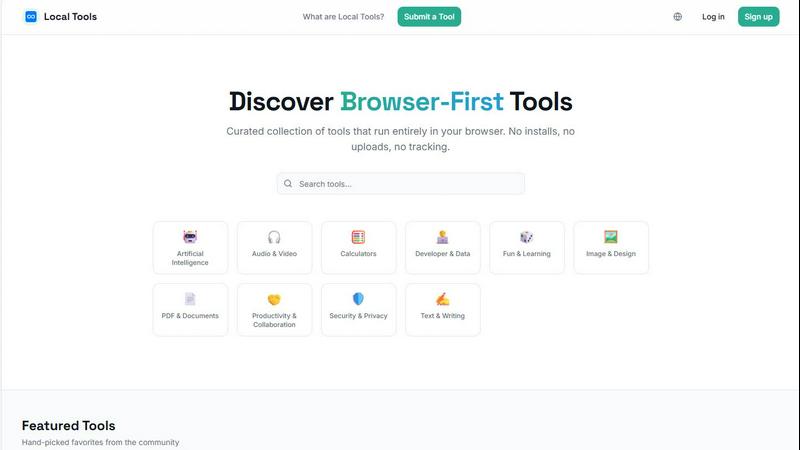
Local Tools is your curated directory for thousands of powerful, private tools that run instantly in your browser with no installs or uploads.
Last updated: April 4, 2026

One More Shot AI
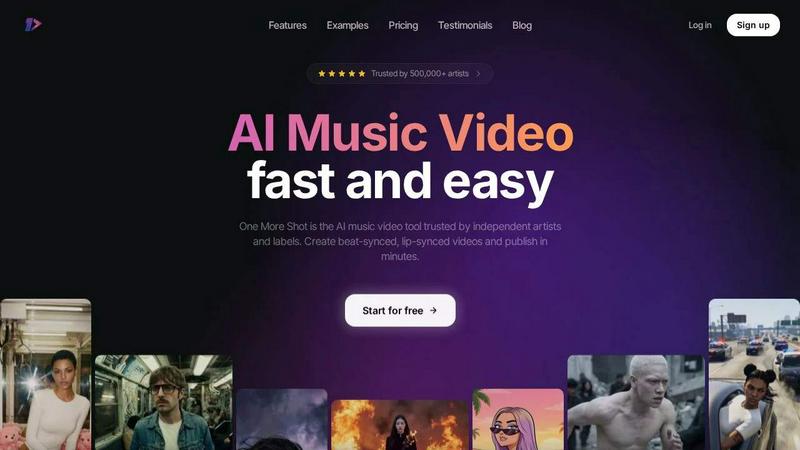
One More Shot AI is my top pick for artists to instantly transform any song into a stunning, perfectly lip-synced music video.
Last updated: April 4, 2026
Visual Comparison
Local Tools
One More Shot AI
Feature Comparison
Local Tools
Curated, Cross-Source Aggregation
Local Tools doesn't create its own utilities; it performs the vital service of discovery and comparison. It aggregates tools from multiple established "on-device" platforms, allowing you to see all your options side-by-side. This means you can find a specific PDF editor available on Site A but not Site B, or compare the output quality between two different image converters. It turns a collection of separate websites into a unified, competitive marketplace for the best browser-based tool for any given task.
Strictly Browser-First & Private Operation
This is the foundational ethos. Every tool listed is vetted to ensure it operates client-side in your browser. Your files are processed locally on your machine using JavaScript and WebAssembly—they are never uploaded to a remote server for processing. This architecture guarantees superior privacy, eliminates concerns about data retention policies, and often results in faster performance since there's no network latency for the core computation.
Functional, Intuitive Organization
Navigating thousands of tools could be chaos, but Local Tools employs a smart, category-driven structure. You won't just find a monolithic list. Tools are organized into intuitive categories like Image & Design, Developer & Data, PDF & Documents, and Security & Privacy. This functional grouping lets you drill down to exactly what you need, whether it's a text diff checker, a color palette generator, or an audio trimmer, without wading through irrelevant options.
Community-Driven Curation & Discovery
The directory is built to evolve with the web. It features a "Submit a Tool" function, allowing the community of privacy-conscious users and developers to contribute new finds. This, combined with user ratings and featured tool sections, creates a living resource. You're not just using a static list; you're tapping into a collective effort to surface the most powerful, efficient, and well-loved tools that respect user privacy.
One More Shot AI
AI Artist & Identity Consistency
This is a game-changer for branding. You can create a virtual artist—your singer, rapper, or band avatar—from just a single photo or description. Once created, this identity remains consistent across every scene and video you generate. No more jarring jumps between different-looking characters. It ensures your artist is recognizable, which is absolutely critical for building a fanbase and professional image across social media and music platforms.
Beat-Synced Auto Videos
This is the flagship "wow" feature. You simply upload your song and a reference image, and the AI agents take over like a real production crew. They analyze the audio waveform, detect beats, drops, and mood shifts, and automatically generate a complete video where the cuts, transitions, and visual effects pulse in perfect sync with the music. It removes all the tedious manual work of timing visuals to audio, delivering a dynamic result that feels professionally edited.
Top Notch Lip-Sync (Seedance 2.0)
Bad lip-sync ruins an AI video instantly. One More Shot AI specifically hosts what they call the best lip-syncing model available, and having tested it, I have to agree it's impressively natural. The recent "Seedance 2.0" update makes singing and rapping scenes look convincingly in-sync with the audio track. The mouth movements match the phonetics and timing of the lyrics, which is essential for maintaining viewer immersion and credibility.
Precise Project Mode Editing
For control freaks and perfectionists like me, this feature is a lifesaver. It allows you to start from scratch or deconstruct an auto-generated video to modify each individual shot. You get granular control over prompts, camera angles, durations, and transitions on a scene-by-scene or even frame-by-frame basis. It bridges the gap between automated speed and hands-on creative direction, letting you polish your video to an exact standard.
Use Cases
Local Tools
The Privacy-Consensitive Professional
A freelance graphic designer receives a client's logo draft on a public library computer. Using Local Tools, they find Photopea—a full-featured, Photoshop-like editor that runs in the browser. They can make crucial edits and adjustments without installing software or risking the client's intellectual property by uploading it to an unknown server. The work is done securely, locally, and with professional-grade results.
The Developer Seeking the Right Utility
A software engineer is debugging a complex API response. Instead of struggling with a dense JSON blob, they search Local Tools and find JSON Crack. They instantly visualize the data structure as an interactive graph, right in their tab, making it trivial to spot anomalies. Later, they might use a separate tool from the directory to minify their CSS, all without leaving the browser or compromising proprietary code.
The Student or Researcher Processing Data
A student working on a thesis needs to analyze survey data stored in a CSV file. They use Local Tools to find a browser-based chart generator and a statistical calculator. They can clean, visualize, and calculate metrics from their dataset entirely on their laptop, even without an internet connection after the tools are loaded. This ensures their research data remains completely confidential and accessible.
The Everyday User Solving Quick Problems
Someone needs to compress a batch of vacation photos to email to family, combine several PDFs into one document, and calculate a tip at a restaurant. Instead of searching separately and risking sketchy download links, they visit Local Tools. They quickly find Squoosh for image optimization, a PDF merger, and a calculator—solving all three tasks in minutes with tools that are fast, safe, and require no sign-ups.
One More Shot AI
Independent Artist Music Videos
This is the primary use case and where the tool shines. An independent artist or band can take a finished track and produce an entire, shareable music video for platforms like YouTube without any video production knowledge or budget. It enables them to create a visual product that competes with major label offerings, helping them attract fans and look professional from day one.
Social Media Content Creation
Musicians and marketers can repurpose a single song into a library of vertical, horizontal, and square format clips perfect for TikTok, Instagram Reels, YouTube Shorts, and Facebook. Generate beat-synced hooks for promo, lyric snippets, or behind-the-scenes style clips featuring your AI Artist to maintain a consistent and engaging social media presence that drives streams.
Lyric Video Production
Skip the basic text-on-screen templates. Use One More Shot AI to create dynamic lyric videos where the words are integrated into stunning AI-generated visuals that react to the music's emotion. This is perfect for Spotify Canvas, lyric videos on YouTube, or as an engaging visualizer to accompany your track on streaming platforms, adding a deeper layer of connection for listeners.
Rapid Prototyping & Pitch Material
Songwriters and producers can use the tool to create quick visual mock-ups or "sizzle reels" for a track before investing in a full production. It's also perfect for creating compelling pitch materials for labels, sync licensing, or film/TV placements, where having a strong visual to accompany the audio can make all the difference in securing a deal.
Overview
About Local Tools
Local Tools is a game-changing answer to a modern digital headache: the scattered, overwhelming world of online utilities. Forget juggling a dozen bookmarked sites that all promise similar tools. Local Tools is a meticulously curated, searchable directory that aggregates thousands of browser-first tools from across the web, all in one intelligent hub. The core, non-negotiable principle? Every single tool runs entirely on your device. This means zero installations, no uploading your sensitive files to mysterious servers, and absolutely no tracking. Your data stays with you, making every action fast, private, and refreshingly simple.
What truly sets it apart is its curatorial approach. Instead of just dumping hundreds of near-identical tools on you, Local Tools organizes by genuine functionality. Want to compare three different in-browser image compressors or find a niche JSON visualizer that one popular site doesn't offer? This is your destination. It's designed for the pragmatist: the developer who needs a quick code formatter, the designer editing a mockup on a public computer, the student processing data for a project, or anyone who just wants to calculate something without the privacy anxiety. Local Tools cuts through the noise, transforming a fragmented ecosystem into a single, powerful, and private resource for getting things done.
About One More Shot AI
One More Shot AI is, in my opinion, the definitive tool for musicians and creators who need a professional-grade music video but lack the budget, crew, or time for a traditional shoot. It's a web and mobile platform that acts as your entire AI production crew, transforming a single audio track into a fully synchronized visual experience. Forget the months of planning and editing; this is about publishing a captivating video in minutes, not months. The core magic lies in its ability to deeply analyze your song's rhythm, energy, and mood, then generate visuals that actually move to the beat. Whether you're an independent artist on Suno, a producer in FL Studio, or a marketer needing social clips, this tool democratizes high-quality video production. Its true value proposition is a blend of incredible speed with surprisingly granular creative control. You can go the simple "one-click" route for a quick result or dive into project mode for frame-by-frame editing. With over half a million artists already using it, One More Shot AI has clearly struck a chord by solving a massive, real-world pain point in the music industry.
Frequently Asked Questions
Local Tools FAQ
Is Local Tools really free to use?
Yes, the Local Tools directory website itself is free to access and use. The individual tools listed within the directory are also typically free, as they are primarily browser-based utilities provided by their respective developers. There is no subscription or fee for browsing, searching, and accessing the links to these external tools through the Local Tools platform.
How do you ensure the tools are truly private and run locally?
The curation team prioritizes and verifies tools that are known to operate on client-side technology. This is often evident in the tool's own description (stating "no uploads" or "runs in your browser") and can be technically observed. Tools that require file uploads to a server for processing are excluded. The focus is on tools leveraging modern web capabilities like HTML5, JavaScript, and WebAssembly to perform computations directly on the user's device.
Can I request or submit a tool to be added?
Absolutely! Local Tools has a "Submit a Tool" feature because the web is vast. If you've found an excellent browser-based, privacy-respecting utility that isn't yet in the directory, you are encouraged to submit it for review. This community-driven approach is key to keeping the resource comprehensive and up-to-date with the best available tools.
What if a linked tool stops working or changes its policy?
Local Tools is an aggregator and directory, not the host of these external tools. While efforts are made to maintain link integrity and monitor for significant changes, the operation and policies of each individual tool are managed by their original creators. Users are always advised to check the specific tool's website for its latest terms of service and privacy policy before use.
One More Shot AI FAQ
What music platforms does it work with?
One More Shot AI is designed to be universally compatible. You can upload any MP3 or audio file from your device. It is explicitly promoted to work seamlessly with AI music generators like Suno and Udio, Digital Audio Workstations (DAWs) like FL Studio and Ableton (by exporting your finished track), and streaming platforms like Spotify (by using local files or recorded audio). It handles the audio from any source.
Do I need video editing experience to use it?
Not at all. The "Auto Videos" feature is built for complete beginners. You just provide a song and a starting idea (like a reference image), and the AI creates a complete video for you. However, if you have editing experience or want more control, the "Precise Project Mode" offers advanced tools to fine-tune everything, making it valuable for users of all skill levels.
How good is the lip-sync technology?
The lip-sync, powered by their specialized "Seedance 2.0" model, is a key selling point and is among the best I've seen in consumer AI video tools. It is specifically engineered to analyze the vocals and generate natural-looking mouth movements that match the timing and shape of the words. While not 100% photorealistic in every scenario, it is highly effective for creating believable singing and rapping performances.
What formats can I export my video in?
This is a major strength for content strategy. You can export your final music video in multiple aspect ratios including horizontal (16:9 for YouTube), vertical (9:16 for TikTok/Reels), and square (1:1 for Instagram Feed). This multi-format support allows you to create one project and then adapt it for every major social media and music platform from a single source.
Alternatives
Local Tools Alternatives
Local Tools is a curated directory that falls into the category of on-device, browser-first utility platforms. It aggregates thousands of tools that run entirely in your browser, eliminating the need for installs or risky file uploads. The goal is to organize a fragmented ecosystem into a single, searchable hub for privacy-focused tasks. People explore alternatives for a few key reasons. They might be looking for a platform with a different organizational structure or a more specialized focus on a particular niche, like advanced developer utilities or creative design tools. Others might prioritize a different user experience or discoverability method beyond a curated directory. When evaluating other options, your north star should be the core principle of local execution. Ensure the tools genuinely run in your browser without hidden uploads. Look for a clean, intuitive interface that matches your workflow, and consider the depth and quality of curation in your most-used categories, whether that's data conversion, image editing, or text processing.
One More Shot AI Alternatives
One More Shot AI is a specialized tool in the AI content creation space, designed specifically to turn audio tracks into synchronized music videos. It caters to musicians and creators who need to produce visual content quickly, bypassing the cost and complexity of traditional video production. Users often seek alternatives for a variety of reasons. Some may need a different pricing model or a free tier to experiment with. Others might require features that go beyond music, like general video generation or more advanced editing tools. Platform preference also plays a role, as some creators need desktop software or integration with specific editing suites. When evaluating other options, consider your primary goal. If music video creation is your focus, look for strong audio analysis and beat-syncing capabilities. For broader use, a more generalist AI video tool might be better. Also, weigh the importance of creative control, output formats, and how the tool handles consistent character generation across scenes.