
Hush Touch | Voice-to-Text for MacOS vs Nanobananapro
Side-by-side comparison to help you choose the right tool.

Hush Touch | Voice-to-Text for MacOS
Hush Touch is the smart, private, and affordable offline voice-to-text app for Mac that learns your vocabulary.
Last updated: February 28, 2026

Nanobananapro
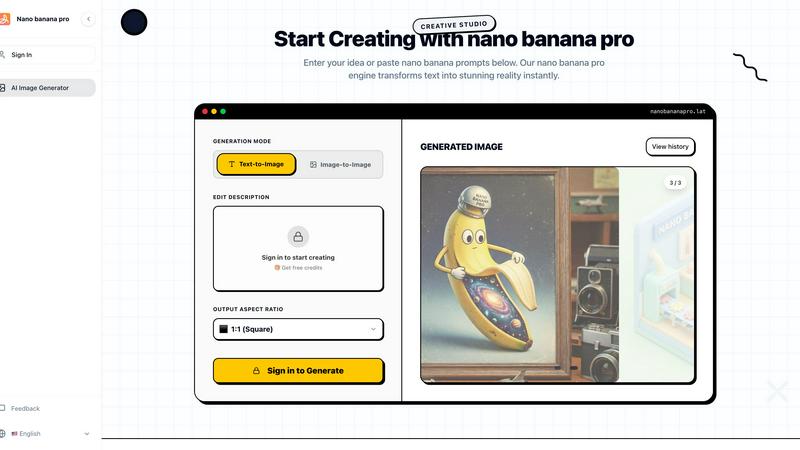
Nano Banana Pro instantly transforms your text into stunning, professional AI images for any creative project.
Last updated: March 1, 2026
Visual Comparison
Hush Touch | Voice-to-Text for MacOS

Nanobananapro
Feature Comparison
Hush Touch | Voice-to-Text for MacOS
Dual-Engine On-Device Recognition
Hush Touch doesn't rely on a single method. It intelligently blends Apple's DictationTranscriber for natural flow and punctuation with SFSpeechRecognizer to spot custom vocabulary. This dual-input is then refined with an Apple Intelligence final pass. The magic? Every step of this process happens on your Mac. This means no lag waiting for a cloud server and, crucially, your private conversations and drafts never leave your device, setting a new bar for local processing power.
Adaptive Custom Vocabulary & Learning
This is where Hush Touch moves from a simple transcriber to a smart writing assistant. You can manually add up to 500 terms—perfect for technical jargon, brand names, or medical terminology. Even better, it learns automatically. When you correct a transcription mistake, Hush Touch detects it and adds the right word to your personal vocabulary. It even creates per-app profiles, boosting relevant terms whether you're in your code editor or email client.
Smart Text Processing & Hands-Free Commands
The app actively cleans up your spoken word in real-time. It strips out filler words ("um," "like," "you know"), auto-corrects common flubs, and can format numbered lists from your speech. For true hands-free operation, use a Siri shortcut or say "Okay send message" to dispatch an email. It auto-inserts text after a pause and supports a double-tap hotkey to stop listening, making the entire dictation-to-insertion flow seamless.
Lightweight Design & Context Modes
Weighing in at just 5.5 MB, Hush Touch is a marvel of efficiency. It launches in a flash and runs without bogging down your system. To further enhance accuracy, it offers four distinct context modes: General, Email, Code, and Notes. Switching modes tailors the engine's focus, helping it better predict punctuation and vocabulary relevant to the task at hand, from writing a formal email to commenting code.
Nanobananapro
Advanced Text-to-Image & Image-to-Image Generation
This is the engine room of Nanobananapro. You can start from a simple text prompt or upload an existing image for the AI to analyze and reinterpret. The platform is powered by the Nano Banana 2 model, which I've found to be exceptionally good at understanding nuanced descriptions and maintaining consistency. The interface lets you customize the output aspect ratio on the fly, making it perfect for everything from square Instagram posts to wide banner graphics, all generated in stunning 4K quality within seconds.
Professional Manga & Comic Coloring
As a feature, this is a game-changer for illustrators and webcomic artists. Instead of painstakingly coloring line art by hand, you can feed your sketches to Nanobananapro. The AI intelligently applies consistent, vibrant colors that respect the lines and shadows of your original drawing. It saves an enormous amount of time and helps maintain a uniform style across panels and pages, which is crucial for serialized content.
Intelligent Photo Restoration & Enhancement
This tool feels like digital magic. You can upload old, damaged, or low-resolution photos, and Nanobananapro will automatically repair scratches, reduce noise, and upscale the image to 4K clarity. It's not just about making pixels bigger; the AI enhances details and can often breathe new life into faded colors. It's an incredibly valuable tool for archivists, genealogists, or anyone looking to preserve precious memories.
Brand-Consistent Style Transfer & Social Graphics
This dual-capability feature is a marketer's secret weapon. The style transfer function allows you to upload a reference image (like a brand logo or a previous design) and have the AI apply that visual style to new creations, ensuring brand consistency. Furthermore, the tool is specifically optimized for social media, generating graphics where text is rendered clearly and legibly—a common failure point for other AI generators—making it ideal for creating posters, infographics, and viral posts for platforms like X and Instagram.
Use Cases
Hush Touch | Voice-to-Text for MacOS
Drafting Long-Form Content and Reports
For writers, researchers, and students, speaking ideas is often faster than typing them. Hush Touch allows you to dictate drafts of articles, essays, or reports naturally. Its smart punctuation and paragraph formatting let you speak in complete thoughts, while the on-device privacy ensures your unpublished ideas and sensitive research data remain completely confidential throughout the creative process.
Managing Professional Communication
Tackle an overflowing inbox hands-free. Dictate emails and messages with tone-appropriate phrasing aided by the Email context mode. The ability to say "Okay send message" allows you to compose and send replies without ever touching the keyboard, perfect for when you're multitasking, on the move, or dealing with repetitive communication throughout a busy workday.
Technical and Specialized Documentation
Software engineers, doctors, lawyers, and academics finally have a dictation tool that understands their language. By learning complex terms like "Kubernetes," "metatarsophalangeal," or legal citations, Hush Touch accurately transcribes technical notes, patient observations, code comments, and research summaries that would stump generic cloud-based services, saving immense time on corrections.
Accessible and Ergonomic Computer Use
For individuals with RSI, carpal tunnel, or other conditions that make typing painful, Hush Touch provides a robust, private alternative for controlling their Mac. The fully hands-free operation via Siri integration and voice commands enables full participation in digital work and communication without strain, all maintained with the dignity of complete data privacy.
Nanobananapro
Rapid Prototyping for Indie Developers and Entrepreneurs
If you're building an app, website, or product and need concept art, mockups, or pitch deck visuals fast, Nanobananapro is your best friend. You can generate high-fidelity product images, UI concepts, and branding elements in minutes based on simple text descriptions. This allows for rapid iteration and presentation without needing a graphic designer on standby, perfectly suiting the agile, fast-paced indie hacker lifestyle.
Streamlining Webcomic and Manga Production
For comic artists, the coloring process is one of the most time-intensive stages. Nanobananapro dramatically accelerates this workflow. Artists can focus on the line art and storytelling, then use the AI to apply consistent, high-quality color to their panels. This can cut production time down significantly, allowing creators to publish more frequently and maintain a consistent visual style without burnout.
Revitalizing Personal and Historical Photographs
This use case extends beyond professional work into personal projects. Anyone with a box of old family photos can use Nanobananapro to scan, upload, and automatically restore them. The AI effectively removes the physical wear and tear of decades, upscales images to modern display standards, and brings faded moments back to vivid life. It's a powerful way to preserve heritage and share it with future generations in stunning clarity.
Creating Engaging Social Media Content at Scale
Content creators, community managers, and small business owners need a constant stream of fresh, engaging visuals. Nanobananapro allows you to quickly generate custom graphics for posts, stories, and ads. Describe the concept you need—a motivational quote graphic, a new product announcement, or a catchy infographic—and get a polished, text-perfect image in seconds. This enables maintaining an active, professional social media presence without daily design costs.
Pricing Comparison
Hush Touch | Voice-to-Text for MacOS
Hush Touch operates on a simple, transparent pricing model that is a breath of fresh air in a subscription-saturated market. It offers a full-featured 7-day free trial with no credit card required. After the trial, you can purchase a lifetime license for a single payment of $20. This one-time fee grants you permanent access to the app, including all current features and future updates, with no monthly or annual subscriptions. When compared to alternatives like Wispr Flow ($12/month) or Superwhisper ($8.49/month), the value is stark: Hush Touch pays for itself in less than two months and saves you hundreds of dollars over time.
Nanobananapro
Nanobananapro offers a straightforward pricing structure to suit different needs. You can begin with a free tier that includes credits to test the platform's core capabilities. For unlimited access, faster generation, and premium features, the Pro plan is available for a compelling price of $7.99. This affordable entry point for a professional-grade tool is one of its most attractive aspects, providing immense value for indie creators and professionals alike.
Overview
About Hush Touch | Voice-to-Text for MacOS
Let's be honest: most dictation software is a compromise. You either sacrifice privacy by sending your voice to the cloud, deal with clunky, inaccurate transcription, or get locked into a draining monthly subscription. Hush Touch is the Mac app that finally ends that compromise. This is a purpose-built, voice-to-text powerhouse that runs entirely on your Mac. It combines not one, but two of Apple's own transcription engines, then applies a final polish with Apple Intelligence—all processed locally. The result is shockingly fast, accurate, and private dictation that learns your personal vocabulary over time. At a featherlight 5.5 MB, it launches instantly and fits into your workflow without the bloat or the privacy anxiety. It's built for anyone who writes on a Mac—from professionals drafting complex emails and reports to students taking notes—and values a one-time payment over a subscription leash. Its core promise is simple: get cleaner, smarter text from your voice, with zero data ever leaving your computer.
About Nanobananapro
Let's cut through the noise: the AI image generation space is crowded, but Nanobananapro is a genuine standout that punches far above its weight class. At its core, it's an all-in-one AI creative studio built on the powerful Nano Banana 2 technology, designed to transform text descriptions or reference images into stunning, high-quality visuals. What truly captivates me is its laser focus on practical, creator-centric tasks. This isn't just another abstract art generator; it's a workhorse tool that excels in specific areas like professional manga coloring, intelligent photo restoration, and creating razor-sharp social media graphics with perfect text rendering—a notorious weak spot for many AI models. It's built for a broad audience, from digital artists and indie developers to marketers and social media managers who need to produce professional visuals without a professional budget or steep learning curve. The value proposition is incredibly compelling: you get a robust, web-based suite of advanced features that rivals paid alternatives, often with superior speed and 4K output quality. For any creator tired of juggling multiple complicated apps, Nanobananapro offers a streamlined, powerful, and surprisingly accessible gateway to elevate any visual project.
Frequently Asked Questions
Hush Touch | Voice-to-Text for MacOS FAQ
Is Hush Touch really 100% offline and private?
Yes, absolutely. This is its cornerstone feature. Every component—from the two Apple speech recognition engines to the Apple Intelligence final pass—processes your audio directly on your Mac. No audio or transcript data is ever sent to external servers. Your voice input and the resulting text never leave your computer, ensuring total privacy.
How does the vocabulary learning actually work?
Hush Touch employs adaptive learning. When you manually correct a word in the transcribed text, the app detects this correction and automatically adds the intended word to your personal vocabulary list. It also uses frequency weighting, so terms you use often in specific apps (like "diagnosis" in your notes app) become prioritized, making the engine smarter with each use.
Can I use Hush Touch completely hands-free?
You can. You can activate dictation using a Siri voice command ("Hey Siri, start touch"). Once listening, it will automatically insert the transcribed text after a short pause (roughly 2 seconds of silence). You can also use voice commands like "Okay send message" to send an email or message, and configure a hotkey to stop listening with a double-click.
What happens after the 7-day free trial?
The free trial gives you full access to all features for 7 days. After that, you need to purchase a lifetime license to continue using the app. There is no subscription. It's a single, one-time payment of $20 that grants you permanent access to the app and all its current features, with no recurring fees.
Nanobananapro FAQ
Is Nanobananapro free to use?
Yes, Nanobananapro operates on a freemium model. You can start creating with free credits to test the core features, which is a fantastic way to explore its capabilities. For higher volume usage, faster generation speeds, and access to premium features, there is a Pro plan available. This approach makes powerful AI tools accessible to everyone while supporting the platform's development.
What are nano banana prompts?
Nano banana prompts are specific text descriptions optimized to get the best results from the Nanobananapro AI engine. The platform offers a library of these prompts for inspiration, helping users learn how to structure their requests effectively. A good prompt can mean the difference between a generic image and a masterpiece, and using these curated suggestions is a great way to master the tool quickly.
Do I own the images I create with Nanobananapro?
Absolutely. You retain full ownership of the images you generate using Nanobananapro. They are yours to use for personal or commercial projects, including in client work, social media, print, and merchandise. This is a critical point for professional creators and businesses who need to ensure their creative assets are their own.
How does Nano Banana Pro compare to other AI models like Gemini or Flux?
Based on my experience, Nanobananapro, built on Nano Banana 2, is highly specialized for creative and practical tasks. While models like Gemini or Flux are powerful generalists, Nanobananapro excels in its niche—particularly in manga styling, precise photo restoration, and social graphics with legible text. It often feels faster for these specific jobs and provides a more streamlined, purpose-built interface for creators who need results, not just experimentation.
Alternatives
Hush Touch | Voice-to-Text for MacOS Alternatives
Hush Touch is a standout in the niche of on-device voice-to-text software for macOS. It’s built for users who prioritize privacy, offline functionality, and a seamless, native Mac experience, leveraging Apple's own powerful transcription and intelligence engines to deliver clean, accurate dictation without ever sending your data to the cloud. People often seek alternatives for a variety of reasons. Some might be looking for a free tier or subscription model instead of a one-time purchase. Others may need cross-platform compatibility with Windows or mobile devices, or require specific integrations with certain apps that a focused tool like Hush Touch doesn't provide. The search usually comes down to balancing cost, privacy, accuracy, and workflow fit. When evaluating other options, your key considerations should be privacy policy (on-device vs. cloud processing), cost structure, accuracy in your primary language, and how well the tool integrates into your daily routine. The best choice isn't always the most feature-packed; it's the one that disappears into your workflow, letting you think out loud and get words on the screen effortlessly.
Nanobananapro Alternatives
Nanobananapro is a powerful, free AI image generator that has quickly become a favorite for creators needing high-quality visuals, from manga art to social media graphics. It belongs to the rapidly evolving category of AI art and image editing assistants, tools that are transforming how we bring ideas to life. Users often seek alternatives for various reasons. Some might need a tool that runs directly on their computer for privacy, while others may require a specific artistic style or more advanced control over the generation process. Pricing is also a key factor, as many powerful AI tools operate on a subscription model. When choosing an alternative, consider your primary use case. Are you restoring old photos, creating original characters, or generating marketing assets? Also, evaluate the cost, output quality, and whether the platform's interface matches your workflow. The best tool is the one that feels like a natural extension of your creativity.