One More Shot AI vs Viral AI Video Maker
Side-by-side comparison to help you choose the right tool.

One More Shot AI
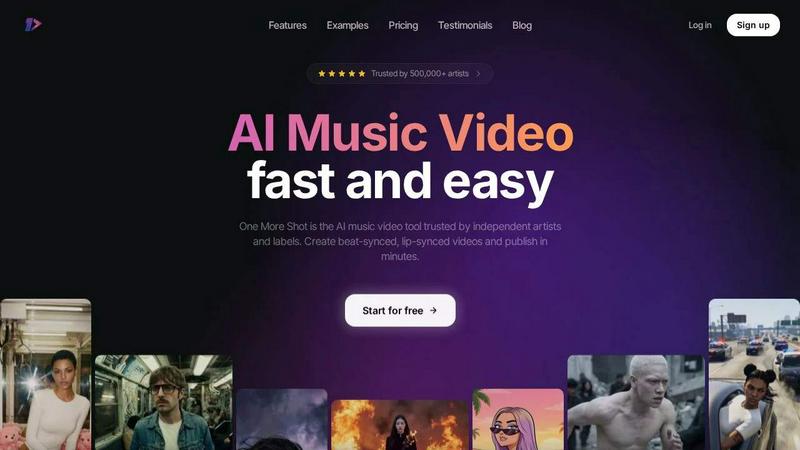
One More Shot AI is my top pick for artists to instantly transform any song into a stunning, perfectly lip-synced music video.
Last updated: April 4, 2026
Viral AI Video Maker
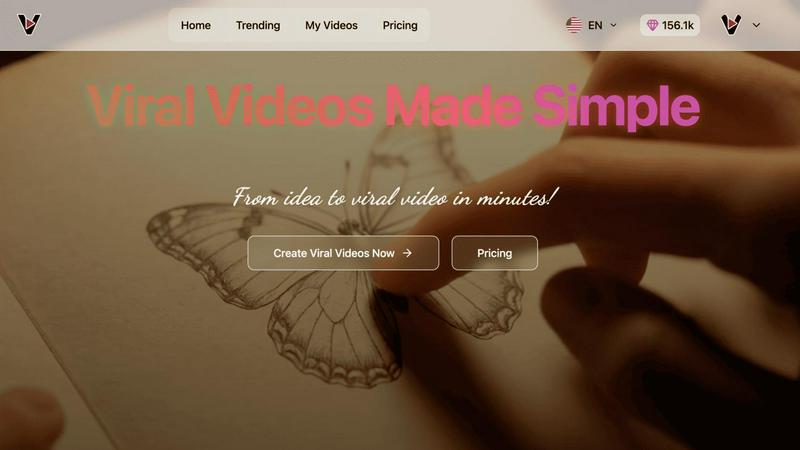
My top pick for effortlessly creating viral TikTok and Instagram videos in minutes, no skills needed.
Last updated: February 28, 2026
Visual Comparison
One More Shot AI
Viral AI Video Maker
Feature Comparison
One More Shot AI
AI Artist & Identity Consistency
This is a game-changer for branding. You can create a virtual artist—your singer, rapper, or band avatar—from just a single photo or description. Once created, this identity remains consistent across every scene and video you generate. No more jarring jumps between different-looking characters. It ensures your artist is recognizable, which is absolutely critical for building a fanbase and professional image across social media and music platforms.
Beat-Synced Auto Videos
This is the flagship "wow" feature. You simply upload your song and a reference image, and the AI agents take over like a real production crew. They analyze the audio waveform, detect beats, drops, and mood shifts, and automatically generate a complete video where the cuts, transitions, and visual effects pulse in perfect sync with the music. It removes all the tedious manual work of timing visuals to audio, delivering a dynamic result that feels professionally edited.
Top Notch Lip-Sync (Seedance 2.0)
Bad lip-sync ruins an AI video instantly. One More Shot AI specifically hosts what they call the best lip-syncing model available, and having tested it, I have to agree it's impressively natural. The recent "Seedance 2.0" update makes singing and rapping scenes look convincingly in-sync with the audio track. The mouth movements match the phonetics and timing of the lyrics, which is essential for maintaining viewer immersion and credibility.
Precise Project Mode Editing
For control freaks and perfectionists like me, this feature is a lifesaver. It allows you to start from scratch or deconstruct an auto-generated video to modify each individual shot. You get granular control over prompts, camera angles, durations, and transitions on a scene-by-scene or even frame-by-frame basis. It bridges the gap between automated speed and hands-on creative direction, letting you polish your video to an exact standard.
Viral AI Video Maker
AI-Optimized Viral Templates
This is the heart of the platform and, in my opinion, its killer feature. These aren't just pretty layouts; they are intelligently designed frameworks based on analysis of trending content. The AI understands pacing, hook placement, text-on-screen dynamics, and transition styles that keep viewers watching. By starting with one of these templates, you're essentially building on a foundation proven to engage audiences, dramatically increasing your content's potential to perform well right out of the gate.
Three-Minute Video Generation
The speed-to-publish metric here is genuinely impressive and a major selling point for anyone feeling overwhelmed by content calendars. The process is streamlined: select a template, customize your text, media, and branding, and hit generate. Within minutes, you have a polished video file. This efficiency enables rapid testing of different concepts and capitalizing on real-time trends before they fade, which is absolutely critical in today's fast-paced social media landscape.
Multi-Platform Formatting
Gone are the days of manually resizing and cropping for each platform. Viral AI Video Maker automatically formats your final video to the perfect specifications for TikTok's 9:16 vertical feed, Instagram Reels, and YouTube Shorts. This one-click optimization saves an enormous amount of time and ensures your content looks native and professional on every channel you publish to, maximizing its reach and impact without extra effort.
No-Skill-Required Editor
The user interface on veo3video.me is a masterclass in accessibility. It's intentionally designed to be intuitive, with drag-and-drop simplicity and clear customization options. You don't need to understand keyframes, layering, or complex editing timelines. This democratizes high-quality video creation, putting powerful tools in the hands of storytellers, not just technicians, which is where truly authentic viral content often originates.
Use Cases
One More Shot AI
Independent Artist Music Videos
This is the primary use case and where the tool shines. An independent artist or band can take a finished track and produce an entire, shareable music video for platforms like YouTube without any video production knowledge or budget. It enables them to create a visual product that competes with major label offerings, helping them attract fans and look professional from day one.
Social Media Content Creation
Musicians and marketers can repurpose a single song into a library of vertical, horizontal, and square format clips perfect for TikTok, Instagram Reels, YouTube Shorts, and Facebook. Generate beat-synced hooks for promo, lyric snippets, or behind-the-scenes style clips featuring your AI Artist to maintain a consistent and engaging social media presence that drives streams.
Lyric Video Production
Skip the basic text-on-screen templates. Use One More Shot AI to create dynamic lyric videos where the words are integrated into stunning AI-generated visuals that react to the music's emotion. This is perfect for Spotify Canvas, lyric videos on YouTube, or as an engaging visualizer to accompany your track on streaming platforms, adding a deeper layer of connection for listeners.
Rapid Prototyping & Pitch Material
Songwriters and producers can use the tool to create quick visual mock-ups or "sizzle reels" for a track before investing in a full production. It's also perfect for creating compelling pitch materials for labels, sync licensing, or film/TV placements, where having a strong visual to accompany the audio can make all the difference in securing a deal.
Viral AI Video Maker
Social Media Influencers & Content Creators
For influencers, consistency is currency. This tool is perfect for daily or weekly content creation, allowing them to quickly produce eye-catching clips for Reels or TikTok that maintain aesthetic quality and engagement rates. It's ideal for sharing quick tips, behind-the-scenes moments, or promotional content without spending hours in a complicated editing suite, freeing up time for community interaction.
Small Business Marketing & Product Promotion
Small businesses and solopreneurs can finally compete with larger brands on social video. They can use it to create stunning product showcases, announce flash sales, share customer testimonials, or explain services in under a minute. The professional output builds brand credibility, and the viral potential of the templates can lead to significant organic reach without a large advertising budget.
Digital Marketers & Agency Teams
Marketing teams can use Viral AI Video Maker for rapid campaign prototyping and high-volume content creation. Need 20 variations of a video ad for A/B testing? This platform makes it feasible. It's an excellent tool for creating cost-effective, engaging social media ads, email marketing visuals, and landing page videos that are designed to convert from the very first second.
Educators & Personal Brand Builders
Anyone looking to establish authority or share knowledge can leverage this tool. Coaches, consultants, and educators can transform key lessons or insights into digestible, shareable short-form videos. The engaging template styles help explain complex topics simply, making information more accessible and far more likely to be saved and shared by their audience.
Overview
About One More Shot AI
One More Shot AI is, in my opinion, the definitive tool for musicians and creators who need a professional-grade music video but lack the budget, crew, or time for a traditional shoot. It's a web and mobile platform that acts as your entire AI production crew, transforming a single audio track into a fully synchronized visual experience. Forget the months of planning and editing; this is about publishing a captivating video in minutes, not months. The core magic lies in its ability to deeply analyze your song's rhythm, energy, and mood, then generate visuals that actually move to the beat. Whether you're an independent artist on Suno, a producer in FL Studio, or a marketer needing social clips, this tool democratizes high-quality video production. Its true value proposition is a blend of incredible speed with surprisingly granular creative control. You can go the simple "one-click" route for a quick result or dive into project mode for frame-by-frame editing. With over half a million artists already using it, One More Shot AI has clearly struck a chord by solving a massive, real-world pain point in the music industry.
About Viral AI Video Maker
Let's cut through the noise. In the frantic race for attention on social media, creating video content that actually breaks through is the single biggest challenge for creators and marketers today. Viral AI Video Maker isn't just another editing tool; it's a strategic partner for virality. This platform, accessible via veo3video.me, is built on a powerful premise: leverage artificial intelligence to demystify what makes a video go viral and put that power directly into your hands, regardless of your skill level. Its core value is breathtakingly simple yet incredibly effective. It transforms your basic idea or message into a compelling, professionally-structured visual narrative optimized for the algorithms of TikTok, Instagram Reels, and YouTube Shorts. For the solo entrepreneur, the small marketing team, or the aspiring influencer without a budget for a production studio, this tool is a game-changer. It removes the technical barriers and the guesswork, offering pre-optimized templates that are data-informed to capture attention. The promise of a high-quality, platform-ready video in about three minutes is not a gimmick; it's a revolutionary shift that allows you to focus on your message and creativity while the AI handles the heavy lifting of format and trend-based structure.
Frequently Asked Questions
One More Shot AI FAQ
What music platforms does it work with?
One More Shot AI is designed to be universally compatible. You can upload any MP3 or audio file from your device. It is explicitly promoted to work seamlessly with AI music generators like Suno and Udio, Digital Audio Workstations (DAWs) like FL Studio and Ableton (by exporting your finished track), and streaming platforms like Spotify (by using local files or recorded audio). It handles the audio from any source.
Do I need video editing experience to use it?
Not at all. The "Auto Videos" feature is built for complete beginners. You just provide a song and a starting idea (like a reference image), and the AI creates a complete video for you. However, if you have editing experience or want more control, the "Precise Project Mode" offers advanced tools to fine-tune everything, making it valuable for users of all skill levels.
How good is the lip-sync technology?
The lip-sync, powered by their specialized "Seedance 2.0" model, is a key selling point and is among the best I've seen in consumer AI video tools. It is specifically engineered to analyze the vocals and generate natural-looking mouth movements that match the timing and shape of the words. While not 100% photorealistic in every scenario, it is highly effective for creating believable singing and rapping performances.
What formats can I export my video in?
This is a major strength for content strategy. You can export your final music video in multiple aspect ratios including horizontal (16:9 for YouTube), vertical (9:16 for TikTok/Reels), and square (1:1 for Instagram Feed). This multi-format support allows you to create one project and then adapt it for every major social media and music platform from a single source.
Viral AI Video Maker FAQ
Do I need any video editing experience to use this tool?
Absolutely not. That's the entire point. Viral AI Video Maker is built specifically for users with zero editing background. The interface is designed for intuitive, point-and-click customization. You simply choose a template, add your own text, images, or clips, and the AI handles the composition, timing, and formatting. It's as close to instant professional video creation as you can get.
What kind of videos can I actually make with it?
The platform is tailored for the short-form, high-impact video formats that dominate social media today. This includes TikTok-style clips, Instagram Reels, YouTube Shorts, and similar content for platforms like Facebook. It's perfect for promotional videos, quick tutorials, announcement clips, motivational content, and entertaining snippets designed to stop the scroll and engage viewers quickly.
How does the AI ensure my video has "viral potential"?
The AI doesn't guarantee virality—no tool can—but it significantly stacks the odds in your favor. Its templates are engineered based on analysis of successful viral content, incorporating proven elements like strong opening hooks, optimal video length, dynamic text animations, and engaging visual rhythms. It provides you with a structurally sound vessel; your compelling idea and call-to-action are the fuel that drives it.
Can I use my own images and video clips?
Yes, full customization is a key part of the process. While the templates provide the structure and motion graphics, you are encouraged and able to upload your own logo, brand colors, photos, and video footage. This allows you to inject your unique branding and personality into the AI-generated framework, creating a final product that is both professionally styled and authentically yours.
Alternatives
One More Shot AI Alternatives
One More Shot AI is a specialized tool in the AI content creation space, designed specifically to turn audio tracks into synchronized music videos. It caters to musicians and creators who need to produce visual content quickly, bypassing the cost and complexity of traditional video production. Users often seek alternatives for a variety of reasons. Some may need a different pricing model or a free tier to experiment with. Others might require features that go beyond music, like general video generation or more advanced editing tools. Platform preference also plays a role, as some creators need desktop software or integration with specific editing suites. When evaluating other options, consider your primary goal. If music video creation is your focus, look for strong audio analysis and beat-syncing capabilities. For broader use, a more generalist AI video tool might be better. Also, weigh the importance of creative control, output formats, and how the tool handles consistent character generation across scenes.
Viral AI Video Maker Alternatives
Viral AI Video Maker is a specialized tool in the AI video generation space, designed to help anyone create social media-ready clips for platforms like TikTok and Instagram. It’s part of a booming category of apps that promise to turn ideas into engaging video content with minimal effort, using pre-built, AI-optimized templates as a shortcut to virality. People often seek alternatives for a few key reasons. Maybe the pricing doesn’t fit their budget, especially if they need to create a high volume of videos without watermarks. Others might need more advanced editing controls, different export formats, or templates that cater to a niche beyond general social media trends. It’s a common search driven by the desire to find the perfect balance of ease, power, and cost. When evaluating other options, focus on what matters most for your workflow. Consider the quality and variety of templates, the depth of customization available, and whether the output is truly optimized for your target platforms. Also, pay close attention to the pricing model—some tools offer more generous free tiers, while others lock essential features behind a paywall. The goal is to find a tool that feels like an upgrade, not just a different set of compromises.