
Hush Touch | Voice-to-Text for MacOS vs Pathoura
Side-by-side comparison to help you choose the right tool.

Hush Touch | Voice-to-Text for MacOS
Hush Touch is the smart, private, and affordable offline voice-to-text app for Mac that learns your vocabulary.
Last updated: February 28, 2026

Pathoura
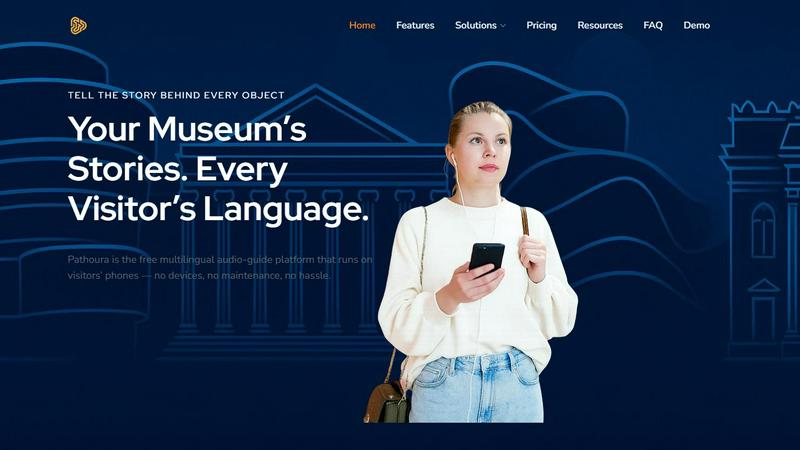
Pathoura instantly creates multilingual audio guides for museums using visitors' own smartphones.
Last updated: March 1, 2026
Visual Comparison
Hush Touch | Voice-to-Text for MacOS

Pathoura
Feature Comparison
Hush Touch | Voice-to-Text for MacOS
Dual-Engine On-Device Recognition
Hush Touch doesn't rely on a single method. It intelligently blends Apple's DictationTranscriber for natural flow and punctuation with SFSpeechRecognizer to spot custom vocabulary. This dual-input is then refined with an Apple Intelligence final pass. The magic? Every step of this process happens on your Mac. This means no lag waiting for a cloud server and, crucially, your private conversations and drafts never leave your device, setting a new bar for local processing power.
Adaptive Custom Vocabulary & Learning
This is where Hush Touch moves from a simple transcriber to a smart writing assistant. You can manually add up to 500 terms—perfect for technical jargon, brand names, or medical terminology. Even better, it learns automatically. When you correct a transcription mistake, Hush Touch detects it and adds the right word to your personal vocabulary. It even creates per-app profiles, boosting relevant terms whether you're in your code editor or email client.
Smart Text Processing & Hands-Free Commands
The app actively cleans up your spoken word in real-time. It strips out filler words ("um," "like," "you know"), auto-corrects common flubs, and can format numbered lists from your speech. For true hands-free operation, use a Siri shortcut or say "Okay send message" to dispatch an email. It auto-inserts text after a pause and supports a double-tap hotkey to stop listening, making the entire dictation-to-insertion flow seamless.
Lightweight Design & Context Modes
Weighing in at just 5.5 MB, Hush Touch is a marvel of efficiency. It launches in a flash and runs without bogging down your system. To further enhance accuracy, it offers four distinct context modes: General, Email, Code, and Notes. Switching modes tailors the engine's focus, helping it better predict punctuation and vocabulary relevant to the task at hand, from writing a formal email to commenting code.
Pathoura
AI-Powered Translation & Narration
This is the heart of Pathoura and my absolute favorite feature. It transforms the traditionally arduous and costly process of creating multilingual audio. You simply upload your exhibit text, and the platform's AI instantly translates it into 20+ languages. Then, it generates a human-sounding voiceover for each one. The ability to preview and fine-tune before publishing means you maintain editorial control without needing a recording studio or a team of translators.
Zero-App, QR Code Access
Pathoura eliminates the biggest friction point for visitors: downloading an app. By using simple QR codes or exhibit numbers displayed next to artifacts, visitors can scan and start listening immediately on their own devices. This barrier-free access dramatically increases adoption rates and ensures a smooth, frustration-free start to the cultural experience, which is crucial for visitor satisfaction.
Centralized Content Management Dashboard
For museum operators, this feature is a lifesaver. All your exhibits, stories, images, and audio files are organized in one intuitive online dashboard. You can create zones or themes, update scripts in real-time, and manage multiple languages from a single interface. This centralized control means your audio guides are always up-to-date, reflecting changes in exhibitions or narratives instantly.
Sustainable & Cost-Effective Operation
Pathoura directly tackles the financial and environmental costs of traditional audio guides. By moving away from proprietary hardware, it reduces e-waste, eliminates device maintenance, and cuts down on printed materials. Institutions pay for what they use with affordable credits for AI generation, making professional-grade interpretation scalable and sustainable for even small local museums.
Use Cases
Hush Touch | Voice-to-Text for MacOS
Drafting Long-Form Content and Reports
For writers, researchers, and students, speaking ideas is often faster than typing them. Hush Touch allows you to dictate drafts of articles, essays, or reports naturally. Its smart punctuation and paragraph formatting let you speak in complete thoughts, while the on-device privacy ensures your unpublished ideas and sensitive research data remain completely confidential throughout the creative process.
Managing Professional Communication
Tackle an overflowing inbox hands-free. Dictate emails and messages with tone-appropriate phrasing aided by the Email context mode. The ability to say "Okay send message" allows you to compose and send replies without ever touching the keyboard, perfect for when you're multitasking, on the move, or dealing with repetitive communication throughout a busy workday.
Technical and Specialized Documentation
Software engineers, doctors, lawyers, and academics finally have a dictation tool that understands their language. By learning complex terms like "Kubernetes," "metatarsophalangeal," or legal citations, Hush Touch accurately transcribes technical notes, patient observations, code comments, and research summaries that would stump generic cloud-based services, saving immense time on corrections.
Accessible and Ergonomic Computer Use
For individuals with RSI, carpal tunnel, or other conditions that make typing painful, Hush Touch provides a robust, private alternative for controlling their Mac. The fully hands-free operation via Siri integration and voice commands enables full participation in digital work and communication without strain, all maintained with the dignity of complete data privacy.
Pathoura
Small Museum Modernization
A local history museum with limited staff and budget can use Pathoura to leap into the 21st century. They can digitize their exhibits with engaging stories, add narration in languages spoken by their community tourists, and offer a professional audio guide without investing in expensive hardware or technical expertise, significantly elevating their visitor experience.
Large Institution Scalability
Major international museums with rotating exhibitions and a global audience can use Pathoura to manage content at scale. They can quickly create and update audio tours for new exhibits, provide consistent interpretation in dozens of languages simultaneously, and reduce the logistical overhead of managing thousands of physical audio guide devices.
Heritage Site Accessibility
Outdoor heritage sites, archaeological parks, or sculpture trails can deploy Pathoura to provide context without intrusive signage. QR codes at points of interest allow visitors to listen to stories on their own phones, enabling a self-guided tour that is rich in detail and available in multiple languages, making the site more inclusive and informative.
Special Exhibition & Event Tours
For temporary exhibitions, festivals, or artist talks, Pathoura offers a perfect turnkey solution. Curators can create a bespoke audio guide in weeks, not months, complete with translations. This adds immense value to the event, provides an accessible resource for all visitors, and can even be monetized as a premium add-on experience.
Overview
About Hush Touch | Voice-to-Text for MacOS
Let's be honest: most dictation software is a compromise. You either sacrifice privacy by sending your voice to the cloud, deal with clunky, inaccurate transcription, or get locked into a draining monthly subscription. Hush Touch is the Mac app that finally ends that compromise. This is a purpose-built, voice-to-text powerhouse that runs entirely on your Mac. It combines not one, but two of Apple's own transcription engines, then applies a final polish with Apple Intelligence—all processed locally. The result is shockingly fast, accurate, and private dictation that learns your personal vocabulary over time. At a featherlight 5.5 MB, it launches instantly and fits into your workflow without the bloat or the privacy anxiety. It's built for anyone who writes on a Mac—from professionals drafting complex emails and reports to students taking notes—and values a one-time payment over a subscription leash. Its core promise is simple: get cleaner, smarter text from your voice, with zero data ever leaving your computer.
About Pathoura
Pathoura is a game-changing audio-guide platform that is single-handedly modernizing how cultural institutions engage with their audiences. Forget clunky hardware, expensive studio recordings, and logistical nightmares. Pathoura offers museums, galleries, and heritage sites a brilliantly simple, AI-powered solution to create and deliver multilingual audio tours directly to visitors' smartphones. Its core genius lies in its accessibility—it's built for institutions of all sizes and budgets, democratizing high-quality interpretation. The platform allows you to input your exhibit text, and with a few clicks, it uses advanced AI to translate content into over 20 languages and generate expressive, natural-sounding voice narrations. Visitors access everything instantly via QR codes, requiring no app download. For me, the standout value proposition is its dual focus: it massively enhances the visitor experience with inclusive, rich storytelling while liberating museum staff from technical burdens and creating a sustainable, potentially revenue-generating channel. It’s not just a tool; it’s a strategic partner for cultural storytelling in the digital age.
Frequently Asked Questions
Hush Touch | Voice-to-Text for MacOS FAQ
Is Hush Touch really 100% offline and private?
Yes, absolutely. This is its cornerstone feature. Every component—from the two Apple speech recognition engines to the Apple Intelligence final pass—processes your audio directly on your Mac. No audio or transcript data is ever sent to external servers. Your voice input and the resulting text never leave your computer, ensuring total privacy.
How does the vocabulary learning actually work?
Hush Touch employs adaptive learning. When you manually correct a word in the transcribed text, the app detects this correction and automatically adds the intended word to your personal vocabulary list. It also uses frequency weighting, so terms you use often in specific apps (like "diagnosis" in your notes app) become prioritized, making the engine smarter with each use.
Can I use Hush Touch completely hands-free?
You can. You can activate dictation using a Siri voice command ("Hey Siri, start touch"). Once listening, it will automatically insert the transcribed text after a short pause (roughly 2 seconds of silence). You can also use voice commands like "Okay send message" to send an email or message, and configure a hotkey to stop listening with a double-click.
What happens after the 7-day free trial?
The free trial gives you full access to all features for 7 days. After that, you need to purchase a lifetime license to continue using the app. There is no subscription. It's a single, one-time payment of $20 that grants you permanent access to the app and all its current features, with no recurring fees.
Pathoura FAQ
Do visitors need to download an app to use Pathoura?
No, and this is a key advantage. Pathoura is designed for instant access. Visitors simply use their smartphone's camera to scan a QR code placed next to an exhibit, or they can enter a short exhibit number into a mobile-friendly web page. The audio guide loads directly in their mobile browser, requiring no app installation, data download, or login.
How accurate and natural is the AI-generated voice narration?
The AI voice technology Pathoura employs is highly advanced, producing clear, expressive, and natural-sounding speech in multiple languages and accents. While it may not capture the unique nuance of a specific human narrator, the quality is excellent for museum interpretation. Crucially, the platform allows you to preview and edit the generated script and audio before publishing, ensuring it meets your standards.
Can we use our own pre-recorded audio files?
Yes, absolutely. Pathoura's dashboard is flexible. While the AI narration is a flagship feature for speed and scalability, you can also upload your own professionally recorded audio files for specific exhibits or languages. This hybrid approach gives you complete creative control over your storytelling.
How does Pathoura handle visitor data and privacy?
Pathoura uses technologies like cookies to store device information to provide the best user experience, such as remembering language preferences. Institutions can manage consent for this data processing. Importantly, the model where visitors access content via their own phones without an app login minimizes the collection of personal visitor data, aligning with modern privacy expectations.
Alternatives
Hush Touch | Voice-to-Text for MacOS Alternatives
Hush Touch is a standout in the niche of on-device voice-to-text software for macOS. It’s built for users who prioritize privacy, offline functionality, and a seamless, native Mac experience, leveraging Apple's own powerful transcription and intelligence engines to deliver clean, accurate dictation without ever sending your data to the cloud. People often seek alternatives for a variety of reasons. Some might be looking for a free tier or subscription model instead of a one-time purchase. Others may need cross-platform compatibility with Windows or mobile devices, or require specific integrations with certain apps that a focused tool like Hush Touch doesn't provide. The search usually comes down to balancing cost, privacy, accuracy, and workflow fit. When evaluating other options, your key considerations should be privacy policy (on-device vs. cloud processing), cost structure, accuracy in your primary language, and how well the tool integrates into your daily routine. The best choice isn't always the most feature-packed; it's the one that disappears into your workflow, letting you think out loud and get words on the screen effortlessly.
Pathoura Alternatives
Pathoura is a leading AI-powered audio guide platform designed for museums and cultural institutions. It falls squarely into the category of AI assistants for cultural engagement, using technology to create multilingual, smartphone-accessible tours that replace clunky hardware. Users often seek alternatives for a few key reasons. Budget constraints are a major driver, as institutions of all sizes weigh feature sets against cost. Some may require deeper customization or specific integrations that a general platform doesn't offer, while others might prioritize a different balance between automated AI content and human-curated narration. When evaluating options, focus on your core needs. Consider the true cost beyond the subscription, including setup and content creation. Scrutinize the language support and voice quality, as not all AI narration is created equal. Finally, assess the visitor experience—the best platform is useless if it creates friction for your guests. The right choice seamlessly blends your institution's story with accessible technology.