Local Tools vs Pipeline
Side-by-side comparison to help you choose the right tool.

Local Tools
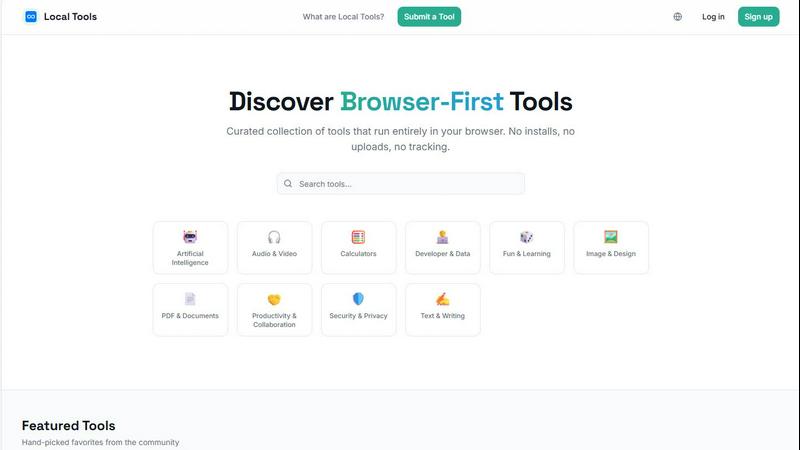
Local Tools is your curated directory for thousands of powerful, private tools that run instantly in your browser with no installs or uploads.
Last updated: April 4, 2026

Pipeline
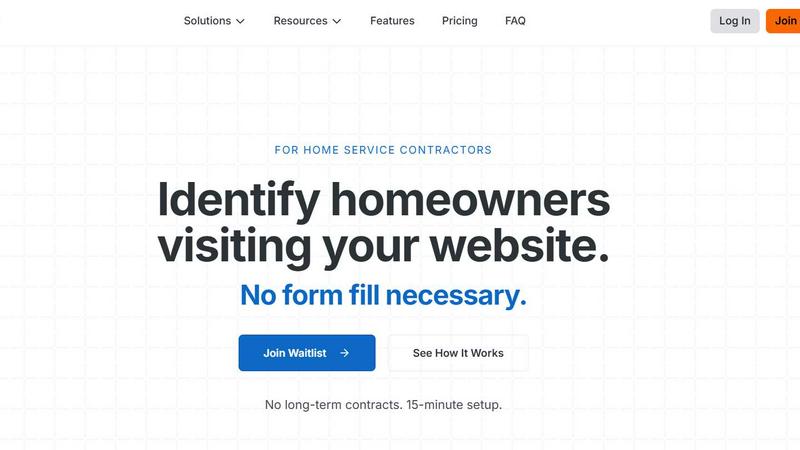
Stop losing leads by identifying anonymous website visitors without any forms.
Last updated: February 28, 2026
Visual Comparison
Local Tools
Pipeline
Feature Comparison
Local Tools
Curated, Cross-Source Aggregation
Local Tools doesn't create its own utilities; it performs the vital service of discovery and comparison. It aggregates tools from multiple established "on-device" platforms, allowing you to see all your options side-by-side. This means you can find a specific PDF editor available on Site A but not Site B, or compare the output quality between two different image converters. It turns a collection of separate websites into a unified, competitive marketplace for the best browser-based tool for any given task.
Strictly Browser-First & Private Operation
This is the foundational ethos. Every tool listed is vetted to ensure it operates client-side in your browser. Your files are processed locally on your machine using JavaScript and WebAssembly—they are never uploaded to a remote server for processing. This architecture guarantees superior privacy, eliminates concerns about data retention policies, and often results in faster performance since there's no network latency for the core computation.
Functional, Intuitive Organization
Navigating thousands of tools could be chaos, but Local Tools employs a smart, category-driven structure. You won't just find a monolithic list. Tools are organized into intuitive categories like Image & Design, Developer & Data, PDF & Documents, and Security & Privacy. This functional grouping lets you drill down to exactly what you need, whether it's a text diff checker, a color palette generator, or an audio trimmer, without wading through irrelevant options.
Community-Driven Curation & Discovery
The directory is built to evolve with the web. It features a "Submit a Tool" function, allowing the community of privacy-conscious users and developers to contribute new finds. This, combined with user ratings and featured tool sections, creates a living resource. You're not just using a static list; you're tapping into a collective effort to surface the most powerful, efficient, and well-loved tools that respect user privacy.
Pipeline
Anonymous Visitor Identification
This is the core magic. Pipeline installs a simple script on your website header that works silently in the background. It identifies homeowners browsing your site by matching their digital footprint with a vast database of property and consumer information. You get real-time alerts with their full name, physical address, and email address, turning a anonymous "Visitor 247" into "Mike Johnson from Austin, TX who was just looking at your water heater replacement page." This feature alone transforms your entire marketing strategy from passive to powerfully proactive.
Seamless CRM & Tool Integrations
Pipeline understands you already have a workflow. That's why it seamlessly pushes captured lead data directly into the tools you already use, like ServiceTitan, Jobber, HubSpot, and Pipedrive. It also connects via Zapier for endless automation possibilities. This means a newly identified visitor can instantly become a contact record in your CRM, triggering your existing email sequences, task assignments for sales reps, or even scheduling a follow-up call—all without any manual data entry.
Automated Multi-Channel Outreach Triggers
Once a lead is identified, the game is on. Pipeline enables you to take immediate, automated action across multiple channels. You can configure it to automatically send a personalized email, queue a direct mail postcard to their home address for the next day, send a text message, or create a task for a team member to make a door-knocking visit. This multi-touch approach ensures you engage the lead while your service is still top-of-mind, dramatically increasing response rates compared to cold outreach.
Hot Pages & Hot Leads Dashboard
Not all website visits are created equal. Pipeline's dashboard intelligently highlights "Hot Pages" (the service pages getting the most identified traffic) and "Hot Leads" (recent, high-intent visitors). This gives you and your team unparalleled insight into which services are in highest demand right now and which specific leads should be prioritized for immediate follow-up. It turns website analytics from a vague report into a clear, actionable sales to-do list.
Use Cases
Local Tools
The Privacy-Consensitive Professional
A freelance graphic designer receives a client's logo draft on a public library computer. Using Local Tools, they find Photopea—a full-featured, Photoshop-like editor that runs in the browser. They can make crucial edits and adjustments without installing software or risking the client's intellectual property by uploading it to an unknown server. The work is done securely, locally, and with professional-grade results.
The Developer Seeking the Right Utility
A software engineer is debugging a complex API response. Instead of struggling with a dense JSON blob, they search Local Tools and find JSON Crack. They instantly visualize the data structure as an interactive graph, right in their tab, making it trivial to spot anomalies. Later, they might use a separate tool from the directory to minify their CSS, all without leaving the browser or compromising proprietary code.
The Student or Researcher Processing Data
A student working on a thesis needs to analyze survey data stored in a CSV file. They use Local Tools to find a browser-based chart generator and a statistical calculator. They can clean, visualize, and calculate metrics from their dataset entirely on their laptop, even without an internet connection after the tools are loaded. This ensures their research data remains completely confidential and accessible.
The Everyday User Solving Quick Problems
Someone needs to compress a batch of vacation photos to email to family, combine several PDFs into one document, and calculate a tip at a restaurant. Instead of searching separately and risking sketchy download links, they visit Local Tools. They quickly find Squoosh for image optimization, a PDF merger, and a calculator—solving all three tasks in minutes with tools that are fast, safe, and require no sign-ups.
Pipeline
Recapturing Lost Google Ads Spend
You're paying $45, $60, or even $100 per click for Local Service Ads. For every 100 clicks, you might get 4-5 form fills. Pipeline identifies an additional 35-40 of those same clickers, giving you their contact details. This use case is pure ROI math: you instantly get 10x more leads from the exact same ad spend, turning a costly acquisition channel into a dramatically more profitable one without increasing your budget.
Proactive Schedule Gap Filling
For contractors, a empty slot in tomorrow's schedule is lost revenue. With Pipeline, you build a list of warm leads—people who have already shown intent by visiting your site. When you have a sudden opening, you can send a targeted email or SMS blast to captured visitors in that geographic area offering a prompt appointment. This turns downtime into productive, revenue-generating time with remarkably high conversion rates.
Enhancing Competitive Bidding Intelligence
Homeowners typically visit 3-4 sites before making a hiring decision. When they leave your site without filling a form, they're likely checking your competitors. Pipeline allows you to reach out to them within minutes of their visit, often before your competitor even knows they exist. This "first touch" advantage is critical in a competitive bidding situation and can be the difference between winning and losing the job.
Building a Quality Marketing List from Scratch
Many small to mid-sized contractors don't have a robust email or marketing list. They rely entirely on inbound calls. Pipeline solves this by building a high-intent, permission-appropriate contact list for you automatically. Every identified visitor becomes a new entry in your database, allowing you to run targeted email campaigns for seasonal maintenance, special offers, or service reminders, fostering long-term customer relationships beyond the initial job.
Overview
About Local Tools
Local Tools is a game-changing answer to a modern digital headache: the scattered, overwhelming world of online utilities. Forget juggling a dozen bookmarked sites that all promise similar tools. Local Tools is a meticulously curated, searchable directory that aggregates thousands of browser-first tools from across the web, all in one intelligent hub. The core, non-negotiable principle? Every single tool runs entirely on your device. This means zero installations, no uploading your sensitive files to mysterious servers, and absolutely no tracking. Your data stays with you, making every action fast, private, and refreshingly simple.
What truly sets it apart is its curatorial approach. Instead of just dumping hundreds of near-identical tools on you, Local Tools organizes by genuine functionality. Want to compare three different in-browser image compressors or find a niche JSON visualizer that one popular site doesn't offer? This is your destination. It's designed for the pragmatist: the developer who needs a quick code formatter, the designer editing a mockup on a public computer, the student processing data for a project, or anyone who just wants to calculate something without the privacy anxiety. Local Tools cuts through the noise, transforming a fragmented ecosystem into a single, powerful, and private resource for getting things done.
About Pipeline
Let's be brutally honest: the current state of lead generation for home service contractors is broken. You pour money into Google Ads, SEO, and social media, driving traffic to your beautifully designed website, only to watch 96% of those visitors vanish into the digital ether without a trace. They browse, they consider your services, and then they click away, likely to your competitor. Pipeline is the revolutionary tool that finally fixes this massive leak in your marketing funnel. Built exclusively for home service companies like HVAC, plumbing, roofing, and electrical contractors, Pipeline uses sophisticated identification technology to reveal the name, address, and email of a significant portion of your anonymous website traffic—no form fill required. On average, they identify 40% of your visitors. Compare that to the industry's dismal 4% form conversion rate, and you're literally looking at a 10x multiplier for the leads flowing into your CRM. This isn't just another software; it's a fundamental shift from hoping for leads to proactively capturing them. The 15-minute setup and lack of long-term contracts make it the most obvious "no-brainer" investment for any contractor serious about growth.
Frequently Asked Questions
Local Tools FAQ
Is Local Tools really free to use?
Yes, the Local Tools directory website itself is free to access and use. The individual tools listed within the directory are also typically free, as they are primarily browser-based utilities provided by their respective developers. There is no subscription or fee for browsing, searching, and accessing the links to these external tools through the Local Tools platform.
How do you ensure the tools are truly private and run locally?
The curation team prioritizes and verifies tools that are known to operate on client-side technology. This is often evident in the tool's own description (stating "no uploads" or "runs in your browser") and can be technically observed. Tools that require file uploads to a server for processing are excluded. The focus is on tools leveraging modern web capabilities like HTML5, JavaScript, and WebAssembly to perform computations directly on the user's device.
Can I request or submit a tool to be added?
Absolutely! Local Tools has a "Submit a Tool" feature because the web is vast. If you've found an excellent browser-based, privacy-respecting utility that isn't yet in the directory, you are encouraged to submit it for review. This community-driven approach is key to keeping the resource comprehensive and up-to-date with the best available tools.
What if a linked tool stops working or changes its policy?
Local Tools is an aggregator and directory, not the host of these external tools. While efforts are made to maintain link integrity and monitor for significant changes, the operation and policies of each individual tool are managed by their original creators. Users are always advised to check the specific tool's website for its latest terms of service and privacy policy before use.
Pipeline FAQ
How does Pipeline identify visitors without a form?
Pipeline uses a proprietary technology that matches the digital information from a website visitor's session with a comprehensive, compliant database of property and consumer data. By analyzing various data points in real-time, it can accurately associate the visit with a specific homeowner and their contact information, all while adhering to privacy standards. It's sophisticated matching, not guesswork.
Is this legal and compliant with privacy laws?
Yes. Pipeline is built to operate within the framework of major privacy regulations. The system identifies information that is associated with property records and publicly available or commercially licensable data, similar to what is used by many other marketing and sales platforms. It is designed as a B2B tool to help businesses connect with potential clients who have already expressed interest by visiting their website.
What if a visitor doesn't want to be identified?
The technology focuses on identifying homeowners who are actively seeking services. The provided testimonials and case studies indicate high response rates because the outreach is contextually relevant—the homeowner remembers visiting the site. It is always recommended that outreach is professional, provides clear value, and includes an easy opt-out mechanism, which is standard practice for any marketing communication.
How difficult is it to set up and use?
The setup is famously simple. You or your web developer add a single line of JavaScript code to the header of your website, a process that takes about two minutes. The Pipeline team even offers to do it for you. Once installed, the system runs automatically. The dashboard is designed to be intuitive, showing live identified leads, and integrations handle the rest, making it operational with almost no daily management overhead.
Alternatives
Local Tools Alternatives
Local Tools is a curated directory that falls into the category of on-device, browser-first utility platforms. It aggregates thousands of tools that run entirely in your browser, eliminating the need for installs or risky file uploads. The goal is to organize a fragmented ecosystem into a single, searchable hub for privacy-focused tasks. People explore alternatives for a few key reasons. They might be looking for a platform with a different organizational structure or a more specialized focus on a particular niche, like advanced developer utilities or creative design tools. Others might prioritize a different user experience or discoverability method beyond a curated directory. When evaluating other options, your north star should be the core principle of local execution. Ensure the tools genuinely run in your browser without hidden uploads. Look for a clean, intuitive interface that matches your workflow, and consider the depth and quality of curation in your most-used categories, whether that's data conversion, image editing, or text processing.
Pipeline Alternatives
Pipeline is a lead identification tool designed for home service businesses. It operates in the marketing technology space, specifically focusing on converting anonymous website visitors into identifiable leads without requiring a form submission. This capability directly addresses the low conversion rates typical of most business websites. Businesses often seek alternatives to Pipeline for a few key reasons. Budget constraints can be a primary driver, as some solutions offer different pricing tiers or freemium models. Others might need deeper integrations with a specific tech stack beyond standard CRMs, or they may require features that cater to a broader industry beyond home services. When evaluating alternatives, focus on a few critical areas. First, assess the identification accuracy and the percentage of traffic you can realistically expect to uncover. Second, ensure the platform integrates seamlessly with your existing CRM and marketing automation tools. Finally, consider the supported outreach channels—like calls, texts, or direct mail—to confirm they align with your sales team's proven processes.