
Kane AI vs QuickImg
Side-by-side comparison to help you choose the right tool.

Kane AI
KaneAI is my top pick for creating and managing complex software tests using simple natural language commands.
Last updated: February 28, 2026

QuickImg
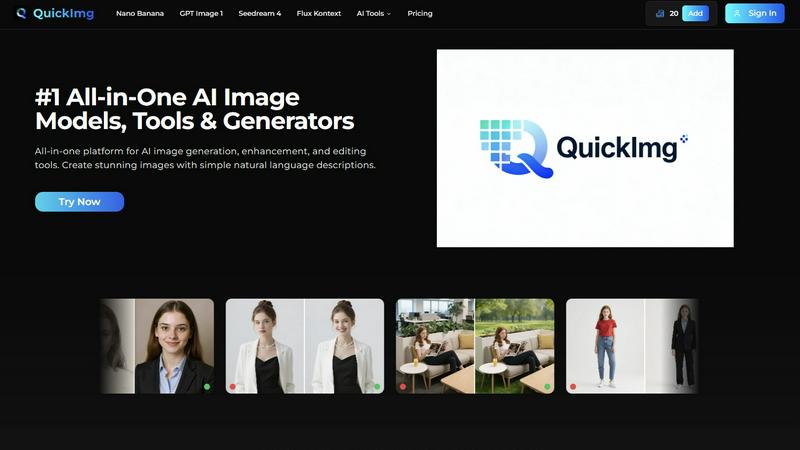
QuickImg is my top pick for effortlessly generating and editing stunning images with AI.
Last updated: February 28, 2026
Visual Comparison
Kane AI

QuickImg
Feature Comparison
Kane AI
Natural Language Test Authoring & Planning
This is the heart of Kane AI and my absolute favorite feature. You simply converse with the AI agent, describing high-level objectives like "test the checkout flow for a guest user with an expired promo code." Kane AI's Intelligent Test Planner then decomposes this into structured, automated test steps. You can even feed it JIRA tickets, PRDs, or spreadsheets to generate test cases. It’s a game-changer that completely skips the technical syntax, letting you focus on what to test instead of how to code it.
Unified Multi-Layer Testing
Forget juggling separate tools for UI, API, and database checks. Kane AI brilliantly unifies end-to-end flow testing across every critical layer of your application in one seamless strategy. You can validate UI interactions, check API responses and network payloads in real-time, run direct database queries, and even perform pixel-perfect visual comparisons and accessibility audits—all within the same test flow. This holistic approach is what true coverage looks like.
Intelligent Execution & Self-Healing
Execution is where many AI tools falter, but not Kane AI. It runs your tests across 3000+ browser, OS, and device combinations via HyperExecute. More impressively, it includes GenAI-powered healing to automatically adapt to minor UI changes and auto-dismiss popups. The step-level control is a masterstroke, allowing you to decide if a failure should stop the run, continue, or be skipped, giving you incredible resilience and precision.
Enterprise-Grade Integrations & Workflow
Kane AI is built to slot into your existing ecosystem, not force you into a new one. The native integration with Jira and Azure DevOps is seamless; you can create test cases, trigger runs, and—crucially—auto-raise well-documented bug tickets directly from a failure. Combined with enterprise essentials like SSO, RBAC, and audit logs, it ensures the platform scales with your team's security and collaboration needs.
QuickImg
Unified Multi-Model AI Playground
This is, hands down, my favorite feature. Instead of subscribing to five different services, QuickImg gives you a curated dashboard of the latest and greatest AI models. Want the hyper-detailed text rendering of GPT Image 1 for a logo concept? Need the blazing speed and 4K output of Seedream 4 for a landscape? It's all here. This consolidation saves you immense time and money, letting you pick the perfect tool for the job without ever leaving the platform. It turns the complex decision of "which AI should I use?" into a simple, informed choice.
Natural Language Command Center
QuickImg completely eliminates the barrier of "prompt engineering." The platform is built around the premise that you should describe your vision as you would to a colleague. Type in "a cozy bookstore on a rainy street at night" or "change this model's jacket to a leather bomber" and the AI handles the technical translation. This intuitive approach unlocks creativity for non-technical users while speeding up the workflow for experts who are tired of syntactic guesswork.
One-Click Professional Editing Tools
Beyond generation, QuickImg shines with its arsenal of specialized, single-function tools. Need a transparent background? The "PNG Maker" does it in one click. Have a photo ruined by a watermark? The "AI Watermark Remover" is your savior. These tools, like the superb "AI Background Changer" and "Remove Text From Image," take complex Photoshop-level tasks and distill them into instant actions. They are incredibly reliable for quick fixes and are a major reason I keep QuickImg open in a permanent browser tab.
Ready-to-Use Template Library
For those moments when you're staring at a blank canvas with zero inspiration, the template library is a lifesaver. It offers professionally designed starting points for common scenarios—social media posts, product mockups, marketing banners. This isn't just about convenience; it's a learning tool that shows you what's possible and helps you achieve polished results instantly, ensuring brand consistency and saving hours of layout work.
Use Cases
Kane AI
Accelerating Test Automation for Non-Coding Teams
Product managers, business analysts, and manual QA engineers can now directly contribute to automation. By describing features or uploading product requirements, they can generate comprehensive, executable test suites without writing a single line of code. This democratizes test creation and drastically reduces the dependency on a few automation specialists, unblocking the entire delivery pipeline.
Continuous Testing in CI/CD Pipelines
Development teams can embed Kane AI into their CI/CD workflows to enable true shift-left testing. Since tests are authored and maintained with natural language, they are easier to create alongside feature development. The platform's flexible scheduling and ability to run on custom environments (like a local build) make it perfect for automated regression suites that run on every commit, providing fast feedback.
Complex End-to-End Business Flow Validation
For validating intricate, multi-step user journeys—like a financial investment flow or a multi-leg flight booking—Kane AI excels. Its ability to weave together UI actions, API calls, database state checks, and visual validation into a single, coherent test ensures that critical business workflows work perfectly from front to back before any release.
Enhancing Test Coverage for Legacy Systems
Teams maintaining large, complex legacy applications often have gaps in test coverage. Kane AI's manual interaction recorder can capture existing user flows, converting them into reusable automated steps. Furthermore, its ability to generate dynamic test data and create modular, reusable test blocks makes building and expanding a regression suite for a legacy system far less daunting.
QuickImg
Rapid Social Media Content Creation
For social media managers and content creators, QuickImg is a game-changer. You can generate a week's worth of unique, eye-catching graphics for posts, stories, and ads in an afternoon. Use the templates for consistency, generate original artwork for blog headers, or use the "Photo to Anime" tool to create viral-style content. The speed and variety directly translate to a more engaged audience and a less stressed creator.
E-commerce Product Visualization
Online sellers can use QuickImg to generate professional product photos in various settings without expensive photoshoots. Need your product on a beach, in a modern kitchen, or with a different color variant? Describe it. You can also use the "Change Background Color" and "Green Screen" tools to create clean, uniform catalog images. It dramatically reduces costs and accelerates listing times.
Creative Brainstorming & Prototyping
Designers, writers, and marketing teams can use QuickImg as a dynamic brainstorming partner. Quickly visualize concepts for characters, book covers, website layouts, or ad campaigns before committing to final art. The ability to iterate rapidly with different models ("what does this look like in Flux Kontext style?") fuels creativity and aligns team vision faster than any mood board.
Personal Fun and Digital Art Projects
Its appeal isn't just professional. Hobbyists can have a blast transforming personal photos into anime characters with "Photo to Anime," creating fantastical avatars with the "AI Character Generator," or even using the delightfully weird "Pet to Human" tool for some laughs. It makes advanced digital art creation accessible and enjoyable for everyone.
Overview
About Kane AI
Let's cut through the noise: test automation is often a bottleneck, not a catalyst. It demands specialized coding skills, creates maintenance nightmares, and leaves critical layers like APIs and accessibility as afterthoughts. Kane AI by TestMu is the paradigm shift we've been waiting for. It's not just another low-code tool with training wheels; it's a first-of-its-kind, GenAI-native testing agent built from the ground up for speed and intelligence. This platform is for modern Quality Engineering teams who are tired of the trade-off between ease-of-use and power. Its core value proposition is breathtakingly simple: you describe your testing intent in plain English, and Kane AI handles the complex orchestration—authoring, managing, debugging, and evolving sophisticated, multi-layered tests. It obliterates the traditional barrier to entry for automation, enabling teams to start fast and scale without compromising on the complexity needed for enterprise-grade applications. If you're looking to move from reactive bug-finding to proactive, AI-powered quality engineering, this is your command center.
About QuickImg
Let's cut through the noise: QuickImg is the Swiss Army knife of AI image creation that actually lives up to the "all-in-one" hype. In a market flooded with single-purpose tools that force you to hop between a dozen different websites, QuickImg consolidates the entire workflow into one sleek, intuitive platform. Its core genius is democratization. It takes the intimidating, technical world of AI image generation and makes it accessible to absolutely anyone who can describe what they want in plain English. Forget crafting perfect, arcane prompts; you just tell it what you see in your mind's eye. But don't mistake its simplicity for a lack of power. Under the hood, it aggregates top-tier models like Google's Gemini 3 Pro (Nano Banana Pro), OpenAI's offerings, and ByteDance's Seedream 4, giving professionals the firepower they need without the friction. Whether you're a solo entrepreneur needing social media graphics, a marketer brainstorming ad concepts, a designer seeking rapid prototypes, or just someone who wants to turn their pet into a anime character for fun, QuickImg is your starting line and finish line. It’s not just a generator; it's a full suite covering creation, enhancement (like upscaling to 4K), and sophisticated editing (think background changes, object removal, style transfer), making it an indispensable tool for elevating any visual content strategy.
Frequently Asked Questions
Kane AI FAQ
How is Kane AI different from traditional low-code testing tools?
Traditional low-code tools often simplify UI recording but struggle with complex logic, conditionals, and non-UI testing. Kane AI is fundamentally different; it's a GenAI-native agent. You instruct it with natural language objectives, and it plans and generates the underlying code for sophisticated workflows across all layers (UI, API, DB). It's built for complexity and enterprise-scale performance, not just simplicity.
Does Kane AI support testing for mobile applications?
Yes, absolutely. Kane AI supports authoring and executing tests across both web and mobile applications. When combined with its execution platform, HyperExecute, you can run these tests on a vast grid of real mobile devices and emulators, ensuring your mobile experience is validated with the same rigor as your web application.
Can I use my existing test frameworks with Kane AI?
Kane AI is designed as a comprehensive platform, but it offers multi-language code export. This means you can export the test logic it generates into code for major frameworks. While it encourages using its native intelligent agent for authoring and execution, this export capability provides flexibility and a potential migration path for certain needs.
How does the "GenAI-powered healing" actually work?
When Kane AI executes a test and encounters a failure—like a button that can't be found because its CSS selector changed—its GenAI engine analyzes the context. It can intelligently suggest and apply alternative, resilient locators or interaction methods to complete the test step. This self-healing capability dramatically reduces test maintenance overhead caused by frequent, minor UI updates.
QuickImg FAQ
Do I need any design experience to use QuickImg?
Absolutely not. This is the core of QuickImg's design philosophy. The platform is built for complete beginners. You interact using simple natural language descriptions and one-click tools. If you can describe what you want to see or know which problem you need to solve (e.g., "remove background"), you can achieve professional-grade results without any prior design or AI prompt skills.
What makes QuickImg different from other AI image generators?
The key difference is consolidation and curation. While most tools offer one model or one function, QuickImg is a unified platform. It gives you access to multiple leading AI models (like Nano Banana Pro, GPT Image 1) and a full suite of editing/enhancement tools (like upscaling, background removal) in one place. You don't need separate subscriptions for generation, editing, and upscaling. It's a complete workflow solution.
Which AI model on QuickImg is the best?
There's no single "best" model; it depends on your need. For images requiring flawless text (like posters or logos), I personally lean towards GPT Image 1. For ultra-high-resolution 4K outputs and speed, Seedream 4 is phenomenal. For advanced control and character consistency in edits, Flux Kontext is a powerhouse. The beauty of QuickImg is you can test them all on the same prompt to see which result you prefer.
Are the images I create owned by me?
Based on standard practices for platforms like this, you typically own the output images you create for personal and commercial use. However, it is always crucial to review QuickImg's specific Terms of Service for the most accurate and detailed information regarding licensing, usage rights, and any limitations, especially for very large-scale commercial projects.
Alternatives
Kane AI Alternatives
Kane AI is a pioneering GenAI-native testing agent, squarely in the category of AI-powered quality engineering assistants. It allows teams to plan, create, and manage complex automated tests using simple natural language, aiming to drastically reduce the time and expertise needed for robust test automation. Users often explore alternatives for various reasons. Budget constraints or specific pricing models can be a primary driver. Others might seek tools with a narrower focus, like only API testing, or require deeper integration with a niche part of their tech stack that a generalist tool doesn't support. When evaluating an alternative, consider your team's core need. Is it raw test generation speed, support for a legacy framework, or unparalleled ease of use? The right choice balances the power of AI assistance with the practicalities of your existing workflows, integration capabilities, and long-term testing strategy.
QuickImg Alternatives
QuickImg is a powerful all-in-one AI platform for generating, enhancing, and editing images. It belongs to the category of AI assistants, specifically those focused on visual creation. It's designed to turn simple text descriptions into stunning visuals using multiple advanced models. Users often seek alternatives for various reasons. Some might find the pricing structure doesn't fit their budget, while others may need specific features QuickImg lacks, like integration with other tools or a different user interface. Platform needs, such as preferring a mobile-first experience or a desktop application, also drive the search for other options. When choosing an alternative, consider your primary use case. Are you mostly generating images from scratch, or do you need powerful editing tools? Evaluate the quality and style of the AI models, the ease of use, and the overall value for money. The right tool should align with your skill level and creative goals without unnecessary complexity.