
Hush Touch | Voice-to-Text for MacOS vs ResponseHub
Side-by-side comparison to help you choose the right tool.

Hush Touch | Voice-to-Text for MacOS
Hush Touch is the smart, private, and affordable offline voice-to-text app for Mac that learns your vocabulary.
Last updated: February 28, 2026

ResponseHub
ResponseHub uses AI to automate security questionnaires for fast, accurate compliance.
Last updated: February 28, 2026
Visual Comparison
Hush Touch | Voice-to-Text for MacOS

ResponseHub
Feature Comparison
Hush Touch | Voice-to-Text for MacOS
Dual-Engine On-Device Recognition
Hush Touch doesn't rely on a single method. It intelligently blends Apple's DictationTranscriber for natural flow and punctuation with SFSpeechRecognizer to spot custom vocabulary. This dual-input is then refined with an Apple Intelligence final pass. The magic? Every step of this process happens on your Mac. This means no lag waiting for a cloud server and, crucially, your private conversations and drafts never leave your device, setting a new bar for local processing power.
Adaptive Custom Vocabulary & Learning
This is where Hush Touch moves from a simple transcriber to a smart writing assistant. You can manually add up to 500 terms—perfect for technical jargon, brand names, or medical terminology. Even better, it learns automatically. When you correct a transcription mistake, Hush Touch detects it and adds the right word to your personal vocabulary. It even creates per-app profiles, boosting relevant terms whether you're in your code editor or email client.
Smart Text Processing & Hands-Free Commands
The app actively cleans up your spoken word in real-time. It strips out filler words ("um," "like," "you know"), auto-corrects common flubs, and can format numbered lists from your speech. For true hands-free operation, use a Siri shortcut or say "Okay send message" to dispatch an email. It auto-inserts text after a pause and supports a double-tap hotkey to stop listening, making the entire dictation-to-insertion flow seamless.
Lightweight Design & Context Modes
Weighing in at just 5.5 MB, Hush Touch is a marvel of efficiency. It launches in a flash and runs without bogging down your system. To further enhance accuracy, it offers four distinct context modes: General, Email, Code, and Notes. Switching modes tailors the engine's focus, helping it better predict punctuation and vocabulary relevant to the task at hand, from writing a formal email to commenting code.
ResponseHub
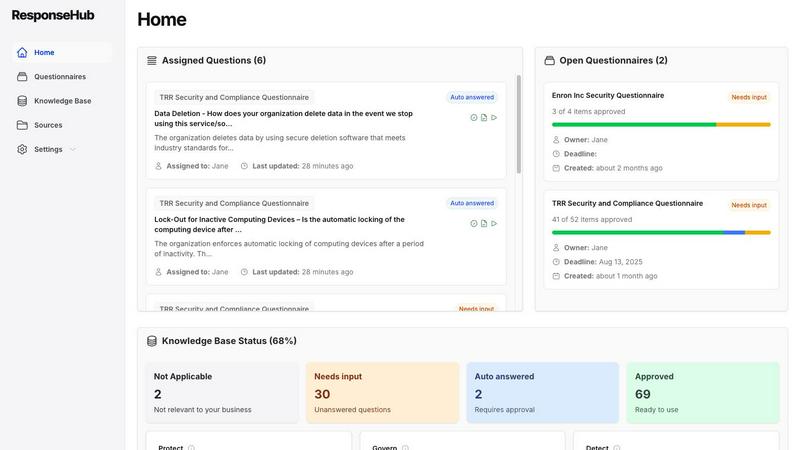
AI-Powered Spreadsheet Parsing
Forget manually deciphering convoluted Excel files with multiple tabs and ambiguous headers. ResponseHub's AI engine is specifically trained to handle any spreadsheet format you throw at it. It automatically identifies and extracts all questions across all sheets, no matter how poorly structured. This feature alone eliminates the frustrating, manual pre-work that often takes hours before you can even start answering.
Automated, Citation-Backed Knowledge Base
This is the heart of the platform and my personal favorite feature. ResponseHub doesn't just answer questions; it builds a dynamic, company-specific knowledge base. It pulls answers directly from your uploaded source documents (policies, SOPs) and cites the exact page, section, and sentence. Even better, it learns from every completed questionnaire, using AI to suggest new entries and keep your knowledge base perpetually updated and accurate.
Confidence Ratings & Question Explainers
Security jargon can be confusing. ResponseHub provides AI-powered, one-click explainers for every question to ensure you understand what's being asked. More critically, it assigns a finely-tuned confidence rating to each AI-generated answer. This gives you immediate, clear guidance on which answers are rock-solid and which might need a human expert's review, drastically reducing risk.
Collaborative Workflow & Delegation
Security reviews are a team sport. ResponseHub allows you to seamlessly assign specific questions to subject matter experts (e.g., your DevOps lead for infrastructure questions) and delegate final approvals. Every change is logged and tracked, creating a clear audit trail and ensuring nothing falls through the cracks, all while freeing up your CTO or security lead from being the bottleneck.
Use Cases
Hush Touch | Voice-to-Text for MacOS
Drafting Long-Form Content and Reports
For writers, researchers, and students, speaking ideas is often faster than typing them. Hush Touch allows you to dictate drafts of articles, essays, or reports naturally. Its smart punctuation and paragraph formatting let you speak in complete thoughts, while the on-device privacy ensures your unpublished ideas and sensitive research data remain completely confidential throughout the creative process.
Managing Professional Communication
Tackle an overflowing inbox hands-free. Dictate emails and messages with tone-appropriate phrasing aided by the Email context mode. The ability to say "Okay send message" allows you to compose and send replies without ever touching the keyboard, perfect for when you're multitasking, on the move, or dealing with repetitive communication throughout a busy workday.
Technical and Specialized Documentation
Software engineers, doctors, lawyers, and academics finally have a dictation tool that understands their language. By learning complex terms like "Kubernetes," "metatarsophalangeal," or legal citations, Hush Touch accurately transcribes technical notes, patient observations, code comments, and research summaries that would stump generic cloud-based services, saving immense time on corrections.
Accessible and Ergonomic Computer Use
For individuals with RSI, carpal tunnel, or other conditions that make typing painful, Hush Touch provides a robust, private alternative for controlling their Mac. The fully hands-free operation via Siri integration and voice commands enables full participation in digital work and communication without strain, all maintained with the dignity of complete data privacy.
ResponseHub
Accelerating Enterprise Sales Cycles
For sales teams chasing large deals, a slow response to a security questionnaire can mean a lost contract. ResponseHub enables companies to return comprehensive, trustworthy answers in hours instead of days, keeping deals moving swiftly and impressing procurement teams with professionalism and speed. It turns a sales blocker into a competitive advantage.
Empowering Security & Compliance Teams
Instead of being reactive document hunters, security teams can use ResponseHub proactively. They can upload and organize all governance documents into a single source of truth. The platform then handles the repetitive Q&A grind, allowing the team to focus on strategic risk management, policy improvement, and actual security work rather than administrative paperwork.
Freeing Up Technical Leadership
CTOs, VPs of Engineering, and technical founders are often pulled into these questionnaires due to their expertise. ResponseHub liberates them by automating the bulk of the work and providing clear delegation tools. This allows leadership to spend time on product development, architecture, and team building—activities that truly drive the business forward.
Streamlining Vendor Onboarding for Procurement
Flip the script: companies assessing their own vendors can use ResponseHub internally to standardize and analyze incoming security questionnaires. It helps procurement and infosec teams quickly evaluate vendor responses against internal standards, ensuring consistency, improving due diligence, and making the entire vendor risk management process more efficient.
Overview
About Hush Touch | Voice-to-Text for MacOS
Let's be honest: most dictation software is a compromise. You either sacrifice privacy by sending your voice to the cloud, deal with clunky, inaccurate transcription, or get locked into a draining monthly subscription. Hush Touch is the Mac app that finally ends that compromise. This is a purpose-built, voice-to-text powerhouse that runs entirely on your Mac. It combines not one, but two of Apple's own transcription engines, then applies a final polish with Apple Intelligence—all processed locally. The result is shockingly fast, accurate, and private dictation that learns your personal vocabulary over time. At a featherlight 5.5 MB, it launches instantly and fits into your workflow without the bloat or the privacy anxiety. It's built for anyone who writes on a Mac—from professionals drafting complex emails and reports to students taking notes—and values a one-time payment over a subscription leash. Its core promise is simple: get cleaner, smarter text from your voice, with zero data ever leaving your computer.
About ResponseHub
Let's be brutally honest: security questionnaires are a soul-crushing, time-sucking black hole for any scaling company. They derail your most valuable engineers and leaders from their actual jobs, all while carrying the immense risk of a single wrong answer torpedoing a deal or your reputation. ResponseHub is the definitive solution to this modern business plague. It's an AI-powered security questionnaire automation platform that intelligently parses complex spreadsheets, references your uploaded policy documents and SOPs, and generates precise, citation-backed answers. Built by a founder who lived the nightmare as a CTO, this tool is for any organization—from startups to enterprises—that needs to streamline compliance, accelerate sales cycles, and reclaim hundreds of lost hours. Its core genius is the creation of a living, automated knowledge base that learns from every completed questionnaire, turning a recurring pain point into a perpetually improving asset. This isn't just another tool; it's an essential system for anyone serious about scaling without the spreadsheet hell.
Frequently Asked Questions
Hush Touch | Voice-to-Text for MacOS FAQ
Is Hush Touch really 100% offline and private?
Yes, absolutely. This is its cornerstone feature. Every component—from the two Apple speech recognition engines to the Apple Intelligence final pass—processes your audio directly on your Mac. No audio or transcript data is ever sent to external servers. Your voice input and the resulting text never leave your computer, ensuring total privacy.
How does the vocabulary learning actually work?
Hush Touch employs adaptive learning. When you manually correct a word in the transcribed text, the app detects this correction and automatically adds the intended word to your personal vocabulary list. It also uses frequency weighting, so terms you use often in specific apps (like "diagnosis" in your notes app) become prioritized, making the engine smarter with each use.
Can I use Hush Touch completely hands-free?
You can. You can activate dictation using a Siri voice command ("Hey Siri, start touch"). Once listening, it will automatically insert the transcribed text after a short pause (roughly 2 seconds of silence). You can also use voice commands like "Okay send message" to send an email or message, and configure a hotkey to stop listening with a double-click.
What happens after the 7-day free trial?
The free trial gives you full access to all features for 7 days. After that, you need to purchase a lifetime license to continue using the app. There is no subscription. It's a single, one-time payment of $20 that grants you permanent access to the app and all its current features, with no recurring fees.
ResponseHub FAQ
How does ResponseHub ensure the accuracy of its answers?
Accuracy is paramount. ResponseHub does not generate answers from a generic database. It pulls responses directly from your own uploaded source documents—your policies, SOPs, and product descriptions—and provides clear citations to the exact source. The AI suggests answers based on this corpus and your growing knowledge base, but a human always reviews and approves, with confidence ratings guiding the process to minimize error risk.
What if I don't have formal security policies yet?
No problem. ResponseHub includes a free policy generator to help you create essential security documents in minutes. You can start with these and refine them over time. The platform is designed to grow with your compliance maturity. You can also start by importing an existing knowledge base from tools like Notion or generate one based on frameworks like NIST.
Can it handle any type of spreadsheet or questionnaire format?
Yes, this is a key strength. The AI-powered parser is built specifically for the messy reality of security questionnaires. It successfully handles files with cover sheets, multiple tabs, merged cells, and ambiguous column headers. You simply upload your Excel file, and the AI does the heavy lifting of extracting all questions into its clean, workable interface.
Is there a long implementation or onboarding process?
Absolutely not. The platform is built for speed. You can get started in under 5 minutes with the self-serve trial by dragging and dropping your documents. For teams that need to move even faster, Premium Onboarding is available where you can provide a dump of old questionnaires and policies, and the ResponseHub team will help set everything up for you immediately.
Alternatives
Hush Touch | Voice-to-Text for MacOS Alternatives
Hush Touch is a standout in the niche of on-device voice-to-text software for macOS. It’s built for users who prioritize privacy, offline functionality, and a seamless, native Mac experience, leveraging Apple's own powerful transcription and intelligence engines to deliver clean, accurate dictation without ever sending your data to the cloud. People often seek alternatives for a variety of reasons. Some might be looking for a free tier or subscription model instead of a one-time purchase. Others may need cross-platform compatibility with Windows or mobile devices, or require specific integrations with certain apps that a focused tool like Hush Touch doesn't provide. The search usually comes down to balancing cost, privacy, accuracy, and workflow fit. When evaluating other options, your key considerations should be privacy policy (on-device vs. cloud processing), cost structure, accuracy in your primary language, and how well the tool integrates into your daily routine. The best choice isn't always the most feature-packed; it's the one that disappears into your workflow, letting you think out loud and get words on the screen effortlessly.
ResponseHub Alternatives
ResponseHub is a specialized AI assistant designed to automate the tedious and high-stakes process of answering security compliance questionnaires. It falls squarely into the category of AI-powered compliance and security automation tools, using your own policy documents to generate accurate, cited responses. This niche focus is its greatest strength, but it's also why teams might look elsewhere. Users often explore alternatives for a few key reasons. Budget is a major factor, as some solutions can be a significant investment. Others might need a platform that integrates deeply with their existing GRC or CRM software, or they may require features beyond questionnaire automation, like full-scale risk management. The specific format of questionnaires your company receives can also dictate the best tool for the job. When evaluating options, don't just look at the price tag. Prioritize core capabilities: how well does the AI parse complex spreadsheets and PDFs? Can it build a usable knowledge base from your past answers? Most importantly, scrutinize how it provides evidence. Clear, direct citations to your source documents are non-negotiable for audit trails and credibility. The right tool should feel like a knowledgeable extension of your security team, not just another piece of software.