
AI Slop Canvas vs Seedance 2.0
Side-by-side comparison to help you choose the right tool.

AI Slop Canvas
AI Slop Canvas is my favorite free Chrome extension for visually creating AI images and videos.
Last updated: March 1, 2026

Seedance 2.0
Seedance 2.0 instantly transforms text and images into stunning cinematic videos with advanced AI technology.
Last updated: February 28, 2026
Visual Comparison
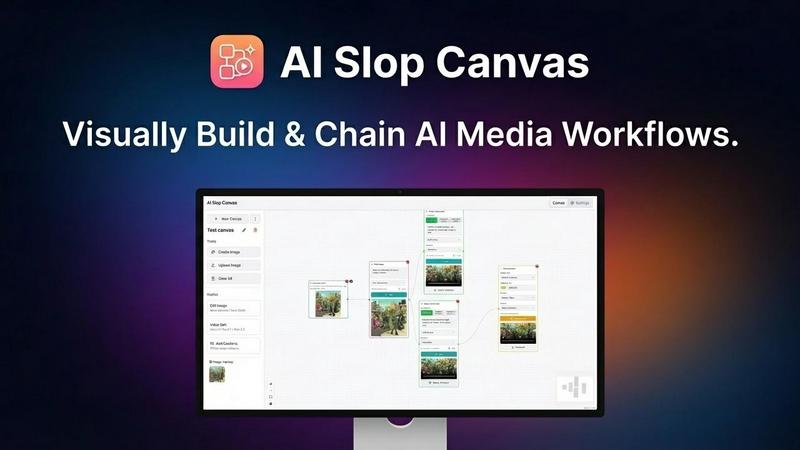
AI Slop Canvas
Seedance 2.0

Feature Comparison
AI Slop Canvas
Visual Workflow Editor
This is the heart and soul of AI Slop Canvas, and what sets it apart from simple prompt boxes. You build generation pipelines by visually connecting nodes on a canvas. Want to take a found image, upscale it, then use it as a base for a Sora video? You can literally drag, drop, and connect the nodes to make it happen. It turns complex, multi-step AI processes into an intuitive and almost playful diagram, making advanced creativity accessible to everyone.
Multiple Integrated AI Models
The extension doesn't force you into one model's style. It acts as a unified gateway to some of the most exciting models available via Fal.ai. You get access to image generators like Nano Banana and Reve Edit, plus the headline-grabbing video power of Sora 2, Sora 2 Pro, and Veo 3.1. This variety is crucial—it means you can pick the perfect tool for each job within a single, consistent interface, which is a massive time-saver.
Uncompromising Privacy-First Design
In an era of data harvesting, this feature is my personal favorite. AI Slop Canvas stores everything locally in your browser. Your Fal.ai API key is encrypted with AES-256 right on your device. The developers explicitly state there is no tracking, no analytics, and no data sent to their servers. Your creative experiments remain truly yours, which is a level of trust and security rarely found in free AI tools.
Instant Web Integration
The workflow starts where your inspiration does: on the web. The ability to right-click any image, meme, or artwork and send it directly to your canvas is a game-changer for iteration. It removes the tedious download-upload cycle, letting you capture inspiration and begin remixing or transforming it with AI in under two seconds. This seamless bridge between browsing and creating is brilliantly executed.
Seedance 2.0
Text to Video Generation
Seedance 2.0's text-to-video feature allows users to describe scenes using natural language, which the AI then transforms into cinematic videos. This capability includes an understanding of complex prompts and artistic styles, making it possible to generate visually captivating results effortlessly.
Image to Video Animation
Users can upload images, such as photos or illustrations, and Seedance 2.0 will animate them into dynamic videos. This feature employs physics-aware animation techniques to create smooth and lifelike motion, ensuring that the original visual style of the image is preserved.
Audio & Voice Synthesis
The platform's audio generation feature produces perfectly synchronized audio along with video content. This includes sound effects, background music, and multilingual voice synthesis with lip-sync support, enabling users to create complete audio-visual experiences without post-production hassles.
Cinematic Motion Control
Seedance 2.0 boasts advanced motion synthesis capabilities that deliver cinematic camera movements, such as dolly shots and zooms. This feature enhances the storytelling aspect of the videos, making them visually engaging and dynamic while maintaining a professional quality.
Use Cases
AI Slop Canvas
Rapid Meme Creation & Remixing
For meme creators, speed is currency. See a viral template? Right-click, send to canvas, and use the image-to-image or inpainting nodes to insert your own twist. You can iterate on visual jokes in minutes, testing different AI-generated alterations until you land on the funniest version, all without ever opening a separate editing program.
Agile Social Media Content Production
Social media managers can create eye-catching visuals and short videos directly within their browser. Need to turn a product screenshot into an engaging video clip for a post? Chain it through Sora 2. Want to generate a series of themed images for a campaign? Set up a reusable workflow. It eliminates app switching and makes producing platform-specific content incredibly efficient.
Experimental Content Creation
For YouTubers, bloggers, and digital artists, this tool is a sandbox for transformation. The standout use case is converting static images into dynamic videos. Imagine taking a book cover or a piece of concept art and bringing it to life with Sora 2 Pro. It opens up entirely new avenues for storytelling, channel intros, and visual effects that were previously reserved for high-end production.
Learning & Experimenting with AI
If you're curious about how AI models work together but are intimidated by code, this is your perfect starting point. The visual canvas allows you to experiment with chaining different models and parameters in a low-risk, intuitive environment. You learn the cause and effect of AI workflows by seeing the connections literally drawn out in front of you.
Seedance 2.0
Marketing Campaigns
Marketers can leverage Seedance 2.0 to create compelling promotional videos tailored for their target audience. The platform allows for quick production of high-quality content that can boost engagement and brand visibility on various digital platforms.
Social Media Content
For social media influencers and businesses, Seedance 2.0 offers an effective way to generate eye-catching videos that stand out. With its user-friendly interface, creating shareable content is simple, enhancing social media strategies and audience interaction.
Storytelling & Narratives
Writers and storytellers can utilize Seedance 2.0 to visualize their narratives in a captivating format. The AI's ability to understand complex prompts means that stories can be brought to life through engaging visuals that resonate with viewers.
Product Demonstrations
E-commerce businesses can create videos showcasing their products in an engaging manner. By using Seedance 2.0, brands can produce informative and visually appealing demonstrations that highlight features and benefits, ultimately driving sales.
Overview
About AI Slop Canvas
Let's cut through the noise: AI Slop Canvas is the most liberating and practical AI art tool I've used in a long time. It's not another subscription-based web app that locks your creations in the cloud. Instead, it's a completely free Chrome extension that brings a powerful, node-based visual editor directly into your browser, where everything—your workflows, your images, your API keys—stays securely on your own machine. The core idea is genius in its simplicity: you right-click any image on the web, send it to the canvas, and instantly begin remixing it with top-tier AI models like Sora 2 for video or Nano Banana for images. This tool is a dream for creators, marketers, and curious tinkerers who are tired of jumping between complicated interfaces. It democratizes advanced AI workflows, allowing you to chain operations like image-to-image and text-to-video without writing a single line of code. If you value privacy, speed, and a genuinely creative sandbox, this is your new playground.
About Seedance 2.0
Seedance 2.0 is a groundbreaking AI video generation platform that empowers creators, marketers, and developers to transform text prompts and creative ideas into visually stunning, cinematic-quality videos. With its advanced AI video models, including Seedance 2, Veo, and Sora-style generation, Seedance 2.0 eliminates the need for traditional filming equipment, extensive editing skills, or a production team. This versatile platform caters to various purposes such as marketing campaigns, social media content, storytelling, and product demonstrations. By providing users complete control over style, motion, duration, and visual quality, Seedance 2.0 significantly reduces production time and costs. It opens up new creative avenues through AI-driven automation and scalability, allowing users to bring their visions to life effortlessly. With a user-friendly interface and robust features, Seedance 2.0 is set to redefine the way video content is created in an increasingly digital world.
Frequently Asked Questions
AI Slop Canvas FAQ
Is AI Slop Canvas really free?
Yes, the Chrome extension itself is 100% free. You install it at no cost and pay nothing to the developers of AI Slop Canvas. The only potential cost is for the AI model credits you use through Fal.ai. Fal.ai offers free initial credits, so you can start generating immediately, and then operates on a pay-as-you-go basis for continued heavy use.
How do I get started with the AI models?
You need a free API key from Fal.ai. Simply go to fal.ai/dashboard/keys, create an account if needed, and copy your key. Then, paste this key into the settings within the AI Slop Canvas extension. This key is your secure gateway to the models, and it's encrypted and stored locally on your computer, not on any external server.
Where are my images and videos saved?
All your generated content and workflow designs are stored locally within your browser's storage. Nothing is uploaded to AI Slop Canvas's servers. This means your creations are private and instantly accessible as long as you're using the same browser and device. You can also download your final outputs to your computer's hard drive.
What if I'm not technical? Is it hard to use?
Not at all. The visual node-based interface is designed to be intuitive. Instead of writing code, you drag, drop, and connect boxes. There's a low barrier to entry: start by right-clicking an image and using a simple "image to video" node. The complexity is optional—you can build more advanced chains as you become more comfortable.
Seedance 2.0 FAQ
How does Seedance 2.0 work?
Seedance 2.0 operates by utilizing advanced AI models to interpret text prompts and images, transforming them into high-quality videos. Users simply input their ideas, and the platform generates cinematic videos with motion, audio, and visual effects.
Is there a limit to the duration of videos I can create?
While the default duration is set to 8 seconds, users have the flexibility to customize the length of their videos according to their specific needs, allowing for a range of video lengths suitable for different platforms and purposes.
Can I use the videos created for commercial purposes?
Yes, all videos generated through Seedance 2.0 can be used for commercial purposes, enabling creators and businesses to leverage their content for marketing, sales, and branding without legal restrictions.
What types of media files can I upload?
Seedance 2.0 supports a variety of image formats including PNG, JPG, JPEG, and WEBP, allowing users to upload up to two files with a maximum size of 50MB each, providing versatility for different creative projects.
Alternatives
AI Slop Canvas Alternatives
AI Slop Canvas is a free Chrome extension that sits at the exciting intersection of content creation and design tools. It’s a browser-based playground for AI image and video generation, letting you build visual workflows and experiment with models like Sora 2 and Veo 3.1 directly from your right-click menu. It’s a fantastic entry point for anyone wanting to dip their toes into AI-powered creativity without a complex setup. Users often seek alternatives for a few key reasons. Some need more advanced features or professional-grade outputs that a free tool might not offer. Others might require a desktop application instead of a browser extension, or they may be looking for a specific AI model that isn't supported. The need for collaborative features, different pricing models, or integration with other software can also drive the search for other options. When evaluating alternatives, focus on what matters most for your workflow. Consider the core AI models available and the quality of their output. Assess the user interface—is it a visual node-based editor like Slop Canvas, or something more traditional? Crucially, examine the privacy policy and data handling practices, as well as the total cost of ownership, including any subscription fees or credit systems.
Seedance 2.0 Alternatives
Seedance 2.0 is an innovative AI video generation platform that transforms text and images into stunning cinematic videos. This tool falls under the content creation category, catering to creators, marketers, and developers who seek to produce high-quality videos without the complexities of traditional filmmaking. Users often look for alternatives to Seedance 2.0 due to various factors such as pricing, specific feature sets, or compatibility with their existing platforms. When searching for an alternative, consider aspects such as ease of use, video quality, customization options, and the types of content you aim to create. It's essential to find a platform that aligns with your creative vision while also offering the necessary tools to streamline your workflow. Look for features that enhance your storytelling, enable scalability, and fit within your budget to ensure a seamless video production experience.