Dokta vs Tailride
Side-by-side comparison to help you choose the right tool.

Dokta is my top pick for freelancers to automate invoices, track cash flow, and chase payments effortlessly.
Last updated: April 4, 2026

Tailride
Tailride automates invoice chaos by scanning your inbox and portals, saving accountants hundreds of hours.
Last updated: February 28, 2026
Visual Comparison
Dokta

Tailride
Feature Comparison
Dokta
Instant AI Document Analysis
This is the brilliant core of Dokta. Forget manual data entry. You drag and drop a photo, scan, or PDF of any invoice, quote, or contract, and in under 60 seconds, the AI performs OCR and intelligent classification. It doesn't just read text; it understands the document type, extracts the amount, due date, client or supplier details, and populates your system. This feature alone can save hours per week and eliminates the risk of human error from manual transcription.
Automated Invoicing & Quote-to-Invoice Workflow
Dokta moves beyond analysis into creation. You can generate professional invoices and quotes in clicks. For freelancers on day-rate contracts, it offers automatic monthly invoicing. But my favorite part is the online quote acceptance: send a quote with a link, the client accepts it online, and you can convert it to a finalized invoice with a single click. This seamless flow from proposal to payment is a game-changer for project-based work.
Real-Time Cash Flow & Anomaly Detection
Dokta provides a crystal-clear, visual dashboard of your financial health—invoiced revenue, collected revenue, unpaid amounts, and VAT—with a 12-month graph. More impressively, its AI acts as a guardian. It proactively detects anomalies like changed IBAN numbers, duplicate invoices, inconsistent VAT, or missing numbering. This protective layer is invaluable for avoiding costly mistakes or fraud.
Intelligent Client Database & Automated Reminders
Every document you process automatically enriches a centralized client and supplier database, complete with SIRET-based information. Dokta assigns payment behavior scores, giving you insight at a glance. Crucially, it automates the awkward but necessary task of chasing late payments by sending polite, professional payment reminders for you, saving you the stress and preserving client relationships.
Tailride
Inbox Scanning & Monitoring
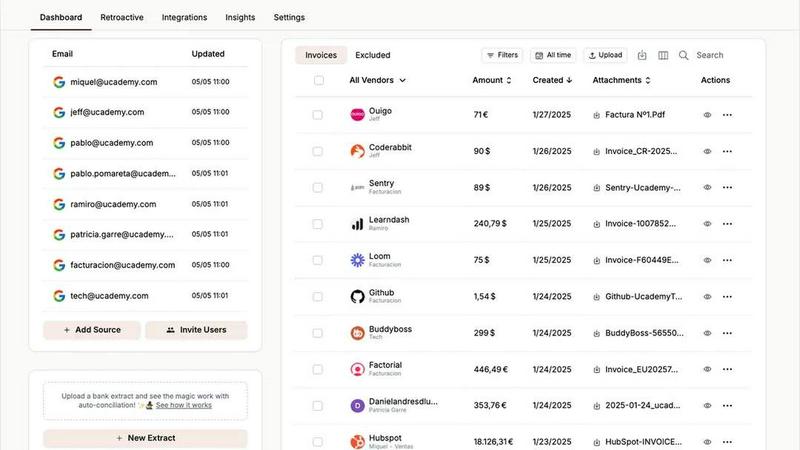
This is Tailride's killer feature and my personal favorite. It establishes a native, secure connection to your email inbox (and your team's inboxes) to continuously monitor for incoming invoices. It doesn't matter if the invoice is a PDF attachment, a scanned image, embedded in the email body, or hidden behind a download link—Tailride finds it, extracts the key data, and files it away. This completely eliminates the archaic practice of forwarding emails to a generic "invoices@" address and gives you total visibility into your company's incoming bills. The peace of mind of knowing nothing is slipping through the cracks is invaluable.
Chrome Extension for Online Portals
Why log into twenty different platforms just to download invoices? Tailride's brilliant Chrome extension cuts this tedious process down to a single click. Need an invoice from Amazon Ads, Meta Ads, Notion, ChatGPT, or Adobe? Just navigate to the portal, click the Tailride button, and it's instantly captured and sent for processing. This feature alone can save hours per month and is a game-changer for businesses that rely on multiple SaaS tools and online services. It turns a fragmented chore into a trivial task.
Intelligent AI Processing & Rules
Once documents are captured, Tailride's AI doesn't just read them—it understands them. It extracts vendor names, dates, amounts, and taxes with impressive accuracy. But the real magic is in the customizable AI rules. You can teach Tailride to automatically categorize invoices based on vendor, amount, or keywords, and route them to specific folders in Google Drive or to the correct client file in your accounting stack. This transforms raw data into structured, actionable information ready for bookkeeping and reconciliation.
Bank Reconciliation & Missing Document Detection
This feature is what elevates Tailride from a document fetcher to a true accounting assistant. It doesn't just collect invoices; it helps you make sense of them. Tailride can match bank transactions with the extracted invoices, highlighting what's been paid and, crucially, identifying missing documents for transactions that lack a corresponding invoice. This turns the monthly reconciliation nightmare into a streamlined, guided process, ensuring your books are always complete and audit-ready.
Use Cases
Dokta
The Freelance Developer or IT Consultant
For a freelance developer on a TJM (daily rate) contract, Dokta is a dream. Set up the contract once, and the system automatically generates and sends monthly invoices. It tracks payments, chases late ones, and provides a real-time view of earnings versus expenses. This allows the developer to focus entirely on coding while knowing the business admin is handled flawlessly and automatically.
The Creative Freelance Designer or Photographer
Managing the project lifecycle from proposal to final payment is chaotic for creatives. Dokta streamlines this: create a beautiful quote, send it for online acceptance, and with one click after approval, convert it to an invoice. It then manages the payment timeline and reminders. This professional workflow impresses clients and ensures the creative spends time designing, not chasing paperwork.
The Auto-Entrepreneur / Micro-Entrepreneur
Simplicity and compliance are key here. Dokta generates compliant invoices, tracks collections against the URSSAF ceiling (a critical feature in France), and sends alerts for contribution deadlines. It demystifies financial tracking for the solo operator, eliminating the stress of manual calculations and potential errors come declaration time.
The Growing Small Business or Agency
As a small business scales, document chaos multiplies. Dokta becomes the central source of truth for all financial documents. It automates accounts payable (reading supplier invoices) and receivable (creating and chasing invoices), provides a real-time cash flow picture for decision-making, and exports clean CSV data for an accountant, saving significant reconciliation time and cost.
Tailride
For Fast-Growing Startups & SMEs
If your company is scaling, your financial paperwork is scaling exponentially faster. Tailride is absolutely mandatory here. It automates the entire accounts payable capture process across your team, ensuring that no invoice from any department gets lost. You achieve 100% capture rate, eliminate manual data entry, and save hundreds of hours every single month, allowing your team to focus on growth, not administrative drudgery.
For Accountants & Bookkeeping Firms
For accountants managing multiple clients, Tailride is a force multiplier. Instead of chasing clients for missing invoices or dealing with messy email forwards, you can invite clients to connect their inboxes. You get a clean, organized, and real-time feed of all their financial documents directly into your preferred system (QuickBooks, Xero). It makes client onboarding smoother, quarter-ends less stressful, and frankly, makes you a happier, more efficient service provider.
For Managing Physical Receipts & Employee Expenses
Paper receipts are the bane of modern finance. Tailride elegantly solves this with its Telegram/WhatsApp bot. Employees can simply take a picture of a physical receipt and send it to the bot. Tailride processes it just like a digital invoice and adds it to the central dashboard. This creates a simple, unified system for tracking all expenses, digital and physical, without forcing anyone to learn new software.
For Historical Data Cleanup and Audits
Need to find all invoices from the past year for an audit or tax filing? Manually searching an inbox is a special kind of hell. With Tailride, you can perform a retroactive scan for any custom date range—this month, last quarter, all of 2024. It will find, extract, and organize all past invoices in minutes, turning a week-long digging project into a task that takes less time than your morning coffee.
Pricing Comparison
Dokta
Dokta's pricing is refreshingly straightforward with no hidden modules. The Discovery plan is completely free forever, offering 15 documents per month (5 pages max each) and includes the free invoice generator—perfect for trying it out. The Starter plan at €9/month is ideal for auto-entrepreneurs, offering 50 documents, automated reminders, expense tracking, and accounting export. The popular Freelance plan at €12/month (founder's price) is tailored for freelancers with recurring contracts, providing 100 documents per month. All paid plans include a 14-day free trial with no credit card required.
Tailride
Tailride offers a free plan to get started, requiring no credit card. This allows you to connect your inbox and begin extracting invoices immediately. For ongoing, full-scale automation with features like unlimited inbox connections, advanced AI rules, and premium integrations (QuickBooks, Xero), they offer paid subscription plans. Businesses, especially accountants with 10 or more clients, are encouraged to explore their tailored plans for higher volume and advanced functionality to fully automate their financial workflow.
Overview
About Dokta
If you're a freelancer, solo entrepreneur, or small business owner, you already know the dirty secret: the "freedom" of being your own boss is often buried under hours of soul-crushing administrative work. Chasing invoices, manually creating quotes, and trying to remember contract deadlines isn't just tedious; it's time stolen from your actual craft and revenue-generating work. This is the profound problem Dokta solves. It's not just another document scanner; it's an AI-powered command center that puts your entire document lifecycle on autopilot. You simply drop any document—a PDF invoice from a supplier, a scanned receipt, a client contract—and Dokta's engine (powered by Anthropic's Claude AI) reads, classifies, and extracts all the key data in under 60 seconds. From there, it builds your client database, tracks your cash flow in real-time, generates tasks like "pay this" or "follow up on that," and even automates payment reminders. What truly sets it apart is its deep understanding of the European, particularly French, freelance ecosystem, with features tailored for auto-entrepreneurs and SIRET-based business info enrichment. With a generous free tier, GDPR-compliant European hosting, and plans starting at a very accessible €9/month, Dokta is the proactive business partner every independent professional wishes they had from day one.
About Tailride
Let's be brutally honest: accounting is a necessary evil that sucks the life out of productive work. Manually chasing down invoices from emails, portals, and chatty colleagues is a soul-crushing time sink. Enter Tailride, the AI-powered accounting automation platform that doesn't just help—it completely redefines the workflow. This isn't another simple receipt-scanning app; it's a full-scale automation engine designed for business owners, finance teams, and accountants who are tired of the administrative chaos. Its core genius lies in its proactive, native approach. Instead of you forwarding documents, Tailride plugs directly into your company's email inboxes (Gmail, Outlook, IMAP) and actively monitors them, automatically detecting and extracting invoices and receipts from emails, attachments, and even URLs. It then processes them with intelligent document recognition, categorizes them with customizable AI rules, and seamlessly syncs everything to your accounting software like QuickBooks and Xero or to Google Drive. The result? You move from reactive invoice hunting to a state of organized, automated bliss where all financial documents are captured, categorized, and reconciled without you lifting a finger. For fast-growing companies and the accountants who serve them, Tailride isn't just a tool; it's the foundation for a sane, scalable financial operation.
Frequently Asked Questions
Dokta FAQ
How accurate is Dokta's AI document reading?
The AI, powered by Claude from Anthropic, is highly accurate for standard document formats like invoices, quotes, and contracts. It's trained on a vast dataset and excels at extracting key fields like dates, amounts, and parties. The system includes a validation step where you can quickly review and correct any extracted data, ensuring 100% accuracy while still saving the bulk of the manual work.
Is my data secure and compliant with European regulations?
Absolutely. This is a major strength of Dokta. Your data is 100% GDPR compliant and hosted on Amazon Web Services (AWS) servers in Paris, Europe. It uses AES-256 encryption for data at rest and in transit. For European freelancers and businesses concerned about data sovereignty, Dokta's infrastructure is a significant trust and compliance advantage.
What happens if I exceed my document limit on my plan?
If you exceed your monthly document limit (e.g., 15 on the free tier, 50 on Starter), you will be notified. You will likely have the option to upgrade your plan for the remainder of the billing cycle or purchase a top-up pack of additional documents. It's designed to be flexible so your workflow isn't interrupted.
Can I connect Dokta to my accounting software or bank?
Currently, Dokta focuses on being a powerful, standalone source of truth. It offers robust CSV export functionality, allowing you to generate perfectly formatted files to import into any accounting software (like Sage, QuickBooks, or local solutions). While direct bank integrations aren't highlighted, the export feature ensures smooth compatibility with your existing financial stack.
Tailride FAQ
Is Tailride secure? Do you read my emails?
Yes, Tailride is built with security as a cornerstone. It establishes a native, encrypted connection to your email provider (like Google or Microsoft). It uses secure protocols to scan for and extract only invoice and receipt data. Your raw emails never leave your inbox or your control, and Tailride does not read or store personal correspondence. It's focused solely on document processing.
What email providers does Tailride work with?
Tailride works with virtually all email clients. It offers seamless native integration with Gmail and Outlook, and also supports any email service that provides IMAP access. This means it can connect to custom domain emails hosted on services like Zoho, iCloud, or private servers, making it incredibly versatile for businesses of all types.
Can I use Tailride for personal receipts?
While Tailride is powerfully built for business accounting automation, its core functionality works perfectly for individuals who want to automate personal expense tracking. You can connect your personal inbox, use the Chrome extension on shopping sites, and send personal receipts via the mobile bot to keep everything organized for tax time or budgeting.
How does the Chrome extension work with online portals?
The Tailride Chrome extension is a lightweight add-on that adds a button to your browser. When you are logged into a supported platform (like Amazon Business, Meta Ads Manager, etc.), you can click the Tailride button on any page listing invoices or transactions. The extension will securely communicate with the webpage to identify and extract the available invoice data and send it directly to your Tailride account for processing.
Alternatives
Dokta Alternatives
Dokta is a sharp, AI-driven document management platform squarely in the business automation category. It’s designed to take the administrative grind out of running a solo practice or small business by reading, organizing, and acting on your documents automatically. For freelancers and SMBs drowning in paperwork, it’s a compelling central hub. People explore alternatives for all sorts of reasons. Maybe Dokta’s pricing or document limit doesn’t fit a specific workflow, or perhaps they need deeper integrations with other software. Some might prioritize a different platform or require features outside Dokta’s core focus on document lifecycle automation. When evaluating other options, think about what truly matters for your operation. Prioritize the core pain point: is it invoice tracking, contract management, or simply reducing manual data entry? Scrutinize the AI’s accuracy, the transparency of pricing, and where your data is stored. The goal is to find a tool that disappears into your workflow, not adds to it.
Tailride Alternatives
Tailride is an AI-powered accounting automation platform that specializes in extracting and processing invoices and receipts from emails and web portals. It falls squarely into the category of financial operations software, designed to save businesses from the tedious manual work of data entry. Users often seek alternatives for a variety of reasons. Perhaps Tailride's pricing tier doesn't align with a startup's budget, or a larger enterprise needs deeper integration with a specific ERP system. Others might prioritize different core features, like multi-currency support or a more robust mobile experience, leading them to explore the competitive landscape. When evaluating other options, focus on the core automation capabilities. Look for strong AI extraction accuracy, the breadth of platform and accounting software integrations, and the flexibility of automation rules. Security and data handling policies are also non-negotiable, as this software will have access to sensitive financial documents.