TrafficClaw vs URL to Any
Side-by-side comparison to help you choose the right tool.

TrafficClaw
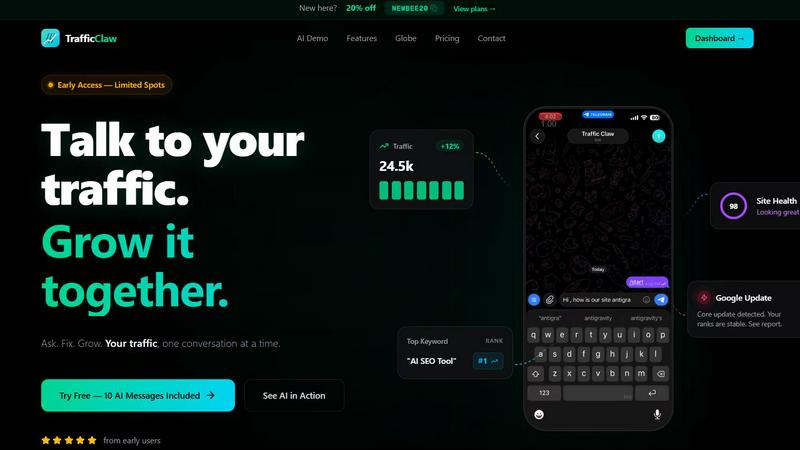
TrafficClaw is an AI analyst that talks to your SEO data to deliver actionable growth insights, not generic advice.
Last updated: April 13, 2026

URL to Any
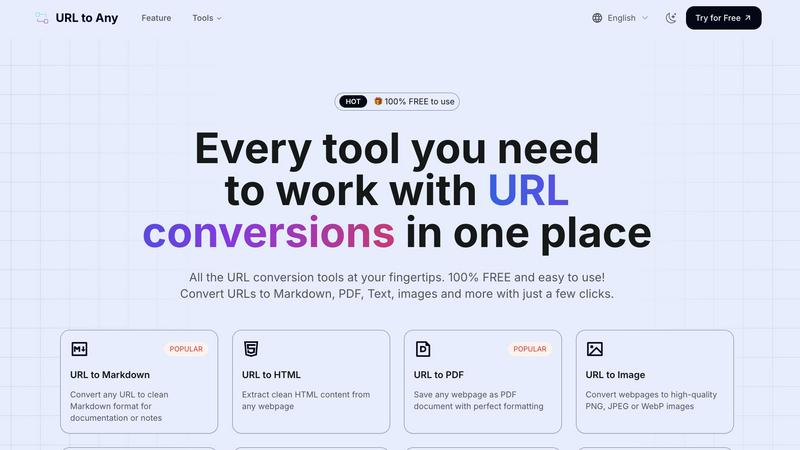
URL to Any instantly converts any webpage into Markdown, PDF, text, images, and more for free.
Last updated: March 2, 2026
Visual Comparison
TrafficClaw
URL to Any
Feature Comparison
TrafficClaw
AI Chat Analyst
This is the heart of TrafficClaw and, in my opinion, its killer feature. You interact with a conversational AI that has direct, read-only access to your connected Google Analytics 4 and Search Console data. You ask natural language questions like "Why are my conversions down?" or "Show me my top underperforming pages," and it doesn't just spit out a chart. It analyzes the correlation between your traffic, keyword rankings, and user behavior to deliver a written "verdict" with evidence and concrete next steps. It feels less like using software and more like consulting a sharp, data-obsessed colleague who works at light speed.
SEO Intelligence Suite
Moving beyond basic rank tracking, TrafficClaw's SEO tools are built for proactive growth. It automatically hunts for keyword gaps your competitors rank for but you don't, alerts you to content decay (pages that are losing traffic over time), and detects keyword cannibalization—where your own pages compete against each other, confusing Google. Crucially, it includes optimization for AI search (like Gemini), helping you structure content for the next frontier of search. It turns SEO from a maintenance task into a growth engine.
Real-Time Analytics & Live Globe
Forget refreshing GA4. TrafficClaw provides a consolidated, real-time dashboard showing current visitors, traffic trends, bounce rates, and referrers. The standout is the embeddable 3D globe, which visually plots your live visitors on a world map with a cute animal alias and activity feed. It's not just eye candy; it's a powerful, immediate way to see geographic engagement and visitor flow, and you can embed it on your own site with a single line of code—no extra tracking scripts needed.
Integrated Site Audit & Content Tools
This feature closes the loop between insight and action. The built-in site auditor goes deep on page-level performance, grading Core Web Vitals and offering auto-fix suggestions for technical SEO. Then, the content tools help you execute. Need to target a discovered keyword gap? Use the AI blog writer and schema generator. Found a page that needs bolstering? The internal linking optimizer provides smart suggestions. It’s a seamless workflow from diagnosis to remedy.
URL to Any
URL to Markdown
This is, hands down, my most-used feature and a game-changer for anyone who works with digital notes or documentation. You simply paste a blog post, article, or tutorial link, and it returns impeccably clean Markdown. It intelligently strips away ads, navigation, and sidebars, leaving you with just the core content: headings, lists, links, and code blocks are all perfectly formatted. It saves hours of manual copying, pasting, and reformatting, making it essential for building knowledge bases or preparing content for static site generators.
URL to PDF
When you need a permanent, portable, and perfectly formatted snapshot of a webpage, this tool is a lifesaver. It's far superior to your browser's "Print to PDF" function, which often breaks layouts. URL to Any's engine captures the page as it truly appears, preserving complex designs, images, and fonts. I use it constantly to archive important receipts, save long-read articles for offline reading on my tablet, or create clean client reports from web-based dashboards. The output is professional and reliable every single time.
AI Summarizer
In an age of information overload, this feature is a secret weapon. Instead of reading a 3000-word article to extract the key points, you let the integrated AI do the heavy lifting. It analyzes the webpage content and provides a concise, coherent summary in seconds. I find it invaluable for quick research, preparing for meetings, or simply deciding if a long-form piece is worth a deep dive. It’s like having a personal research assistant who works at the speed of light.
URL Meta Tags & Heading Extractor
For SEO professionals, developers, and content strategists, this duo of tools is pure gold. The Meta Tags Extractor doesn't just show you basic tags; it gives you a complete SEO, Open Graph, and Twitter Cards audit for any URL, which you can export to CSV. The Heading Extractor visually maps out the H1 to H6 structure of a page, crucial for analyzing content hierarchy and SEO health. I use these to spy on competitor strategies, audit my own sites, and ensure every piece of content is optimally structured before publishing.
Use Cases
TrafficClaw
Diagnosing Sudden Traffic Drops
This is the classic, hair-pulling scenario TrafficClaw was made for. Instead of manually cross-referencing GA4 events, Search Console impressions, and Google update logs, you simply ask the AI, "Why did my traffic drop 40% on March 15th?" Within seconds, it can analyze your data and deliver a verdict like, "A core update rolled out that day. While your overall ranks are stable, you lost position 3 for your top keyword 'cloud hosting reviews' to a competitor's newer guide, causing a 12k impression drop. Recommended fix: Update your post with a more comprehensive comparison table."
Uncovering Hidden Keyword Opportunities
You're stuck thinking you've targeted all relevant keywords. TrafficClaw's SEO intelligence continuously scours your niche to find "keyword gaps"—high-potential terms your site could rank for but currently doesn't. You can ask the AI, "What are my top 5 keyword gap opportunities?" and get a list of specific, data-backed terms with search volume and difficulty, allowing you to strategically plan your next content piece or page update.
Preventing Content Cannibalization
You've written multiple blog posts on similar topics, and now they're mysteriously underperforming. TrafficClaw automatically detects when your pages are competing for the same keywords and alerts you. The AI can then advise on how to consolidate or differentiate the content, ensuring you have one strong page to rank instead of several weak ones that split authority. It solves a complex, often invisible SEO problem effortlessly.
Real-Time Campaign & Launch Monitoring
When you launch a new product, feature, or marketing campaign, you want immediate feedback. With the real-time dashboard and globe, you can watch live visitor spikes, see which countries are engaging first, and monitor referral sources the moment they happen. You can ask the AI, "How is traffic from my LinkedIn campaign today performing vs. direct traffic?" for instant, comparative analysis without waiting for data to process.
URL to Any
Content Curation & Research
As a writer, I live in this use case. When I'm researching a topic, I use URL to Any to convert key sources into Markdown or Text format. I then compile these clean text snippets into my research documents without the clutter of web page junk. The AI Summarizer helps me quickly evaluate the relevance of sources. This workflow turns a chaotic browser tab graveyard into an organized, actionable research project in minutes.
Web Development & Debugging
Developers, listen up. Need to quickly check the structured data or heading hierarchy of a live site? Use the JSON/XML and Heading Extractors. Want to grab the clean HTML of a component for reference without the surrounding site boilerplate? The "URL to HTML" tool is perfect. It's like a lightweight, instant Swiss Army knife for front-end investigation and data gathering, all without touching the browser's inspector console.
Archiving & Documentation
This is for the organizers and compliance-minded users. Need a verifiable, unalterable record of a webpage—like a terms of service update, a news article, or a transaction confirmation? Convert it to a PDF. Building internal documentation and want to include a snapshot of a web-based tool's interface? "URL to Image" creates a perfect capture. It creates trustworthy, format-stable records for your personal or business archives.
Enhanced Sharing & Accessibility
Make your shared links more powerful and accessible. Generate a QR code from a lengthy URL to share on printed materials or presentations instantly. Convert a text-heavy article to an MP3 audio file for listening on the go, which is fantastic for accessibility or consuming content during a commute. It transforms static links into multi-format resources that cater to different audience preferences and situations.
Overview
About TrafficClaw
Let's be brutally honest: modern analytics are a mess. You've got Google Analytics 4 with its labyrinthine interface, Search Console with its pretty-but-passive graphs, and a dozen other tools that show you the "what" but never the "why." When your traffic plummets, you're left piecing together clues like a digital detective with no leads. TrafficClaw is the antidote to this frustration. It's not another dashboard to stare at; it's an AI analyst you can actually talk to. You connect your GA4 and Search Console accounts (a 30-second, read-only process), and then you just ask questions in plain English. "Why did my traffic drop last Tuesday?" "What's my top opportunity for more organic traffic?" "Is a Google update affecting me?" Instead of generic blog post advice, you get a specific, actionable verdict backed by your own live data. It's built for founders, marketers, and developers who are tired of data guesswork and want to have a direct conversation with their analytics to drive real, intelligent growth. The core promise is simple yet revolutionary: stop analyzing and start asking.
About URL to Any
In the chaotic sprawl of the modern web, we've all hit that wall: you find a perfect article for your research, a brilliant design for inspiration, or a crucial set of instructions, but you need it in a different format. Saving it as a messy bookmark isn't enough. You need it as a clean PDF for your records, as structured Markdown for your notes, or even as a shareable image. This is the exact problem URL to Any was built to demolish. It's not just a tool; it's your personal web content alchemist, transforming any URL into practically any format you can think of with shocking ease and, believe it or not, for completely free. As someone who juggles content creation, development, and research daily, I've tried countless converters. URL to Any stands out because it consolidates a powerhouse suite of utilities into one blindingly simple, no-login-required interface. It's built for everyone—from developers needing JSON feeds and bloggers curating Markdown, to students archiving PDFs and marketers creating QR codes. The core value proposition is irresistible: instant, barrier-free access to professional-grade conversion tools without a single paywall or upsell in sight.
Frequently Asked Questions
TrafficClaw FAQ
Is my Google data safe with TrafficClaw?
Absolutely. TrafficClaw uses secure, read-only Google OAuth to connect to your GA4 and Search Console. This means the tool can only view your data; it cannot edit, delete, or modify anything in your Google accounts. Your data is not sold or used to train public AI models. It remains yours, and you can revoke access at any time directly from your Google account security settings.
How is this different from ChatGPT or other AI chatbots?
Generic AI chatbots give generic advice based on public internet knowledge. TrafficClaw's AI Analyst is specialized and connected. It bases every single response on the private, live data from your specific website. When you ask "why did my traffic drop?", it's analyzing your traffic graphs, your keyword rankings, and your user behavior to give you a unique, actionable verdict, not a list of possible reasons from a blog.
What's included in the free trial?
The free trial includes 10 AI messages. This allows you to fully connect your GA4 and Search Console accounts and ask a series of substantive questions to experience the core "ask and get a verdict" functionality. You also get access to the dashboard and can explore the features to see how it would work with your real data before committing to a paid plan.
Can I use TrafficClaw on multiple websites?
Yes. During the connection process, TrafficClaw auto-detects all the GA4 properties and Search Console sites associated with your Google account. You can manage and analyze data from multiple websites within a single TrafficClaw dashboard, asking specific questions about each site. This makes it an efficient tool for agencies or developers managing several client or project sites.
URL to Any FAQ
Is URL to Any really free to use?
Yes, and this isn't a limited "freemium" model with hidden traps. Every single tool listed—from PDF conversion and Markdown generation to AI summarization and meta tag extraction—is 100% free with no usage caps, mandatory registrations, or watermarks. They sustain the platform in a transparent way, and it's a breath of fresh air in a market full of subscription fees.
How does the tool handle privacy and my data?
Privacy is clearly a priority. Your data is processed securely in the cloud, but crucially, it is never stored on their servers after the conversion is complete. The process is transient. You paste a URL, their engine fetches and converts the public content, delivers the result to you, and then the data is purged. You aren't uploading sensitive files, and your conversion history isn't logged or tracked.
What formats can I convert a URL into?
The range is impressively comprehensive. The core formats include Markdown, PDF, PNG/JPEG/WebP Images, Plain Text, HTML, JSON, and XML. Beyond that, you have utilities for creating MP3 audio, QR Codes, and encoded/decoded text. There are also analytical tools like the URL, Meta Tag, and Heading Extractors. It truly covers the vast majority of conversion needs one would encounter.
Do I need to install any software or create an account?
Absolutely not. This is a huge part of its appeal. URL to Any is a fully web-based platform. You can access it from any modern browser on any device—desktop, tablet, or phone. There is no software to download, no extensions required (though one is offered), and no account registration. You just visit the site and start converting immediately, which minimizes friction and maximizes utility.
Alternatives
TrafficClaw Alternatives
TrafficClaw is an AI assistant for SEO and analytics, a tool that lets you ask plain-English questions about your traffic data and get actionable answers. It connects to sources like GA4 and Search Console to move beyond static graphs and provide context. This places it in the growing category of conversational analytics and AI-driven SEO platforms. People look for alternatives for various reasons. Perhaps the pricing doesn't fit a startup budget, or a specific required data source isn't supported. Some users might need deeper, more traditional reporting dashboards, while others prioritize different workflow integrations. It's a natural part of finding the right tool-to-task fit. When evaluating alternatives, focus on the core promise: actionable insight from your data. Consider the depth of data source connections, the intelligence and specificity of the AI's answers, and how well it integrates into your existing workflow. The goal is to stop guessing and start understanding.
URL to Any Alternatives
URL to Any is a fantastic, free tool in the AI Assistants category that lets you instantly convert any webpage into formats like Markdown, PDF, or even a QR code. It’s a perfect example of a simple, no-fuss utility that gets a specific job done without any barriers. However, even the best tools aren't a perfect fit for everyone. Users often seek alternatives for reasons like needing advanced editing features, wanting integrations with other apps, requiring higher conversion limits, or simply preferring a different interface. The search for the "right" tool is deeply personal and depends on your specific workflow. When evaluating other options, I always recommend looking beyond just price. Consider the output quality—does the Markdown conversion preserve links and formatting cleanly? Check for platform availability: is it a web app, a browser extension, or desktop software? And finally, think about your long-term needs; a tool that's free today might introduce limits tomorrow, so understanding the developer's model is key.