
Image3D AI
Image3D AI effortlessly converts any 2D image into high-quality 3D models for printing or digital use in minutes.
Visit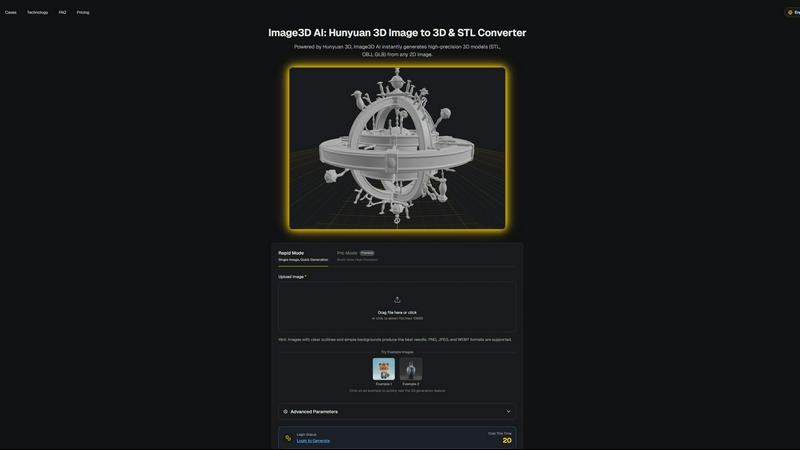
About Image3D AI
Image3D AI is a cutting-edge tool designed to revolutionize the 3D modeling landscape by transforming 2D images into high-quality 3D assets in mere minutes. Powered by Tencent's advanced Hunyuan 3D engine, this software eliminates the traditional complexities of 3D modeling, making it accessible to a wide range of users—from hobbyists to professionals. Whether you're a game developer needing rapid prototyping, a creative looking to 3D print designs, or an e-commerce manager wanting to create interactive product views, Image3D AI serves as your go-to solution. Its ability to intelligently infer depth, geometry, and texture from a single image not only streamlines the workflow but also democratizes the process, allowing anyone with an idea and an image to generate stunning 3D models without the need for extensive training or expensive software.
Features of Image3D AI
Rapid Mode
The Rapid Mode allows users to generate 3D models quickly from a single image. Ideal for those in a hurry, this feature provides a fast turnaround time, making it perfect for rapid prototyping or when immediate results are needed.
Pro Mode
For users requiring higher precision, the Pro Mode offers multi-view capabilities. By uploading multiple angles of an object, this feature generates detailed and accurate 3D models, catering to the needs of professionals who demand quality in their 3D assets.
File Format Compatibility
Image3D AI supports a variety of file formats including STL, OBJ, and GLB. This versatility ensures that your generated models are ready for various applications, whether for 3D printing, game development, or web use, making it a flexible choice for multiple industries.
Best Practices Guide
The Best Practices Guide provides users with essential tips to enhance their 3D conversion results. By understanding image selection, generation modes, and leveraging multi-view capabilities, users can significantly improve the quality of their outputs, ensuring they get the most out of the Image3D AI tool.
Use Cases of Image3D AI
Game Development
Game developers can utilize Image3D AI to rapidly create 3D assets from concept art or sketches. The software's ability to generate game-ready models with PBR material support makes it a valuable tool for enhancing gameplay experiences without extensive modeling time.
E-commerce Applications
For e-commerce businesses, converting product images into interactive 3D models significantly boosts customer engagement. These AR-ready models can provide potential buyers with a unique, immersive shopping experience, increasing conversion rates and reducing return rates.
3D Printing Projects
Hobbyists and professionals alike can benefit from Image3D AI's STL conversion capabilities. The software produces high-precision files that are ready for 3D printing, enabling users to bring their creative visions to life without the need for complex modeling software.
Architectural Designs
Architects can streamline their design processes by generating architectural models directly from 2D plans or images. This feature saves significant modeling time and enhances productivity, allowing architects to focus on creativity rather than technical details.
Frequently Asked Questions
What types of images work best for 3D conversion?
Images with clear outlines, high contrast, and simple backgrounds yield the best results. Avoid using blurry or low-light images to ensure accurate 3D modeling.
Can I use Image3D AI for commercial purposes?
Yes, Image3D AI can be used for commercial projects, including game development, product design, and e-commerce applications, making it a versatile tool for both personal and professional use.
How long does it take to generate a 3D model?
Using the Rapid Mode, you can expect to receive your 3D model in approximately 60 seconds, allowing for swift integration into your projects.
What file formats can I export my 3D models in?
Image3D AI supports several file formats, including STL for 3D printing, OBJ for 3D editing, and GLB for web and AR applications, ensuring compatibility with various platforms and workflows.
Similar to Image3D AI
Z Image Turbo
Create photorealistic images, bilingual posters, ecommerce visuals, and social content online with Z Image Turbo.

Presentation Intelligence
AI-native presentation and visual content platform that turns prompts, documents, images, videos, and data into polished, shareable decks.

Magic Eraser
AI photo editor for removing objects and backgrounds, enhancing images, and creating visuals on web and mobile.

PNG to SVG
Free, private image conversion tools that run entirely in your browser.

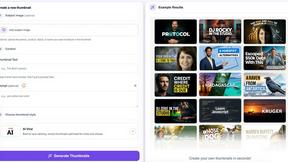
StopScroll
AI YouTube thumbnail maker that generates multiple thumbnail concepts from a URL, title, or prompt.
HubVanta AI
HubVanta AI helps creators generate images and videos with advanced AI tools for visual content workflows.