
vaethat
Vaethat elevates your architectural renders with effortless AI enhancements for stunning clarity and detail retention.
Visit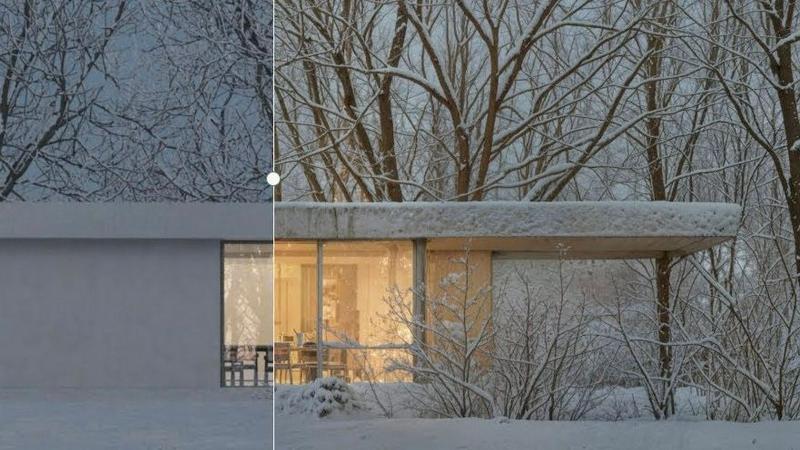
About vaethat
Vaethat is an innovative AI-powered tool specifically designed for architectural visualization professionals. By leveraging advanced artificial intelligence, Vaethat enhances and upscales 3D renders, bringing clarity, sharpness, and an unprecedented level of realism to architectural images. This product caters to architects, designers, and visualizers who need to present their work in the best possible light without the hassle of complex editing processes. The main value proposition of Vaethat lies in its ability to streamline the enhancement workflow, allowing users to focus on creativity rather than technicalities. With features tailored for the unique requirements of architectural visualization, Vaethat not only preserves the original design intent but also amplifies the visual richness and detail of renders, making it an indispensable tool for professionals in the field.
Features of vaethat
AI Render Upscaling
Vaethat’s AI render upscaling feature increases the resolution and sharpness of 3D architectural renders while maintaining clean and consistent geometry. This ensures that users can showcase their designs in high quality, capturing every intricate detail without losing the essence of the original render.
Detail Refinement
With detail refinement, Vaethat enhances fine textures, edges, and small architectural elements, resulting in a crisper and more polished look. This feature is essential for professionals aiming to present their work with the utmost clarity, ensuring that even the most subtle details stand out.
Material and Lighting Enhancement
The material and lighting enhancement feature boosts the perceived realism of renders by improving material definition, contrast, and lighting balance. This results in images that not only look visually appealing but also accurately reflect the intended atmosphere of the architectural project.
Noise and Artifact Cleanup
Vaethat excels in noise and artifact cleanup, effectively reducing common rendering artifacts that can detract from the quality of an image. By producing cleaner, presentation-ready images, this feature is vital for professionals preparing visuals for client presentations, portfolios, or marketing materials.
Use Cases of vaethat
Architectural Presentations
Architects can use Vaethat to upscale their 3D renders, ensuring that their presentations to clients are visually striking and professionally polished. This enhances the chances of securing approvals and positive feedback.
Portfolio Development
For architectural visualizers, Vaethat can significantly improve the quality of portfolio images. By enhancing renders, users can create a standout portfolio that showcases their skills and the quality of their work, attracting potential clients and employers.
Marketing Materials
Vaethat is ideal for creating high-quality images for marketing materials, such as brochures or social media posts. The enhanced visuals can help convey the design’s intent and appeal more effectively to prospective buyers or stakeholders.
Project Documentation
During project documentation phases, Vaethat allows professionals to present clear and detailed images that accurately represent the final design. This is crucial for ensuring that all stakeholders are aligned on the project vision and details.
Frequently Asked Questions
How does the AI render enhancer calculate credits?
Vaethat calculates credits based on the number of images processed and the complexity of enhancements applied. Users can easily track their credits within the platform, ensuring transparency and accessibility.
Can I use the archviz AI upscaler with V-Ray, Lumion, Enscape, 3ds Max, and SketchUp?
Yes, Vaethat is compatible with various architectural visualization tools including V-Ray, Lumion, Enscape, 3ds Max, and SketchUp. This versatility makes it a valuable addition to any workflow.
What makes this AI post-production tool different from manual editing?
Unlike manual editing, which can be time-consuming and require extensive skill, Vaethat offers a streamlined process that allows users to achieve high-quality results quickly and efficiently. The AI technology automates enhancements while preserving design intent.
Can I upgrade or downgrade my AI enhancement plan anytime?
Yes, Vaethat offers flexible subscription plans that allow users to upgrade or downgrade based on their needs. This ensures that professionals can adapt their usage according to project demands without any hassle.
Explore more in this category:
Similar to vaethat

Vikas Editor AI
AI photo and video creative studio for Indian creators and global users, with cinematic edits, templates, and customizable prompts.
NestMaxx
Free online true-shape nesting software for laser, plasma and CNC router cutting. Pack parts tightly on sheets and export DXF or SVG layouts.

AppScreenshots
Create professional App Store and Google Play screenshots with 3D device frames, templates and batch export.
Rhinobird
AI video ads, UGC-style videos, and product visuals for cross-border sellers and e-commerce brands.

Promptclay
Free-to-copy AI image prompt library. Each prompt is shown next to the image it made.
The Kiss
Turn two photos into a cinematic AI kissing video. Pick one of 13 kiss video templates; 30 free credits on sign-up.

trykissai
AI kiss generator: add a photo of each person, pick a kiss scene, and get a kiss photo or a 5–7 second clip. 30 free credits.
Adobe Alternatives
Explore open-source creative software by workflow, platform and development stage, with comparisons and official project links.