Appkittie vs Master Metrics
Side-by-side comparison to help you choose the right tool.

Appkittie
AppKittie reveals the secret strategies of top apps so you can replicate their success and dominate the market.
Last updated: March 18, 2026

Master Metrics
Master Metrics is my essential AI tool for merging marketing data and automating client reports effortlessly.
Last updated: February 28, 2026
Visual Comparison
Appkittie
Master Metrics
Feature Comparison
Appkittie
App Discovery & Filtering Engine
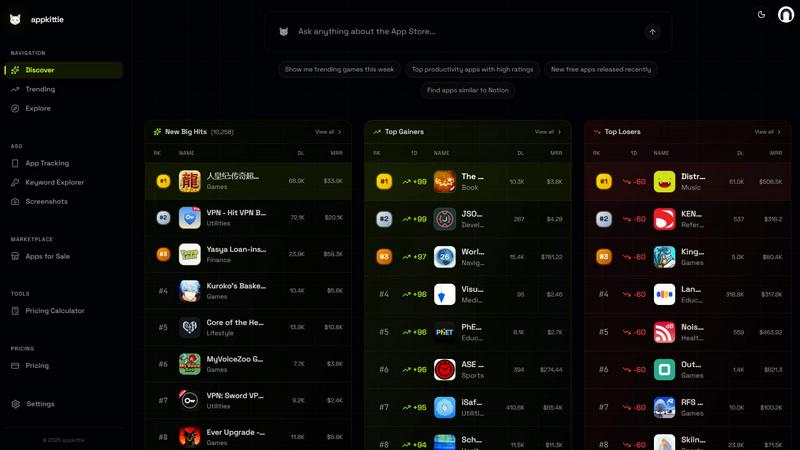
This is your mission control for finding golden opportunities. You can sift through a massive database of apps using advanced filters to segment markets by category, revenue tier, download volume, and more. My favorite use is hunting for "high-income apps" in seemingly quiet niches—it’s like having a treasure map where X marks validated business models instead of empty guesses. This engine transforms overwhelming market noise into a curated list of actionable, profitable ideas.
Winning Ads Spy & Creator Tracker
This dual-power feature is an absolute game-changer for user acquisition. The Ads Spy lets you visualize the exact Meta ad creatives successful apps are running right now, so you can invest your ad budget with confidence. Even better, the Creator Tracker identifies the specific UGC creators and influencers those apps are collaborating with on platforms like TikTok. This isn't just inspiration; it's a direct line to the viral growth drivers and partnership opportunities you'd otherwise spend months trying to uncover.
Keyword & ASO Intelligence
Forget keyword guesswork. Appkittie’s ASO tools help you find high-traffic, low-competition keywords that your competitors are ranking for but might be missing from your metadata. It provides personalized suggestions to optimize your title and subtitle, giving you a concrete plan to outrank others on the App Store. This feature alone can save you countless hours of manual research and directly impact your organic installs.
App Store Screenshot Generator
Even the best app can fail with poor store assets. Appkittie’s built-in generator is a surprisingly powerful tool that lets you create professional, high-converting screenshots without any design skills. By analyzing what works for top apps, it helps you craft visuals that communicate value instantly. This directly tackles one of the biggest conversion killers and can help double your install rate from the store listing page.
Master Metrics
Unified Overview Control Panel
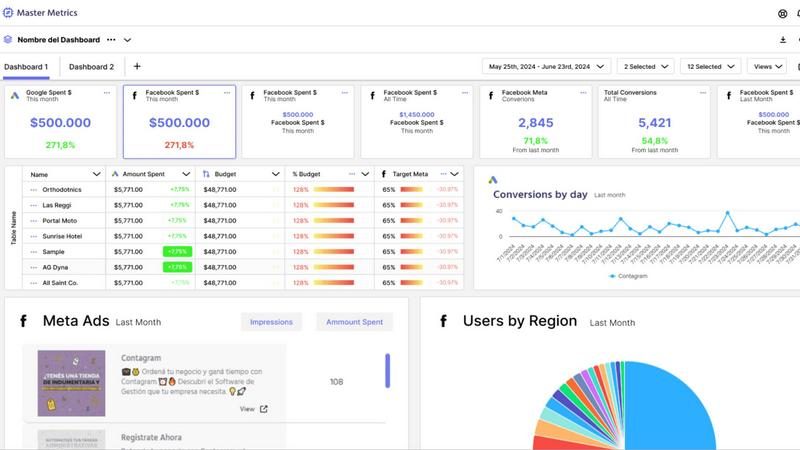
This is the mission control for your entire client portfolio. Instead of logging into a dozen different platforms, you get a single, customizable dashboard that shows the health of all accounts at a glance. You can build a master table pulling key metrics from any connected data source, add manual data, and even create custom formulas to merge data points. It’s the ultimate tool for quickly identifying what needs your immediate attention, making it indispensable for agency owners and account managers.
AI-Powered Google Slides Generation
This feature alone can save you hours of tedious work each week. Simply select your data sources, choose the key metrics and goals, and pick a design template. Master Metrics' AI then automatically generates a fully editable, client-ready Google Slides presentation. It dynamically pulls in the latest data and even brings in ad creative and social post images. This transforms reporting from a painful chore into a strategic, value-added activity you can complete in just a few clicks.
Proactive Custom Alerts & Notifications
Move from reactive firefighting to proactive management. Set up intelligent alerts for virtually any scenario: an ad campaign underspending, e-commerce sales dropping, or a CRM close rate declining. You can even configure alerts to control daily spend against monthly budgets. Notifications can be sent directly to your email, Slack, or WhatsApp, ensuring you and your team are always the first to know about critical changes, no matter where you are.
Flexible Data Connectors & Templates
Master Metrics understands that your data ecosystem is unique. It offers seamless connectors to pull live data directly into Google Sheets and Looker Studio for ultimate flexibility. Combine this with their library of dashboard templates, and you can go from zero to a fully functional analytics setup in minutes. The ability to clone entire dashboards for new client accounts with one click is a game-changer for scalability, making onboarding new business effortless.
Use Cases
Appkittie
Validating a Startup or Side Project Idea
Before you write a single line of code, use Appkittie to pressure-test your concept. Search for similar apps and see if they have genuine revenue and download traction. If you find several apps in your space making real money, you've found a validated market. If you find nothing, you've either discovered a blue ocean or a graveyard—Appkittie gives you the data to decide which it is before you invest your time.
Deconstructing Competitor Growth Strategies
Go beyond basic analytics. When a competitor suddenly spikes, use Appkittie to reverse-engineer their success. See which new ad campaigns they launched, which influencers started promoting them, and which keywords they began targeting. This allows you to understand their playbook and adapt the most effective tactics for your own app, turning their wins into your learning blueprint.
Finding Profitable Apps to Acquire
The "Apps for Sale" database is a hidden gem for indie hackers and studios looking to buy, not build. You can discover apps with proven revenue history that are on the market. This lets you skip the risky initial build and growth phase and acquire an asset with existing cash flow, using Appkittie's data to perform thorough due diligence on its performance and market position.
Expanding into New Global Markets
Spot regional hits before they go global. Use the Global Market Rankings to see what's trending in countries like Japan, Brazil, or Germany. If you see an app dominating in one region but lacking presence in yours, you've identified a prime opportunity to localize a proven concept and be the first to capture that demand in your home market.
Master Metrics
Marketing Agencies Managing Multiple Clients
For agencies, time is literally money. Master Metrics is the ultimate force multiplier, allowing teams to manage dozens or hundreds of client accounts from a single Overview Panel. They can standardize reporting with templates, ensure consistency, and use AI Slides to produce stunning client reviews in a fraction of the time. The custom alerts also allow junior staff to monitor account health, freeing senior strategists to focus on deeper analysis and growth.
Freelancers & Consultants Streamlining Their Workflow
Solo professionals wearing all the hats need efficiency above all else. Master Metrics automates the entire data aggregation and reporting pipeline that typically consumes a freelancer's week. They can connect their few key accounts, set up a personalized dashboard, and use automated reports and alerts to stay on top of performance without constant manual checking, allowing them to deliver premium, data-driven service without the burnout.
In-House Marketing Teams Driving ROI
Internal teams need to prove their impact and optimize spend continuously. Master Metrics unifies data from paid ads, organic social, the website, and sales CRM into one source of truth. Teams can build custom metrics to track true ROI, use alerts to guard against budget overruns or performance dips, and create internal presentations that clearly communicate results and strategic recommendations to company leadership.
E-commerce Brands Monitoring Sales & Ad Performance
For e-commerce, the line between marketing spend and revenue is critical. This tool is perfect for connecting platforms like Meta Ads, Google Ads, Shopify, and Google Analytics. Store owners or marketers can create dashboards that merge ad spend with conversion data, track customer acquisition cost in real-time, and set instant alerts for stockouts or sudden drops in sales conversion rates, enabling rapid, data-driven decision-making.
Pricing Comparison
Appkittie
Appkittie keeps its pricing refreshingly simple and transparent. They offer a Pro plan with two billing options, both of which include a 3-day free trial. The Monthly plan is $49 per month, offering flexibility. The Yearly plan is priced at $169 per year, which breaks down to roughly $14.08 per month and represents a 71% saving compared to monthly billing, making it the best value. Both tiers provide full access to all features: unlimited searches, complete analytics, ad and creator tracking, ASO tools, the screenshot generator, historical data, export capabilities, priority support, and the ability to invite up to 5 team members.
Master Metrics
Master Metrics offers a clear, tiered pricing structure based primarily on the number of client accounts you need to manage, scaling from freelancers to large agencies. All paid plans include core features like the Overview Control Panel, Alerts, and Dashboards. Notably, implementation support is free on all plans except the very entry-level "Freelancer" tier. The plans are: Freelancer ($30/mo for 15 accounts), Basic ($69/mo for 15 accounts + connectors), Basic Plus ($129/mo for 30 accounts), Intermediate ($169/mo for 50 accounts), Intermediate Plus ($229/mo for 70 accounts), Pro ($289/mo for 100 accounts), Pro Plus 1 ($359/mo for 150 accounts), and Pro Plus 2 ($439/mo for 250 accounts). You can try any plan free for 7 days before committing.
Overview
About Appkittie
In the chaotic world of mobile apps, guessing is a luxury no founder or marketer can afford. Enter Appkittie, the app intelligence platform that flips the script on product discovery and growth. Instead of building in the dark, Appkittie gives you a backstage pass to see exactly which apps are winning, how they're doing it, and how much money they're making. It's a comprehensive database that reveals real revenue and download figures, stripping away the guesswork from your next big idea. But where Appkittie truly shines—and why I'm such a fan—is its deep dive into the strategies behind the success. You're not just seeing numbers; you're seeing the winning Meta ad creatives, the TikTok creators driving viral UGC campaigns, and the low-competition Apple Search Ads keywords they're dominating. This platform is built for a specific, savvy audience: founders, indie hackers, and growth marketers who are tired of wasting resources and want to replicate proven paths to profitability. Its core value proposition is brutally simple: stop building what you think people want, and start building what the data proves they already pay for.
About Master Metrics
Master Metrics is the analytics command center that finally silences the siren call of endless, chaotic spreadsheets. Born from the genuine frustration of marketers drowning in disjointed reports, this platform is a comprehensive management solution built by marketers, for marketing teams and agencies of all sizes. Its core mission is transformative yet beautifully simple: to maximize your marketing and sales results through unified, intelligent data. If you're tired of manual data pulls, static PowerPoints, and the mental gymnastics of stitching together data from Facebook Ads, Google Analytics, your CRM, and more, this tool is your lifeline. It cuts through the chaos by aggregating everything into a single, intelligently designed platform. What truly sets it apart is its masterful blend of powerful automation—think AI-generated client presentations and smart budget alerts—with the deep, granular customization that data-savvy analysts demand. Whether you're a solo freelancer or an agency managing hundreds of client accounts, Master Metrics is designed to automate the heavy lifting, surface critical insights instantly, and let you reclaim your time for actual strategy instead of spreadsheet wrangling.
Frequently Asked Questions
Appkittie FAQ
What can I actually do with Appkittie?
You can use Appkittie as your all-in-one app intelligence command center. Primarily, it allows you to discover profitable app ideas by analyzing real revenue and download data. You can spy on competitors' winning ad creatives on Meta, identify the UGC creators they work with, uncover high-value keywords for ASO, generate conversion-optimized screenshots, and track top apps in any global market. It's designed to inform every stage of your app journey, from ideation to scaling.
Who is Appkittie built for?
Appkittie is built for action-oriented builders and marketers. Its core audience includes app founders (both startup and indie hackers), mobile app developers, growth marketers, and product managers. It's perfect for anyone who needs to make data-driven decisions about what to build, how to market it, and how to outmaneuver competitors, eliminating reliance on intuition alone.
Is there a free trial, and can I cancel anytime?
Yes, Appkittie offers a full-featured 3-day free trial for its Pro plan. You can explore all its capabilities without any upfront charge. After the trial, if you choose to continue, you'll be billed according to the plan you selected. You can cancel your subscription at any time, and the service is very transparent with no hidden fees, which I always appreciate in a SaaS tool.
Can I export data or share access with my team?
Absolutely. A key feature of the Pro plan is the ability to export your research and app data to CSV or JSON formats for further analysis offline or in other tools. Furthermore, you can invite up to 5 team members to your account, making it easy for your entire development or marketing team to collaborate on research, strategy, and competitive analysis from a single source of truth.
Master Metrics FAQ
What data sources can I connect to Master Metrics?
Based on the provided content, specific integrated platforms are listed as "Coming soon," indicating the connectors are actively being expanded. However, the platform is built to extract and merge data from a wide array of marketing, sales, and analytics tools. Crucially, it offers powerful connectors to Google Sheets and Looker Studio, allowing you to pull Master Metrics' unified data into these environments for further customization and analysis, effectively making any source accessible through those pipelines.
How does the AI Google Slides feature work?
It's brilliantly straightforward. Within Master Metrics, you navigate to the AI Slides feature, select the client account or data source you want to report on, and choose the specific metrics and KPIs to highlight. Then, you pick from a selection of professional design templates. The AI engine then assembles a complete, editable Google Slides presentation, populating it with your selected data, visualizations like charts and graphs, and even pulling in relevant ad images automatically. You get a client-ready deck in minutes, not hours.
Can I set up alerts for custom metrics?
Absolutely, and this is one of the platform's strongest suits. Beyond pre-defined metrics, you can create alerts based on custom formulas and calculations that you build within the platform. For example, you could create an alert for when your calculated "Cost per Qualified Lead" exceeds a certain threshold, or when the ratio of ad spend to revenue from a specific campaign dips. This allows for incredibly nuanced and business-specific monitoring.
Is there a limit to the number of dashboards I can create?
The limit depends on your chosen pricing plan. The available plans scale the number of allowed "Dashboards" alongside the number of client "Accounts." For instance, the entry-level Freelancer plan includes dashboards, while higher-tier plans like Pro and Pro Plus naturally support more. It's designed to scale with your business, from a freelancer with a few key dashboards to an agency needing hundreds.
Alternatives
Appkittie Alternatives
Appkittie is a powerful app intelligence platform in the competitive intelligence and market research category. It helps entrepreneurs and marketers discover fast-growing apps, analyze their revenue, and uncover the marketing strategies that make them successful. This focus on actionable insights, like ad creatives and influencer campaigns, is what sets it apart. Users often explore alternatives for a few key reasons. Budget is a primary concern, as some tools can be a significant investment for indie developers. Others might need a platform with a different focus, like deeper analytics for web apps or a more basic feature set for casual research. The specific data sources and update frequency can also be deciding factors. When evaluating other options, prioritize what matters most for your goals. Look closely at the depth of app store coverage, the quality of marketing intelligence (like ad libraries), and the transparency of pricing. The best tool is one that delivers the specific, validated signals you need to make confident decisions without overwhelming you with irrelevant data.
Master Metrics Alternatives
Master Metrics is my top pick in the marketing analytics and reporting automation category. It's the command center that unifies data and automates client reports, saving teams from the chaos of manual spreadsheets. People often look for alternatives for a few key reasons. Budget is a big one, as needs and pricing tiers vary. Others might seek a tool that integrates with a very niche platform or requires a specific feature, like deeper data warehousing or a different presentation output. When evaluating other options, focus on your core needs. Prioritize the depth of native integrations you actually use, the flexibility of the reporting engine, and the true time-savings from automation. The best fit is the one that removes your biggest friction point, whether that's data merging, visualization, or client presentation creation.