
conceptviz vs Hush Touch | Voice-to-Text for MacOS
Side-by-side comparison to help you choose the right tool.

conceptviz
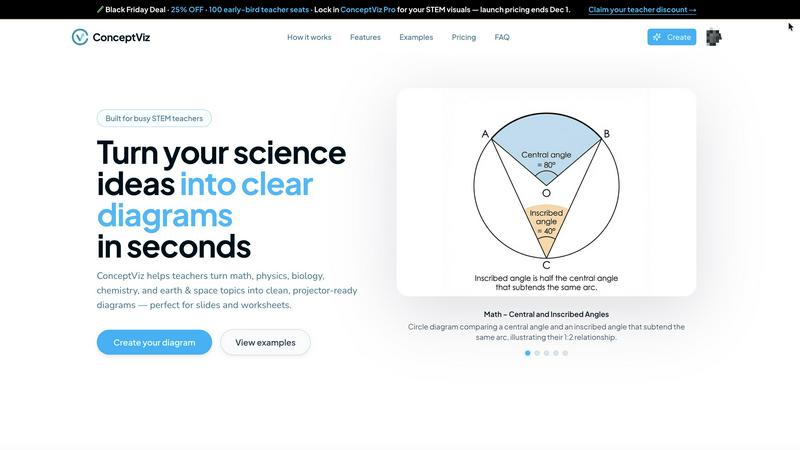
Easily create clear, engaging science and math diagrams for classrooms and research with ConceptViz's intuitive tool.
Last updated: February 28, 2026

Hush Touch | Voice-to-Text for MacOS
Hush Touch is the smart, private, and affordable offline voice-to-text app for Mac that learns your vocabulary.
Last updated: February 28, 2026
Visual Comparison
conceptviz
Hush Touch | Voice-to-Text for MacOS

Feature Comparison
conceptviz
User-Friendly Interface
ConceptViz boasts an intuitive and straightforward interface, allowing users of all skill levels to create detailed diagrams effortlessly. With just a few clicks, educators and students can produce visuals that enhance their presentations and learning materials, saving time and reducing frustration.
Subject and Grade Presets
One of the standout features of ConceptViz is its collection of subject and grade presets. Users can select from quick presets designed specifically for popular STEM subjects like physics, biology, and chemistry, tailored for various educational levels from elementary to high school, ensuring that diagrams meet the appropriate standards.
Projector-Ready Clarity
Diagrams created with ConceptViz are optimized for classroom use, featuring thick, legible lines and simple backgrounds. This design ensures that visuals remain clear and easy to read from any distance, making it perfect for presentations and group discussions where clarity is essential.
High-Resolution Downloads
ConceptViz allows users to download their diagrams in high-resolution PNG format, ensuring that visuals maintain their quality whether being used in digital presentations or printed materials. This feature is particularly beneficial for educators who need visually appealing handouts or slides for their lessons.
Hush Touch | Voice-to-Text for MacOS
Dual-Engine On-Device Recognition
Hush Touch doesn't rely on a single method. It intelligently blends Apple's DictationTranscriber for natural flow and punctuation with SFSpeechRecognizer to spot custom vocabulary. This dual-input is then refined with an Apple Intelligence final pass. The magic? Every step of this process happens on your Mac. This means no lag waiting for a cloud server and, crucially, your private conversations and drafts never leave your device, setting a new bar for local processing power.
Adaptive Custom Vocabulary & Learning
This is where Hush Touch moves from a simple transcriber to a smart writing assistant. You can manually add up to 500 terms—perfect for technical jargon, brand names, or medical terminology. Even better, it learns automatically. When you correct a transcription mistake, Hush Touch detects it and adds the right word to your personal vocabulary. It even creates per-app profiles, boosting relevant terms whether you're in your code editor or email client.
Smart Text Processing & Hands-Free Commands
The app actively cleans up your spoken word in real-time. It strips out filler words ("um," "like," "you know"), auto-corrects common flubs, and can format numbered lists from your speech. For true hands-free operation, use a Siri shortcut or say "Okay send message" to dispatch an email. It auto-inserts text after a pause and supports a double-tap hotkey to stop listening, making the entire dictation-to-insertion flow seamless.
Lightweight Design & Context Modes
Weighing in at just 5.5 MB, Hush Touch is a marvel of efficiency. It launches in a flash and runs without bogging down your system. To further enhance accuracy, it offers four distinct context modes: General, Email, Code, and Notes. Switching modes tailors the engine's focus, helping it better predict punctuation and vocabulary relevant to the task at hand, from writing a formal email to commenting code.
Use Cases
conceptviz
Classroom Instruction
Teachers can utilize ConceptViz to create engaging diagrams that help explain complex scientific concepts during lessons. By transforming difficult ideas into visual formats, educators can facilitate better understanding and encourage student participation.
Student Projects
Students can leverage ConceptViz to visualize their research or project ideas effectively. By generating clear diagrams that complement their written work, they can present their findings in a more engaging manner, enhancing their overall project quality.
Lab Activities
Researchers and educators can employ ConceptViz to illustrate lab setups and processes, providing students with clear visual aids that outline experimental designs. This helps students grasp the procedures and concepts involved in scientific experimentation.
Curriculum Development
Curriculum developers can use ConceptViz to create a variety of educational materials, including worksheets and lesson plans. By incorporating accurate and visually appealing diagrams, they can enhance the quality of educational resources and make learning more interactive.
Hush Touch | Voice-to-Text for MacOS
Drafting Long-Form Content and Reports
For writers, researchers, and students, speaking ideas is often faster than typing them. Hush Touch allows you to dictate drafts of articles, essays, or reports naturally. Its smart punctuation and paragraph formatting let you speak in complete thoughts, while the on-device privacy ensures your unpublished ideas and sensitive research data remain completely confidential throughout the creative process.
Managing Professional Communication
Tackle an overflowing inbox hands-free. Dictate emails and messages with tone-appropriate phrasing aided by the Email context mode. The ability to say "Okay send message" allows you to compose and send replies without ever touching the keyboard, perfect for when you're multitasking, on the move, or dealing with repetitive communication throughout a busy workday.
Technical and Specialized Documentation
Software engineers, doctors, lawyers, and academics finally have a dictation tool that understands their language. By learning complex terms like "Kubernetes," "metatarsophalangeal," or legal citations, Hush Touch accurately transcribes technical notes, patient observations, code comments, and research summaries that would stump generic cloud-based services, saving immense time on corrections.
Accessible and Ergonomic Computer Use
For individuals with RSI, carpal tunnel, or other conditions that make typing painful, Hush Touch provides a robust, private alternative for controlling their Mac. The fully hands-free operation via Siri integration and voice commands enables full participation in digital work and communication without strain, all maintained with the dignity of complete data privacy.
Overview
About conceptviz
ConceptViz is an innovative diagramming tool designed for educators, students, and researchers who need to visually communicate complex scientific ideas. It allows users to create high-quality, classroom-ready diagrams in seconds, making it an essential resource for teaching and learning in STEM subjects. With a focus on clarity and accuracy, ConceptViz caters to a wide range of educational levels, from K-12 classrooms to university research settings. The user-friendly interface enables users to easily generate diagrams tailored to their specific needs, enhancing the learning experience. Whether you are a teacher striving to elucidate challenging concepts or a student looking to visualize information for a project, ConceptViz transforms intricate information into accessible visuals, promoting better understanding and retention of scientific principles across disciplines such as physics, biology, chemistry, and mathematics.
About Hush Touch | Voice-to-Text for MacOS
Let's be honest: most dictation software is a compromise. You either sacrifice privacy by sending your voice to the cloud, deal with clunky, inaccurate transcription, or get locked into a draining monthly subscription. Hush Touch is the Mac app that finally ends that compromise. This is a purpose-built, voice-to-text powerhouse that runs entirely on your Mac. It combines not one, but two of Apple's own transcription engines, then applies a final polish with Apple Intelligence—all processed locally. The result is shockingly fast, accurate, and private dictation that learns your personal vocabulary over time. At a featherlight 5.5 MB, it launches instantly and fits into your workflow without the bloat or the privacy anxiety. It's built for anyone who writes on a Mac—from professionals drafting complex emails and reports to students taking notes—and values a one-time payment over a subscription leash. Its core promise is simple: get cleaner, smarter text from your voice, with zero data ever leaving your computer.
Frequently Asked Questions
conceptviz FAQ
How do I create a diagram using ConceptViz?
To create a diagram with ConceptViz, simply sign in with a free account, choose your subject and educational level, describe the diagram you need in plain English, and the tool will generate a high-quality visual ready for use.
Can I use ConceptViz for subjects other than science?
While ConceptViz is primarily designed for STEM subjects, its intuitive diagramming capabilities can be adapted for other educational disciplines as well, making it a versatile tool for various teaching needs.
Is there a cost to use ConceptViz?
ConceptViz is currently offering a limited-time lifetime deal for $229. This one-time fee provides users with access to all features and functionalities, making it a cost-effective solution for educators and researchers.
What types of diagrams can I create with ConceptViz?
Users can create a wide range of diagrams, including but not limited to ray diagrams, anatomical cross-sections, chemical structures, and mathematical representations. The tool is flexible and designed to accommodate diverse educational needs.
Hush Touch | Voice-to-Text for MacOS FAQ
Is Hush Touch really 100% offline and private?
Yes, absolutely. This is its cornerstone feature. Every component—from the two Apple speech recognition engines to the Apple Intelligence final pass—processes your audio directly on your Mac. No audio or transcript data is ever sent to external servers. Your voice input and the resulting text never leave your computer, ensuring total privacy.
How does the vocabulary learning actually work?
Hush Touch employs adaptive learning. When you manually correct a word in the transcribed text, the app detects this correction and automatically adds the intended word to your personal vocabulary list. It also uses frequency weighting, so terms you use often in specific apps (like "diagnosis" in your notes app) become prioritized, making the engine smarter with each use.
Can I use Hush Touch completely hands-free?
You can. You can activate dictation using a Siri voice command ("Hey Siri, start touch"). Once listening, it will automatically insert the transcribed text after a short pause (roughly 2 seconds of silence). You can also use voice commands like "Okay send message" to send an email or message, and configure a hotkey to stop listening with a double-click.
What happens after the 7-day free trial?
The free trial gives you full access to all features for 7 days. After that, you need to purchase a lifetime license to continue using the app. There is no subscription. It's a single, one-time payment of $20 that grants you permanent access to the app and all its current features, with no recurring fees.
Alternatives
conceptviz Alternatives
ConceptViz is an innovative tool designed to simplify the creation of diagrams for complex science and math concepts, making it ideal for educators, students, and researchers. As part of the broader categories of AI Assistants, Content Creation, Data Visualization, and Design Tools, it serves a vital role in enhancing visual learning. However, users often seek alternatives due to factors like pricing, specific feature sets, or compatibility with different platforms and educational needs. When searching for the right alternative, it's essential to consider the ease of use, the quality of visual outputs, and the range of subjects covered. Evaluating user reviews and trial options can also help ensure that the chosen tool effectively meets the specific requirements for teaching or learning.
Hush Touch | Voice-to-Text for MacOS Alternatives
Hush Touch is a standout in the niche of on-device voice-to-text software for macOS. It’s built for users who prioritize privacy, offline functionality, and a seamless, native Mac experience, leveraging Apple's own powerful transcription and intelligence engines to deliver clean, accurate dictation without ever sending your data to the cloud. People often seek alternatives for a variety of reasons. Some might be looking for a free tier or subscription model instead of a one-time purchase. Others may need cross-platform compatibility with Windows or mobile devices, or require specific integrations with certain apps that a focused tool like Hush Touch doesn't provide. The search usually comes down to balancing cost, privacy, accuracy, and workflow fit. When evaluating other options, your key considerations should be privacy policy (on-device vs. cloud processing), cost structure, accuracy in your primary language, and how well the tool integrates into your daily routine. The best choice isn't always the most feature-packed; it's the one that disappears into your workflow, letting you think out loud and get words on the screen effortlessly.