conceptviz vs Patrivox
Side-by-side comparison to help you choose the right tool.

Easily create clear, engaging science and math diagrams for classrooms and research with ConceptViz's intuitive tool.
Last updated: February 28, 2026

Patrivox
Transform your archives into searchable treasures in minutes with Patrivox's powerful AI digitization and.
Last updated: March 4, 2026
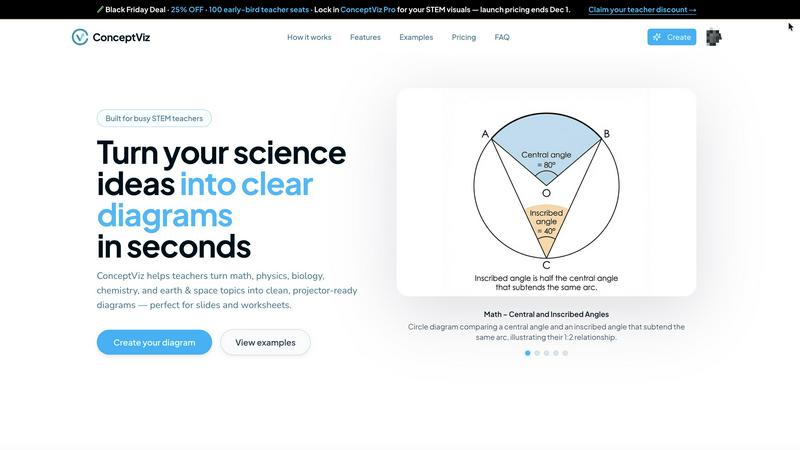
Visual Comparison
conceptviz
Patrivox
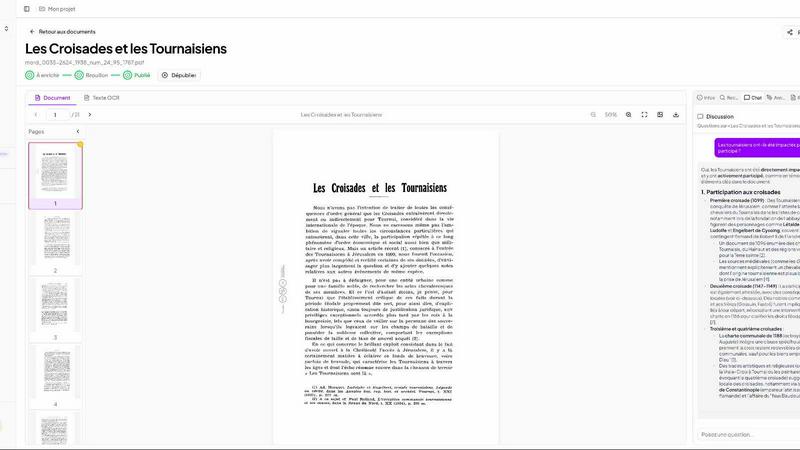
Feature Comparison
conceptviz
User-Friendly Interface
ConceptViz boasts an intuitive and straightforward interface, allowing users of all skill levels to create detailed diagrams effortlessly. With just a few clicks, educators and students can produce visuals that enhance their presentations and learning materials, saving time and reducing frustration.
Subject and Grade Presets
One of the standout features of ConceptViz is its collection of subject and grade presets. Users can select from quick presets designed specifically for popular STEM subjects like physics, biology, and chemistry, tailored for various educational levels from elementary to high school, ensuring that diagrams meet the appropriate standards.
Projector-Ready Clarity
Diagrams created with ConceptViz are optimized for classroom use, featuring thick, legible lines and simple backgrounds. This design ensures that visuals remain clear and easy to read from any distance, making it perfect for presentations and group discussions where clarity is essential.
High-Resolution Downloads
ConceptViz allows users to download their diagrams in high-resolution PNG format, ensuring that visuals maintain their quality whether being used in digital presentations or printed materials. This feature is particularly beneficial for educators who need visually appealing handouts or slides for their lessons.
Patrivox
Automation
With the drag-and-drop functionality, users can easily upload their PDFs in bulk. Mistral AI automatically reads and classifies the documents, making them searchable in mere minutes. This feature eliminates the need for manual entry and configuration, streamlining the digitization process.
Advanced Search Capabilities
Patrivox offers full-text search across entire collections with impressive speed and accuracy. Users benefit from typo tolerance, enabling them to find information quickly. Additionally, the platform supports filtering by date, author, and type, while also allowing natural language queries that yield sourced answers from the AI.
Interactive Knowledge Graph
The platform's ability to identify and link entities such as people, places, and organizations creates a dynamic knowledge graph. Users can navigate through this graph, discovering connections between documents that may have previously gone unnoticed, enriching their research experience.
Built-in Viewer
Patrivox includes a built-in viewer that allows users to zoom, navigate, and copy OCR text seamlessly. This viewer enhances the user experience by providing an intuitive interface for reviewing and interacting with documents directly within the platform.
Use Cases
conceptviz
Classroom Instruction
Teachers can utilize ConceptViz to create engaging diagrams that help explain complex scientific concepts during lessons. By transforming difficult ideas into visual formats, educators can facilitate better understanding and encourage student participation.
Student Projects
Students can leverage ConceptViz to visualize their research or project ideas effectively. By generating clear diagrams that complement their written work, they can present their findings in a more engaging manner, enhancing their overall project quality.
Lab Activities
Researchers and educators can employ ConceptViz to illustrate lab setups and processes, providing students with clear visual aids that outline experimental designs. This helps students grasp the procedures and concepts involved in scientific experimentation.
Curriculum Development
Curriculum developers can use ConceptViz to create a variety of educational materials, including worksheets and lesson plans. By incorporating accurate and visually appealing diagrams, they can enhance the quality of educational resources and make learning more interactive.
Patrivox
Municipal Archives
Municipalities can utilize Patrivox to digitize and showcase deliberations, registers, and correspondence, making historical records more accessible to the public and researchers.
Historical Societies
Historical societies can leverage Patrivox to make their bulletins and documentary collections searchable and explorable, thus preserving valuable information for future generations.
Heritage Libraries
Heritage libraries can open their special collections to researchers and the public, enhancing the visibility and accessibility of rare documents and manuscripts.
Dioceses & Parishes
Patrivox can aid dioceses and parishes in preserving and indexing their parish registers and ecclesiastical archives, ensuring that important historical data is not lost over time.
Overview
About conceptviz
ConceptViz is an innovative diagramming tool designed for educators, students, and researchers who need to visually communicate complex scientific ideas. It allows users to create high-quality, classroom-ready diagrams in seconds, making it an essential resource for teaching and learning in STEM subjects. With a focus on clarity and accuracy, ConceptViz caters to a wide range of educational levels, from K-12 classrooms to university research settings. The user-friendly interface enables users to easily generate diagrams tailored to their specific needs, enhancing the learning experience. Whether you are a teacher striving to elucidate challenging concepts or a student looking to visualize information for a project, ConceptViz transforms intricate information into accessible visuals, promoting better understanding and retention of scientific principles across disciplines such as physics, biology, chemistry, and mathematics.
About Patrivox
Patrivox is an innovative European SaaS platform designed specifically for organizations such as heritage institutions, municipal services, associations, and enterprises. Its primary mission is to transform vast collections of scanned documents into a fully searchable and interactive knowledge base. Users can effortlessly drag and drop their PDFs, and in just minutes, Mistral AI employs advanced optical character recognition (OCR) technology to extract every word from the documents. This platform excels at identifying key entities like people, places, and organizations, linking them into an interactive knowledge graph. Patrivox is tailored for those who require quick access to information, allowing users to search instantly with typo tolerance or pose questions in natural language, with AI delivering sourced answers. Its core value proposition lies in making previously inaccessible knowledge easily searchable and shareable, thereby unlocking new avenues for research and public access.
Frequently Asked Questions
conceptviz FAQ
How do I create a diagram using ConceptViz?
To create a diagram with ConceptViz, simply sign in with a free account, choose your subject and educational level, describe the diagram you need in plain English, and the tool will generate a high-quality visual ready for use.
Can I use ConceptViz for subjects other than science?
While ConceptViz is primarily designed for STEM subjects, its intuitive diagramming capabilities can be adapted for other educational disciplines as well, making it a versatile tool for various teaching needs.
Is there a cost to use ConceptViz?
ConceptViz is currently offering a limited-time lifetime deal for $229. This one-time fee provides users with access to all features and functionalities, making it a cost-effective solution for educators and researchers.
What types of diagrams can I create with ConceptViz?
Users can create a wide range of diagrams, including but not limited to ray diagrams, anatomical cross-sections, chemical structures, and mathematical representations. The tool is flexible and designed to accommodate diverse educational needs.
Patrivox FAQ
How does Patrivox ensure data security?
Patrivox is 100% hosted in Europe and is GDPR-native, ensuring comprehensive data protection. An audit log tracks all changes, providing transparency and security for sensitive documents.
Can I use Patrivox for large collections of documents?
Absolutely! Patrivox supports batch imports, allowing users to upload hundreds of files at once, making it an ideal solution for large-scale digitization projects.
What types of documents can be processed with Patrivox?
Patrivox can process a variety of document types, primarily PDF files. This versatility makes it suitable for different organizations needing to digitize and search through diverse collections.
Is there a free trial available for Patrivox?
Yes, Patrivox offers a free trial that allows users to test the platform with 100 trial pages and a one-time credit, giving them a taste of its powerful features without any financial commitment.
Alternatives
conceptviz Alternatives
ConceptViz is an innovative tool designed to simplify the creation of diagrams for complex science and math concepts, making it ideal for educators, students, and researchers. As part of the broader categories of AI Assistants, Content Creation, Data Visualization, and Design Tools, it serves a vital role in enhancing visual learning. However, users often seek alternatives due to factors like pricing, specific feature sets, or compatibility with different platforms and educational needs. When searching for the right alternative, it's essential to consider the ease of use, the quality of visual outputs, and the range of subjects covered. Evaluating user reviews and trial options can also help ensure that the chosen tool effectively meets the specific requirements for teaching or learning.
Patrivox Alternatives
Patrivox is an innovative European SaaS platform that specializes in transforming scanned documents into a fully searchable knowledge base through advanced AI technology. This platform is particularly favored by heritage institutions, municipal services, associations, and enterprises seeking to enhance their document accessibility. Users often turn to alternatives for various reasons, including pricing constraints, specific feature requirements, or unique platform integration needs that better align with their organizational goals. When searching for an alternative, consider critical factors such as the scalability of the solution, the accuracy of the optical character recognition capabilities, the ability to integrate with existing systems, user-friendliness, and overall support provided by the company. Look for features that enhance search functionality and ensure a seamless user experience to maximize the value of your document digitization efforts.