conceptviz vs Proofapp
Side-by-side comparison to help you choose the right tool.

Easily create clear, engaging science and math diagrams for classrooms and research with ConceptViz's intuitive tool.
Last updated: February 28, 2026

Proofapp
Effortlessly gather visual feedback on your designs with Proofapp, reducing miscommunication and speeding up approvals.
Last updated: March 4, 2026
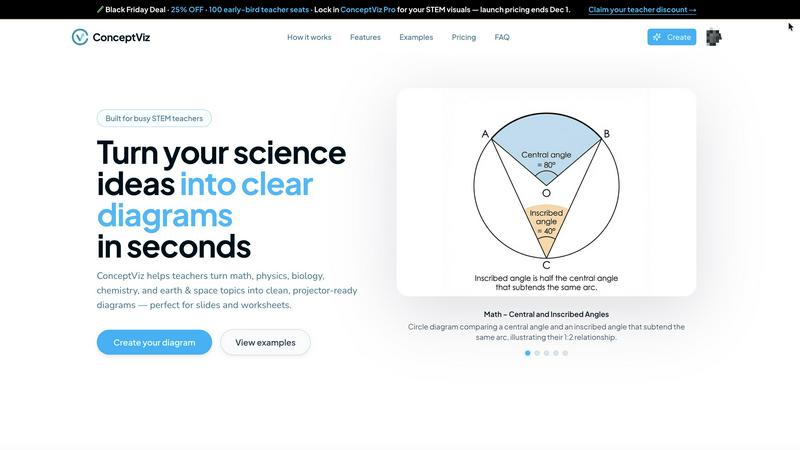
Visual Comparison
conceptviz
Proofapp

Feature Comparison
conceptviz
User-Friendly Interface
ConceptViz boasts an intuitive and straightforward interface, allowing users of all skill levels to create detailed diagrams effortlessly. With just a few clicks, educators and students can produce visuals that enhance their presentations and learning materials, saving time and reducing frustration.
Subject and Grade Presets
One of the standout features of ConceptViz is its collection of subject and grade presets. Users can select from quick presets designed specifically for popular STEM subjects like physics, biology, and chemistry, tailored for various educational levels from elementary to high school, ensuring that diagrams meet the appropriate standards.
Projector-Ready Clarity
Diagrams created with ConceptViz are optimized for classroom use, featuring thick, legible lines and simple backgrounds. This design ensures that visuals remain clear and easy to read from any distance, making it perfect for presentations and group discussions where clarity is essential.
High-Resolution Downloads
ConceptViz allows users to download their diagrams in high-resolution PNG format, ensuring that visuals maintain their quality whether being used in digital presentations or printed materials. This feature is particularly beneficial for educators who need visually appealing handouts or slides for their lessons.
Proofapp
Visual Commenting
Proofapp’s visual commenting feature allows users to click anywhere on the website screenshot to leave feedback. This eliminates the ambiguity of traditional text-based comments, making it clear where changes are needed. No more vague descriptions like "top left, under the nav," as every comment is pinned exactly where it belongs, enhancing communication clarity.
Multi-Breakpoint Testing
With multi-breakpoint testing, Proofapp automatically captures screenshots at both desktop and mobile resolutions. This feature ensures that feedback can be gathered from different device views, allowing teams to review and make necessary adjustments that cater to all users, regardless of their device.
Real-time Collaboration
Proofapp promotes seamless real-time collaboration among team members. Users can see comments as they come in, reply instantly, and resolve feedback collectively. This reduces the turnaround time for revisions and keeps everyone on the same page, enhancing team productivity and project timelines.
Secure Share Links
The platform offers secure, expirable links for easy sharing with clients. This feature allows clients to view and comment on projects without needing an account, simplifying the feedback process while maintaining security. It's a practical solution that fosters client engagement and streamlines communication.
Use Cases
conceptviz
Classroom Instruction
Teachers can utilize ConceptViz to create engaging diagrams that help explain complex scientific concepts during lessons. By transforming difficult ideas into visual formats, educators can facilitate better understanding and encourage student participation.
Student Projects
Students can leverage ConceptViz to visualize their research or project ideas effectively. By generating clear diagrams that complement their written work, they can present their findings in a more engaging manner, enhancing their overall project quality.
Lab Activities
Researchers and educators can employ ConceptViz to illustrate lab setups and processes, providing students with clear visual aids that outline experimental designs. This helps students grasp the procedures and concepts involved in scientific experimentation.
Curriculum Development
Curriculum developers can use ConceptViz to create a variety of educational materials, including worksheets and lesson plans. By incorporating accurate and visually appealing diagrams, they can enhance the quality of educational resources and make learning more interactive.
Proofapp
Freelancers
Freelancers can leverage Proofapp to present their work professionally and collect client feedback efficiently. By using visual comments, they can save time and avoid confusion, ensuring smoother project delivery and higher client satisfaction.
Design Teams
Design teams benefit greatly from Proofapp as it allows them to receive precise visual feedback pinned directly on their designs. This means less time spent deciphering comments and more time focused on producing quality work, ultimately speeding up project completion.
Small Development Teams
Small dev teams can use Proofapp to streamline client approvals and revisions without the hefty price tag of enterprise tools. This allows them to focus on delivering great products while managing client expectations effectively.
Marketing Teams
Marketing teams can utilize Proofapp to review landing pages and campaigns visually with their entire team. By gathering feedback in one place, they can ensure that their marketing materials are optimized and aligned with their goals before launch.
Overview
About conceptviz
ConceptViz is an innovative diagramming tool designed for educators, students, and researchers who need to visually communicate complex scientific ideas. It allows users to create high-quality, classroom-ready diagrams in seconds, making it an essential resource for teaching and learning in STEM subjects. With a focus on clarity and accuracy, ConceptViz caters to a wide range of educational levels, from K-12 classrooms to university research settings. The user-friendly interface enables users to easily generate diagrams tailored to their specific needs, enhancing the learning experience. Whether you are a teacher striving to elucidate challenging concepts or a student looking to visualize information for a project, ConceptViz transforms intricate information into accessible visuals, promoting better understanding and retention of scientific principles across disciplines such as physics, biology, chemistry, and mathematics.
About Proofapp
Proofapp is a revolutionary visual feedback and website review platform designed to enhance collaboration among designers, developers, and their clients. It addresses the common pain points of traditional feedback methods, such as email chains and miscommunication. By allowing users to upload any website URL, Proofapp automatically captures both desktop and mobile screenshots, making it easier for reviewers to provide contextual feedback. With features like pinning comments directly on designs, replying in threads, and attaching files, the platform streamlines the feedback process without requiring users to create accounts. This makes it ideal for freelancers, agencies, and teams who need a quick, organized, and efficient way to gather and manage feedback. With real-time notifications, Slack integration, and a generous free tier, Proofapp eliminates confusion and enhances productivity, ensuring that every piece of feedback is visual, actionable, and easily trackable.
Frequently Asked Questions
conceptviz FAQ
How do I create a diagram using ConceptViz?
To create a diagram with ConceptViz, simply sign in with a free account, choose your subject and educational level, describe the diagram you need in plain English, and the tool will generate a high-quality visual ready for use.
Can I use ConceptViz for subjects other than science?
While ConceptViz is primarily designed for STEM subjects, its intuitive diagramming capabilities can be adapted for other educational disciplines as well, making it a versatile tool for various teaching needs.
Is there a cost to use ConceptViz?
ConceptViz is currently offering a limited-time lifetime deal for $229. This one-time fee provides users with access to all features and functionalities, making it a cost-effective solution for educators and researchers.
What types of diagrams can I create with ConceptViz?
Users can create a wide range of diagrams, including but not limited to ray diagrams, anatomical cross-sections, chemical structures, and mathematical representations. The tool is flexible and designed to accommodate diverse educational needs.
Proofapp FAQ
How does Proofapp improve the feedback process?
Proofapp improves the feedback process by allowing users to leave visual comments directly on screenshots of websites. This eliminates confusion and miscommunication often associated with traditional email feedback, making it easier to understand and act on comments.
Is there a free trial available for Proofapp?
Yes, Proofapp offers a 2-month free trial with full access and no credit card required. This allows potential users to explore all features and see how the platform can benefit their workflow before committing financially.
Do I need an account to leave feedback as a client?
No, clients do not need to create an account to leave feedback. They can simply use secure share links to access the project and provide their comments, making it easy for everyone involved.
What platforms does Proofapp integrate with?
Proofapp integrates seamlessly with Slack, allowing teams to receive real-time notifications and updates on feedback directly within their communication platform. This integration helps maintain an organized workflow and keeps everyone informed.
Alternatives
conceptviz Alternatives
ConceptViz is an innovative tool designed to simplify the creation of diagrams for complex science and math concepts, making it ideal for educators, students, and researchers. As part of the broader categories of AI Assistants, Content Creation, Data Visualization, and Design Tools, it serves a vital role in enhancing visual learning. However, users often seek alternatives due to factors like pricing, specific feature sets, or compatibility with different platforms and educational needs. When searching for the right alternative, it's essential to consider the ease of use, the quality of visual outputs, and the range of subjects covered. Evaluating user reviews and trial options can also help ensure that the chosen tool effectively meets the specific requirements for teaching or learning.
Proofapp Alternatives
Proofapp is a visual feedback and website review platform designed to streamline collaboration among designers, developers, and clients. By enabling users to upload website URLs and automatically capture screenshots, it transforms the feedback process into a more organized and actionable experience. This falls into the category of design tools, where efficiency and clarity in communication are paramount. Users often seek alternatives to Proofapp due to various reasons such as pricing structures, specific feature sets, or compatibility with their existing workflows. When searching for an alternative, consider factors like ease of use, integration capabilities, and the ability to facilitate clear communication among team members. The right tool should not only meet your functional requirements but also enhance collaboration and productivity.