dmaya vs Prompt Builder
Side-by-side comparison to help you choose the right tool.

dmaya
dMaya is the AI design platform that streamlines UI creation, client collaboration, and code export for teams and agencies.
Last updated: April 13, 2026

Prompt Builder
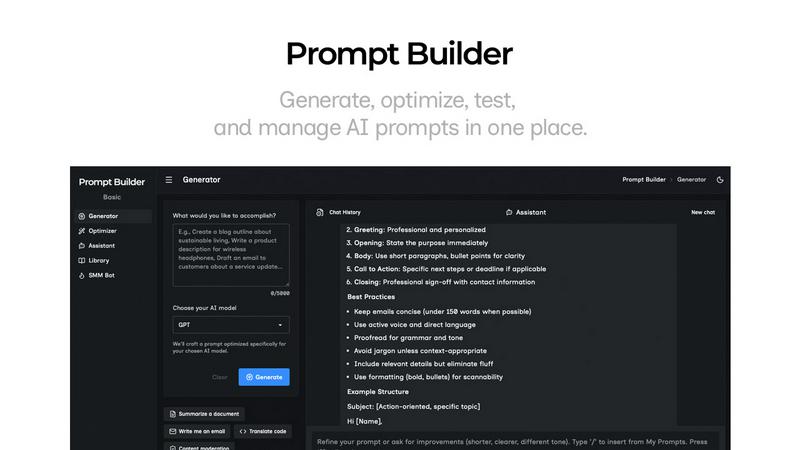
Generate, optimize, test, and manage AI prompts in one place. Turn an idea into a ready-to-use prompt in seconds.
Visual Comparison
dmaya
Prompt Builder
Overview
About dmaya
dMaya is a cutting-edge design platform expertly crafted for agencies, teams, and freelancers who prioritize the design phase before diving into coding. It transforms the traditional design workflow by allowing users to generate professional UI designs from simple text descriptions, making it an invaluable tool for those who need to visualize their concepts quickly. By engaging with an AI agent, users can create everything from SaaS dashboards to mobile app interfaces in mere seconds. The platform emphasizes collaboration, enabling teams to iterate through design changes in real-time, ensuring that feedback is seamlessly integrated into the design process. With features that allow for instant changes in colors, layouts, and typography, dMaya ensures that the design stays consistent across screens thanks to its design tokens. The process culminates in an efficient review cycle, where clients can approve designs without the need for an account, significantly reducing the time it takes to move from concept to development. Once the designs are approved, users can export them as clean HTML, CSS, and JS code, ready for any coding agent to build in their preferred frameworks, such as React or Flutter. dMaya is designed for those who value a thoughtful design-first approach, ensuring that teams can present, approve, and ship their projects with confidence and speed.
About Prompt Builder
Prompt Builder is a prompt engineering workspace for writing, testing, and saving prompts. Describe the task in plain English, and it helps you create a prompt that matches the model you choose. Start with a draft, refine it in chat, save or pin versions, then run them when you are ready. It works with GPT, Claude, Gemini, Llama, Mistral, DeepSeek, Grok, Perplexity, and more. You also get an Optimizer, an assistant for quick tests, and a library of reusable prompts and templates from the community. Turn an idea into a ready-to-use prompt in seconds. Refine it in chat, save it to your Library, and run it anytime.