Prompt Builder
Create and optimize AI prompts instantly for any model, saving time and enhancing results all in one streamlined tool.
Visit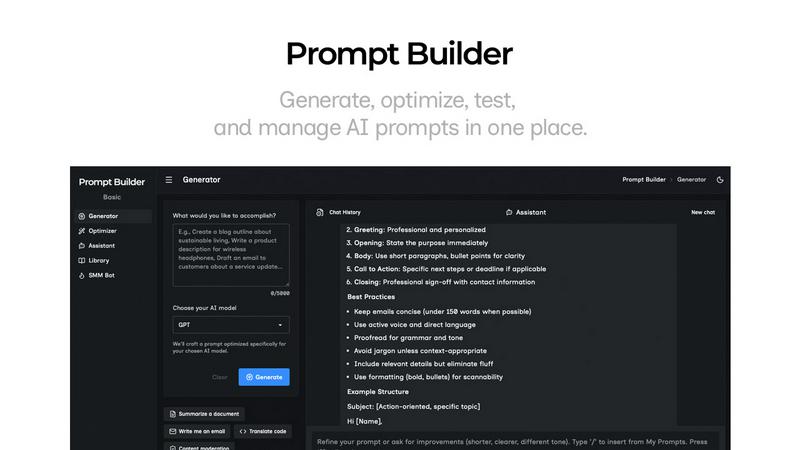
About Prompt Builder
Prompt Builder is an innovative workspace designed specifically for prompt engineering, allowing users to write, test, and save prompts seamlessly. It's ideal for individuals and teams looking to streamline their AI interactions by crafting tailored prompts that align perfectly with the specific AI models they are utilizing, such as GPT, Claude, Gemini, and many others. The platform simplifies the prompt creation process, enabling users to start with a basic draft, refine it through an intuitive chat interface, and save or pin their best versions for future use. This tool effectively reduces the time spent on prompt crafting, transforming what could take hours into a matter of seconds. With additional features like the Optimizer for enhancing existing prompts, a library of community-generated templates, and an assistant for quick testing, Prompt Builder empowers users to turn ideas into actionable prompts effortlessly, ensuring they achieve optimal results with minimal effort.
Features of Prompt Builder
Prompt Generator
The Prompt Generator feature allows users to describe their ideas in plain English, select their target AI model, and generate a professional-grade prompt optimized for that model. This feature enhances efficiency by providing a solid first draft that can be quickly refined in a dedicated chat interface.
Prompt Optimizer
With the Prompt Optimizer, users can take existing prompts and improve them significantly. This feature offers structured suggestions for clarity, constraints, output formats, and examples, helping users create clearer and more effective prompts in just seconds.
Prompt Library
The Prompt Library serves as a central repository for all prompts created by users. It allows for easy organization, search, and retrieval of prompts, enabling users to pin their favorites, categorize them by model, and even explore community-generated prompts to inspire new ideas.
Prompt Assistant
The Prompt Assistant feature lets users test their prompts without switching between different tools. Users can run their prompts, iterate on them with follow-up questions, and keep everything organized within a chat-centric workspace, making the testing and refining process smoother.
Use Cases of Prompt Builder
Content Creation
Content creators can use Prompt Builder to generate tailored prompts for writing articles, social media posts, or marketing materials. By utilizing the platform's capabilities, they can quickly produce high-quality content that resonates with their target audience.
AI Model Testing
Researchers and developers can leverage Prompt Builder to test various AI models by generating prompts specific to each model's capabilities. This enables them to assess performance variations and refine their AI systems more effectively.
Educational Purposes
Educators can utilize Prompt Builder to create engaging prompts for students, facilitating interactive lessons and assessments. The tool allows teachers to generate prompts that cater to different learning styles and educational objectives.
Social Media Management
Social media managers can generate and refine prompts for various platforms, ensuring that content is optimized for each audience. With features like platform-specific generation and tone presets, they can create posts that are ready to publish in seconds.
Frequently Asked Questions
How does Prompt Builder improve prompt generation?
Prompt Builder streamlines the process by allowing users to generate model-optimized prompts quickly. Users can refine these prompts through an interactive chat interface, which minimizes the time spent on crafting and improves the overall quality of the output.
Can I use Prompt Builder with different AI models?
Yes, Prompt Builder is designed to work with a wide array of AI models, including GPT, Claude, Gemini, Llama, and more. This flexibility allows users to generate tailored prompts for the specific model they are using.
Is there a limit to how many prompts I can save?
Prompt Builder provides a robust library feature that allows users to save, pin, and organize an extensive number of prompts. Users can categorize them for easy retrieval, ensuring that their best work is always accessible.
How does the Optimizer feature work?
The Optimizer takes existing prompts and applies structured improvements to enhance clarity, constraints, and output formats. Users can paste their prompts or select from their library, and the Optimizer provides a refined version almost instantly.