dmaya vs Refbox
Side-by-side comparison to help you choose the right tool.

dmaya
dMaya is the AI design platform that streamlines UI creation, client collaboration, and code export for teams and agencies.
Last updated: April 13, 2026

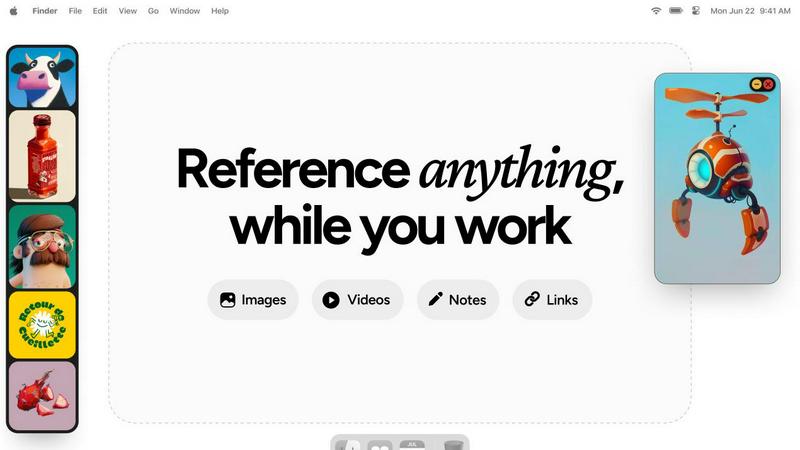
Refbox provides instant access to your images, videos, and notes, streamlining your creative workflow effortlessly.
Last updated: February 28, 2026
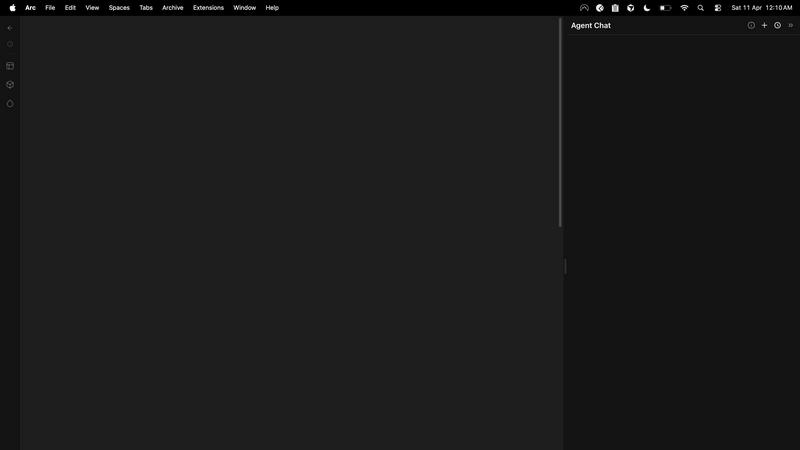
Visual Comparison
dmaya
Refbox
Feature Comparison
dmaya
AI-Powered Design Generation
dMaya leverages advanced AI to generate production-ready UI designs from plain language descriptions. This feature allows users to create complete layouts, component systems, and responsive variants in seconds, significantly speeding up the design process.
Multi-Screen Canvas
Work across multiple frames for desktop and mobile simultaneously on an infinite canvas. This feature allows designers to drag, zoom, and organize screens effortlessly, similar to Figma, but with the added advantage of AI assistance to streamline the heavy lifting involved in design.
Built for Teams & Collaboration
dMaya enhances collaboration by allowing team members to be invited to projects, share work with clients, and leave comments in real-time. Role-based access ensures that everyone can contribute effectively while maintaining control over the design process.
Client Presentation Mode
This unique feature enables users to share polished, interactive previews with clients via a single link, eliminating the need for accounts. This streamlined approach allows clients to provide feedback and approve designs directly within dMaya, enhancing communication and efficiency.
Refbox
Floating Reference Frames
Refbox's standout feature is its ability to create floating, resizable frames that can be pinned on top of any application. This ensures that your references are always visible, allowing you to immerse yourself in your work without interruptions. You can easily adjust these frames to suit your workspace, maximizing your creative potential.
Infinite Canvas
The infinite canvas feature allows users to see everything at once, enabling quick comparisons between different references. You can flip through items like a slideshow, making it easier to analyze and decide on visual elements for your project, enhancing your workflow dramatically.
Auto-Hide Functionality
Refbox offers an auto-hide feature that lets you minimize distractions while still keeping your references accessible. You can set it to only show your reference box when needed, ensuring your workspace remains uncluttered and focused on your creative tasks.
Versatile Media Support
With Refbox, you can pin a variety of media types including images, GIFs, videos, and notes. This versatility not only accommodates different creative processes but also allows you to compile a rich source of inspiration all in one place, making it easier to switch between various media types seamlessly.
Use Cases
dmaya
Rapid Prototyping for Agencies
Agencies can use dMaya to generate design concepts on the fly during discovery calls. This capability allows them to present multiple design directions to stakeholders in a fraction of the usual time, making pitches more dynamic and impactful.
Streamlined Design Approval for Product Teams
Product teams can leverage dMaya to explore UI directions before committing to engineering resources. By collaborating in a single workspace, they can ensure that design, product, and engineering are aligned, reducing the chances of miscommunication.
Efficient Client Communication for Freelancers
Freelancers can take on more projects without extending their working hours by using dMaya. The platform enables them to present work quickly and iteratively, allowing for rapid feedback and approval from clients.
Visualizing Concepts for Startups
Startups can utilize dMaya to visualize their app or service concepts before investing heavily in development. This approach allows them to refine their ideas and get stakeholder buy-in, ensuring a more focused and effective development phase.
Refbox
Graphic Design Projects
Graphic designers can utilize Refbox to keep their inspiration images, color palettes, and typography samples visible while working on projects. This constant access enables faster decision-making, ultimately resulting in a more streamlined design process.
UI Development
For UI developers, Refbox serves as an invaluable tool to keep design references, style guides, and user experience research at hand. This ensures that developers can create more cohesive and user-friendly interfaces without the hassle of toggling between multiple tabs or applications.
Illustration Work
Illustrators can benefit from Refbox by pinning sketches, color references, and inspiration boards directly on their workspace. This allows them to maintain focus and creativity, ensuring that they can reference and adapt their work dynamically as they illustrate.
Animation and Motion Graphics
Animators can utilize Refbox to keep their reference videos and storyboards visible while they work on scenes. This access to reference materials can significantly enhance the quality and fluidity of animations, allowing for a more efficient workflow.
Overview
About dmaya
dMaya is a cutting-edge design platform expertly crafted for agencies, teams, and freelancers who prioritize the design phase before diving into coding. It transforms the traditional design workflow by allowing users to generate professional UI designs from simple text descriptions, making it an invaluable tool for those who need to visualize their concepts quickly. By engaging with an AI agent, users can create everything from SaaS dashboards to mobile app interfaces in mere seconds. The platform emphasizes collaboration, enabling teams to iterate through design changes in real-time, ensuring that feedback is seamlessly integrated into the design process. With features that allow for instant changes in colors, layouts, and typography, dMaya ensures that the design stays consistent across screens thanks to its design tokens. The process culminates in an efficient review cycle, where clients can approve designs without the need for an account, significantly reducing the time it takes to move from concept to development. Once the designs are approved, users can export them as clean HTML, CSS, and JS code, ready for any coding agent to build in their preferred frameworks, such as React or Flutter. dMaya is designed for those who value a thoughtful design-first approach, ensuring that teams can present, approve, and ship their projects with confidence and speed.
About Refbox
Refbox is a groundbreaking floating reference application specifically designed for creatives who thrive on visual inspiration. Whether you're sketching, designing, animating, or modeling, Refbox keeps your sources of inspiration visible and easily accessible, allowing for a seamless creative workflow. Say goodbye to the frustration of constant window switching; with Refbox, users can pin images, GIFs, videos, and notes in resizable, always-on-top frames that stay above all other windows. This means that whether you are a graphic designer, UI developer, photographer, or animator, your references are just a glance away. Refbox empowers professionals across various creative fields by enabling them to compile their references into collections, thus enhancing efficiency and elevating the creative process. By ensuring inspiration is readily accessible, Refbox transforms how creatives work, making it an essential tool for anyone who values both creativity and productivity.
Frequently Asked Questions
dmaya FAQ
How does dMaya ensure design consistency across screens?
dMaya uses design tokens to maintain consistency across all screens automatically. This means that any changes made to design elements will reflect consistently throughout the project, reducing the risk of discrepancies.
Can I collaborate with my team in real-time using dMaya?
Absolutely! dMaya is built for collaboration, allowing multiple team members to work together in real-time. You can invite colleagues, share projects, leave comments, and iterate on designs collectively.
What frameworks can I export my designs to?
Once your designs are approved, dMaya allows you to export them as clean HTML, CSS, and JS code. You can then hand this code to coding agents like Claude Code or Cursor for integration into frameworks such as React, Next.js, or Flutter.
Is there a need for clients to create an account to provide feedback?
No, dMaya allows clients to review and provide feedback on designs without needing to create an account. This feature simplifies the review process, enabling quicker iterations and approvals.
Refbox FAQ
What platforms does Refbox support?
Refbox is designed to work across multiple platforms, making it compatible with various operating systems. This ensures that creatives can use it regardless of their preferred device.
Can I collaborate with others using Refbox?
Yes, Refbox allows users to share their collections, making it easy for teams to collaborate. You can compile and share references with colleagues or clients, enhancing collaborative efforts.
Is there a mobile version of Refbox?
Currently, Refbox is primarily focused on desktop applications to provide the best experience for creatives. However, future mobile compatibility may be considered based on user demand.
What types of media can I pin in Refbox?
Refbox supports a wide range of media types, including images, GIFs, videos, and text notes. This versatility allows users to gather diverse sources of inspiration and keep them organized in one place.
Alternatives
dmaya Alternatives
dMaya is an innovative AI vibe design platform tailored for agencies, teams, and freelancers who need to craft visually appealing designs before diving into coding. This platform empowers users to engage directly with an AI agent, transforming text descriptions into polished UI designs in mere seconds. With its emphasis on design iteration and client collaboration, dMaya streamlines the process of turning ideas into actionable designs, offering a vital step that many AI tools overlook. Users often seek alternatives to dMaya for various reasons, including pricing concerns, specific feature requirements, or compatibility with different platforms. When searching for an alternative design tool, it’s essential to consider factors such as ease of use, the ability to facilitate team collaboration, the quality of generated designs, and the flexibility of exporting options. Ensuring that the chosen platform aligns with your workflow and meets your design needs is crucial for a seamless experience.
Refbox Alternatives
Refbox is a groundbreaking floating reference application designed for creative professionals who rely on visual inspiration. It allows users to pin images, videos, and notes in resizable frames that stay visible while they work, thereby reducing distractions and enhancing productivity. This innovative tool caters to a variety of fields such as graphic design, photography, and animation, making it an essential resource for anyone looking to streamline their creative process. Users often seek alternatives to Refbox for various reasons, including pricing, specific features, or compatibility with their operating systems. Some may find that they need a different interface or additional functionalities to better suit their workflow. When searching for an alternative, it's crucial to consider aspects such as usability, the variety of media supported, organizational features, and how well it integrates with other tools you may already be using.