Dreamflow vs PUNKU.AI
Side-by-side comparison to help you choose the right tool.

Dreamflow
Dreamflow is an AI-powered visual builder that transforms your app ideas into responsive, production-ready applications.
Last updated: March 1, 2026

PUNKU.AI
PUNKU.AI builds powerful AI automations for you in plain English, no coding required.
Last updated: February 28, 2026
Visual Comparison
Dreamflow
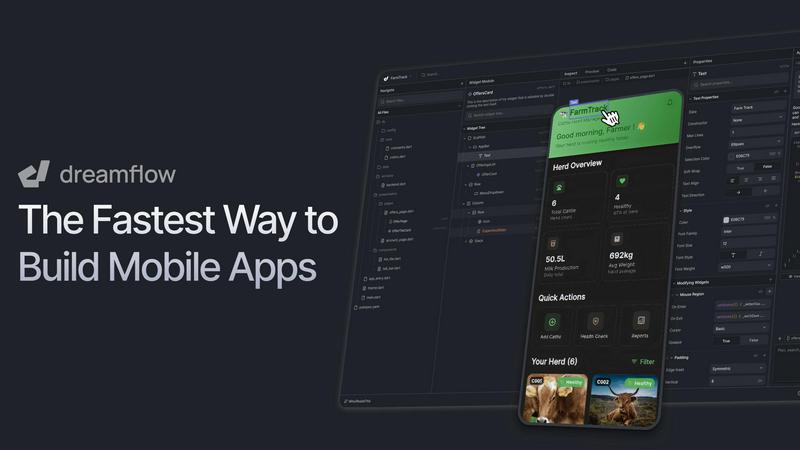
PUNKU.AI

Feature Comparison
Dreamflow
Tri-Surface Editing
Dreamflow's tri-surface editing allows users to switch effortlessly between AI prompts, a visual design canvas, and full Flutter code. This seamless integration ensures that any changes made in one area are instantly reflected across all surfaces, promoting an efficient and fluid development workflow.
AI-Powered Generation
With context-aware generation, Dreamflow employs intelligent AI that understands user needs and best practices. This feature helps scaffold app features accurately and efficiently, allowing users to focus on creativity and innovation without getting bogged down in technicalities.
Cross-Platform Development
Dreamflow empowers users to build robust and responsive applications that adapt seamlessly to various device sizes. Utilizing the power of Flutter, users can deploy their apps to the App Store, Play Store, and the web with just a few clicks, simplifying the launch process.
Backend Integrations
The platform comes with built-in integrations for popular backend services like Firebase and Supabase. This capability allows users to create full-stack applications from the ground up, ensuring scalability and efficiency from day one.
PUNKU.AI
Plain English Automation Builder
This is the game-changer. Instead of learning a new software language, you simply tell PUNKU.AI what you need. Typing something like "Create a customer service chatbot that connects with our booking system and Gmail" is enough to start the build process. The AI interprets your intent, asks clarifying questions, and constructs the underlying automation for you. It democratizes powerful workflow creation, putting the power directly in the hands of the people who understand the problem best.
Visual Node Graph for Oversight
Once your automation is built, you're not left in the dark. PUNKU.AI provides a clear, visual node graph that maps out every step of your AI agent's process. This transparency is crucial for trust and optimization. You can see exactly where data is pulled from, what logic is applied, and where outputs are sent. It offers the control of a developer tool with the accessibility of a consumer app, a combination I find exceptionally well-executed.
Vast Integration Library (3,000+ Apps)
An automation tool is only as good as its connections. PUNKU.AI shines here with native integration support for a massive library of over 3,000 applications. Whether it's core communication tools like Slack and Microsoft Teams, productivity suites like Google Workspace and Notion, or specialized CRM and support software, chances are it connects. This ensures your AI agents can work across your entire digital ecosystem without forcing disruptive changes.
Proactive Error Monitoring & Improvement Suggestions
This feature elevates PUNKU.AI from a setup tool to a true management platform. Your automations are actively monitored for failures or bottlenecks. More impressively, the platform analyzes key performance indicators and proactively suggests improvements to your agents. It’s like having an expert systems engineer constantly fine-tuning your workflows for peak efficiency and reliability, which is a massive value-add for any team.
Use Cases
Dreamflow
Rapid Prototyping
Entrepreneurs can leverage Dreamflow to quickly turn their app ideas into functional prototypes. With the platform's AI-driven features and intuitive design tools, users can iterate on their concepts in real-time, significantly reducing the time to market.
MVP Development
Startups looking to validate their business ideas can utilize Dreamflow to build Minimum Viable Products (MVPs) efficiently. By using the tri-surface editing, they can refine their applications based on user feedback, making adjustments swiftly before a full-scale launch.
App Enhancements
Existing applications can benefit from Dreamflow's features, allowing developers to enhance functionality or redesign aspects of their apps without starting from scratch. The platform's integration capabilities make it easier to incorporate new backend services and features.
Collaborative Projects
Teams can use Dreamflow for collaborative app development, where multiple users can work together in real-time, making it ideal for remote teams. The synchronization across AI, design, and code ensures that all team members are on the same page, fostering better communication and project management.
PUNKU.AI
24/7 Customer Service Chatbot
Deploy an AI agent to handle common customer inquiries around the clock. It can connect to your knowledge base, booking system, and email to answer FAQs, check availability, and even draft personalized response emails. This instantly reduces ticket volume for your human team, allowing them to focus on complex, high-value support issues that truly require a personal touch.
Automated Lead Nurturing & Sales Follow-ups
Transform your lead management by creating an AI sales agent. It can qualify leads from your website, send personalized follow-up sequences via email, update your CRM, and notify your sales team on Slack when a hot lead is ready for a human conversation. This ensures no lead falls through the cracks and helps move prospects smoothly through your funnel.
Cross-Platform Social Media & Marketing Campaigns
Streamline your marketing efforts with agents that handle scheduling, posting, and basic engagement. An agent can be instructed to draft posts, publish them across multiple platforms at optimal times, and even analyze engagement metrics to report back. You maintain strategic control while offloading the repetitive execution and calendar management.
Internal Operations & Task Coordination
Automate the internal glue that holds teams together. Create agents to sync calendars across departments, coordinate task assignments from project management tools to individual team members, send reminders for deadlines, and compile daily or weekly status reports. This use case is a personal favorite for eliminating meeting overhead and keeping projects moving forward autonomously.
Overview
About Dreamflow
Dreamflow is a revolutionary platform designed to simplify mobile app development for developers and creators alike, enabling them to create applications with minimal hassle. It caters to a diverse audience, from solo entrepreneurs to large enterprises, providing powerful tools that facilitate the creation of production-ready mobile applications ready for deployment across various platforms. The standout feature of Dreamflow is its innovative tri-surface editing capability, which synchronizes AI prompts, a visual design canvas, and full Flutter code. This unique approach allows users to brainstorm ideas using AI, refine them through an intuitive drag-and-drop interface, and ultimately fine-tune the code for complete control over the final product. Dreamflow streamlines the app development process, ensuring flexibility, scalability, and full ownership, whether for launching a new startup or enhancing existing applications.
About PUNKU.AI
Let's cut to the chase: the promise of AI automation has been a frustrating mess of complex, code-heavy platforms or opaque "black box" solutions. PUNKU.AI is the breath of fresh air we've been waiting for. This platform is built on a brilliantly simple premise: you describe what you want to automate in plain English, and it builds the AI agent to do it. No coding, no wrestling with cryptic workflow diagrams. It's designed for the doers—the business owners, project managers, marketing teams, and support leaders who are tired of drowning in repetitive digital busywork. The core value proposition is unparalleled clarity and control. Unlike other tools that feel like magic tricks you can't understand, PUNKU.AI lets you visualize your automations in an intuitive node graph, so you actually see and comprehend the process. With seamless connections to over 3,000 apps like Gmail, Slack, and Notion, it slots right into your existing stack. Plus, it doesn't just set and forget; it actively monitors for errors and suggests improvements. For over 200 businesses worldwide, it's become the trusted engine that handles the boring stuff, freeing them to focus on strategy and growth.
Frequently Asked Questions
Dreamflow FAQ
What types of applications can I build with Dreamflow?
Dreamflow is versatile and allows you to create a wide range of mobile applications, from simple personal projects to complex enterprise solutions. The platform's flexibility supports various use cases, making it suitable for almost any app idea.
Is Dreamflow suitable for beginners?
Absolutely! Dreamflow is designed with user-friendliness in mind. Its AI-powered features and visual design tools make it accessible even for those with little to no coding experience, empowering beginners to create quality applications.
Can I export my projects from Dreamflow?
Yes, Dreamflow allows users to export their full Flutter projects. This feature ensures that developers have full control over their code and can make further customizations as needed outside the platform.
What support options are available for Dreamflow users?
Dreamflow provides various support resources, including documentation, video tutorials, and a community forum. Additionally, enterprise users can access dedicated support and onboarding engagement to ensure a smooth development experience.
PUNKU.AI FAQ
Do I need technical knowledge to use PUNKU.AI?
Absolutely not. This is the core philosophy of the platform. You interact with PUNKU.AI entirely in plain English. Describe the task you want to automate as you would to a colleague (e.g., "When a new form is submitted, send a confirmation email and add the details to our calendar"). The AI handles all the technical setup, logic, and connections. No coding or complex workflow design is required.
How long does it take to get started?
You can go from an idea to a live automation in minutes. The process is incredibly fast: describe your agent, connect the necessary apps (which is usually just a few clicks with OAuth), and let the AI build it. Using one of their 100+ pre-built templates gets you up and running even faster—you can have a functional customer service chatbot or lead gen bot operational in under 10 minutes.
How secure is my data on PUNKU.AI?
Based on their documentation, PUNKU.AI takes security seriously. Connections to your apps (like Gmail, Slack, etc.) use secure OAuth protocols, meaning your login credentials are not stored by PUNKU.AI. The platform acts as a secure conduit, following the permissions you set. It's always advisable to review a company's specific Privacy Policy and security whitepapers, but the use of standard, secure connection methods is a strong positive indicator.
Can I try it before committing?
Yes, PUNKU.AI offers a "Get Started Free" option. This allows you to instantly explore the platform, test the plain-English builder, and likely create a simple automation without entering credit card details. It's the best way to experience the transformative simplicity of the tool firsthand and see if it fits your workflow before any financial commitment.
Alternatives
Dreamflow Alternatives
Dreamflow is a cutting-edge visual AI builder that seamlessly integrates design and code, enabling users to develop mobile applications effortlessly across a multitude of devices. As a versatile platform, it caters to a diverse audience, from independent entrepreneurs to large enterprises, by providing the necessary tools to create production-ready apps without the complexities of traditional development methods. However, users often seek alternatives to Dreamflow for various reasons, including pricing concerns, specific feature requirements, or compatibility with different platforms. When exploring alternatives, it's crucial to consider factors such as ease of use, flexibility in design and coding, deployment capabilities, and the level of support offered. Finding a platform that aligns with your unique development needs can significantly enhance your app-building experience.
PUNKU.AI Alternatives
PUNKU.AI is a standout in the no-code automation space, designed to turn your workflow ideas into reality using plain English. It’s built for those who want to automate tasks without getting tangled in code, offering a clear visual graph and deep integrations to keep everything running smoothly. People often search for alternatives for a few key reasons. Budget is a big one, as pricing structures can vary widely. Others might need a specific integration that’s not available, or they may prefer a different interface style, like a more template-heavy approach versus PUNKU.AI’s descriptive, build-from-scratch model. When evaluating other platforms, focus on what matters most for your use case. Consider the depth of API connections, the learning curve, and how much transparency and control you want over your automations. The best tool is the one that disappears into your workflow, handling the busywork so you don't have to.