Dubvid vs Seedance 2.0
Side-by-side comparison to help you choose the right tool.

Dubvid
Dubvid dubs your audio and video into multiple languages with natural voices and optional lip-sync in minutes.
Last updated: February 27, 2026

Seedance 2.0
Seedance 2.0 transforms text and images into stunning, high-quality videos with seamless motion and cinematic detail.
Last updated: February 28, 2026
Visual Comparison
Dubvid
Seedance 2.0

Feature Comparison
Dubvid
Seamless Upload Process
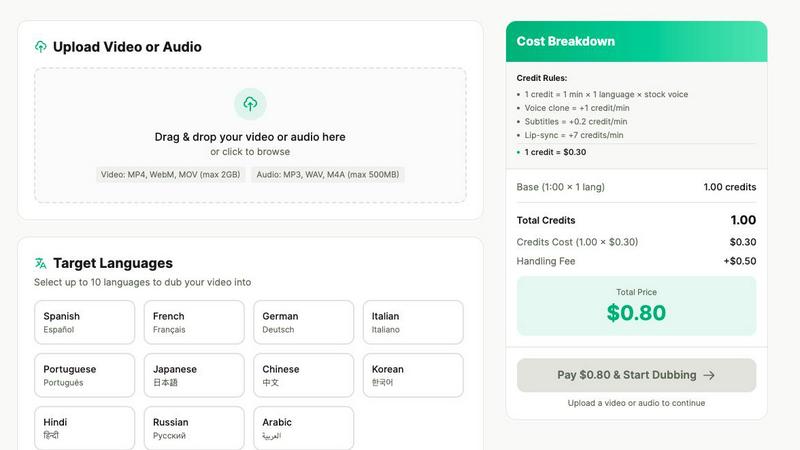
Dubvid offers a straightforward upload interface that supports various video formats, including MP4, MOV, and WebM. Users can simply drag and drop their files, making the initial step quick and hassle-free.
AI-Powered Voice Options
Users can choose from a range of natural AI voices or even opt to clone their own voice for a personalized touch. This feature ensures that the dubbed audio maintains the original's characteristics, making the final product feel authentic.
Flexible Language Selection
Dubvid supports over 10 languages, allowing users to select multiple target languages for their videos. This feature is crucial for content creators who want to reach a wider audience across different regions and demographics.
Optional Lip-Sync Capability
For content that requires a higher level of realism, Dubvid offers an optional lip-sync feature. This enhances the viewing experience by matching the dubbed audio with the speaker's mouth movements, making it ideal for talking-head videos and presentations.
Seedance 2.0
Text-to-Video
Seedance 2.0 allows users to convert a single sentence into a fully realized cinematic scene. The model generates coherent motion that maintains continuity throughout the video, making it perfect for storytelling and marketing narratives.
Image-to-Video
This feature enables users to take reference images and transform them into animated videos. By guiding composition, identity, and visual style, it allows for a personalized touch in video creation, appealing especially to artists and designers.
Integrated Audio Generation
The Pro version of Seedance 2.0 seamlessly generates synchronized audio alongside video in a single pass. This includes sound effects, background music, speech synthesis, and multilingual lip-sync, simplifying the video creation process and enhancing the overall experience.
Physics-Aware Motion
Seedance 2.0 excels in simulating realistic physical dynamics, such as cloth movement, water splashes, and fire effects. This attention to detail elevates the realism of generated videos, making them visually stunning and immersive.
Use Cases
Dubvid
Expanding YouTube Reach
YouTube creators can leverage Dubvid to dub their videos into multiple languages, significantly increasing their potential audience. This feature allows them to tap into new markets and engage viewers who may not speak the original language.
Localizing Educational Content
Educators can utilize Dubvid to translate their online courses and tutorials for global learners. This capability ensures that valuable knowledge is accessible to non-English speakers, promoting inclusivity in education.
Enhancing Customer Support
Businesses can create localized walkthroughs and support videos using Dubvid, reducing the volume of customer support tickets. By providing help in multiple languages, companies can improve user experience and customer satisfaction.
Dubbing Podcasts and Interviews
Podcasters can easily release episodes in various languages without the need for extensive production efforts. Dubvid streamlines the process, allowing creators to focus on content while reaching a broader audience.
Seedance 2.0
Marketing Campaigns
Businesses can utilize Seedance 2.0 to create engaging promotional videos that capture attention through high-quality visuals and coherent narratives. This tool streamlines the video production process, allowing for rapid content generation.
Educational Content
Educators can develop instructional videos that visually demonstrate concepts using both text and imagery. This feature enhances learning experiences, making complex ideas easier to grasp through dynamic visuals.
Social Media Content Creation
Content creators can leverage Seedance 2.0 to produce captivating video snippets for platforms like Instagram and TikTok. The ability to generate quick, high-quality videos helps maintain audience engagement in a fast-paced digital environment.
Film and Animation Projects
Filmmakers and animators can utilize the platform to create storyboards or rough cuts from scripts and images. The ability to visualize scenes quickly allows for better planning and execution in larger production projects.
Overview
About Dubvid
Dubvid is an innovative AI-powered platform that simplifies the process of video and audio dubbing, making it accessible for creators, businesses, and brands looking to engage with a global audience. By allowing users to upload their original videos and select from a variety of target languages, Dubvid automatically translates and recreates voices, skillfully preserving the natural tone, pacing, and emotion of the original content. This groundbreaking technology removes the need for traditional studios, voice actors, or complicated editing workflows, democratizing the dubbing process for everyone. Whether you are a YouTuber aiming to broaden your reach, an educator wishing to share lessons on a global scale, or a marketing team looking to quickly localize content, Dubvid facilitates international content scaling in mere minutes rather than weeks. With support for over 10 languages, it effectively bridges language barriers and allows users to connect with diverse audiences effortlessly.
About Seedance 2.0
Seedance 2.0 is an advanced AI video generation model engineered by ByteDance's Seed research team, setting a new standard in video creation technology. It builds upon the foundations of its predecessor, Seedance, offering substantial enhancements in motion coherence, physical realism, and multimodal generation capabilities that are unmatched in the industry. Designed for content creators, marketers, filmmakers, and anyone looking to produce high-quality video content quickly, Seedance 2.0 transforms simple text or images into breathtaking cinematic scenes. Its unique architecture not only facilitates text-to-video and image-to-video generation but also integrates audio seamlessly, streamlining the creative process. This makes Seedance 2.0 an invaluable tool for anyone aiming to produce professional-grade videos with ease and efficiency.
Frequently Asked Questions
Dubvid FAQ
How does Dubvid ensure the quality of the dubbed audio?
Dubvid utilizes advanced AI technology that analyzes the original audio to maintain natural tone, pacing, and emotion in the dubbed version. This results in high-quality audio that resonates with viewers.
What file formats does Dubvid support for uploads?
Dubvid supports multiple file formats, including MP4, MOV, WebM for video, and MP3, WAV for audio. This flexibility allows users to work with various media types.
Is there a limit to the video length I can dub?
While Dubvid can handle files up to 500MB, the actual dubbing duration is flexible. Users can dub videos of varying lengths according to their needs, with pricing based on the length of the video and the languages selected.
Can I try Dubvid for free?
Yes, Dubvid offers a free trial that includes two credits, allowing users to dub up to 60 seconds of content. This trial provides a risk-free opportunity to explore the platform before committing to any payment.
Seedance 2.0 FAQ
What types of videos can I create with Seedance 2.0?
With Seedance 2.0, you can create a variety of videos including promotional content, educational videos, social media clips, and even complex narratives for film projects, all with high production quality.
How does the audio generation feature work?
The integrated audio generation feature in the Pro version creates synchronized audio tracks with the video. This includes background music, sound effects, and speech, all generated in one go, eliminating the need for separate audio editing.
Is Seedance 2.0 suitable for beginners?
Absolutely! Seedance 2.0 is designed to be user-friendly, allowing beginners to easily create professional-quality videos without requiring extensive technical knowledge or experience in video production.
Can I use my own images in the video generation process?
Yes, Seedance 2.0 allows users to upload their own images as references. This feature helps guide the composition and visual style of the generated videos, making it highly customizable for individual projects.
Alternatives
Dubvid Alternatives
Dubvid is a cutting-edge AI-driven platform designed for video and audio dubbing, enabling users to effortlessly translate their content into multiple languages with natural-sounding voices and optional lip-syncing. This tool falls within the content creation category, appealing to a broad range of creators, educators, and marketers looking to reach global audiences. Users often seek alternatives to Dubvid for various reasons, such as pricing structures, specific feature sets, or compatibility with different platforms. When selecting an alternative, it's essential to consider factors like the quality of voice synthesis, the range of supported languages, and the ease of use in terms of uploading and managing content. Evaluating these aspects will help ensure that you find a dubbing solution that meets your specific needs and enhances your content creation process.
Seedance 2.0 Alternatives
Seedance 2.0 is an advanced AI video generation model developed by ByteDance's Seed research team, designed to create high-quality videos from text or images. With its impressive capabilities, including coherent motion and stable frames, it has positioned itself as a leader in the video generation category. As users explore video creation tools, they often seek alternatives due to various factors such as pricing, specific feature sets, or compatibility with different platforms. When considering an alternative to Seedance 2.0, it's essential to evaluate factors like ease of use, the quality of output, the range of customization options, and whether it meets your particular project needs. Understanding the strengths and limitations of different tools can help you find a solution tailored to your requirements, ensuring that you can achieve your creative vision without compromise.