
Fieldtics vs PDF Compiler
Side-by-side comparison to help you choose the right tool.

Fieldtics
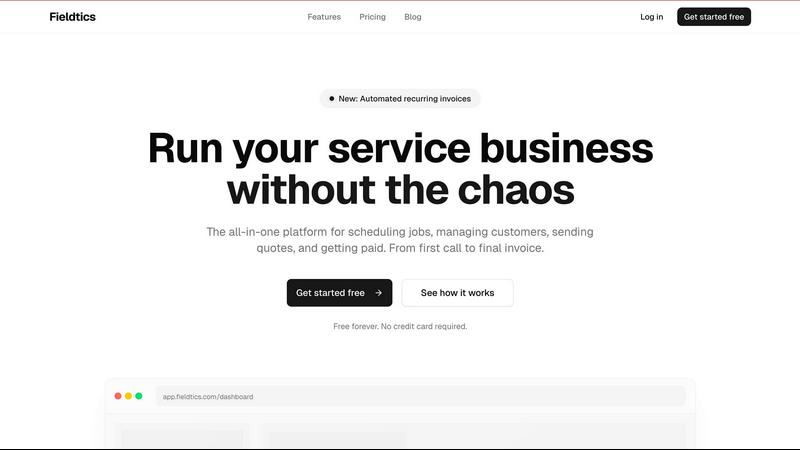
Fieldtics is my top pick for service businesses to effortlessly schedule jobs, manage clients, and get paid faster.
Last updated: February 28, 2026

PDF Compiler
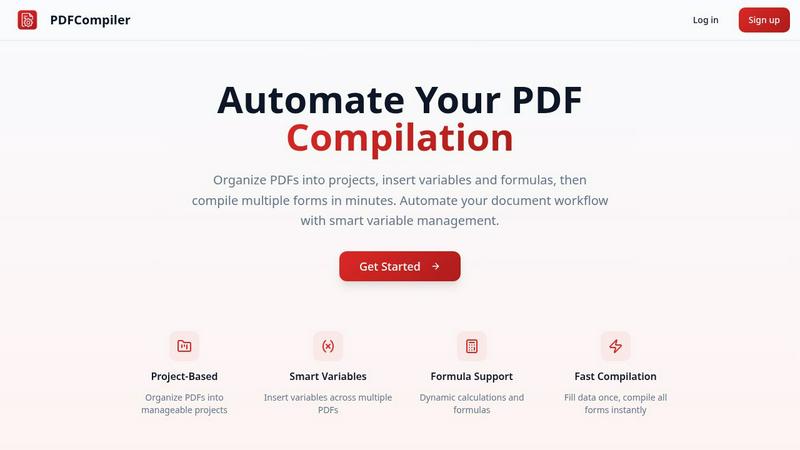
Effortlessly automate your PDF workflow by entering data once to instantly populate multiple forms with ease.
Last updated: February 28, 2026
Visual Comparison
Fieldtics
PDF Compiler
Feature Comparison
Fieldtics
Unified Job Scheduling & Dispatch
This is the beating heart of Fieldtics and, in my opinion, its killer feature. Move over, chaotic whiteboards and frantic phone calls. This smart scheduling dashboard lets you visually map out jobs, assign them to specific team members or crews, and set deadlines with drag-and-drop ease. The magic happens with real-time syncing to the mobile app; your field technicians get instant updates, and you can track their progress and location. It eliminates the "where are you?" and "what's next?" calls, creating a smooth, professional workflow that customers will notice and appreciate.
Integrated CRM & Customer Hub
Fieldtics understands that your customer relationships are your most valuable asset. Its built-in CRM centralizes all client information—contact details, full job history, communications, quotes, and invoices—into a single, searchable profile. No more digging through emails or old paperwork. This 360-degree view allows for personalized service and smarter follow-ups. You can manage leads from the first call, convert them to jobs, and nurture them into repeat customers, all within the same system that handles the operational work.
Automated Invoicing & Payments
Chasing payments is a universal time-suck for service businesses. Fieldtics tackles this head-on with a robust financial toolkit. Create and send professional, branded invoices in seconds directly from a completed job entry. The recent addition of automated recurring invoices is a game-changer for maintenance contracts or subscription services. Best of all, it offers integrated payment processing, allowing clients to pay online instantly via credit card or ACH. This dramatically speeds up your cash flow and reduces administrative overhead.
Customizable Business Workspace
Many platforms force you into a rigid, one-size-fits-all box. Fieldtics takes the opposite approach, offering impressive flexibility. You can customize your dashboard layout to highlight the metrics you care about most, apply your own branding and logos throughout the client-facing materials (quotes, invoices), and even tailor menus to match your specific workflow. This level of personalization means the software truly feels like a natural extension of your business, boosting adoption from your team.
PDF Compiler
Configurable Fields
PDF Compiler allows users to define a variety of fields in their documents, including text inputs, dates, variables, selections, and even Excel-style formulas. This flexibility ensures that all necessary data can be efficiently captured and managed, catering to the unique requirements of each project.
Minimal Input
One of the standout features of PDF Compiler is its ability to minimize user input. Users only need to enter essential data once, and the software automatically populates all linked documents with the appropriate information, adhering to the predefined configurations. This not only saves time but also reduces the likelihood of data entry errors.
Data Linking
With PDF Compiler, any updates made to a field automatically propagate across all PDFs within the project. This means that users can make changes to a single data point, and the software will ensure that all related documents reflect those updates, maintaining consistency and accuracy throughout the entire set.
Automated Workflows
The software enables users to generate complete document sets in mere minutes. With its dynamic calculations and formatting capabilities, PDF Compiler streamlines the entire process of document preparation, allowing users to compile all necessary forms instantly, ready for submission, sharing, or printing.
Use Cases
Fieldtics
Managing a Growing Cleaning Service
For a residential or commercial cleaning company, Fieldtics is a powerhouse. You can set up recurring schedules for regular clients effortlessly with the new automated invoicing feature. The mobile app allows cleaners to check job details, log task completion, and even add notes or photos (like reporting damage) on-site. The office manager can dispatch last-minute requests, track which teams are where, and ensure all supplies are accounted for, all while maintaining a pristine customer history for each property.
Streamlining an Electrical or Plumbing Operation
Trade businesses with emergency calls and complex quoting benefit immensely. Dispatchers can quickly schedule urgent jobs based on technician location and specialty. Technicians in the field can access client history (e.g., past wiring diagrams or pipe layouts), generate and send quotes on the spot using a mobile device, and accept electronic signatures. Once approved, that quote can instantly convert to a work order and later, an invoice, ensuring accuracy and professional speed.
Scaling a Landscaping or Lawn Care Business
Seasonal businesses with large crews and variable workloads need robust scheduling. Fieldtics allows you to plan weekly routes efficiently, assign multiple crew members to large projects, and track materials and equipment usage against specific jobs. The time and expense tracking feature is crucial for understanding the true profitability of each service offered, from basic mowing to full garden installations.
Centralizing Operations for a Multi-Service Contractor
A general contractor or handyman service offering diverse skills can use Fieldtics as a central command center. You can manage leads for different service lines (plumbing, carpentry, painting), schedule specialized subcontractors, and track the progress of multiple concurrent projects from a single dashboard. The integrated CRM ensures clear communication with homeowners across all touchpoints, building trust and professionalism.
PDF Compiler
Tender and Proposal Documentation
In scenarios where organizations frequently prepare tenders and proposals, PDF Compiler excels by automating the completion of these documents. By reducing repetitive data entry, teams can create professional proposals swiftly, ensuring they meet tight deadlines without compromising quality.
Financial and Administrative Reports
For finance and admin teams tasked with generating comprehensive reports, PDF Compiler simplifies the process. The ability to link data across multiple PDFs means that any adjustments made to core figures will automatically update all related reports, enhancing both accuracy and efficiency.
Multi-Document Workflows
Any workflow that involves multiple documents requiring repetitive data entry can benefit from PDF Compiler. Whether it's contracts, invoices, or project documentation, the software streamlines the compilation process, saving time and ensuring consistency across all documents.
Compliance and Regulatory Filings
Organizations that must adhere to strict compliance and regulatory standards find PDF Compiler invaluable. By automating the completion of required forms and ensuring that all data is accurate and up-to-date, businesses can minimize risks associated with manual entry and ensure adherence to legal obligations.
Overview
About Fieldtics
Let's cut to the chase: running a service business is a logistical nightmare. You're juggling phone calls, scheduling crews, chasing invoices, and trying to keep customer information from living in six different notebooks and spreadsheets. Fieldtics is the antidote to that chaos. It's not just another generic project management tool; it's a purpose-built operating system for service businesses like plumbing, electrical, landscaping, cleaning, and HVAC. The core value proposition is breathtakingly simple: it brings every single critical tool you need onto one, cohesive platform. From the first customer inquiry to the final paid invoice, Fieldtics creates a seamless workflow. What I love most is its philosophical commitment to being "comprehensive, yet straightforward." It packs serious power—smart scheduling, integrated CRM, invoicing, payment processing, time tracking—but presents it in a way that doesn't require a PhD to operate. Built for hybrid teams, its web and mobile apps ensure your office admin and your field techs are literally on the same page in real-time. The ability to customize the dashboard and branding means the software molds to your business, not the other way around. For any service business owner tired of the daily scramble, Fieldtics offers the clarity, control, and efficiency needed to stop just working in the business and start working on growing it.
About PDF Compiler
PDF Compiler is an innovative tool designed to automate the completion of PDF forms across multiple documents, significantly enhancing efficiency and accuracy in various workflows. This software caters to professionals and organizations that deal with repetitive data entry tasks, such as proposal teams, financial analysts, and administrative personnel. The primary value proposition of PDF Compiler lies in its ability to reduce manual input, ensuring consistency and minimizing the risk of errors. Unlike traditional PDF editors, PDF Compiler excels in handling data propagation, complex formulas, and field references throughout an entire document set. By streamlining the compilation process, users can focus on high-value tasks while the software takes care of the tedious details, ultimately resulting in faster project completions and enhanced productivity.
Frequently Asked Questions
Fieldtics FAQ
Is there really a free plan, and what does it include?
Yes, the Starter plan is completely free forever with no credit card required to sign up. It's a remarkably generous offer that includes core features like unlimited client profiles, job scheduling tools, the basic CRM, and access to both web and mobile apps. This makes it perfect for solopreneurs or very small teams to fully test-drive the platform's workflow and manage their operations without any financial risk.
How does Fieldtics handle integration with other software?
Fieldtics is built with connectivity in mind. It offers seamless integrations with popular accounting software, payment gateways, and other business tools you likely already use. This allows you to automate workflows—like syncing invoices to your accounting ledger or importing contacts—and centralizes data to avoid duplicate entry. The philosophy is to fit into your existing tech stack, not replace it forcibly.
Is my data safe and secure on the platform?
Fieldtics employs enterprise-grade security measures to protect your business and customer data. This includes data encryption both in transit and at rest, secure cloud infrastructure, and regular backups. They are committed to compliance with relevant data protection regulations. You can review their specific policies on security, privacy, and terms of use on their website for full details.
Can I customize invoices and quotes with my branding?
Absolutely, and this is a standout feature. Fieldtics allows you to fully brand all client-facing documents. You can upload your company logo, set your brand colors, and customize templates for quotes, invoices, and estimates. This professional touch reinforces your brand identity at every financial interaction and presents a cohesive, trustworthy image to your customers.
PDF Compiler FAQ
How does PDF Compiler ensure data accuracy?
PDF Compiler eliminates manual entry errors by allowing users to enter data only once. Changes to linked fields automatically propagate across all related documents, ensuring that all information remains consistent and accurate.
Can I customize the fields in my PDF documents?
Yes, PDF Compiler offers configurable fields, allowing users to define the types of data they need, including text, dates, variables, selections, and formulas. This customization ensures that each document meets specific project requirements.
Is there a limit to the number of PDFs I can compile at once?
No, PDF Compiler is designed to handle multiple PDFs within a single project. Users can organize their documents efficiently and compile all forms simultaneously, regardless of the number of files involved.
Is a demo available for PDF Compiler?
Absolutely! Users can try an interactive demo with sample documents to experience the automated compilation process firsthand. No account is required to see the power of PDF Compiler in action.
Alternatives
Fieldtics Alternatives
Fieldtics is a comprehensive field service management platform designed to streamline operations for service businesses. It tackles everything from scheduling and CRM to invoicing and payments, aiming to be a central hub for teams in the office and on the go. Users often explore alternatives for a variety of reasons. Perhaps Fieldtics’ pricing structure doesn't fit a lean startup budget, or maybe a specific niche feature is missing. Others might simply prefer a different user interface or need deeper integration with a particular accounting software they're locked into. When evaluating other options, focus on your non-negotiables. Consider your team size, the complexity of your jobs, and your must-have integrations. Don't just chase features; prioritize a platform that feels intuitive for your daily workflow and scales affordably as you grow.
PDF Compiler Alternatives
PDF Compiler is a powerful tool designed for automating PDF form completion, falling within the realm of business productivity and task management solutions. By allowing users to enter data just once and having it populate across multiple PDFs, PDF Compiler streamlines workflows that involve repetitive data entry, making it invaluable for tasks like tender documentation and financial reporting. However, users often seek alternatives due to various factors such as pricing, specific feature sets, or compatibility with different operating systems. When choosing an alternative, it's essential to consider aspects like ease of use, the ability to handle complex data linking, automation capabilities, and the overall scalability of the solution to meet your unique needs.