Grok Imagine vs Kling 5
Side-by-side comparison to help you choose the right tool.

Grok Imagine
Effortlessly turn your ideas into stunning AI videos with Grok Imagine's intuitive text and image-to-video features.
Last updated: February 28, 2026

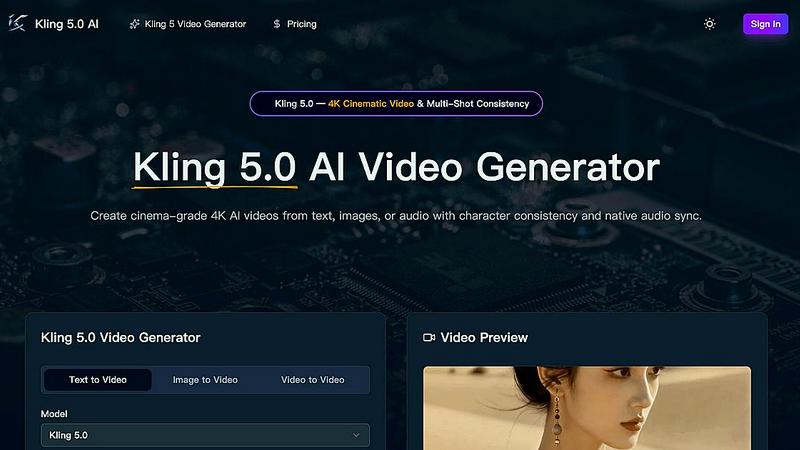
Kling 5.0 is my top pick for creating stunning, 4K cinematic AI videos with perfectly consistent characters.
Last updated: April 13, 2026
Visual Comparison
Grok Imagine

Kling 5
Feature Comparison
Grok Imagine
Fast Generation
Grok Imagine excels in rapid video production, generating 6-second videos with audio in just seconds. This remarkable speed allows users to quickly create and iterate on content, making it an invaluable resource for those working on tight deadlines or high-volume projects.
Synced Audio
One of the most impressive features of Grok Imagine is its ability to automatically generate background music and sound effects that are perfectly synced with the video. This ensures a cohesive viewing experience and saves users from the hassle of sourcing audio separately.
Image to Video
Grok Imagine's image-to-video capability enables users to transform static images into dynamic videos. This feature supports all creative modes, allowing for versatility in content creation. Users can breathe life into their visuals, making them more engaging and impactful.
Three Modes
With three distinct creative modes—Normal, Fun, and Spicy—Grok Imagine caters to a variety of creative needs. Normal mode provides clear and balanced outputs for professional use, Fun mode infuses playful animations for social media, and Spicy mode unleashes bold colors and expressive styles for those looking to push creative boundaries.
Kling 5
4K Cinematic Video Generation
This is the headline act. Kling 5 generates videos up to 15 seconds long in true 4K resolution. But it's not just about pixels; it's about the cinematic language. The AI understands complex lighting, atmospheric effects, and realistic textures, rendering outputs that have a professional, filmic look and feel right out of the gate. The difference in quality compared to standard 1080p AI video is immediately noticeable and game-changing for professional use.
Omni Subject Library for Character Consistency
This is, hands down, my favorite feature and Kling 5's killer app. The Omni Subject Library allows you to "lock" a character's facial features, proportions, and style across multiple shots and camera angles. This means you can create episodic content, product series, or brand campaigns where your protagonist looks identical in every scene. It solves the single biggest headache in AI video production and opens up possibilities for serialized storytelling.
Native Audio Generation & Multilingual Lip-Sync
Kling 5 doesn't just make silent movies. It generates synchronized audio—dialogue, ambient sound, Foley effects—alongside the video in a single pass. Even more impressively, it delivers phoneme-level lip-sync in five languages (English, Chinese, Japanese, Korean, Spanish). The audio feels native to the scene, with mouth movements that accurately match the spoken words and even convey matched emotion, adding a massive layer of authenticity.
Advanced Physics Simulation Engine
Where many AI videos fall into the "uncanny valley," Kling 5 excels with its physics engine. It simulates natural movement for water, fabric, fire, and human anatomy with startling realism. This attention to the physical behavior of materials is what separates a good AI video from a believable one. It's perfect for creating dynamic nature scenes, flowing costumes, or any scenario where realistic motion is critical to immersion.
Use Cases
Grok Imagine
Social Media Content Creation
Grok Imagine is perfect for social media influencers looking to enhance their content. The tool allows for quick video generation, enabling users to produce engaging clips that capture their audience’s attention and boost their online presence.
Marketing and Advertising
Marketers can leverage Grok Imagine to create compelling advertisements that resonate with their target audience. The platform's ability to generate high-quality videos in seconds makes it an essential tool for campaigns that require rapid turnaround times.
Educational Videos
Educators and trainers can utilize Grok Imagine to create informative and visually appealing educational videos. By converting text and images into engaging video content, they can enhance the learning experience and maintain student interest.
Creative Projects
For artists and creators exploring new avenues, Grok Imagine offers a playground for experimentation. Users can generate unique videos that reflect their personal style, using the various modes and capabilities to unleash their creativity without limits.
Kling 5
Social Media Content & Short-Form Video
For influencers, brands, and marketers, Kling 5 is a content machine. Imagine generating a week's worth of unique, eye-catching 4K clips for TikTok, Instagram Reels, or YouTube Shorts in an afternoon. Describe your concept, select the 9:16 aspect ratio, and you have professional-grade vertical video ready to post, complete with synced audio and trending cinematic styles.
Prototyping for Film & Animation
Independent filmmakers and animators can use Kling 5 to rapidly prototype scenes, test storyboards, and visualize complex shots before a single real-world camera rolls. The multi-shot consistency feature is invaluable for pre-visualizing sequences with the same character, while the cinematic camera control (zoom, pan, tilt) allows for precise shot planning.
Explainer Videos & Product Marketing
Marketing teams can create stunning product demos and explainer videos without expensive production. Upload an image of your product, and Kling 5 can animate it with elegant motion. Use character consistency to create a branded spokesperson who can explain features across a whole video series, all while maintaining a polished, corporate-friendly 4K aesthetic.
Educational Content & Concept Visualization
Educators and trainers can bring complex concepts to life. Need to show the water cycle, a historical event, or a scientific process? Describe it in text, and Kling 5 will generate a clear, engaging visual representation with realistic physics. It transforms abstract ideas into concrete, memorable video segments that enhance learning and retention.
Overview
About Grok Imagine
Grok Imagine is an innovative AI tool that revolutionizes the way creators, marketers, and video enthusiasts produce video content. By harnessing the power of advanced text-to-video and image-to-video capabilities, Grok Imagine allows users to generate stunning videos with ease and speed. This platform is ideal for social media influencers seeking to elevate their content, marketers striving to create captivating advertisements, and anyone eager to explore their creative talents. The standout feature of Grok Imagine is its user-friendly interface, complemented by the powerful xAI Aurora engine, which ensures high-quality, photorealistic results. With the ability to create videos in mere seconds, complete with synced audio, background music, and sound effects, users can quickly bring their ideas to life. The tool also supports various output ratios, making it easy to tailor videos for multiple platforms. Whether you are a seasoned professional or a budding creator, Grok Imagine is your key to unlocking unparalleled video creativity.
About Kling 5
Let's cut to the chase: Kling 5 isn't just another AI video tool; it's the one that finally makes professional-grade video creation feel like a superpower for the rest of us. Forget the clunky, uncanny-valley outputs of older models. Kling 5.0 is a revolutionary AI video generator designed to produce stunning, cinematic 4K clips from a simple text prompt, uploaded image, or even audio. What truly sets it apart, and why I'm so bullish on it, is its obsessive focus on cinematic quality and consistency. It's built for creators, marketers, filmmakers, and businesses who need broadcast-ready content without the broadcast-level budget or technical crew. The core value proposition is breathtakingly simple: describe your vision in plain language, and in seconds, you have a video with realistic physics, multi-shot character consistency, and native audio sync. This isn't about replacing human creativity; it's about turbocharging it, removing the technical barriers so you can focus on the story. For anyone serious about video content in 2024, ignoring Kling 5 would be a strategic mistake.
Frequently Asked Questions
Grok Imagine FAQ
What types of videos can I create with Grok Imagine?
Grok Imagine allows you to create videos using text-to-video and image-to-video capabilities. This means you can generate videos from written prompts or transform images into animated content.
How fast can Grok Imagine generate videos?
Grok Imagine is designed for speed, capable of generating 6-second videos complete with audio in just seconds. This rapid production time is ideal for users needing quick content turnaround.
Are there different creative modes in Grok Imagine?
Yes, Grok Imagine offers three creative modes: Normal, Fun, and Spicy. Each mode caters to different artistic needs, allowing users to choose the style that best fits their project or creative vision.
Can I customize the output ratio of my videos?
Absolutely! Grok Imagine supports multiple output ratios, including 1:1, 2:3, 3:2, 9:16, and 16:9. This flexibility enables users to create content tailored to various platforms and audience preferences.
Kling 5 FAQ
What is the maximum video length Kling 5 can generate?
Based on the provided interface, Kling 5 can generate videos with a duration setting, with the example showing a 5-second option. The descriptive text states it can create videos "up to 15 seconds" in length. This is ideal for short-form content, scenes, and clips. For longer narratives, you would sequence multiple consistent 15-second generations together.
How does the character consistency feature actually work?
The feature is powered by the Omni Subject Library. You first generate or define a character. Kling 5 then creates a unique "subject lock" for that character, storing their specific facial features, proportions, and style. In any subsequent video generation, you can reference this locked subject, and the AI will ensure the character appears identical, even across different shots, angles, and actions.
Can I use Kling 5 for commercial projects?
Absolutely. The platform is designed for professional use. The output is broadcast-ready 4K quality, making it suitable for commercial marketing, social media campaigns, paid advertising, and even elements within larger film or television projects. Always check the specific Terms of Service for the latest licensing details.
What languages are supported for lip-sync?
Kling 5.0's native audio generation supports lip-sync at the phoneme level in five key languages: English, Chinese, Japanese, Korean, and Spanish. This means the AI doesn't just overlay sound; it animates the mouth shapes to precisely match the spoken words in these languages, creating a highly realistic and synchronized result.
Alternatives
Grok Imagine Alternatives
Grok Imagine is an innovative AI tool in the realm of generative art and video production, empowering users to transform their ideas into captivating videos with ease. It excels with its intuitive text-to-video and image-to-video capabilities, making it a go-to choice for creators and marketers alike. However, many users find themselves seeking alternatives due to various factors, such as pricing structures, specific feature sets, or compatibility with particular platforms. When exploring alternatives to Grok Imagine, it is essential to consider what aspects are most important for your projects. Evaluate features like video generation speed, audio synchronization, and creative modes, as well as the overall user experience. Additionally, assess whether the alternative provides the flexibility and customization options needed for your unique video content requirements.
Kling 5 Alternatives
Kling 5.0 is a prominent player in the rapidly evolving AI video generator space. It promises to democratize video creation by turning text prompts into professional-looking clips, a category that has exploded in popularity for marketers, educators, and content creators. However, no single tool is a perfect fit for everyone, and users often explore alternatives for a variety of reasons. Common motivations include budget constraints, as premium AI video tools can be costly. Others might seek different creative styles, more granular control over the output, or specific features like advanced lip-syncing or longer video generation. Platform compatibility, such as needing a mobile app or a specific integration, also drives the search for other options. When evaluating alternatives, look beyond just the price tag. Consider the core AI model's quality and style, the flexibility of the editing suite, and the learning curve. Your ideal choice should align with your primary use case, whether it's rapid social media clips, detailed explainer videos, or something more narrative-driven.