Hush Touch | Voice-to-Text for MacOS vs TrafficClaw
Side-by-side comparison to help you choose the right tool.

Hush Touch | Voice-to-Text for MacOS
Hush Touch is the smart, private, and affordable offline voice-to-text app for Mac that learns your vocabulary.
Last updated: February 28, 2026

TrafficClaw
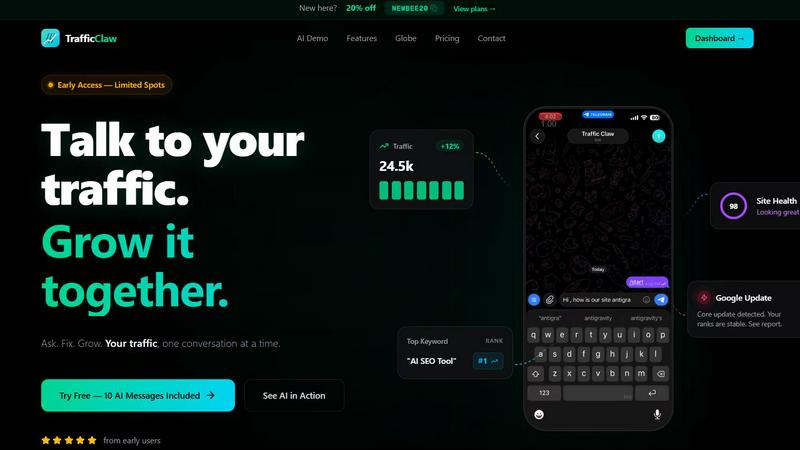
TrafficClaw is an AI analyst that talks to your SEO data to deliver actionable growth insights, not generic advice.
Last updated: April 13, 2026
Visual Comparison
Hush Touch | Voice-to-Text for MacOS

TrafficClaw
Feature Comparison
Hush Touch | Voice-to-Text for MacOS
Dual-Engine On-Device Recognition
Hush Touch doesn't rely on a single method. It intelligently blends Apple's DictationTranscriber for natural flow and punctuation with SFSpeechRecognizer to spot custom vocabulary. This dual-input is then refined with an Apple Intelligence final pass. The magic? Every step of this process happens on your Mac. This means no lag waiting for a cloud server and, crucially, your private conversations and drafts never leave your device, setting a new bar for local processing power.
Adaptive Custom Vocabulary & Learning
This is where Hush Touch moves from a simple transcriber to a smart writing assistant. You can manually add up to 500 terms—perfect for technical jargon, brand names, or medical terminology. Even better, it learns automatically. When you correct a transcription mistake, Hush Touch detects it and adds the right word to your personal vocabulary. It even creates per-app profiles, boosting relevant terms whether you're in your code editor or email client.
Smart Text Processing & Hands-Free Commands
The app actively cleans up your spoken word in real-time. It strips out filler words ("um," "like," "you know"), auto-corrects common flubs, and can format numbered lists from your speech. For true hands-free operation, use a Siri shortcut or say "Okay send message" to dispatch an email. It auto-inserts text after a pause and supports a double-tap hotkey to stop listening, making the entire dictation-to-insertion flow seamless.
Lightweight Design & Context Modes
Weighing in at just 5.5 MB, Hush Touch is a marvel of efficiency. It launches in a flash and runs without bogging down your system. To further enhance accuracy, it offers four distinct context modes: General, Email, Code, and Notes. Switching modes tailors the engine's focus, helping it better predict punctuation and vocabulary relevant to the task at hand, from writing a formal email to commenting code.
TrafficClaw
AI Chat Analyst
This is the heart of TrafficClaw and, in my opinion, its killer feature. You interact with a conversational AI that has direct, read-only access to your connected Google Analytics 4 and Search Console data. You ask natural language questions like "Why are my conversions down?" or "Show me my top underperforming pages," and it doesn't just spit out a chart. It analyzes the correlation between your traffic, keyword rankings, and user behavior to deliver a written "verdict" with evidence and concrete next steps. It feels less like using software and more like consulting a sharp, data-obsessed colleague who works at light speed.
SEO Intelligence Suite
Moving beyond basic rank tracking, TrafficClaw's SEO tools are built for proactive growth. It automatically hunts for keyword gaps your competitors rank for but you don't, alerts you to content decay (pages that are losing traffic over time), and detects keyword cannibalization—where your own pages compete against each other, confusing Google. Crucially, it includes optimization for AI search (like Gemini), helping you structure content for the next frontier of search. It turns SEO from a maintenance task into a growth engine.
Real-Time Analytics & Live Globe
Forget refreshing GA4. TrafficClaw provides a consolidated, real-time dashboard showing current visitors, traffic trends, bounce rates, and referrers. The standout is the embeddable 3D globe, which visually plots your live visitors on a world map with a cute animal alias and activity feed. It's not just eye candy; it's a powerful, immediate way to see geographic engagement and visitor flow, and you can embed it on your own site with a single line of code—no extra tracking scripts needed.
Integrated Site Audit & Content Tools
This feature closes the loop between insight and action. The built-in site auditor goes deep on page-level performance, grading Core Web Vitals and offering auto-fix suggestions for technical SEO. Then, the content tools help you execute. Need to target a discovered keyword gap? Use the AI blog writer and schema generator. Found a page that needs bolstering? The internal linking optimizer provides smart suggestions. It’s a seamless workflow from diagnosis to remedy.
Use Cases
Hush Touch | Voice-to-Text for MacOS
Drafting Long-Form Content and Reports
For writers, researchers, and students, speaking ideas is often faster than typing them. Hush Touch allows you to dictate drafts of articles, essays, or reports naturally. Its smart punctuation and paragraph formatting let you speak in complete thoughts, while the on-device privacy ensures your unpublished ideas and sensitive research data remain completely confidential throughout the creative process.
Managing Professional Communication
Tackle an overflowing inbox hands-free. Dictate emails and messages with tone-appropriate phrasing aided by the Email context mode. The ability to say "Okay send message" allows you to compose and send replies without ever touching the keyboard, perfect for when you're multitasking, on the move, or dealing with repetitive communication throughout a busy workday.
Technical and Specialized Documentation
Software engineers, doctors, lawyers, and academics finally have a dictation tool that understands their language. By learning complex terms like "Kubernetes," "metatarsophalangeal," or legal citations, Hush Touch accurately transcribes technical notes, patient observations, code comments, and research summaries that would stump generic cloud-based services, saving immense time on corrections.
Accessible and Ergonomic Computer Use
For individuals with RSI, carpal tunnel, or other conditions that make typing painful, Hush Touch provides a robust, private alternative for controlling their Mac. The fully hands-free operation via Siri integration and voice commands enables full participation in digital work and communication without strain, all maintained with the dignity of complete data privacy.
TrafficClaw
Diagnosing Sudden Traffic Drops
This is the classic, hair-pulling scenario TrafficClaw was made for. Instead of manually cross-referencing GA4 events, Search Console impressions, and Google update logs, you simply ask the AI, "Why did my traffic drop 40% on March 15th?" Within seconds, it can analyze your data and deliver a verdict like, "A core update rolled out that day. While your overall ranks are stable, you lost position 3 for your top keyword 'cloud hosting reviews' to a competitor's newer guide, causing a 12k impression drop. Recommended fix: Update your post with a more comprehensive comparison table."
Uncovering Hidden Keyword Opportunities
You're stuck thinking you've targeted all relevant keywords. TrafficClaw's SEO intelligence continuously scours your niche to find "keyword gaps"—high-potential terms your site could rank for but currently doesn't. You can ask the AI, "What are my top 5 keyword gap opportunities?" and get a list of specific, data-backed terms with search volume and difficulty, allowing you to strategically plan your next content piece or page update.
Preventing Content Cannibalization
You've written multiple blog posts on similar topics, and now they're mysteriously underperforming. TrafficClaw automatically detects when your pages are competing for the same keywords and alerts you. The AI can then advise on how to consolidate or differentiate the content, ensuring you have one strong page to rank instead of several weak ones that split authority. It solves a complex, often invisible SEO problem effortlessly.
Real-Time Campaign & Launch Monitoring
When you launch a new product, feature, or marketing campaign, you want immediate feedback. With the real-time dashboard and globe, you can watch live visitor spikes, see which countries are engaging first, and monitor referral sources the moment they happen. You can ask the AI, "How is traffic from my LinkedIn campaign today performing vs. direct traffic?" for instant, comparative analysis without waiting for data to process.
Overview
About Hush Touch | Voice-to-Text for MacOS
Let's be honest: most dictation software is a compromise. You either sacrifice privacy by sending your voice to the cloud, deal with clunky, inaccurate transcription, or get locked into a draining monthly subscription. Hush Touch is the Mac app that finally ends that compromise. This is a purpose-built, voice-to-text powerhouse that runs entirely on your Mac. It combines not one, but two of Apple's own transcription engines, then applies a final polish with Apple Intelligence—all processed locally. The result is shockingly fast, accurate, and private dictation that learns your personal vocabulary over time. At a featherlight 5.5 MB, it launches instantly and fits into your workflow without the bloat or the privacy anxiety. It's built for anyone who writes on a Mac—from professionals drafting complex emails and reports to students taking notes—and values a one-time payment over a subscription leash. Its core promise is simple: get cleaner, smarter text from your voice, with zero data ever leaving your computer.
About TrafficClaw
Let's be brutally honest: modern analytics are a mess. You've got Google Analytics 4 with its labyrinthine interface, Search Console with its pretty-but-passive graphs, and a dozen other tools that show you the "what" but never the "why." When your traffic plummets, you're left piecing together clues like a digital detective with no leads. TrafficClaw is the antidote to this frustration. It's not another dashboard to stare at; it's an AI analyst you can actually talk to. You connect your GA4 and Search Console accounts (a 30-second, read-only process), and then you just ask questions in plain English. "Why did my traffic drop last Tuesday?" "What's my top opportunity for more organic traffic?" "Is a Google update affecting me?" Instead of generic blog post advice, you get a specific, actionable verdict backed by your own live data. It's built for founders, marketers, and developers who are tired of data guesswork and want to have a direct conversation with their analytics to drive real, intelligent growth. The core promise is simple yet revolutionary: stop analyzing and start asking.
Frequently Asked Questions
Hush Touch | Voice-to-Text for MacOS FAQ
Is Hush Touch really 100% offline and private?
Yes, absolutely. This is its cornerstone feature. Every component—from the two Apple speech recognition engines to the Apple Intelligence final pass—processes your audio directly on your Mac. No audio or transcript data is ever sent to external servers. Your voice input and the resulting text never leave your computer, ensuring total privacy.
How does the vocabulary learning actually work?
Hush Touch employs adaptive learning. When you manually correct a word in the transcribed text, the app detects this correction and automatically adds the intended word to your personal vocabulary list. It also uses frequency weighting, so terms you use often in specific apps (like "diagnosis" in your notes app) become prioritized, making the engine smarter with each use.
Can I use Hush Touch completely hands-free?
You can. You can activate dictation using a Siri voice command ("Hey Siri, start touch"). Once listening, it will automatically insert the transcribed text after a short pause (roughly 2 seconds of silence). You can also use voice commands like "Okay send message" to send an email or message, and configure a hotkey to stop listening with a double-click.
What happens after the 7-day free trial?
The free trial gives you full access to all features for 7 days. After that, you need to purchase a lifetime license to continue using the app. There is no subscription. It's a single, one-time payment of $20 that grants you permanent access to the app and all its current features, with no recurring fees.
TrafficClaw FAQ
Is my Google data safe with TrafficClaw?
Absolutely. TrafficClaw uses secure, read-only Google OAuth to connect to your GA4 and Search Console. This means the tool can only view your data; it cannot edit, delete, or modify anything in your Google accounts. Your data is not sold or used to train public AI models. It remains yours, and you can revoke access at any time directly from your Google account security settings.
How is this different from ChatGPT or other AI chatbots?
Generic AI chatbots give generic advice based on public internet knowledge. TrafficClaw's AI Analyst is specialized and connected. It bases every single response on the private, live data from your specific website. When you ask "why did my traffic drop?", it's analyzing your traffic graphs, your keyword rankings, and your user behavior to give you a unique, actionable verdict, not a list of possible reasons from a blog.
What's included in the free trial?
The free trial includes 10 AI messages. This allows you to fully connect your GA4 and Search Console accounts and ask a series of substantive questions to experience the core "ask and get a verdict" functionality. You also get access to the dashboard and can explore the features to see how it would work with your real data before committing to a paid plan.
Can I use TrafficClaw on multiple websites?
Yes. During the connection process, TrafficClaw auto-detects all the GA4 properties and Search Console sites associated with your Google account. You can manage and analyze data from multiple websites within a single TrafficClaw dashboard, asking specific questions about each site. This makes it an efficient tool for agencies or developers managing several client or project sites.
Alternatives
Hush Touch | Voice-to-Text for MacOS Alternatives
Hush Touch is a standout in the niche of on-device voice-to-text software for macOS. It’s built for users who prioritize privacy, offline functionality, and a seamless, native Mac experience, leveraging Apple's own powerful transcription and intelligence engines to deliver clean, accurate dictation without ever sending your data to the cloud. People often seek alternatives for a variety of reasons. Some might be looking for a free tier or subscription model instead of a one-time purchase. Others may need cross-platform compatibility with Windows or mobile devices, or require specific integrations with certain apps that a focused tool like Hush Touch doesn't provide. The search usually comes down to balancing cost, privacy, accuracy, and workflow fit. When evaluating other options, your key considerations should be privacy policy (on-device vs. cloud processing), cost structure, accuracy in your primary language, and how well the tool integrates into your daily routine. The best choice isn't always the most feature-packed; it's the one that disappears into your workflow, letting you think out loud and get words on the screen effortlessly.
TrafficClaw Alternatives
TrafficClaw is an AI assistant for SEO and analytics, a tool that lets you ask plain-English questions about your traffic data and get actionable answers. It connects to sources like GA4 and Search Console to move beyond static graphs and provide context. This places it in the growing category of conversational analytics and AI-driven SEO platforms. People look for alternatives for various reasons. Perhaps the pricing doesn't fit a startup budget, or a specific required data source isn't supported. Some users might need deeper, more traditional reporting dashboards, while others prioritize different workflow integrations. It's a natural part of finding the right tool-to-task fit. When evaluating alternatives, focus on the core promise: actionable insight from your data. Consider the depth of data source connections, the intelligence and specificity of the AI's answers, and how well it integrates into your existing workflow. The goal is to stop guessing and start understanding.