
Customer Feedback vs Interhubz
Side-by-side comparison to help you choose the right tool.

Customer Feedback
Capture feedback, transform it into actionable insights, and close the loop with your users.

Interhubz
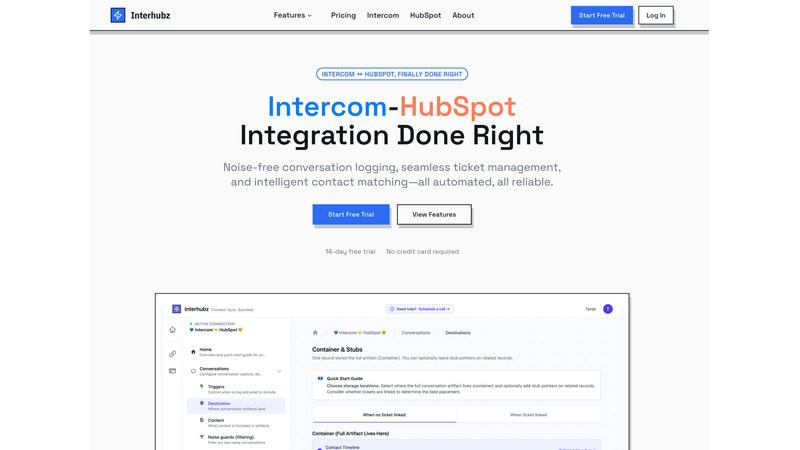
Interhubz perfectly syncs Intercom chats to HubSpot as clean, single timeline entries.
Last updated: February 28, 2026
Visual Comparison
Customer Feedback

Interhubz
Feature Comparison
Customer Feedback
Omnichannel Feedback Collection
Gone are the days of forcing users into a single, clunky feedback form. Customer Feedback lets you meet your users where they are. Embed sleek, customizable widgets directly in your web app or product. Create dedicated feedback or feature request pages. Even implement a public roadmap or "wishlist" where users can submit and vote on ideas. This flexibility ensures you capture insights at the exact moment of inspiration or frustration, leading to higher-quality, contextual feedback rather than forced, after-the-fact surveys.
AI-Powered Insight Analysis
This is the game-changer. The tool's AI doesn't just collect comments; it actively analyzes them to identify patterns, trends, and urgent sentiments. Imagine it sifting through hundreds of comments to tell you, "23 users this week mentioned the checkout button is confusing, and sentiment is predominantly negative." It stops you from drowning in qualitative data by automatically categorizing, summarizing, and highlighting what truly matters. You move from reading every single comment to reviewing intelligent summaries, saving countless hours and spotting critical issues faster.
Transparent Update & Roadmap Sharing
Collecting feedback is only half the battle; the magic is in closing the loop. Customer Feedback makes it dead simple to share updates. When you release a feature based on user requests, you can instantly notify everyone who voted or commented on that idea. This public acknowledgment builds incredible trust and loyalty. It transforms users from passive critics into active co-creators, keeping them hyped and connected because they see their input directly shaping the product's future.
Centralized Feedback Hub
This feature is the backbone that makes everything else possible. All feedback, regardless of its source—widget, form, email import, or wishlist—flows into a single, organized dashboard. You can tag, prioritize, assign to team members, and track the status of every piece of feedback from "Under Review" to "Planned" to "Launched." This eliminates the chaos of scattered inputs and creates a single source of truth for your entire team, ensuring no valuable suggestion ever gets lost in the shuffle again.
Interhubz
One Rich Note Per Conversation
This is the flagship feature that makes everything else possible. Instead of the typical deluge of individual message logs, tag changes, and assignment notes, Interhubz consolidates an entire Intercom conversation into a single, beautifully formatted HubSpot timeline entry. It includes the full transcript, a summary, any file attachments, and a direct link back to the conversation in Intercom. This transforms your CRM from a cluttered log into a readable, actionable record of customer interactions.
Intelligent Contact & Company Matching
Duplicate contacts are a CRM killer, and basic integrations that match only by email are notoriously fragile. Interhubz employs advanced algorithms that match contacts using email, phone number, and even custom unique properties you define. This multi-layered approach ensures contacts are matched accurately the first time, maintaining a single source of truth in HubSpot and keeping your data pristine without any manual de-duplication work.
Bi-Directional Ticket Spine
This feature finally closes the loop between support and sales. With Interhubz's embedded inbox app, you can create a HubSpot ticket directly from an Intercom conversation with one click. Once linked, the ticket's stage and owner sync in real-time both ways. If a rep updates the stage in HubSpot, it reflects in Intercom, and vice-versa. This eliminates the status drift and manual update hell that plagues other setups, creating a truly unified workflow.
Configurable Noise Guards
A clean CRM is a useful CRM. Interhubz understands that not every automated bot response or spam message deserves a permanent home in HubSpot. Its intelligent noise guards allow you to set filters—like minimum message counts, conversation duration, or excluding auto-closed chats—to prevent low-value interactions from ever syncing. This automated curation ensures only meaningful customer conversations populate your sales team's timeline.
Use Cases
Customer Feedback
Product-Led Growth for SaaS Companies
For B2B or B2C SaaS teams, this tool is indispensable for driving a true product-led growth strategy. Use the embedded widget to capture in-app feedback on new features. Let users submit and vote on the next big thing via a public roadmap. Then, use the AI analysis to pinpoint exactly which improvements will deliver the most value to the most users, allowing you to prioritize a development backlog that directly translates to increased retention and expansion revenue.
Building a Loyal User Community
Turn your most vocal users into your biggest advocates. By providing a structured, visible platform for their ideas and consistently showing how that feedback leads to real changes, you foster a powerful sense of ownership and community. Announcing updates through the platform makes users feel heard and valued, dramatically increasing loyalty, reducing churn, and turning customers into a free, passionate marketing arm.
Validating New Feature Ideas
Instead of guessing what to build next, use Customer Feedback to validate demand quantitatively. Post a potential feature concept to your wishlist and let users vote. The voting data provides clear, unbiased validation (or invalidation) of your hypotheses. This data-driven approach prevents costly development mistakes and ensures you're always working on features that have proven, pre-existing demand from your user base.
Improving Customer Support & CX
Forward-thinking support teams can use this tool to identify recurring pain points before they become support ticket avalanches. Analyze feedback trends to spot a confusing UI element or a broken workflow that multiple users are hinting at. Proactively addressing these issues based on aggregated feedback reduces ticket volume, improves the overall customer experience, and positions your support as strategic rather than reactive.
Interhubz
For Support Teams Handing Off to Sales
When a support conversation reveals a sales-qualified lead (SQL), the handoff should be seamless. With Interhubz, the agent can one-click create a linked HubSpot ticket from the Intercom chat. The sales rep receives a single, rich note in the contact's timeline with the entire conversation context, understanding the lead's pain points instantly without having to ask the customer to repeat themselves.
For Customer Success Managing Renewals & Upsells
Customer Success Managers (CSMs) using HubSpot need full visibility into support history to manage accounts proactively. Interhubz provides a complete, organized record of every support interaction directly within the HubSpot contact and company records. This allows CSMs to spot trends, identify at-risk accounts, and find upsell opportunities based on actual usage and issues, all without ever leaving their primary CRM.
For Operations Teams Ensuring Data Hygiene
For ops professionals tasked with maintaining CRM integrity, Interhubz is a lifesaver. It automates reliable contact matching to prevent duplicates and uses noise guards to filter out system noise. This drastically reduces manual data cleanup, ensures reporting accuracy, and provides a reliable, automated sync that the entire revenue team can trust.
For Executives Needing a Unified Customer View
Leaders need a clear picture of the customer journey without wading through clutter. Interhubz delivers a executive-ready timeline in HubSpot. Each conversation is a coherent story, not a series of broken fragments. This provides leadership with the clean data needed to analyze support impact on revenue, churn, and customer satisfaction effectively.
Overview
About Customer Feedback
Let's be brutally honest: most customer feedback tools are a chore. They're either glorified suggestion boxes that drown you in raw, unstructured data, or they're so complex they require a PhD to set up. Customer Feedback (yes, that's the product name, and its simplicity is a feature, not a bug) cuts through that noise. This is an all-in-one platform designed for modern product teams, founders, and community managers who actually want to listen to their users without losing their minds. Its core value proposition is a powerful trifecta: collect feedback from anywhere, understand it instantly with AI, and close the loop transparently. Instead of letting valuable insights languish in spreadsheets or disjointed Slack threads, this tool centralizes everything. It transforms the chaotic scream of the crowd into a clear, actionable roadmap. For anyone building a product in today's competitive landscape, ignoring direct user input is suicide. Customer Feedback provides the system to not just hear that input, but to truly understand and act on it, fostering a product-led growth loop that feels less like guesswork and more like a guided conversation with your market.
About Interhubz
If you run support on Intercom and sales or customer success on HubSpot, you've felt the pain. The standard integration is a mess, flooding your precious HubSpot timeline with 8+ fragmented, unreadable entries for every single conversation. It buries critical context, creates duplicate contacts, and makes ticket management a manual nightmare. Interhubz is the definitive solution, built by operators who have lived this frustration. It's not just another connector; it's an intelligent synchronization layer designed to bring order to the chaos. The core value proposition is breathtakingly simple: one clean, formatted HubSpot timeline note per Intercom conversation. This single change eliminates timeline pollution, preserves full context with transcripts and attachments, and enables seamless, bi-directional ticket management. It's built for teams that demand reliability and clarity, automating the sync so your people can focus on the customer, not on juggling tabs and cleaning data. After testing countless integrations, Interhubz stands out as the curated, opinionated choice for anyone serious about aligning their support and revenue operations.
Frequently Asked Questions
Customer Feedback FAQ
How does the AI analysis actually work?
The AI employs natural language processing (NLP) to scan all incoming feedback. It automatically detects common themes, groups similar comments together, and analyzes the sentiment (positive, negative, neutral) behind the words. It doesn't just count keywords; it understands context. This allows it to generate concise summaries like "Growing frustration with mobile load times" instead of just showing you 50 individual comments saying "slow." You get the insight without the manual reading.
Can I customize the feedback widgets to match my brand?
Absolutely, and you should. Customer Feedback offers extensive customization options for its widgets and forms. You can match your brand's colors, fonts, and overall aesthetic seamlessly. This is critical because a widget that looks and feels like a native part of your product increases trust and submission rates. A generic, off-the-shelf looking form can feel impersonal and reduce user engagement.
Is it suitable for a very small startup or solo founder?
In my opinion, it's one of the best tools for that very audience. As a solo founder, you have zero time to manually sift through feedback. The AI analysis acts as your first hire, doing the heavy lifting of pattern recognition. The transparent update system helps you build a loyal early user base with minimal effort. It scales from day one, providing a professional system for user input without requiring a full-time community manager.
How do you handle user privacy and data security?
This is a non-negotiable. A reputable tool like Customer Feedback should operate with strict data protection standards. This typically includes data encryption in transit and at rest, compliance with regulations like GDPR, and clear options for users to delete their data. You own your feedback data. Always review the provider's specific security page and privacy policy, but expect enterprise-grade security to be a baseline requirement for any serious tool in this category.
Interhubz FAQ
How does Interhubz handle duplicate contacts?
Interhubz uses a sophisticated, multi-property matching engine to intelligently find and link to existing HubSpot contacts. It checks against email addresses, phone numbers, and custom unique ID fields you specify. When it finds a match, it logs the conversation to that existing contact record. If no match is found, it can create a new one. This process is designed to prioritize data integrity and prevent duplicate creation automatically.
Can I filter which Intercom conversations sync to HubSpot?
Absolutely. This is the core of the Noise Guards feature. You can configure filters to exclude conversations based on criteria like being auto-closed, having only one message (often a bot), or involving specific tags. You can set minimum thresholds for message count or conversation duration to ensure only substantial, human-led interactions are logged in your CRM.
Does the ticket sync work in both directions?
Yes, and this bi-directional sync is a critical advantage. When you create a linked HubSpot ticket from Intercom, the connection is maintained. If the ticket stage or owner is updated in HubSpot, that change is reflected in the Intercom conversation. Similarly, if a support agent changes the conversation state or assignee in Intercom, the linked HubSpot ticket updates accordingly, ensuring both teams are always in sync.
How long does setup take?
One of Interhubz's strongest selling points is its simplicity. Setup is designed to take about 10 minutes. It uses one-click OAuth for both Intercom and HubSpot, so no API key management is needed. You then walk through a short configuration to set matching rules and noise guards, often using the smart defaults provided. After that, the sync begins automatically based on your triggers.