Donkey Support vs Interhubz
Side-by-side comparison to help you choose the right tool.

Donkey Support
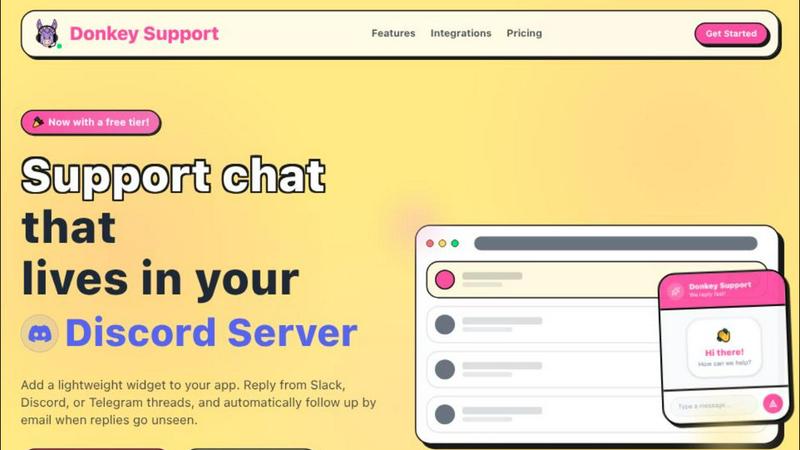
Donkey Support is my top pick for founders who need a simple, lightning-fast support chat that works right inside Slack, Discord, or Telegram.
Last updated: March 26, 2026

Interhubz
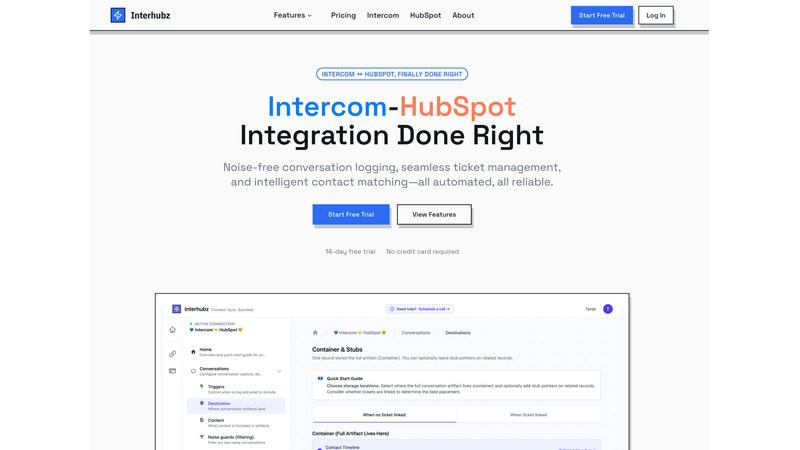
Interhubz perfectly syncs Intercom chats to HubSpot as clean, single timeline entries.
Last updated: February 28, 2026
Visual Comparison
Donkey Support
Interhubz
Feature Comparison
Donkey Support
Seamless Platform Integrations
This is the killer feature. Donkey Support doesn't ask you to live in its inbox. You connect it to your existing communication hub—be it Slack, Discord, or Telegram. Once linked, every new customer inquiry automatically spawns a dedicated thread in your chosen support channel. You can reply directly from that thread as if you're chatting with a teammate, and your response is instantly sent back to the user on your website. It turns support from a disruptive task into a natural part of your daily workflow, all without ever opening a separate app.
Customizable & Branded Widget
First impressions matter, even in support. Donkey Support gives you full control over the widget's appearance to ensure it feels like a native part of your product. You can set your company name, upload a profile picture, write custom greeting text, and, most importantly, pick primary and accent colors that perfectly match your brand's palette. This level of customization builds trust and provides a cohesive user experience from your marketing site to your support interactions.
Trusted Visitor Context & Signed Metadata
Knowing who you're talking to is crucial for effective support. The widget can pass along valuable user context like their name, email, and even custom metadata (e.g., user ID, plan tier). For added security and trust, you can implement a signed metadata token. This ensures the information your agents see in Slack or Discord is verified and hasn't been tampered with, allowing for more personalized and secure conversations from the very first message.
Automatic Missed-Reply Email Follow-Ups
Customers sometimes close the chat window before you can respond. Donkey Support has a clever safety net for this: automatic email follow-ups. If a customer misses your reply in the widget, the system can send them a branded email with your response. It even tracks the delivery status, so you know nothing slips through the cracks. This feature dramatically increases response rates and customer satisfaction without you lifting a finger.
Interhubz
One Rich Note Per Conversation
This is the flagship feature that makes everything else possible. Instead of the typical deluge of individual message logs, tag changes, and assignment notes, Interhubz consolidates an entire Intercom conversation into a single, beautifully formatted HubSpot timeline entry. It includes the full transcript, a summary, any file attachments, and a direct link back to the conversation in Intercom. This transforms your CRM from a cluttered log into a readable, actionable record of customer interactions.
Intelligent Contact & Company Matching
Duplicate contacts are a CRM killer, and basic integrations that match only by email are notoriously fragile. Interhubz employs advanced algorithms that match contacts using email, phone number, and even custom unique properties you define. This multi-layered approach ensures contacts are matched accurately the first time, maintaining a single source of truth in HubSpot and keeping your data pristine without any manual de-duplication work.
Bi-Directional Ticket Spine
This feature finally closes the loop between support and sales. With Interhubz's embedded inbox app, you can create a HubSpot ticket directly from an Intercom conversation with one click. Once linked, the ticket's stage and owner sync in real-time both ways. If a rep updates the stage in HubSpot, it reflects in Intercom, and vice-versa. This eliminates the status drift and manual update hell that plagues other setups, creating a truly unified workflow.
Configurable Noise Guards
A clean CRM is a useful CRM. Interhubz understands that not every automated bot response or spam message deserves a permanent home in HubSpot. Its intelligent noise guards allow you to set filters—like minimum message counts, conversation duration, or excluding auto-closed chats—to prevent low-value interactions from ever syncing. This automated curation ensures only meaningful customer conversations populate your sales team's timeline.
Use Cases
Donkey Support
The Solopreneur Wearing All Hats
For a founder running the entire show solo, efficiency is survival. Donkey Support is perfect because it centralizes support into the communication tool you're already using all day (like Slack). You can instantly reply to a customer query between writing code and checking analytics, with zero mental overhead from switching contexts. The simple, thread-based interface keeps conversations organized without the bloat of a full helpdesk.
Early-Stage Startup Teams
Small startup teams often share support duties informally. With Donkey Support, anyone in the connected Slack channel or Discord server can jump into a thread and help a customer. There's no need for separate logins or training on a complex ticketing system. The conversation flow is intuitive, and the shared inbox model in a familiar platform makes collaborative support effortless and transparent.
SaaS Companies with In-App Support
For product-led SaaS companies, providing immediate, contextual support within the app is key to reducing churn. Embedding the Donkey Support widget directly into the web app allows users to ask questions without leaving their workflow. Developers can pass signed user metadata, so support agents immediately see the user's plan and account details, enabling faster, more accurate resolutions right from their chat platform.
Communities & Platforms Using Discord
For projects, games, or platforms where the community and support naturally live on Discord, Donkey Support bridges the gap between the website and the server. Website visitors can get help via the widget, and those conversations become organized threads in a dedicated Discord channel. This keeps all user communication in one searchable place and leverages Discord's robust notification and role system for managing responses.
Interhubz
For Support Teams Handing Off to Sales
When a support conversation reveals a sales-qualified lead (SQL), the handoff should be seamless. With Interhubz, the agent can one-click create a linked HubSpot ticket from the Intercom chat. The sales rep receives a single, rich note in the contact's timeline with the entire conversation context, understanding the lead's pain points instantly without having to ask the customer to repeat themselves.
For Customer Success Managing Renewals & Upsells
Customer Success Managers (CSMs) using HubSpot need full visibility into support history to manage accounts proactively. Interhubz provides a complete, organized record of every support interaction directly within the HubSpot contact and company records. This allows CSMs to spot trends, identify at-risk accounts, and find upsell opportunities based on actual usage and issues, all without ever leaving their primary CRM.
For Operations Teams Ensuring Data Hygiene
For ops professionals tasked with maintaining CRM integrity, Interhubz is a lifesaver. It automates reliable contact matching to prevent duplicates and uses noise guards to filter out system noise. This drastically reduces manual data cleanup, ensures reporting accuracy, and provides a reliable, automated sync that the entire revenue team can trust.
For Executives Needing a Unified Customer View
Leaders need a clear picture of the customer journey without wading through clutter. Interhubz delivers a executive-ready timeline in HubSpot. Each conversation is a coherent story, not a series of broken fragments. This provides leadership with the clean data needed to analyze support impact on revenue, churn, and customer satisfaction effectively.
Overview
About Donkey Support
Let's be honest: most customer support tools are built for massive teams with dedicated agents, not for the indie founder who's coding, marketing, and handling support all before lunch. That's where Donkey Support changes the game. It's a brilliantly simple live chat widget designed specifically for bootstrappers, solopreneurs, and small startups. Its core philosophy is ruthless efficiency: eliminate context switching. Instead of forcing you into yet another complex dashboard, Donkey Support brings the support conversations directly to where you already work—Slack, Discord, or Telegram. New customer messages instantly create a thread in your chosen platform, and your replies sync back to the widget on your website in real-time. It takes just five minutes to set up, offers deep customization to match your brand, and includes smart automation like missed-reply email follow-ups. With transparent, usage-based pricing and no per-seat fees, it's the pragmatic, founder-first support system we've been waiting for. If you believe support should be a conversation, not a ticket number, this is your tool.
About Interhubz
If you run support on Intercom and sales or customer success on HubSpot, you've felt the pain. The standard integration is a mess, flooding your precious HubSpot timeline with 8+ fragmented, unreadable entries for every single conversation. It buries critical context, creates duplicate contacts, and makes ticket management a manual nightmare. Interhubz is the definitive solution, built by operators who have lived this frustration. It's not just another connector; it's an intelligent synchronization layer designed to bring order to the chaos. The core value proposition is breathtakingly simple: one clean, formatted HubSpot timeline note per Intercom conversation. This single change eliminates timeline pollution, preserves full context with transcripts and attachments, and enables seamless, bi-directional ticket management. It's built for teams that demand reliability and clarity, automating the sync so your people can focus on the customer, not on juggling tabs and cleaning data. After testing countless integrations, Interhubz stands out as the curated, opinionated choice for anyone serious about aligning their support and revenue operations.
Frequently Asked Questions
Donkey Support FAQ
How long does it take to set up?
Incredibly fast. The entire process, from embedding the widget to connecting your Slack/Discord/Telegram, is designed to take about five minutes. You simply add a short script tag to your website, follow the OAuth or bot installation flow for your chosen platform, and you're ready to go. There's no complex configuration or lengthy onboarding.
Can I use multiple integrations at once?
Not simultaneously. The design philosophy is to keep you focused in one primary workflow. You choose one integration at a time—Slack, Discord, or Telegram. However, you can switch your connected platform at any time if your team's primary communication tool changes, offering flexibility as you grow.
How does the pricing work?
Donkey Support uses a transparent, usage-based model that is ideal for small teams. Crucially, there is no per-seat pricing. You don't pay more because you have three founders instead of one. You pay for the volume of conversations or features you use, which aligns cost directly with value and scales predictably as your user base grows.
Is the user data passed to Slack/Discord secure?
Yes. For sensitive information, Donkey Support supports signed metadata tokens. This means you can cryptographically sign user data (like email and user ID) on your backend before it's sent to the widget. The integration then verifies this signature, ensuring the context agents see is authentic and hasn't been modified, maintaining a high level of trust and security.
Interhubz FAQ
How does Interhubz handle duplicate contacts?
Interhubz uses a sophisticated, multi-property matching engine to intelligently find and link to existing HubSpot contacts. It checks against email addresses, phone numbers, and custom unique ID fields you specify. When it finds a match, it logs the conversation to that existing contact record. If no match is found, it can create a new one. This process is designed to prioritize data integrity and prevent duplicate creation automatically.
Can I filter which Intercom conversations sync to HubSpot?
Absolutely. This is the core of the Noise Guards feature. You can configure filters to exclude conversations based on criteria like being auto-closed, having only one message (often a bot), or involving specific tags. You can set minimum thresholds for message count or conversation duration to ensure only substantial, human-led interactions are logged in your CRM.
Does the ticket sync work in both directions?
Yes, and this bi-directional sync is a critical advantage. When you create a linked HubSpot ticket from Intercom, the connection is maintained. If the ticket stage or owner is updated in HubSpot, that change is reflected in the Intercom conversation. Similarly, if a support agent changes the conversation state or assignee in Intercom, the linked HubSpot ticket updates accordingly, ensuring both teams are always in sync.
How long does setup take?
One of Interhubz's strongest selling points is its simplicity. Setup is designed to take about 10 minutes. It uses one-click OAuth for both Intercom and HubSpot, so no API key management is needed. You then walk through a short configuration to set matching rules and noise guards, often using the smart defaults provided. After that, the sync begins automatically based on your triggers.
Alternatives
Donkey Support Alternatives
Donkey Support is a customer support widget designed to streamline help desk operations for small teams. It falls into the category of lightweight, chat-centric support tools that prioritize direct integration with communication platforms like Slack and Discord, allowing teams to manage inquiries without leaving their primary work environment. Users often seek alternatives for a variety of reasons. Some may outgrow its focused feature set and require more robust ticketing or automation. Others might need native integration with a different platform, like Microsoft Teams, or have budget constraints that necessitate a different pricing model, such as a free tier for a solo founder. When evaluating other options, consider your team's core workflow. The key is finding a tool that minimizes context switching. Look for seamless integration with the apps your team already lives in, straightforward setup that doesn't require IT support, and transparent pricing that scales predictably with your business, not your headcount.
Interhubz Alternatives
Interhubz is a specialized integration tool in the customer support category, designed to create a clean, intelligent bridge between Intercom and HubSpot. It solves the specific problem of timeline pollution by syncing entire conversations as single, readable notes instead of a chaotic flood of message fragments. Users often explore alternatives for various reasons. Some may need a different pricing model, require integrations with additional platforms beyond these two, or seek a broader set of automation features. The specific needs of a sales, support, or marketing team can dictate different priorities. When evaluating options, focus on the core outcome: a synchronized workflow without manual overhead. Key considerations include the cleanliness of the CRM sync, the intelligence of contact matching to prevent duplicates, and the ability to filter out noise to maintain data integrity. The best tool seamlessly connects your teams without creating new problems.