Interhubz vs Playwriter
Side-by-side comparison to help you choose the right tool.

Interhubz
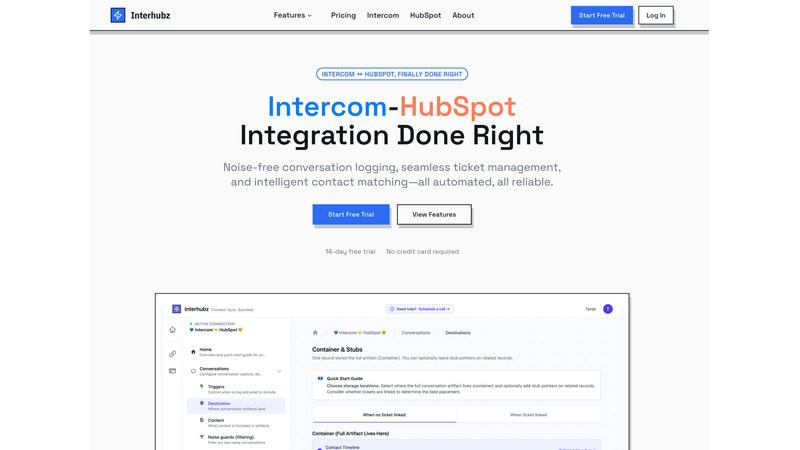
Interhubz perfectly syncs Intercom chats to HubSpot as clean, single timeline entries.
Last updated: February 28, 2026

Playwriter
Playwriter lets AI agents control your real Chrome browser with all your logins and extensions intact.
Last updated: March 18, 2026
Visual Comparison
Interhubz
Playwriter

Feature Comparison
Interhubz
One Rich Note Per Conversation
This is the flagship feature that makes everything else possible. Instead of the typical deluge of individual message logs, tag changes, and assignment notes, Interhubz consolidates an entire Intercom conversation into a single, beautifully formatted HubSpot timeline entry. It includes the full transcript, a summary, any file attachments, and a direct link back to the conversation in Intercom. This transforms your CRM from a cluttered log into a readable, actionable record of customer interactions.
Intelligent Contact & Company Matching
Duplicate contacts are a CRM killer, and basic integrations that match only by email are notoriously fragile. Interhubz employs advanced algorithms that match contacts using email, phone number, and even custom unique properties you define. This multi-layered approach ensures contacts are matched accurately the first time, maintaining a single source of truth in HubSpot and keeping your data pristine without any manual de-duplication work.
Bi-Directional Ticket Spine
This feature finally closes the loop between support and sales. With Interhubz's embedded inbox app, you can create a HubSpot ticket directly from an Intercom conversation with one click. Once linked, the ticket's stage and owner sync in real-time both ways. If a rep updates the stage in HubSpot, it reflects in Intercom, and vice-versa. This eliminates the status drift and manual update hell that plagues other setups, creating a truly unified workflow.
Configurable Noise Guards
A clean CRM is a useful CRM. Interhubz understands that not every automated bot response or spam message deserves a permanent home in HubSpot. Its intelligent noise guards allow you to set filters—like minimum message counts, conversation duration, or excluding auto-closed chats—to prevent low-value interactions from ever syncing. This automated curation ensures only meaningful customer conversations populate your sales team's timeline.
Playwriter
Your Actual Browser Session
This is the killer feature. Instead of spawning a fresh, suspicious Chrome instance, Playwriter attaches directly to your existing browser via a Chrome extension. Your agent operates in an environment with all your personal logins, saved cookies, installed extensions (like ad-blockers or password managers), and even your existing tabs. This eliminates bot detection triggers from "new" browser fingerprints and avoids the memory overhead of running a second Chrome process. It’s the difference between sending a stranger to do your online shopping versus giving your trusted friend your laptop.
Full Playwright API via a Single Tool
Forget menus of dozens of limited, pre-wrapped tools like "click_button" or "extract_text." Playwriter exposes one powerful execute command that accepts any valid Playwright code. This means your AI agent can use the entire, mature Playwright API for complex interactions: waiting for specific network responses, setting JavaScript breakpoints, manipulating localStorage, or taking efficient accessibility snapshots. This approach drastically reduces context window usage and provides maximum flexibility, trusting the developer or AI to write precise instructions.
Built-in Debugger & Live Editor
Playwriter transforms your browser into a debuggable runtime for AI agents. You can set breakpoints in the agent's Playwright script, pause execution, and inspect the state of the page. The live code editing feature allows you to modify the agent's commands on-the-fly without restarting the entire session. This is invaluable for troubleshooting, refining scripts, or when the agent gets stuck on an unexpected UI element. It brings a developer-grade workflow to AI-powered automation.
Lightweight Accessibility Snapshots
Traditional full-page screenshots are context hogs, often exceeding 100KB. Playwriter's accessibility snapshots are a game-changer, typically weighing only 5-20KB. They capture the semantic structure of the page—roles, names, states, and relationships—which is exactly what an AI agent needs to understand the page layout and interact with elements. This makes agent interactions faster, more accurate, and far cheaper in terms of token usage compared to processing large image files.
Use Cases
Interhubz
For Support Teams Handing Off to Sales
When a support conversation reveals a sales-qualified lead (SQL), the handoff should be seamless. With Interhubz, the agent can one-click create a linked HubSpot ticket from the Intercom chat. The sales rep receives a single, rich note in the contact's timeline with the entire conversation context, understanding the lead's pain points instantly without having to ask the customer to repeat themselves.
For Customer Success Managing Renewals & Upsells
Customer Success Managers (CSMs) using HubSpot need full visibility into support history to manage accounts proactively. Interhubz provides a complete, organized record of every support interaction directly within the HubSpot contact and company records. This allows CSMs to spot trends, identify at-risk accounts, and find upsell opportunities based on actual usage and issues, all without ever leaving their primary CRM.
For Operations Teams Ensuring Data Hygiene
For ops professionals tasked with maintaining CRM integrity, Interhubz is a lifesaver. It automates reliable contact matching to prevent duplicates and uses noise guards to filter out system noise. This drastically reduces manual data cleanup, ensures reporting accuracy, and provides a reliable, automated sync that the entire revenue team can trust.
For Executives Needing a Unified Customer View
Leaders need a clear picture of the customer journey without wading through clutter. Interhubz delivers a executive-ready timeline in HubSpot. Each conversation is a coherent story, not a series of broken fragments. This provides leadership with the clean data needed to analyze support impact on revenue, churn, and customer satisfaction effectively.
Playwriter
AI-Assisted Web Research & Data Extraction
Need to compile a report from multiple sources that require login? Instruct your AI agent to navigate your logged-in news subscriptions, academic journals, or business intelligence platforms. It can click through pagination, handle consent modals with your guidance, and extract structured data—all within your authenticated session, avoiding paywalls and login barriers that stop other automation tools cold.
Automated Testing with Real User Context
Developers can use Playwriter to create and run integration tests that mimic real user journeys. Since it uses your actual browser profile, tests can run against staging environments that require specific authentication cookies or against complex workflows that depend on browser extensions. This provides a more accurate testing environment than isolated, clean browser instances.
Routine Administrative Task Automation
Automate the tedious, repetitive web tasks that clutter your day. This could be filling out recurring forms, checking statuses on multiple dashboards, downloading daily reports from a web portal, or managing content across platforms like Shopify or WordPress. Your AI handles the routine clicks and inputs, and you simply supervise or step in for exceptions like CAPTCHAs.
Collaborative Browsing & Pair Programming
This is where Playwriter shines as a collaboration tool. You can watch the AI navigate in real-time on your screen. When it encounters a hurdle—a tricky multi-factor authentication step, an ambiguous "I'm not a robot" checkbox, or a novel UI—you can immediately intervene. Disable the extension on that tab, solve the human-required problem manually, re-enable control, and let the AI continue. It's true human-AI teamwork.
Overview
About Interhubz
If you run support on Intercom and sales or customer success on HubSpot, you've felt the pain. The standard integration is a mess, flooding your precious HubSpot timeline with 8+ fragmented, unreadable entries for every single conversation. It buries critical context, creates duplicate contacts, and makes ticket management a manual nightmare. Interhubz is the definitive solution, built by operators who have lived this frustration. It's not just another connector; it's an intelligent synchronization layer designed to bring order to the chaos. The core value proposition is breathtakingly simple: one clean, formatted HubSpot timeline note per Intercom conversation. This single change eliminates timeline pollution, preserves full context with transcripts and attachments, and enables seamless, bi-directional ticket management. It's built for teams that demand reliability and clarity, automating the sync so your people can focus on the customer, not on juggling tabs and cleaning data. After testing countless integrations, Interhubz stands out as the curated, opinionated choice for anyone serious about aligning their support and revenue operations.
About Playwriter
Let's be brutally honest: most AI browser automation tools are a pain. They either lock your agent in a sterile, cookie-less sandbox that gets flagged as a bot instantly, or they give it a clunky, limited set of pre-defined "tools" that can't handle real-world web complexity. Playwriter is the antidote. It's a Chrome extension and CLI that hands the full power of the Playwright automation API directly to your AI agent, but with one critical twist: it runs inside your actual, logged-in browser session. This means your AI can navigate the web with all your extensions, cookies, and saved logins already in place, bypassing the instant detection that plagues headless instances. It's like giving your AI a driver's license for your personal browser. Built as an open-source MCP (Model Context Protocol) server, it integrates seamlessly with clients like Cursor, Claude Desktop, and VS Code. The philosophy is powerful yet simple: one single execute tool that can run any Playwright code, eliminating schema bloat and giving developers and AI agents unprecedented, granular control over the browsing experience. This isn't just automation; it's a collaborative browsing session where the AI handles the tedious work, and you step in as the human-in-the-loop when needed.
Frequently Asked Questions
Interhubz FAQ
How does Interhubz handle duplicate contacts?
Interhubz uses a sophisticated, multi-property matching engine to intelligently find and link to existing HubSpot contacts. It checks against email addresses, phone numbers, and custom unique ID fields you specify. When it finds a match, it logs the conversation to that existing contact record. If no match is found, it can create a new one. This process is designed to prioritize data integrity and prevent duplicate creation automatically.
Can I filter which Intercom conversations sync to HubSpot?
Absolutely. This is the core of the Noise Guards feature. You can configure filters to exclude conversations based on criteria like being auto-closed, having only one message (often a bot), or involving specific tags. You can set minimum thresholds for message count or conversation duration to ensure only substantial, human-led interactions are logged in your CRM.
Does the ticket sync work in both directions?
Yes, and this bi-directional sync is a critical advantage. When you create a linked HubSpot ticket from Intercom, the connection is maintained. If the ticket stage or owner is updated in HubSpot, that change is reflected in the Intercom conversation. Similarly, if a support agent changes the conversation state or assignee in Intercom, the linked HubSpot ticket updates accordingly, ensuring both teams are always in sync.
How long does setup take?
One of Interhubz's strongest selling points is its simplicity. Setup is designed to take about 10 minutes. It uses one-click OAuth for both Intercom and HubSpot, so no API key management is needed. You then walk through a short configuration to set matching rules and noise guards, often using the smart defaults provided. After that, the sync begins automatically based on your triggers.
Playwriter FAQ
Is my browsing data sent to a remote server?
Absolutely not. Playwriter is designed with privacy first. The architecture is local: the Chrome extension connects to a WebSocket relay running on localhost:19988 on your own machine. Your AI client (CLI, MCP) also connects to this local relay. All commands and data (CDP traffic) flow directly between your browser and your local client. No data is sent to any remote server, and no account is required.
How does it avoid bot detection?
It avoids the classic red flags of automation. Because it uses your existing, long-lived Chrome session with a normal history of use, cookies, and extensions, it presents a browser fingerprint that looks entirely human. Websites see it as you browsing, not a fresh, sterile automation environment. The extension uses the official chrome.debugger API, which is a supported method for development tools.
Can I use it with any AI or just specific clients?
Playwriter is built on the open Model Context Protocol (MCP), making it client-agnostic. It works seamlessly with any MCP-compliant client. This includes popular AI-powered editors like Cursor and Windsurf, desktop agents like Claude Desktop, and code editors like VS Code with an MCP plugin. The provided CLI also lets you drive it directly from your terminal or your own scripts.
What happens if the AI gets stuck or makes a mistake?
You have full control. You can see every action happening live in your browser. If the agent enters a loop or starts clicking the wrong thing, you can instantly click the extension icon to detach it (turning it gray) and regain manual control of the tab. After you fix the state of the page, re-attach the extension, and the agent can pick up from there. The built-in debugger also allows you to pause and step through the agent's commands.
Alternatives
Interhubz Alternatives
Interhubz is a specialized integration tool in the customer support category, designed to create a clean, intelligent bridge between Intercom and HubSpot. It solves the specific problem of timeline pollution by syncing entire conversations as single, readable notes instead of a chaotic flood of message fragments. Users often explore alternatives for various reasons. Some may need a different pricing model, require integrations with additional platforms beyond these two, or seek a broader set of automation features. The specific needs of a sales, support, or marketing team can dictate different priorities. When evaluating options, focus on the core outcome: a synchronized workflow without manual overhead. Key considerations include the cleanliness of the CRM sync, the intelligence of contact matching to prevent duplicates, and the ability to filter out noise to maintain data integrity. The best tool seamlessly connects your teams without creating new problems.
Playwriter Alternatives
Playwriter is an open-source tool in the browser automation category, designed to give AI agents control over your actual, logged-in Chrome session. This solves the common problem where agents operate in a sterile, fresh browser with no extensions, logins, or context, making real-world tasks impossible. People look for alternatives for various reasons. Some need a different pricing model, like a fully hosted service versus self-hosted software. Others require specific features Playwriter may lack, or they need compatibility with a different browser or automation framework beyond the Model Context Protocol (MCP). When evaluating options, consider the core problem you need to solve. The key is whether the tool provides access to a persistent, authenticated browser session with your extensions and data. Also, assess if it offers the necessary control features, like debugging or network interception, and check its compatibility with your existing AI agent workflow and security requirements.