invoice Sonic vs ProcessBankStatement
Side-by-side comparison to help you choose the right tool.

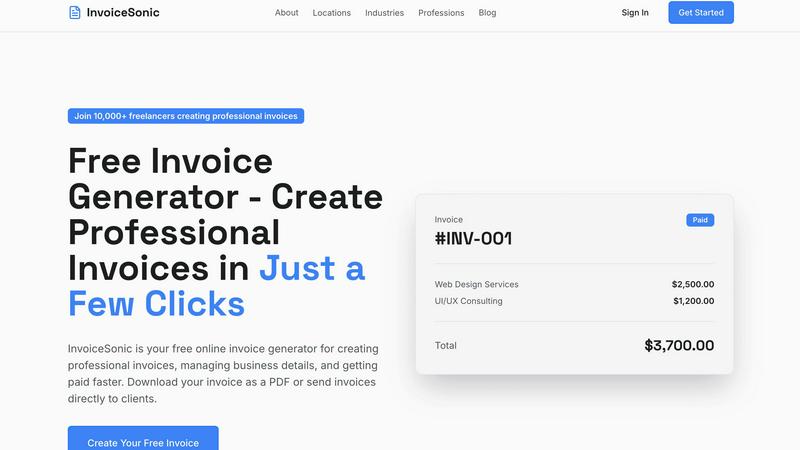
Effortlessly create and download professional invoices in seconds with InvoiceSonic's free, user-friendly generator.
Last updated: February 28, 2026

ProcessBankStatement
Stop manually typing data; instantly convert any PDF bank statement into a clean, ready-to-use CSV file in seconds.
Last updated: March 19, 2026
Visual Comparison
invoice Sonic
ProcessBankStatement

Feature Comparison
invoice Sonic
Unlimited Free Invoices
Invoice Sonic allows users to create unlimited invoices for free, providing up to five invoices per month. This feature is perfect for freelancers and small businesses that require flexibility without incurring costs. There are no hidden fees, and you can start invoicing immediately.
Professional Invoice Templates
The platform boasts a library of beautifully crafted invoice templates that cater to various industries. These modern designs are not only aesthetically pleasing but also functional, ensuring that every invoice meets professional standards and reflects your brand identity.
Instant PDF Downloads
With Invoice Sonic, you can generate invoices and download them as high-quality PDF files instantly. This feature saves time and ensures that your invoices are ready for distribution without unnecessary delays, allowing for quicker payment processing.
Automatic Calculations
Invoice Sonic takes the guesswork out of invoicing by automatically calculating totals, taxes, and balances. This functionality is particularly beneficial for users managing multiple line items or varying tax rates, ensuring accuracy and reducing the risk of errors in financial documentation.
ProcessBankStatement
Universal PDF & Scanned Image Support
This is the killer feature that sets it apart. Many basic converters fail the moment you upload a scanned statement or a photo saved as a PDF. ProcessBankStatement's smart parsing engine handles both digital text-based PDFs and image-based scans with impressive accuracy. It uses advanced OCR (Optical Character Recognition) tailored for financial documents, meaning you're not limited to perfect downloads from your banking portal. That crumpled paper statement you scanned? It can handle that, too.
Blazing-Fast, Batch Processing
Speed is the name of the game here. We're talking about conversion times measured in seconds, not minutes. But the real productivity booster is the batch upload capability. Need to process 14 months of statements for a client? You can upload them all at once. This transforms a task that could take hours into a two-minute operation, making it indispensable for professionals dealing with high monthly volumes or year-end closes.
Bank-Agnostic Accuracy
The tool proudly supports statements from all major U.S. banks like Chase, Bank of America, and Wells Fargo, but its compatibility doesn't stop there. It's built to be bank-agnostic, effectively parsing data from a wide variety of domestic and international institutions. The 99%+ accuracy rate isn't just a marketing claim; it's a result of an engine fine-tuned to recognize the diverse formats and layouts that different banks use, delivering clean, reliable data you can trust for your books.
Secure, User-Controlled Data
In finance, data security is non-negotiable. ProcessBankStatement operates on a secure web platform with encryption for files in transit. Crucially, you maintain full control over your data. You can delete uploaded statements and generated files from their servers at any time. This commitment to user privacy and security makes it a trustworthy choice for professionals handling sensitive client financial information.
Use Cases
invoice Sonic
Freelancers Generating Invoices
Freelancers can benefit immensely from Invoice Sonic by quickly generating invoices for their services. Whether for one-time projects or ongoing work, the tool allows them to maintain a professional appearance while managing their finances without hassle.
Small Business Owners
Small business owners can utilize Invoice Sonic to streamline their invoicing process, creating customized invoices that reflect their brand. This ease of use allows them to focus more on their business operations instead of getting bogged down by administrative tasks.
Service Providers
Service providers like consultants, graphic designers, and web developers can create invoices that detail their services and charge clients accurately. The automatic calculation feature helps ensure they do not overlook any fees or taxes.
Startups Managing Cash Flow
Startups can leverage Invoice Sonic to manage their cash flow effectively. By using the free tier to create invoices without upfront costs, they can maintain a steady invoicing routine as they grow their client base and revenue streams.
ProcessBankStatement
Streamlining Client Bookkeeping
For accountants and bookkeepers, this tool is a game-changer. Clients notoriously send over PDF statements (often scanned) and expect seamless reconciliation. Instead of manually transposing data, a professional can upload the PDF and instantly have a CSV ready for import into QuickBooks, Xero, or other accounting software. This slashes the time spent per client, increases billing efficiency, and eliminates manual entry errors that can derail the reconciliation process.
Small Business Monthly Reconciliation
Small business owners wearing the "CFO hat" need to close their books quickly to understand cash flow. Manually entering a month's worth of transactions from a downloaded bank PDF is a major bottleneck. With ProcessBankStatement, they can get a clean CSV in seconds, pop it into Excel or their accounting software, and immediately begin categorizing and analyzing expenses, reclaiming an evening or weekend previously lost to data entry.
Accelerating Loan Application Reviews
Loan officers and underwriters often need to review months of bank statements to verify income and assess financial health. Manually sifting through PDFs is slow and prone to oversight. By converting multiple statements into structured CSV data, they can quickly filter, sort, and analyze transaction patterns, significantly speeding up the application review process and improving the customer experience.
Efficient Financial Auditing & Analysis
Auditors, financial analysts, or even individuals preparing their taxes need organized transaction data. A CSV file allows for powerful manipulation—filtering for specific vendors, summing categories, or spotting anomalies. Converting a stack of annual statements into analyzable data takes minutes instead of days, enabling deeper, faster insights without the grunt work.
Overview
About invoice Sonic
Invoice Sonic is an innovative, free invoice generator tailored specifically for freelancers and small business owners looking to simplify their invoicing process. This powerful tool enables users to create professional invoices quickly and effortlessly, eliminating the burdensome complexities of traditional spreadsheets and outdated software. With Invoice Sonic, users can select from a diverse library of beautifully designed templates that cater to a wide range of industries, ensuring that every invoice not only looks modern and polished but also reflects the unique branding of the business. This platform is particularly valuable for those who send invoices frequently but want to avoid the financial burden of costly subscription services. Key features such as instant PDF downloads, automatic calculations for totals and taxes, and customizable options for adding business logos empower users to maintain a professional image and manage their finances effectively. Whether you are a freelancer just starting or a seasoned business owner, Invoice Sonic is designed to help you manage your invoicing needs with confidence and ease.
About ProcessBankStatement
Let's be brutally honest: manually entering data from a bank statement PDF is a soul-crushing waste of time. It's the kind of tedious, error-prone chore that makes finance professionals and business owners want to pull their hair out. Enter ProcessBankStatement, which is, in my opinion, the definitive solution to this universal pain point. This isn't just another clunky converter; it's an intelligent, web-based engine designed to turn your messy bank statement PDFs—whether they're text-based downloads or scanned images of paper statements—into pristine, structured CSV files in literal seconds. The core value proposition is breathtakingly simple: reclaim hours of your week. Built specifically for accountants, bookkeepers, small business owners, and loan officers, it automates a critical yet frustrating step in the financial workflow. With support for all major U.S. banks and a staggering 99%+ accuracy rate, it delivers clean data ready for instant import into QuickBooks, Excel, or any analysis platform. In a world full of overpromising software, this tool does one thing exceptionally well: it gives you your time back, securely and reliably.
Frequently Asked Questions
invoice Sonic FAQ
How many invoices can I create for free?
You can create up to five invoices per month for free with Invoice Sonic. This allows you to test the platform and start invoicing without any financial commitment.
Can I customize my invoices?
Absolutely! Invoice Sonic provides customizable templates where you can add your business details and logo, ensuring that every invoice reflects your brand identity.
Is there a mobile version of Invoice Sonic?
While the platform is primarily web-based, it is designed to be mobile-friendly, allowing users to create and manage invoices on various devices without losing functionality.
What if I need more than five invoices per month?
If you find yourself needing more than five invoices per month, Invoice Sonic offers the option to create a free account where you can access additional features and benefits tailored to your invoicing needs.
ProcessBankStatement FAQ
Is there a free trial available?
Absolutely, and it's genuinely risk-free. You can use the tool as a Guest and process up to 3 pages per day without even creating an account. If you register for free, that limit increases to 5 pages per day. This is more than enough to test it with a few real statements and experience the speed and accuracy firsthand before committing to a paid plan.
How secure is my financial data?
Your data security is treated with paramount importance. Files are encrypted during upload and transit to their servers. Furthermore, you retain full control: you can permanently delete any uploaded statements and generated CSV files from their system at any time through your dashboard. They are built for professionals who handle sensitive data daily.
Do you support international bank statements?
Yes, they do. While they prominently highlight support for major U.S. banks, the parsing engine is designed to work with a wide array of bank statement formats from financial institutions all over the world. It's always worth testing a statement with the free credits to confirm compatibility for your specific international bank.
What happens if I exceed my page limit?
The system is straightforward. If you are on a free plan and hit your daily page limit, you'll receive an error message and will need to wait until the limit resets (the next day) or upgrade to a paid subscription. For paid plans, if you exceed your monthly page allotment, you will be prompted to upgrade to a higher-tier plan to continue processing, ensuring you're never unexpectedly charged for overages.
Alternatives
invoice Sonic Alternatives
InvoiceSonic is a user-friendly, innovative tool designed to simplify the invoicing process for freelancers and small business owners. As a free invoice generator, it allows users to create polished, professional invoices quickly, a necessity in today’s fast-paced economy. Given the variety of invoicing solutions available, users often seek alternatives to InvoiceSonic for various reasons, including pricing structures, specific feature sets, or compatibility with other platforms. When searching for an alternative to InvoiceSonic, it’s essential to consider several factors. Look for features that align with your invoicing needs, such as customizable templates, automatic calculations, and ease of use. Additionally, consider the pricing model; some alternatives may offer more flexibility in terms of free usage or subscription plans that fit your budget better.
ProcessBankStatement Alternatives
ProcessBankStatement is a specialized tool in the business and finance software category, designed to automate the conversion of PDF bank statements into structured CSV data. It solves a specific but common pain point: the tedious and error-prone task of manual data entry. Users often explore alternatives for a variety of reasons. Some may be seeking a different pricing model, such as a one-time purchase versus a subscription. Others might need specific integrations with accounting software beyond standard CSV export, or they may require a downloadable desktop application instead of a web-based service. The need for support for international banks or more advanced data categorization features can also drive the search. When evaluating other options, focus on a few key criteria. Accuracy and reliability in parsing are paramount—nothing wastes time faster than correcting errors. Consider the security measures in place for your sensitive financial documents. Also, assess the overall user experience, from upload simplicity to the clarity of the final output. The right tool should feel like a seamless extension of your workflow, not a new hurdle.