Klipzy vs One More Shot AI
Side-by-side comparison to help you choose the right tool.

Klipzy instantly transforms your photos into cinematic videos with AI effects, perfect for social media.
Last updated: February 28, 2026

One More Shot AI
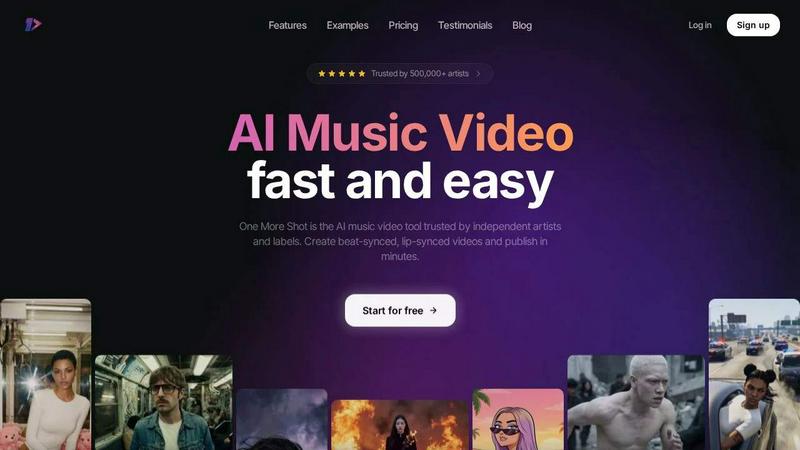
One More Shot AI is my top pick for artists to instantly transform any song into a stunning, perfectly lip-synced music video.
Last updated: April 4, 2026
Visual Comparison
Klipzy

One More Shot AI
Feature Comparison
Klipzy
20+ Cinematic AI Motion Effects
This is the heart and soul of Klipzy. Instead of manually keyframing, you get a curated library of professional motion styles applied intelligently by AI. My personal favorites are the subtle 'Parallax' for creating faux 3D depth and the classic 'Ken Burns' for elegant storytelling. From dramatic zooms and pans to fun effects like 'Hand Shake' or 'Swing,' these presets do all the heavy lifting. You're not just getting a simple slide show; you're getting thoughtfully designed motion that adds a layer of polish I'd expect from a much more complicated tool.
Built-in Watermark Remover
This is an unsung hero feature that makes Klipzy an incredible value. Need to use a stock photo or an image with an unwanted logo? Instead of jumping to another app or website, Klipzy has a watermark remover built right in. It streamlines your workflow from image prep to final video export into one seamless process within a single, clean interface. For marketers and creators on a tight schedule, this integration is a massive time-saver and a clever inclusion that sets Klipzy apart.
Native macOS Application & Local Export
As a Mac user, I deeply appreciate software that feels like it belongs on my system. Klipzy is a native app, which means it's fast, responsive, and doesn't rely on a browser or a slow web connection. More importantly, all processing happens locally on your Mac. Your photos and videos never get uploaded to a cloud server, ensuring privacy and speed. You export a standard MP4 file directly to your computer, giving you full control over your assets. This local, efficient approach is a major win for professionals concerned with privacy and workflow reliability.
Multiple Aspect Ratio Support
Creating content for different platforms is a non-negotiable part of the job today. Klipzy understands this perfectly. With support for five key aspect ratios—including the vertical 9:16 for Reels/TikToks, square 1:1 for Instagram feeds, and landscape 16:9 for YouTube—you can adapt a single photo into multiple formats instantly. This flexibility means you can maximize the value of your best images by repurposing them across all your social channels without any manual cropping or reformatting hassles.
One More Shot AI
AI Artist & Identity Consistency
This is a game-changer for branding. You can create a virtual artist—your singer, rapper, or band avatar—from just a single photo or description. Once created, this identity remains consistent across every scene and video you generate. No more jarring jumps between different-looking characters. It ensures your artist is recognizable, which is absolutely critical for building a fanbase and professional image across social media and music platforms.
Beat-Synced Auto Videos
This is the flagship "wow" feature. You simply upload your song and a reference image, and the AI agents take over like a real production crew. They analyze the audio waveform, detect beats, drops, and mood shifts, and automatically generate a complete video where the cuts, transitions, and visual effects pulse in perfect sync with the music. It removes all the tedious manual work of timing visuals to audio, delivering a dynamic result that feels professionally edited.
Top Notch Lip-Sync (Seedance 2.0)
Bad lip-sync ruins an AI video instantly. One More Shot AI specifically hosts what they call the best lip-syncing model available, and having tested it, I have to agree it's impressively natural. The recent "Seedance 2.0" update makes singing and rapping scenes look convincingly in-sync with the audio track. The mouth movements match the phonetics and timing of the lyrics, which is essential for maintaining viewer immersion and credibility.
Precise Project Mode Editing
For control freaks and perfectionists like me, this feature is a lifesaver. It allows you to start from scratch or deconstruct an auto-generated video to modify each individual shot. You get granular control over prompts, camera angles, durations, and transitions on a scene-by-scene or even frame-by-frame basis. It bridges the gap between automated speed and hands-on creative direction, letting you polish your video to an exact standard.
Use Cases
Klipzy
Social Media Content Creation
This is Klipzy's sweet spot. If you're tasked with feeding the endless content beast for Instagram Reels, TikTok, or YouTube Shorts, this tool is a secret weapon. Turn a single great product shot, a behind-the-scenes photo, or a travel snapshot into a 15-second clip that holds attention. The motion adds the "scroll-stopping" quality that static posts often lack, helping you boost engagement and grow your audience without spending hours in editing software.
Real Estate & Property Marketing
For real estate agents, making a property listing stand out is critical. Klipzy allows you to take your high-quality listing photos and inject life into them. Apply a smooth 'Pan Left to Right' effect across a living room or a gentle 'Zoom In' on a kitchen's finish to create a mini cinematic tour. These dynamic clips are perfect for social media promotions, website headers, or digital ads, offering a more immersive preview than a static gallery and helping potential buyers connect emotionally with the space.
E-commerce & Product Promotion
Online shoppers can't touch your products, so video is the next best thing. Klipzy empowers e-commerce store owners to easily create engaging product videos. Showcase a clothing item from different angles with an 'Orbit' effect, highlight details with a 'Focus Center' zoom, or create a compelling ad clip from a flat lay photo. These videos can dramatically increase conversion rates on product pages, social ads, and email campaigns, making your products look more desirable and dynamic.
Travel & Personal Memory Sharing
Beyond business, Klipzy is fantastic for personal use. Transform your favorite vacation photos into beautiful, moving memories. A stunning landscape photo becomes a breathtaking scene with a 'Ken Burns' effect, and a group shot can feel more lively with a subtle 'Swing.' It's the perfect way to create more engaging slideshows for family or to share your adventures on social media in a way that truly captures the feeling of the moment, far beyond a standard photo album.
One More Shot AI
Independent Artist Music Videos
This is the primary use case and where the tool shines. An independent artist or band can take a finished track and produce an entire, shareable music video for platforms like YouTube without any video production knowledge or budget. It enables them to create a visual product that competes with major label offerings, helping them attract fans and look professional from day one.
Social Media Content Creation
Musicians and marketers can repurpose a single song into a library of vertical, horizontal, and square format clips perfect for TikTok, Instagram Reels, YouTube Shorts, and Facebook. Generate beat-synced hooks for promo, lyric snippets, or behind-the-scenes style clips featuring your AI Artist to maintain a consistent and engaging social media presence that drives streams.
Lyric Video Production
Skip the basic text-on-screen templates. Use One More Shot AI to create dynamic lyric videos where the words are integrated into stunning AI-generated visuals that react to the music's emotion. This is perfect for Spotify Canvas, lyric videos on YouTube, or as an engaging visualizer to accompany your track on streaming platforms, adding a deeper layer of connection for listeners.
Rapid Prototyping & Pitch Material
Songwriters and producers can use the tool to create quick visual mock-ups or "sizzle reels" for a track before investing in a full production. It's also perfect for creating compelling pitch materials for labels, sync licensing, or film/TV placements, where having a strong visual to accompany the audio can make all the difference in securing a deal.
Overview
About Klipzy
Klipzy is a breath of fresh air in the often-overwhelming world of video editing software. Forget complex timelines and expensive subscriptions. This is a native Mac app with one laser-focused mission: to magically transform your static photos into captivating, cinematic video clips with almost zero effort. As someone who tests a lot of "AI-powered" tools, I can be skeptical, but Klipzy delivers on its promise of simplicity and power. It's built for the rest of us—content creators, social media managers, real estate agents, small business owners, or just anyone who wants their photos to have more impact without becoming a video editor. The core value proposition is irresistible: drag in a photo, choose a dynamic motion effect, and get a professional-looking, share-ready video in seconds. The fact that it's a one-time purchase for a native Mac app (not a sluggish web tool) is the cherry on top. It respects your time, your wallet, and your desire for quality results.
About One More Shot AI
One More Shot AI is, in my opinion, the definitive tool for musicians and creators who need a professional-grade music video but lack the budget, crew, or time for a traditional shoot. It's a web and mobile platform that acts as your entire AI production crew, transforming a single audio track into a fully synchronized visual experience. Forget the months of planning and editing; this is about publishing a captivating video in minutes, not months. The core magic lies in its ability to deeply analyze your song's rhythm, energy, and mood, then generate visuals that actually move to the beat. Whether you're an independent artist on Suno, a producer in FL Studio, or a marketer needing social clips, this tool democratizes high-quality video production. Its true value proposition is a blend of incredible speed with surprisingly granular creative control. You can go the simple "one-click" route for a quick result or dive into project mode for frame-by-frame editing. With over half a million artists already using it, One More Shot AI has clearly struck a chord by solving a massive, real-world pain point in the music industry.
Frequently Asked Questions
Klipzy FAQ
What image formats are supported?
Klipzy supports all the major image formats you're likely to use, including JPG, PNG, and WebP. You can upload images up to 50MB in size, which is more than enough for high-resolution photos from modern cameras and smartphones, ensuring your final video retains excellent quality.
Is Klipzy a subscription service?
No, and this is one of its best features. Klipzy is a one-time purchase. You pay a single, affordable license fee (currently $10) and own the app forever with no recurring monthly or annual payments. This model is incredibly user-friendly and cost-effective, especially compared to the subscription fatigue caused by most software today.
What platforms are supported?
Currently, Klipzy is exclusively available as a native application for macOS. This means it is designed specifically to run on Apple Mac computers, leveraging the system's performance for fast, smooth processing and a integrated user experience. There are no web-based or Windows versions at this time.
How many effects are available and how long can videos be?
Klipzy comes packed with over 20 different AI-powered cinematic motion effects to choose from. Each video you create can be up to 15 seconds in duration, which is the ideal length for most social media platforms like Instagram Reels and TikTok, forcing you to create concise, impactful content.
One More Shot AI FAQ
What music platforms does it work with?
One More Shot AI is designed to be universally compatible. You can upload any MP3 or audio file from your device. It is explicitly promoted to work seamlessly with AI music generators like Suno and Udio, Digital Audio Workstations (DAWs) like FL Studio and Ableton (by exporting your finished track), and streaming platforms like Spotify (by using local files or recorded audio). It handles the audio from any source.
Do I need video editing experience to use it?
Not at all. The "Auto Videos" feature is built for complete beginners. You just provide a song and a starting idea (like a reference image), and the AI creates a complete video for you. However, if you have editing experience or want more control, the "Precise Project Mode" offers advanced tools to fine-tune everything, making it valuable for users of all skill levels.
How good is the lip-sync technology?
The lip-sync, powered by their specialized "Seedance 2.0" model, is a key selling point and is among the best I've seen in consumer AI video tools. It is specifically engineered to analyze the vocals and generate natural-looking mouth movements that match the timing and shape of the words. While not 100% photorealistic in every scenario, it is highly effective for creating believable singing and rapping performances.
What formats can I export my video in?
This is a major strength for content strategy. You can export your final music video in multiple aspect ratios including horizontal (16:9 for YouTube), vertical (9:16 for TikTok/Reels), and square (1:1 for Instagram Feed). This multi-format support allows you to create one project and then adapt it for every major social media and music platform from a single source.
Alternatives
Klipzy Alternatives
Klipzy is a standout in the AI video creation space, a tool that magically turns your photo library into dynamic social media clips. It falls squarely into the productivity category, designed to save creators time while boosting their content's production value. Users often seek alternatives for a few key reasons. Maybe the pricing model doesn't fit a tight budget, or they need a specific feature Klipzy lacks, like more advanced editing controls or direct publishing to a niche platform. Others might simply prefer a different user interface or workflow. When evaluating other options, focus on what matters most for your projects. Consider the depth of the effects library, the flexibility of export options, and the overall ease of use. The best alternative isn't necessarily the most powerful—it's the one that feels intuitive and helps you create consistently, without friction.
One More Shot AI Alternatives
One More Shot AI is a specialized tool in the AI content creation space, designed specifically to turn audio tracks into synchronized music videos. It caters to musicians and creators who need to produce visual content quickly, bypassing the cost and complexity of traditional video production. Users often seek alternatives for a variety of reasons. Some may need a different pricing model or a free tier to experiment with. Others might require features that go beyond music, like general video generation or more advanced editing tools. Platform preference also plays a role, as some creators need desktop software or integration with specific editing suites. When evaluating other options, consider your primary goal. If music video creation is your focus, look for strong audio analysis and beat-syncing capabilities. For broader use, a more generalist AI video tool might be better. Also, weigh the importance of creative control, output formats, and how the tool handles consistent character generation across scenes.