
FilexHost vs Learniverse
Side-by-side comparison to help you choose the right tool.

FilexHost
Effortlessly host and share your files in seconds with FilexHost's simple drag-and-drop interface and instant links.
Last updated: February 28, 2026

Learniverse
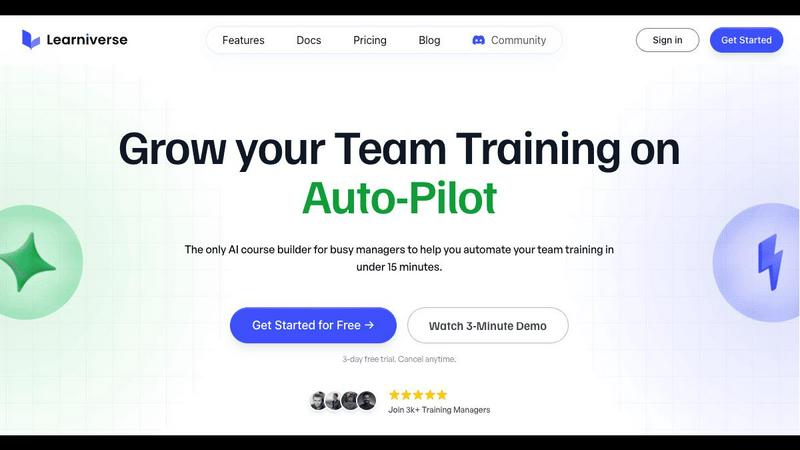
Learniverse instantly turns your team's scattered documents into engaging, automated training courses.
Last updated: February 28, 2026
Visual Comparison
FilexHost

Learniverse
Feature Comparison
FilexHost
Instant Subdomains
FilexHost provides users with instant subdomains (your-file.filex.host) for every uploaded file, allowing for quick and easy access without any setup hassle. This feature enhances user experience by ensuring that files can be shared immediately, streamlining workflows for professionals and casual users alike.
Free SSL Encryption
Every link generated through FilexHost is secured with free SSL encryption, which means that your data is protected during transit. This feature is essential for maintaining privacy and security, especially when sharing sensitive documents or files with clients and collaborators.
Smart View Modes
FilexHost offers smart view modes that allow users to choose between direct rendering or a download page for their files. This flexibility ensures that recipients can access content in the format that suits them best, enhancing usability and engagement without the need for additional downloads or plugins.
Optional Password Protection
Users can add an extra layer of security to their files by utilizing optional password protection and expiry settings. This feature allows individuals to control who can access their files and for how long, making it perfect for sharing confidential information or time-sensitive content.
Learniverse
AI-Powered Course Creation
This is the flagship feature that makes Learniverse a genuine game-changer. Forget storyboarding and manual lesson building. You can chat with your AI assistant, drop in a PDF of a technical manual, or upload a video from last quarter's all-hands meeting. The AI then intelligently analyzes the content, identifies key concepts, and automatically structures it into digestible modules, complete with interactive elements and assessment quizzes. It turns the most tedious part of training—content creation—into a task that takes literal minutes instead of weeks.
Branded Academy Deployment
Your training portal shouldn't look like a generic, off-the-shelf template from the early 2000s. Learniverse lets you launch a professional, fully-branded learning academy in minutes. You can customize it with your company's colors, logo, and even use your own domain. This creates a polished, cohesive experience for your team that reinforces your brand identity and shows you take their development seriously, moving far beyond the "cheaped out" look of many basic tools.
Zero-Effort Progress & Analytics
Ditch the spreadsheet nightmares for tracking completion rates. Learniverse provides a robust analytics dashboard that gives you clear, immediate insights into your training's impact. You can see who has completed what courses, identify exactly where learners are getting stuck, track engagement metrics, and monitor overdue assignments across teams or the entire organization. This feature transforms guesswork into data-driven strategy for improving your training programs.
Integrated Community & Chat Tools
Training isn't just about pushing content; it's about fostering discussion and collaboration. Learniverse builds community engagement directly into the learning experience. Beyond this, it's paving the way for seamless workflow integration with tools like Slack and WhatsApp (noted as coming soon). This means you'll be able to build courses, update training, and nudge learners directly from the communication platforms your team already lives in, eliminating app-switching fatigue.
Use Cases
FilexHost
Professional Reporting
Business professionals can utilize FilexHost to share client reports and presentations with ease. By simply uploading files and generating secure links, users can eliminate the back-and-forth email exchanges often associated with file sharing, leading to more efficient communication.
Developer File Hosting
For developers, FilexHost serves as an excellent platform for hosting landing pages or mock APIs. The ability to share files quickly with instant subdomains allows for seamless collaboration and testing, ensuring that projects progress smoothly without technical barriers.
Creative Product Distribution
Creators can leverage FilexHost to distribute digital products, such as eBooks, courses, or design assets. The straightforward upload and sharing process enables them to focus on their creative work rather than getting bogged down by technical details, making it easier to reach their audience.
Educational Resource Sharing
Educators can use FilexHost to share teaching materials and resources with students. The platform’s ability to host various file types, including PDFs and media, allows teachers to provide a rich learning experience without worrying about file size limitations or compatibility issues.
Learniverse
Onboarding New Hires at Scale
For HR and people ops teams drowning in repetitive onboarding tasks, Learniverse is a lifesaver. Transform your scattered collection of welcome docs, compliance videos, and process PDFs into a single, engaging onboarding track. New hires get a consistent, professional introduction to the company, and managers get their time back instead of walking every new person through the same old slides. Progress tracking ensures no step is missed.
Converting SOPs into Engaging Training
Every company has critical Standard Operating Procedures (SOPs) that sit in a forgotten folder. Learniverse excels at turning these dense, often-ignored documents into interactive, mandatory training modules. Upload the PDF, and the AI can break down complex procedures into step-by-step lessons with built-in comprehension checks, ensuring your team actually understands and retains vital operational knowledge.
Upskilling Existing Teams with Latest Knowledge
When processes update or new skills are needed, getting everyone up to speed is a headache. With Learniverse, you can quickly turn a recording of a training session, a new product manual, or a set of best practices into a fresh course. This allows for continuous, agile learning that keeps your team's knowledge current without requiring massive, time-consuming training overhauls.
Centralizing Scattered Tribal Knowledge
So much crucial company knowledge lives in Slack threads, old Google Docs, and employees' heads. Learniverse acts as a central hub to capture and structure this "tribal knowledge." Team leads can upload snippets, recordings of explanations, or documents and instantly create a searchable, structured knowledge base and training path, preventing critical information from being lost when someone leaves the team.
Overview
About FilexHost
FilexHost is an innovative file hosting and sharing platform designed to simplify the way users manage and distribute their digital content. With its intuitive "Drop & Share" workflow, users can effortlessly upload files of any type—be it documents, media, spreadsheets, or entire websites—and receive an instant secure URL for sharing. This hassle-free approach eliminates the need for complex server setups, DNS configurations, or logins for recipients, making it an ideal solution for both casual users and professionals alike. The platform is particularly beneficial for those who require fast and reliable file delivery without the usual headaches associated with traditional file sharing methods. Whether you are a developer sharing project files, a business professional distributing client reports, or a creator showcasing digital products, FilexHost delivers seamless file hosting with a focus on viewer experience.
About Learniverse
Let's be brutally honest: corporate training is a mess. It's a soul-crushing cycle of juggling Google Docs, hunting for the latest video link in Slack, and watching new hires flounder because your "knowledge base" is actually just a digital junk drawer. Enter Learniverse, and prepare to have your entire perspective on Learning Management Systems (LMS) flipped on its head. This isn't just another platform; it's an AI-powered training assistant that finally understands the sheer, time-poor reality of modern training managers, HR pros, and team leaders. Its core magic? It obliterates the setup and design phase. You simply upload the raw materials—PDFs, SOPs, meeting recordings, even a verbal idea—and its AI gets to work, structuring that chaos into polished, interactive courses with quizzes and tracking in minutes. The value proposition is crystal clear: stop being an admin clerk and start being a strategic educator. Learniverse automates the entire training hub, from a branded academy launch to progress analytics, giving you back the hours you used to waste on manual busywork so you can focus on what actually moves the needle: your team's growth and performance.
Frequently Asked Questions
FilexHost FAQ
What is FilexHost?
FilexHost is a file hosting and sharing service that allows users to upload and share files of any type quickly and securely. Its user-friendly interface and features make it suitable for professionals, developers, and casual users alike.
Is it really free?
Yes, FilexHost offers a free plan that allows users to host up to 1,000 files with a maximum size of 25MB each. This plan includes ad-supported hosting with an expiry of 7 days, making it a great option for quick sharing and testing.
What file types are supported?
FilexHost supports a wide range of file types, including documents (PDFs, Excel sheets), media (audio, video), images (JPG, PNG), and archived files (ZIP). This versatility makes it a comprehensive solution for various hosting needs.
How do I update my site?
To update your hosted file or website on FilexHost, simply upload the new version of the file using the same process as before. The platform will generate a new link that can be shared with your audience, ensuring they always access the latest version of your content.
Learniverse FAQ
How does the AI actually build a course?
You provide the raw input—a document, video, audio recording, or even a text description of what you want to teach. Learniverse's AI analyzes this content, identifies the key themes and logical flow, and automatically structures it into a sequenced course. It creates modules, suggests lesson titles, generates summaries, and can even propose quiz questions to test understanding, all based on the material you provided. You remain in full control to edit and refine the final output.
Can I use my own branding and domain?
Absolutely, and you should! A core feature of Learniverse is the ability to launch a fully branded academy. You can upload your logo, set your brand's color scheme, and apply these across the entire learner portal. For a fully seamless experience, you can also connect your own custom domain (e.g., training.yourcompany.com) so your academy looks and feels like a native part of your company's digital ecosystem.
What kind of analytics and reporting does it offer?
Learniverse moves you far beyond simple completion percentages. The analytics dashboard provides insights into learner progress, engagement rates (how interactively they use the course), and assessment scores. You can see detailed reports on who has completed training, what specific content items people are spending time on or struggling with, and get a high-level view of training impact across different departments or teams.
Is there a free trial or a free plan?
Yes, Learniverse offers a 7-day free trial that allows you to experience the full platform without any commitment. This lets you upload your own content, test the AI course builder, explore the branding options, and see the analytics in action to prove its value for your specific use case before any payment is required. The trial is noted as fast to set up and easy to cancel if needed.
Alternatives
FilexHost Alternatives
FilexHost is a user-friendly file hosting and sharing service that allows individuals and businesses to upload and disseminate files effortlessly. As part of the productivity and management category, it excels in providing a simple drag-and-drop interface for sharing various file types, from documents to entire websites. Users often seek alternatives to FilexHost for a variety of reasons, including pricing constraints, specific feature requirements, or compatibility with unique platform needs. When evaluating alternatives, it’s essential to consider factors such as storage limits, security features, user experience, and the range of file types supported. Additionally, look for services that offer robust sharing options, like password protection or customizable expiry settings, to ensure your files are secure while remaining accessible to intended recipients.
Learniverse Alternatives
Learniverse is an AI-powered Learning Management System (LMS) that excels at transforming scattered documents and ideas into structured training courses in minutes. It sits squarely in the productivity and management category, designed to free training managers and HR teams from the heavy lifting of course creation and platform setup. People often search for alternatives for a few key reasons. Budget is a primary driver, as pricing models vary widely. Others might need more advanced features, deeper integrations with specific software, or a platform tailored for a different audience, like external customer education versus internal employee training. When evaluating other options, focus on your core needs. Prioritize the ease of content creation, the depth of analytics you require, and how well a platform scales with your team. The right tool should remove friction, not create it, letting you focus on delivering impactful learning rather than managing the system itself.