
Melograph vs VideoDubber Video Translator
Side-by-side comparison to help you choose the right tool.

Melograph transforms your music tracks into eye-catching videos with customizable templates in just minutes.
Last updated: February 28, 2026

VideoDubber Video Translator
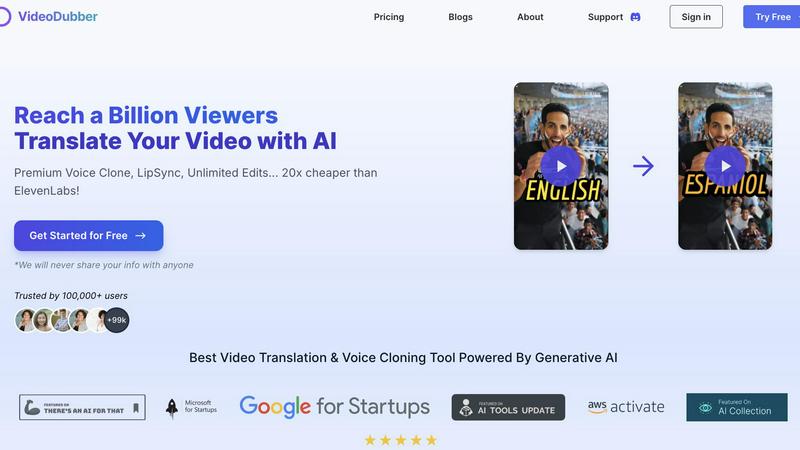
VideoDubber instantly translates and dubs your videos into over 150 languages, unlocking global reach and engagement.
Last updated: March 1, 2026
Visual Comparison
Melograph

VideoDubber Video Translator
Feature Comparison
Melograph
Intuitive Template Selection
Melograph's template library is designed for ease and speed. Musicians can select from a variety of high-quality templates that resonate with different vibes, allowing for a seamless match between the visual and audio elements of their work.
Audio-Reactive Visuals
The platform excels in generating visuals that react dynamically to your music. As soon as you upload your track, Melograph instantly visualizes the waveform and creates a stunning representation of the audio, making your video more engaging and appealing.
Quick Export Formats
With Melograph, you can export your video in 1080p MP4 format optimized for various platforms like TikTok, Instagram, and YouTube. This ensures that your visuals are ready to post without the need for additional editing, making it incredibly convenient for busy creators.
Customizable Text and Branding
Users can easily add their artist name, song title, and even their logo or album cover on selected templates. This feature allows for branding consistency across all your visuals, enhancing your professional image as a musician or creator.
VideoDubber Video Translator
Superior Voice Cloning and Dubbing
VideoDubber’s advanced voice cloning technology produces natural and engaging voice-overs that closely match the original speaker’s tone and emotion. This feature enhances the viewer's connection to the content, making the experience more authentic and relatable.
Simple Yet Powerful 1-click UI
The platform offers an intuitive interface that allows users to translate an entire video with just one click. For those who require more control, advanced options for editing subtitles and adjusting timestamps are readily available, streamlining the overall process.
Unlimited Free Editing and Voice-overs
Unlike many competitors, VideoDubber offers unlimited free edits, allowing users to change voice-overs, timestamps, and texts without incurring additional costs. This policy empowers users to refine their videos until they achieve the desired result.
DeepSeek, Gemini & GPT-5 Translation Models
Choose from multiple AI-powered translation models such as DeepSeek, Gemini, or OpenAI's GPT-5. This flexibility ensures users can select the model that best meets their needs, providing high accuracy and context in every translation.
Use Cases
Melograph
Enhancing Music Releases
Indie artists can utilize Melograph to create visually striking videos that accompany their music releases. By pairing their audio with stunning visuals, they can effectively capture audience attention and promote their tracks on social media.
Promotional Content for Labels
Record labels can leverage Melograph to produce high-quality visuals for their artists. This not only elevates the branding of the label but also provides their artists with the tools they need to market their music effectively.
Engaging Social Media Posts
DJs and music producers can use Melograph to craft engaging audio-reactive videos for their social media accounts. This helps in creating buzz around their performances or new releases, driving more traffic and engagement on their platforms.
Creative Visuals for Content Creators
Content creators who aren't musicians can also benefit from Melograph. Whether it's background music for a vlog or a podcast, they can create visually appealing videos that enhance the viewer's experience and keep them engaged.
VideoDubber Video Translator
YouTube Content Localization
YouTubers can expand their audience reach significantly by localizing content into multiple languages. With VideoDubber, creators can easily translate and dub their videos, making them accessible to viewers worldwide.
Educational Resource Development
Educators can leverage VideoDubber to create multilingual educational materials for diverse classrooms. By translating instructional videos, teachers can enhance learning experiences for students speaking different languages.
Corporate Training and Development
Businesses can utilize VideoDubber to localize training videos and corporate communications, ensuring all employees receive consistent information regardless of their language. This enhances understanding and compliance across global teams.
Marketing Campaign Expansion
Marketers can use VideoDubber to adapt advertisements and promotional videos for different regions. By providing localized content, businesses can improve engagement and connect more effectively with target audiences in various markets.
Overview
About Melograph
Melograph is a groundbreaking web-based music visualizer that caters specifically to the needs of musicians and creators who crave stunning visuals without the hassle of traditional video editing. Designed with a user-friendly interface, Melograph allows users to create mesmerizing audio-reactive videos in just minutes. The platform offers a rich selection of premium templates that encompass various styles, from chill and cinematic to retro and futuristic. This means that whether you're an indie artist or a seasoned DJ, you can easily find a visual style that complements your music. Simply upload your track, enter your artist name and song title, and let Melograph do the rest. The core value proposition of Melograph lies in its efficiency; it streamlines the visual creation process, enabling users to focus on what they do best—making music—while effortlessly generating captivating content for social media and other platforms. With high-quality exports available, this tool is perfect for anyone looking to enhance their releases with professional-looking visuals without investing significant time or effort.
About VideoDubber Video Translator
VideoDubber Video Translator stands out as a revolutionary AI-powered platform designed to eliminate language obstacles in video content. More than just a subtitle generator, it encompasses a comprehensive suite of features including translation, dubbing, voice cloning, and subtitle generation, all integrated into a seamless workflow. With the capability to transform any video into more than 150 languages, VideoDubber ensures that the emotional depth and authenticity of the original content are preserved. This tool is perfect for a diverse array of users, including YouTubers, educators, and businesses, allowing them to reach global audiences without the high costs and lengthy timelines associated with conventional dubbing studios. What truly distinguishes VideoDubber is its commitment to delivering a natural, engaging final product. With cutting-edge lip-sync technology and advanced voice cloning options, users can maintain the original speaker's vocal identity across languages. For creators on a budget, VideoDubber offers remarkable value, costing up to 20 times less than premium alternatives, all while providing unlimited free edits, making it a must-try for anyone serious about expanding their global reach.
Frequently Asked Questions
Melograph FAQ
Do I need editing experience to use Melograph?
No, you do not need any editing experience. If you can choose a template and input a title, you can create stunning visuals effortlessly.
Will this work for TikTok, Reels, or Shorts?
Absolutely! Melograph is designed with social media in mind, providing exports that are perfectly suited for platforms like TikTok, Instagram Reels, and YouTube Shorts.
Can I use it for multiple songs?
Yes, you can create visuals for multiple songs. Each export counts towards your credits, so you can make as many videos as your credits allow.
Is it web-based?
Yes, Melograph is entirely web-based, meaning you can access it from any device without needing to download or install software. This makes it incredibly convenient for users on the go.
VideoDubber Video Translator FAQ
How does VideoDubber ensure voice accuracy?
VideoDubber employs advanced voice cloning technology that captures the original speaker's tone and emotional nuances, ensuring that the dubbed audio resonates authentically with viewers.
Is there a limit to how many languages I can translate my video into?
No, you can select multiple target languages at once without needing to upload your video multiple times, making the process efficient and user-friendly.
Can I edit my video after translation?
Absolutely! VideoDubber offers unlimited free editing, allowing you to make changes to subtitles, voice-overs, and timestamps as needed, without any additional costs.
What AI models can I choose for translation?
Users can select from various AI models, including DeepSeek, Gemini, and OpenAI's GPT-5, ensuring that translations are accurate and contextually relevant for each specific project.
Alternatives
Melograph Alternatives
Melograph is a cutting-edge web-based music visualizer designed for musicians and creators who wish to convert their audio tracks into visually captivating videos. This tool simplifies the video creation process, allowing users to select from a variety of customizable templates that cater to different aesthetics, making it an appealing option for those who value both creativity and efficiency. However, users often seek alternatives to Melograph for various reasons, such as pricing, specific feature sets, or compatibility with different platforms. When exploring alternatives, it's essential to consider factors like user interface, template variety, export quality, and additional features that could enhance your video-making experience. Finding the right tool can significantly impact your creative workflow and the final product you share with your audience.
VideoDubber Video Translator Alternatives
VideoDubber Video Translator is an innovative AI-powered platform that specializes in breaking down language barriers within video content. It combines translation, dubbing, voice cloning, and subtitle generation into a single workflow, catering to a diverse audience that includes content creators, educators, and businesses. Users often seek alternatives to VideoDubber due to factors such as pricing, feature sets, or specific platform requirements that better align with their needs. When searching for alternatives, consider what features are most important to you. Look for platforms that offer advanced voice technology, context-aware translations, and user-friendly interfaces. Additionally, evaluate pricing structures to ensure you find a solution that provides good value without compromising on quality or functionality.