
VideoDubber Video Translator
VideoDubber instantly translates and dubs your videos into over 150 languages, unlocking global reach and engagement.
Visit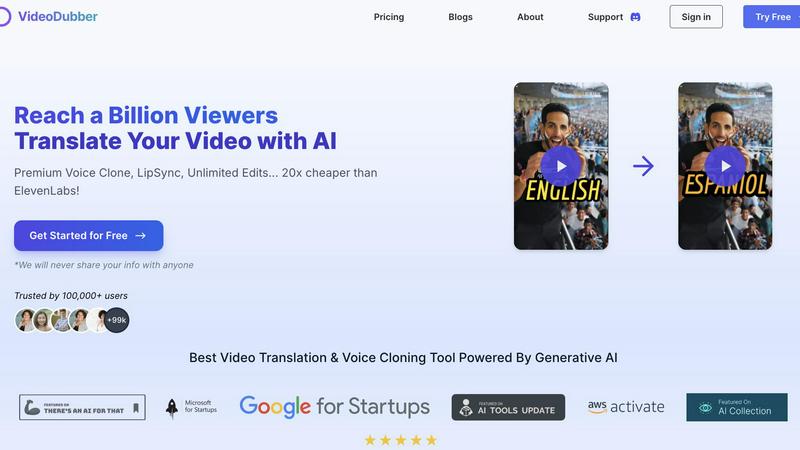
About VideoDubber Video Translator
VideoDubber Video Translator stands out as a revolutionary AI-powered platform designed to eliminate language obstacles in video content. More than just a subtitle generator, it encompasses a comprehensive suite of features including translation, dubbing, voice cloning, and subtitle generation, all integrated into a seamless workflow. With the capability to transform any video into more than 150 languages, VideoDubber ensures that the emotional depth and authenticity of the original content are preserved. This tool is perfect for a diverse array of users, including YouTubers, educators, and businesses, allowing them to reach global audiences without the high costs and lengthy timelines associated with conventional dubbing studios. What truly distinguishes VideoDubber is its commitment to delivering a natural, engaging final product. With cutting-edge lip-sync technology and advanced voice cloning options, users can maintain the original speaker's vocal identity across languages. For creators on a budget, VideoDubber offers remarkable value, costing up to 20 times less than premium alternatives, all while providing unlimited free edits, making it a must-try for anyone serious about expanding their global reach.
Features of VideoDubber Video Translator
Superior Voice Cloning and Dubbing
VideoDubber’s advanced voice cloning technology produces natural and engaging voice-overs that closely match the original speaker’s tone and emotion. This feature enhances the viewer's connection to the content, making the experience more authentic and relatable.
Simple Yet Powerful 1-click UI
The platform offers an intuitive interface that allows users to translate an entire video with just one click. For those who require more control, advanced options for editing subtitles and adjusting timestamps are readily available, streamlining the overall process.
Unlimited Free Editing and Voice-overs
Unlike many competitors, VideoDubber offers unlimited free edits, allowing users to change voice-overs, timestamps, and texts without incurring additional costs. This policy empowers users to refine their videos until they achieve the desired result.
DeepSeek, Gemini & GPT-5 Translation Models
Choose from multiple AI-powered translation models such as DeepSeek, Gemini, or OpenAI's GPT-5. This flexibility ensures users can select the model that best meets their needs, providing high accuracy and context in every translation.
Use Cases of VideoDubber Video Translator
YouTube Content Localization
YouTubers can expand their audience reach significantly by localizing content into multiple languages. With VideoDubber, creators can easily translate and dub their videos, making them accessible to viewers worldwide.
Educational Resource Development
Educators can leverage VideoDubber to create multilingual educational materials for diverse classrooms. By translating instructional videos, teachers can enhance learning experiences for students speaking different languages.
Corporate Training and Development
Businesses can utilize VideoDubber to localize training videos and corporate communications, ensuring all employees receive consistent information regardless of their language. This enhances understanding and compliance across global teams.
Marketing Campaign Expansion
Marketers can use VideoDubber to adapt advertisements and promotional videos for different regions. By providing localized content, businesses can improve engagement and connect more effectively with target audiences in various markets.
Frequently Asked Questions
How does VideoDubber ensure voice accuracy?
VideoDubber employs advanced voice cloning technology that captures the original speaker's tone and emotional nuances, ensuring that the dubbed audio resonates authentically with viewers.
Is there a limit to how many languages I can translate my video into?
No, you can select multiple target languages at once without needing to upload your video multiple times, making the process efficient and user-friendly.
Can I edit my video after translation?
Absolutely! VideoDubber offers unlimited free editing, allowing you to make changes to subtitles, voice-overs, and timestamps as needed, without any additional costs.
What AI models can I choose for translation?
Users can select from various AI models, including DeepSeek, Gemini, and OpenAI's GPT-5, ensuring that translations are accurate and contextually relevant for each specific project.
Similar to VideoDubber Video Translator
benchmark.directory
An independent directory of 146 AI tools. Every listing was paid for, set up and used on real work. Nobody can buy a place or a score.
saasgrow.ai
Get your SaaS tool discovered. Free listing, honest screening, a dofollow link — and no way for anyone to outbid you.
LinkedIn Translator
Turn rough notes into credible LinkedIn writing, or decode professional jargon into plain English.
Tools Network
Tools Network is a curated directory that brings the internet's best AI tools together in one organized place. Spanning 25+ categories
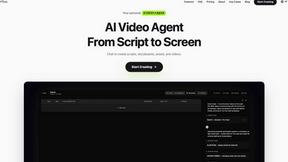

Built2WinWeb AI SEO
A development studio and AI‑native infrastructure provider that builds high‑performance, agent‑ready websites and AI discovery tools.
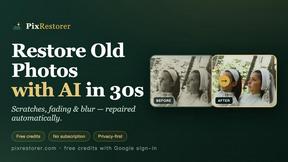
PixRestorer
Restore and colorize old photos with AI in seconds. PixRestorer repairs scratches, fading, blur, and tears, brings black-and-white prints to life in n