
Nano Photo vs Seedance 2.0
Side-by-side comparison to help you choose the right tool.

NanoPhoto.AI effortlessly transforms your ideas into stunning AI photos and videos.
Last updated: March 1, 2026

Seedance 2.0
Seedance 2.0 transforms text and images into stunning, high-quality videos with seamless motion and cinematic detail.
Last updated: February 28, 2026
Visual Comparison
Nano Photo
Seedance 2.0

Feature Comparison
Nano Photo
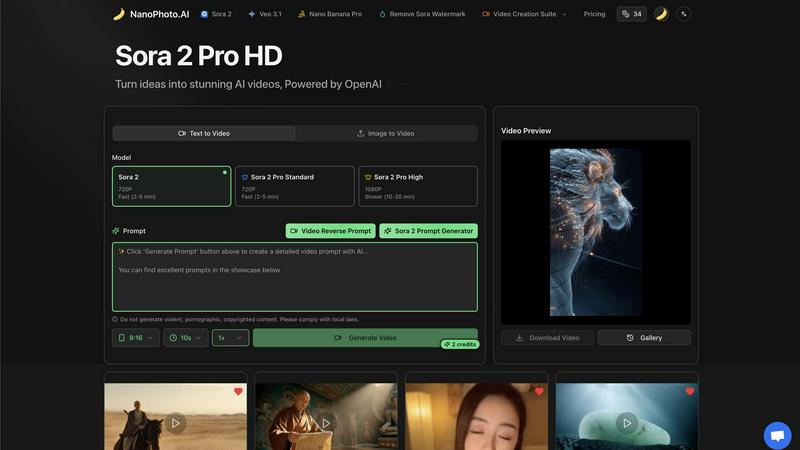
Sora 2 Pro Video Generation
This is the crown jewel. Nano Photo provides direct access to OpenAI's Sora 2 model, which is notoriously difficult for the average user to get their hands on. You can generate videos from text prompts or by uploading an image, with clear tiers for quality and speed. The "Pro High" option delivering 1080P resolution is where the magic truly happens for final outputs, though the faster 720P options are perfect for rapid prototyping. It effectively puts a Hollywood-caliber AI model on your desktop.
Advanced Prompt Engineering Suite
Where many platforms leave you guessing, Nano Photo actively helps you craft better prompts. The dedicated Sora 2 Prompt Generator is an invaluable tool for beginners and pros alike to refine their ideas. Even more impressively, the Video Reverse Prompt feature can analyze existing video content to suggest prompts, which is a brilliant way to learn the "language" of the AI and reverse-engineer styles you admire.
Nano Banana Pro & Watermark Removal
This feature bundle addresses the practical frustrations of AI video creation. "Nano Banana Pro" appears to be their enhanced processing or upscaling suite. More critically, the explicit "Remove Sora Watermark" feature is a game-changer for professional use, allowing creators to produce clean, brand-ready content without distracting AI branding, which is a common limitation in other platforms.
Integrated Video Creation Workflow
Nano Photo isn't a one-button wonder. It's a full suite. From the initial prompt generation and model selection (Sora 2 or Veo 3.1) to previewing, downloading, and managing your creations in a Gallery, the entire workflow is contained in a clean interface. The ability to generate videos in specific formats like 9:16 for social media reels shows a thoughtful, user-centric design that understands real-world content needs.
Seedance 2.0
Text-to-Video
Seedance 2.0 allows users to convert a single sentence into a fully realized cinematic scene. The model generates coherent motion that maintains continuity throughout the video, making it perfect for storytelling and marketing narratives.
Image-to-Video
This feature enables users to take reference images and transform them into animated videos. By guiding composition, identity, and visual style, it allows for a personalized touch in video creation, appealing especially to artists and designers.
Integrated Audio Generation
The Pro version of Seedance 2.0 seamlessly generates synchronized audio alongside video in a single pass. This includes sound effects, background music, speech synthesis, and multilingual lip-sync, simplifying the video creation process and enhancing the overall experience.
Physics-Aware Motion
Seedance 2.0 excels in simulating realistic physical dynamics, such as cloth movement, water splashes, and fire effects. This attention to detail elevates the realism of generated videos, making them visually stunning and immersive.
Use Cases
Nano Photo
Social Media Content Creation
For influencers and brand managers, this tool is a powerhouse. Imagine generating a week's worth of unique, eye-catching short-form video clips for TikTok or Instagram Reels in an afternoon. You can quickly iterate on concepts, maintain a consistent visual style, and stay ahead of trends without needing a production crew or expensive stock footage.
Rapid Storyboarding & Pre-Visualization
Filmmakers and video directors can use Nano Photo to breathe life into script pages instantly. Instead of static sketches, generate dynamic, moving sequences to convey pacing, composition, and mood to your team and clients. It dramatically improves communication and alignment in the pre-production phase, saving countless hours of misunderstanding.
Marketing & Advertising Asset Production
Create compelling product demo videos, explainer animations, or branded visual hooks for ad campaigns directly from a product description or logo. Marketers can A/B test different visual concepts at near-zero cost before committing to a full production shoot, allowing for data-driven creative decisions and significantly higher campaign ROI.
Artistic Exploration & Concept Art
Digital artists and concept designers can use the platform as a collaborative brainstorming partner. Feed it a mood board or a descriptive paragraph of a fantasy scene and let the AI generate surprising interpretations and visual directions. It's an incredible tool for overcoming creative block and exploring visual themes you might not have manually conceived.
Seedance 2.0
Marketing Campaigns
Businesses can utilize Seedance 2.0 to create engaging promotional videos that capture attention through high-quality visuals and coherent narratives. This tool streamlines the video production process, allowing for rapid content generation.
Educational Content
Educators can develop instructional videos that visually demonstrate concepts using both text and imagery. This feature enhances learning experiences, making complex ideas easier to grasp through dynamic visuals.
Social Media Content Creation
Content creators can leverage Seedance 2.0 to produce captivating video snippets for platforms like Instagram and TikTok. The ability to generate quick, high-quality videos helps maintain audience engagement in a fast-paced digital environment.
Film and Animation Projects
Filmmakers and animators can utilize the platform to create storyboards or rough cuts from scripts and images. The ability to visualize scenes quickly allows for better planning and execution in larger production projects.
Overview
About Nano Photo
Let's cut through the noise. Nano Photo (NanoPhoto.AI) isn't just another AI tool; it's a curated creative command center that genuinely democratizes high-end video and image generation. In a market flooded with complex, single-purpose apps, Nano Photo stands out by integrating the very best AI models—like OpenAI's Sora 2 and Google's Veo 3.1—into one shockingly intuitive platform. It’s built for the modern creator who values speed and quality equally: the social media manager on a deadline, the indie filmmaker sketching a storyboard, the marketer needing a product visual, or the artist exploring new mediums. The main value proposition is crystal clear: professional-grade AI video creation without the professional-grade learning curve or cost. They’ve removed the technical gatekeeping, allowing you to focus purely on the idea. The recent annual half-price offer is a no-brainer and signals they're serious about empowering users, not just upselling them. This is the tool I recommend when someone asks how to start with AI video without getting overwhelmed.
About Seedance 2.0
Seedance 2.0 is an advanced AI video generation model engineered by ByteDance's Seed research team, setting a new standard in video creation technology. It builds upon the foundations of its predecessor, Seedance, offering substantial enhancements in motion coherence, physical realism, and multimodal generation capabilities that are unmatched in the industry. Designed for content creators, marketers, filmmakers, and anyone looking to produce high-quality video content quickly, Seedance 2.0 transforms simple text or images into breathtaking cinematic scenes. Its unique architecture not only facilitates text-to-video and image-to-video generation but also integrates audio seamlessly, streamlining the creative process. This makes Seedance 2.0 an invaluable tool for anyone aiming to produce professional-grade videos with ease and efficiency.
Frequently Asked Questions
Nano Photo FAQ
What AI models does Nano Photo use?
Nano Photo is powered by cutting-edge, state-of-the-art models, primarily OpenAI's Sora 2 for high-fidelity video generation and Google's Veo 3.1. The platform smartly integrates these technologies, providing you with a unified interface to leverage the strengths of each model without needing separate accounts or technical know-how.
How long does it take to generate a video?
Generation time depends on the quality tier you select. For faster iterations, the "Fast (2-5 min)" options in 720P are ideal. For final, high-quality outputs, the "Pro High" 1080P videos take longer, typically between 10 to 20 minutes. This tiered system lets you balance speed with quality based on your immediate need.
Can I use the videos commercially?
Based on the inclusion of a dedicated "Remove Sora Watermark" feature, it is strongly implied that Nano Photo enables commercial use of the generated content. Always double-check the specific Terms of Service for the latest licensing details, but the tool is clearly built with professional, commercial output in mind.
What is the "Annual Payment Special Offer"?
This is a fantastic limited-time deal where you can get an annual subscription to Nano Photo at half the standard price. It's their way of lowering the barrier to entry for serious creators. If you plan to use the tool consistently for content creation, this offer represents tremendous value and is highly recommended.
Seedance 2.0 FAQ
What types of videos can I create with Seedance 2.0?
With Seedance 2.0, you can create a variety of videos including promotional content, educational videos, social media clips, and even complex narratives for film projects, all with high production quality.
How does the audio generation feature work?
The integrated audio generation feature in the Pro version creates synchronized audio tracks with the video. This includes background music, sound effects, and speech, all generated in one go, eliminating the need for separate audio editing.
Is Seedance 2.0 suitable for beginners?
Absolutely! Seedance 2.0 is designed to be user-friendly, allowing beginners to easily create professional-quality videos without requiring extensive technical knowledge or experience in video production.
Can I use my own images in the video generation process?
Yes, Seedance 2.0 allows users to upload their own images as references. This feature helps guide the composition and visual style of the generated videos, making it highly customizable for individual projects.
Alternatives
Nano Photo Alternatives
Nano Photo is a powerful AI video generation platform that makes creating professional-looking videos from text or images surprisingly simple. It leverages cutting-edge models like Sora 2 and Veo 3.1 to help marketers, content creators, and artists produce ads, storyboards, and social media visuals quickly. Users often explore alternatives for a few key reasons. Some may find the pricing structure doesn't fit their budget, while others might need specific features or integrations that Nano Photo lacks. The platform's focus might also be too broad or too narrow for certain specialized workflows, prompting a search for a tool with a different core strength. When looking for a different solution, prioritize what matters most for your projects. Consider the primary type of content you create, whether you need advanced editing controls, and how important factors like cost, output quality, and ease of use are for your team. The right tool should feel like a natural extension of your creative process.
Seedance 2.0 Alternatives
Seedance 2.0 is an advanced AI video generation model developed by ByteDance's Seed research team, designed to create high-quality videos from text or images. With its impressive capabilities, including coherent motion and stable frames, it has positioned itself as a leader in the video generation category. As users explore video creation tools, they often seek alternatives due to various factors such as pricing, specific feature sets, or compatibility with different platforms. When considering an alternative to Seedance 2.0, it's essential to evaluate factors like ease of use, the quality of output, the range of customization options, and whether it meets your particular project needs. Understanding the strengths and limitations of different tools can help you find a solution tailored to your requirements, ensuring that you can achieve your creative vision without compromise.