
Never Drop vs PollQR
Side-by-side comparison to help you choose the right tool.

Never Drop
NeverDrop captures contacts, enriches profiles, and drafts personalized follow-ups instantly, turning handshakes into.
Last updated: February 28, 2026

PollQR creates engaging QR code surveys and live polls for businesses and presenters.
Last updated: March 1, 2026
Visual Comparison
Never Drop

PollQR
Feature Comparison
Never Drop
AI-Powered Business Card Scanning
Never Drop utilizes cutting-edge AI-powered Optical Character Recognition (OCR) technology to scan any business card in seconds. This feature instantly extracts critical details, including the contact's name, company, title, phone number, and email, removing the need for tedious manual entry.
Context Enrichment
Gone are the days of generic email addresses. This feature allows users to enrich captured leads by automatically finding verified work emails based on the contact's name and company. This ensures that you never have to guess or waste time searching for accurate contact information.
Personalized AI Drafts
Never Drop's standout feature is its ability to generate personalized follow-up emails based on your conversation context and voice notes. This means you can review and send a tailored email in under two minutes, ensuring that your follow-up feels personal and relevant, not just another generic template.
Team Collaboration and Organization
Designed for fast-paced environments, Never Drop allows teams to organize scans by event and reassign leads among team members. The dashboard provides a comprehensive view of team activity, ensuring everyone stays aligned and no lead falls through the cracks.
PollQR
Dual-Purpose QR Code Engine
This is the core of PollQR's genius. It doesn't just generate a static QR code to a website. It creates intelligent, purpose-built codes for two distinct modes. For surveys, the codes are long-lived, placed on tables or receipts, and act as a permanent feedback channel. For live polls, the codes are dynamic gateways to real-time voting and interaction. This single feature, applied in two ways, makes the tool versatile yet incredibly simple to understand and deploy for specific needs.
AI-Powered Sentiment & Theme Analysis
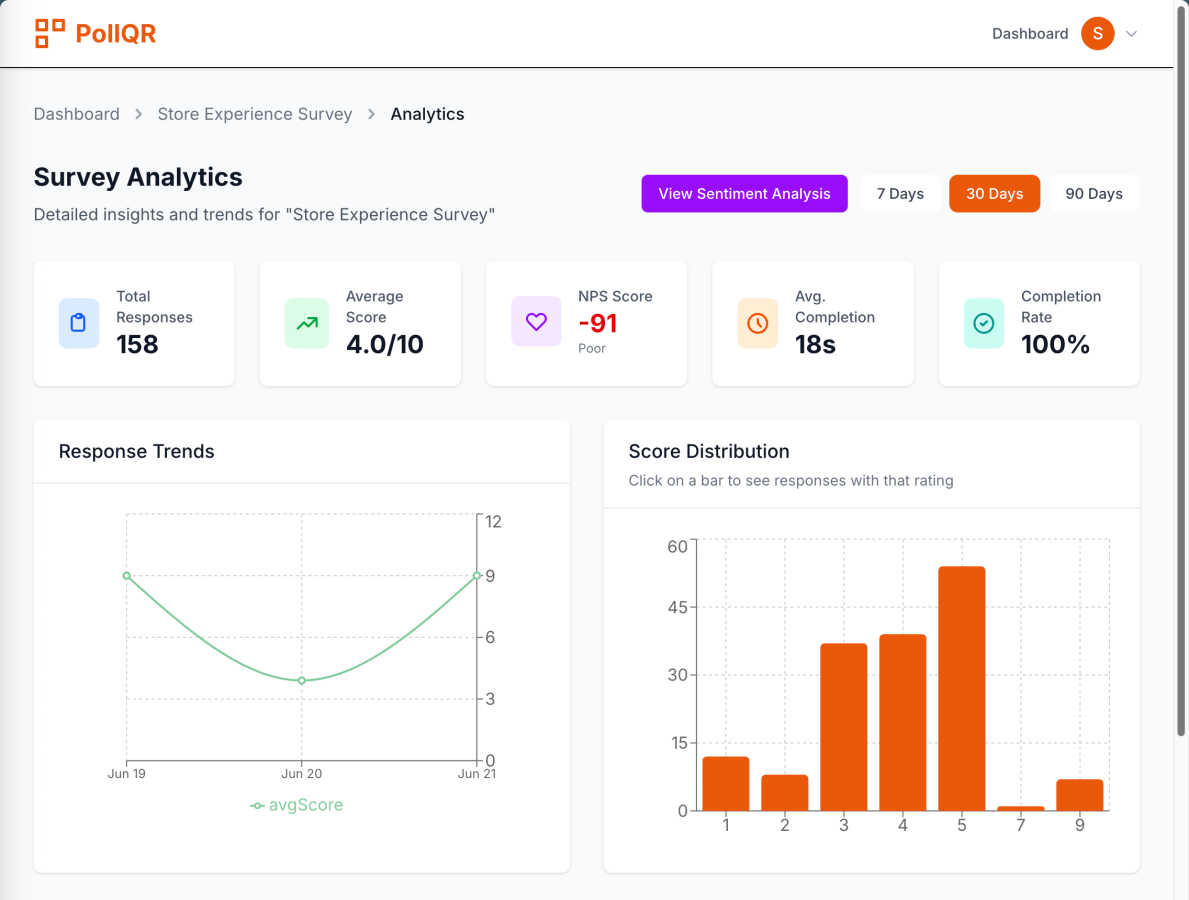
Collecting feedback is one thing; understanding it at scale is another. This is where PollQR truly shines and justifies its place in your toolkit. Its AI doesn't just count keywords; it analyzes the emotion behind responses (Sentiment Analysis), clusters feedback into major topics (Key Themes), and surfaces actionable insights. You can click on a theme like "wait time" and instantly see every comment mentioning it. This transforms raw, overwhelming data into a clear, prioritized roadmap for improvement, saving you hours of manual analysis.
Flexible Live Polling & Pricing
For presenters, the flexibility here is a major win. You can choose from multiple engaging poll types like word clouds, rankings, and star ratings—far beyond simple multiple choice. More importantly, the pricing model is presenter-friendly. You can subscribe to a Pro plan for high-volume needs, or, and this is my favorite part, pay just $2.99 for a single, one-off live poll event. This a-la-carte option makes professional-grade audience interaction accessible for anyone, eliminating the barrier of a monthly subscription for occasional use.
Integrated Data Collection & Management
PollQR provides a complete backend system, which is often an afterthought for similar tools. It automatically sets up a data store for all your responses. You get email notifications for new feedback, and the ability to download everything in a clean .CSV file for further analysis or CRM import. For live polls, you have full control over when to reveal results in visually appealing charts. This end-to-end management means you're never left wondering where the data goes or how to access it.
Use Cases
Never Drop
Trade Shows
When attending trade shows, time is of the essence. Never Drop allows sales teams to efficiently capture leads by scanning business cards, enriching contact profiles, and sending follow-ups while still on the exhibition floor, turning fleeting interactions into lasting connections.
Networking Events
At networking events, the ability to quickly follow up with new contacts can set you apart from competitors. With Never Drop, you can scan, add context, and send personalized emails, ensuring you stay top of mind long after the event has ended.
Conferences
Conferences bring together a multitude of potential leads. Never Drop streamlines the lead-capturing process, allowing you to focus on building relationships rather than worrying about losing contact information. Organizing leads by event helps in effective follow-ups.
Business Dinners
In more intimate settings like business dinners, capturing leads can often be overlooked. Never Drop enables users to document conversations in real-time and follow up promptly, ensuring that important discussions lead to actionable outcomes and future collaborations.
PollQR
In-Store Customer Feedback & Review Generation
Perfect for restaurants, retail shops, and salons. Place a QR code on receipts, tables, or countertops with a simple call-to-action like "Scan to tell us how we did!" This passively collects continuous feedback, identifies your happiest customers to gently nudge them toward leaving a 5-star Google or Yelp review, and gathers lead information. It turns every customer touchpoint into a measurable opportunity for insight and reputation growth.
Interactive Conference & Workshop Presentations
This is a killer app for any speaker. Instead of asking for a show of hands, display a PollQR code for live voting on questions, word cloud brainstorming, or session feedback. It increases engagement, provides instant visual data to discuss, and makes your presentation feel modern and participatory. Attendees simply scan with their phone camera—no app download required—which is the lowest possible barrier to entry.
Classroom & Training Engagement
Ideal for educators and corporate trainers. Use live polls to check understanding in real-time, run quick quizzes, or gather anonymous questions. The ranking and rating polls are fantastic for debriefing exercises or prioritizing discussion topics. It gives every student a voice, increases participation from those who are shy, and provides the instructor with immediate feedback on the group's comprehension.
Post-Service Feedback for Consultants & Contractors
Service professionals like plumbers, electricians, or consultants can include a PollQR survey link in their follow-up email or on a printed invoice. This creates a structured, professional channel for clients to rate the service, provide detailed comments, and offer testimonials. The AI analysis helps quickly spot recurring praise or issues across multiple jobs, informing better business practices and service delivery.
Overview
About Never Drop
Never Drop is a groundbreaking lead-capture application tailored for sales teams navigating the hectic environments of trade shows, conferences, and networking events. This tool revolutionizes the traditional approach to lead management by enabling users to effortlessly scan business cards using their smartphones. Once a card is scanned, sales professionals can enhance the gathered data by adding voice notes or textual context about their interactions, ensuring that they capture essential details about each lead. The app's advanced AI technology takes it a step further by drafting personalized follow-up emails in less than two minutes, significantly reducing the chances of losing valuable leads. With seamless integration into popular CRMs like HubSpot, Never Drop guarantees that your sales pipeline remains organized and efficient. Say farewell to lost opportunities and embrace a streamlined follow-up process that transforms leads into closed deals, maximizing your team's productivity and success.
About PollQR
PollQR is a brilliantly focused tool that cuts through the noise of generic feedback platforms. In my experience, tools that try to do everything often end up doing nothing well. PollQR is the refreshing exception. It zeroes in on two incredibly powerful, real-world applications: generating QR code surveys for long-term customer feedback and facilitating QR code live polls for instant audience engagement. This isn't just another form builder; it's a strategic engagement engine. For business owners, especially in retail, hospitality, or services, it's a seamless way to transform physical customer interactions into digital insights and 5-star reviews. For presenters, educators, and trainers, it's a game-changer that kills the awkward "show of hands" and makes any session interactive and memorable. The real magic, beyond the clever QR code delivery, is in its AI-powered analytics. You're not just collecting data; you're getting a curated analysis of customer sentiment and key themes. If you're looking for a practical, no-nonsense tool to bridge the gap between your physical presence and digital understanding, PollQR is a top-tier choice that delivers on its promises without unnecessary complexity.
Frequently Asked Questions
Never Drop FAQ
What is Never Drop?
Never Drop is a specialized lead-capture app designed for sales teams at events. It allows users to scan business cards, add context via voice or text, and generates personalized follow-up emails in under two minutes, all while enriching contact profiles with verified emails.
How does business card scanning work?
Simply take a photo of a business card using the Never Drop mobile app. The app's AI-powered OCR technology extracts essential contact information, including the name, company, title, and email, in seconds. Manual entry is also an option for user preference.
What types of events is Never Drop suitable for?
Never Drop is ideal for a variety of events, including trade shows, conferences, networking events, meetups, and business dinners. It allows users to categorize scans by event, making it easier to track leads and follow up effectively.
Do I need the mobile app?
Yes, the mobile app is essential for scanning business cards, recording voice context, and triggering follow-ups while on the go. The web dashboard complements the app by providing team management, scan review, and configuration options, ensuring seamless operation between both platforms.
PollQR FAQ
Do people need to download an app to use PollQR?
Absolutely not, and this is a huge advantage. For both surveys and live polls, respondents and audience members only need the standard camera app on their smartphone to scan the QR code. It opens directly in their mobile browser. This eliminates the single biggest friction point for live engagement tools and is why adoption rates during presentations are so high.
What kind of insights does the AI analysis provide?
The AI goes beyond simple metrics. It performs three key functions: First, Sentiment Analysis categorizes feedback as positive, negative, or neutral, letting you gauge overall customer emotion. Second, Key Themes automatically groups comments into topics like "service speed," "product quality," or "staff friendliness." Third, it provides Actionable Insights, highlighting specific areas to improve or double down on based on the sentiment and frequency of themes.
Can I use PollQR for one-time events without a subscription?
Yes, and this is one of its most user-friendly policies. While there is a Pro subscription for heavy users, PollQR offers a flexible pay-per-poll option. You can create and run a single live poll for a specific presentation or event for just $2.99. This makes it incredibly accessible for occasional presenters, teachers, or event organizers who don't need a monthly plan.
Where should I place my survey QR codes for the best response?
Placement is key for visibility and context. The best practice is to put the code where the feedback is most relevant and the customer has a moment to spare. Top locations include: on restaurant tables or receipts, at the checkout counter of a retail store, on the back of a service technician's business card or invoice, or embedded in a follow-up email. Always pair it with a clear, benefit-oriented instruction like "Scan for a chance to win!" or "Tell us how we did in 30 seconds."
Alternatives
Never Drop Alternatives
Never Drop is a cutting-edge lead-capture app tailored for sales teams in dynamic settings such as trade shows and networking events. By enabling users to scan business cards and enrich the data with personalized notes, it ensures that no lead is forgotten. The app's AI-driven feature drafts customized follow-up emails in mere minutes, streamlining the process of nurturing leads. Users often seek alternatives to Never Drop for various reasons, including pricing structures, desired features, or compatibility with specific platforms. When evaluating alternatives, consider factors such as ease of use, integration capabilities, and the ability to enhance productivity while ensuring that your lead management process remains efficient and effective.
PollQR Alternatives
PollQR is a clever tool in the productivity and management space that uses QR codes to bridge the gap between businesses and their customers or audiences. It excels at two things: creating permanent QR code surveys for ongoing feedback and running live polls for interactive presentations. This dual functionality makes it a unique contender for anyone looking to move beyond static feedback forms or awkward hand-raising. People often seek alternatives to PollQR for a few key reasons. Budget is a major one, as pricing tiers might not fit every startup or individual presenter. Some users might need more advanced survey logic, deeper integrations with other software platforms, or a different visual style for their QR codes. The specific use case—whether it's heavy on customer feedback or centered around live events—can also drive the search for a more specialized tool. When evaluating other options, focus on what matters most for your goals. If customer sentiment is your priority, look for robust analytics. For live events, real-time speed and reliability are non-negotiable. Always consider the total cost, ease of use for both you and your respondents, and how well the tool fits into your existing workflow. The best alternative is the one that feels purpose-built for your primary need.