Patrivox vs StatPecker
Side-by-side comparison to help you choose the right tool.

Patrivox
Transform your archives into searchable treasures in minutes with Patrivox's powerful AI digitization and.
Last updated: March 4, 2026

StatPecker
StatPecker delivers fast, secure insights and stunning visuals from your data, making analysis effortless and shareable.
Last updated: March 1, 2026
Visual Comparison
Patrivox
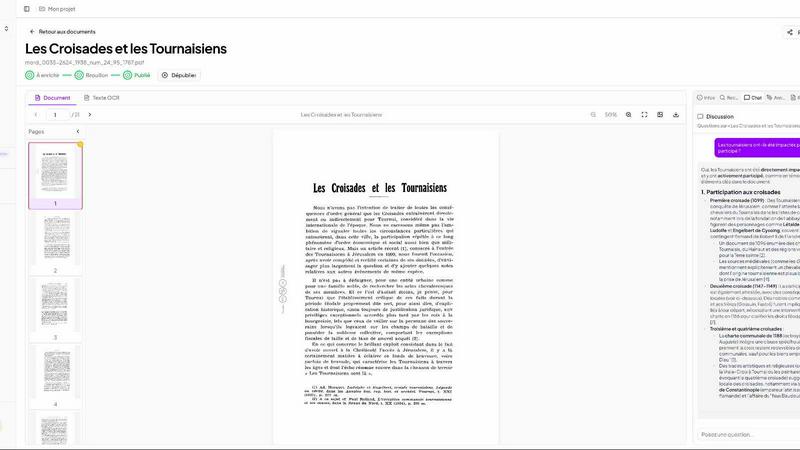
StatPecker

Feature Comparison
Patrivox
Automation
With the drag-and-drop functionality, users can easily upload their PDFs in bulk. Mistral AI automatically reads and classifies the documents, making them searchable in mere minutes. This feature eliminates the need for manual entry and configuration, streamlining the digitization process.
Advanced Search Capabilities
Patrivox offers full-text search across entire collections with impressive speed and accuracy. Users benefit from typo tolerance, enabling them to find information quickly. Additionally, the platform supports filtering by date, author, and type, while also allowing natural language queries that yield sourced answers from the AI.
Interactive Knowledge Graph
The platform's ability to identify and link entities such as people, places, and organizations creates a dynamic knowledge graph. Users can navigate through this graph, discovering connections between documents that may have previously gone unnoticed, enriching their research experience.
Built-in Viewer
Patrivox includes a built-in viewer that allows users to zoom, navigate, and copy OCR text seamlessly. This viewer enhances the user experience by providing an intuitive interface for reviewing and interacting with documents directly within the platform.
StatPecker
Ask Your Query
With StatPecker's intuitive interface, you can ask questions directly about your data, receiving instant insights without navigating complex tools. This feature empowers users to extract valuable information quickly, making it ideal for those who need to generate insights on the fly.
Publish & Embed
StatPecker allows users to create interactive visuals that can be seamlessly integrated into blogs, articles, and websites. This feature enhances the storytelling aspect of your data, enabling you to share insights in a visually appealing format that captures audience attention.
Upload & Analyze CSVs
Easily upload your local CSV files, and let StatPecker handle the analysis. The on-device processing ensures that your data remains secure while you extract key insights without the hassle of traditional spreadsheet software. This feature is perfect for users looking for a quick and private way to visualize their data.
Download & Use Anywhere
Once your infographics are created, you can export them as images for use in reports, presentations, and more. This flexibility allows for easy sharing across different platforms, ensuring that your visual data stories reach the right audience in the format that suits them best.
Use Cases
Patrivox
Municipal Archives
Municipalities can utilize Patrivox to digitize and showcase deliberations, registers, and correspondence, making historical records more accessible to the public and researchers.
Historical Societies
Historical societies can leverage Patrivox to make their bulletins and documentary collections searchable and explorable, thus preserving valuable information for future generations.
Heritage Libraries
Heritage libraries can open their special collections to researchers and the public, enhancing the visibility and accessibility of rare documents and manuscripts.
Dioceses & Parishes
Patrivox can aid dioceses and parishes in preserving and indexing their parish registers and ecclesiastical archives, ensuring that important historical data is not lost over time.
StatPecker
Data-Driven Marketing
Marketers can utilize StatPecker to create compelling visuals that demonstrate campaign performance, customer insights, or market trends. By presenting data in an engaging format, they can enhance their storytelling and drive audience engagement.
Educational Presentations
Educators can leverage StatPecker to transform complex data into simple, understandable graphics for classroom presentations. This helps students grasp difficult concepts and makes learning more interactive and visually appealing.
Business Reporting
StatPecker is ideal for business analysts who need to present insights to stakeholders. By generating clear and professional infographics, analysts can communicate findings effectively, aiding decision-making processes within their organizations.
Social Media Content Creation
Content creators can use StatPecker to generate visually striking infographics for social media platforms. This capability enables them to share data-driven insights in a format that attracts attention and encourages sharing, enhancing their online presence.
Overview
About Patrivox
Patrivox is an innovative European SaaS platform designed specifically for organizations such as heritage institutions, municipal services, associations, and enterprises. Its primary mission is to transform vast collections of scanned documents into a fully searchable and interactive knowledge base. Users can effortlessly drag and drop their PDFs, and in just minutes, Mistral AI employs advanced optical character recognition (OCR) technology to extract every word from the documents. This platform excels at identifying key entities like people, places, and organizations, linking them into an interactive knowledge graph. Patrivox is tailored for those who require quick access to information, allowing users to search instantly with typo tolerance or pose questions in natural language, with AI delivering sourced answers. Its core value proposition lies in making previously inaccessible knowledge easily searchable and shareable, thereby unlocking new avenues for research and public access.
About StatPecker
StatPecker is an innovative AI-powered visual storytelling engine that transforms raw data into stunning infographics effortlessly. Designed for creators, marketers, analysts, and educators who may not be data experts, StatPecker provides a solution to the often mundane task of data presentation. By simply uploading a CSV file or asking a straightforward question, users can generate polished visuals in seconds. This tool eliminates the need for complex software or costly designers, allowing users to focus on the narrative behind their data rather than getting bogged down in technicalities. The platform promises significant time savings, zero production costs beyond the tool itself, and enhanced engagement with content. StatPecker is your go-to resource for turning tedious spreadsheets into captivating visuals, making data comprehension more accessible for everyone.
Frequently Asked Questions
Patrivox FAQ
How does Patrivox ensure data security?
Patrivox is 100% hosted in Europe and is GDPR-native, ensuring comprehensive data protection. An audit log tracks all changes, providing transparency and security for sensitive documents.
Can I use Patrivox for large collections of documents?
Absolutely! Patrivox supports batch imports, allowing users to upload hundreds of files at once, making it an ideal solution for large-scale digitization projects.
What types of documents can be processed with Patrivox?
Patrivox can process a variety of document types, primarily PDF files. This versatility makes it suitable for different organizations needing to digitize and search through diverse collections.
Is there a free trial available for Patrivox?
Yes, Patrivox offers a free trial that allows users to test the platform with 100 trial pages and a one-time credit, giving them a taste of its powerful features without any financial commitment.
StatPecker FAQ
How does StatPecker ensure data privacy?
StatPecker prioritizes data security by processing information locally on your device. This means your data never leaves your computer, ensuring that sensitive information remains confidential while you create your visuals.
Can I use StatPecker without any data expertise?
Absolutely! StatPecker is designed for users with varying levels of data expertise. Its user-friendly interface and intuitive features allow anyone to create stunning visuals without needing to navigate complex data analysis tools.
What formats can I export my infographics in?
StatPecker allows users to export their infographics as images, making it easy to include them in reports, presentations, or share them across different platforms. This versatility ensures your visuals are accessible wherever you need them.
Is there a limit on the size of CSV files I can upload?
Yes, StatPecker allows users to upload CSV files of up to 50 MB. This provides ample space for most datasets, enabling users to analyze significant amounts of data without issue.
Alternatives
Patrivox Alternatives
Patrivox is an innovative European SaaS platform that specializes in transforming scanned documents into a fully searchable knowledge base through advanced AI technology. This platform is particularly favored by heritage institutions, municipal services, associations, and enterprises seeking to enhance their document accessibility. Users often turn to alternatives for various reasons, including pricing constraints, specific feature requirements, or unique platform integration needs that better align with their organizational goals. When searching for an alternative, consider critical factors such as the scalability of the solution, the accuracy of the optical character recognition capabilities, the ability to integrate with existing systems, user-friendliness, and overall support provided by the company. Look for features that enhance search functionality and ensure a seamless user experience to maximize the value of your document digitization efforts.
StatPecker Alternatives
StatPecker is an innovative AI-driven tool in the data visualization category, designed to transform raw data into engaging infographics quickly and effortlessly. Users are often drawn to StatPecker for its ability to simplify the process of data storytelling, but they may seek alternatives due to factors like pricing, specific feature sets, or compatibility with their existing platforms. The need for user-friendly interfaces, robust analytics capabilities, and flexible data integration options are essential considerations when exploring alternatives, as these aspects can significantly impact the effectiveness of data communication. --- [{"question": "What is StatPecker?", "answer": "StatPecker is an AI-powered visual storytelling engine that transforms raw data into polished infographics, making data insights accessible and engaging."}, {"question": "Who is StatPecker for?", "answer": "StatPecker is ideal for creators, marketers, analysts, and educators who need to communicate data insights without being data experts."}, {"question": "Is StatPecker free?", "answer": "The content does not specify whether StatPecker is free; users should check the official website for pricing details."}, {"question": "What are the main features of StatPecker?", "answer": "StatPecker features AI-powered query-to-visual capabilities, direct CSV upload and analysis, allowing users to effortlessly create meaningful charts from their data."}]