documentorium vs PDF Compiler
Side-by-side comparison to help you choose the right tool.

documentorium
Documentorium enables service professionals to create tailored contractor documents and professional PDFs swiftly with guided forms.
Last updated: March 26, 2026

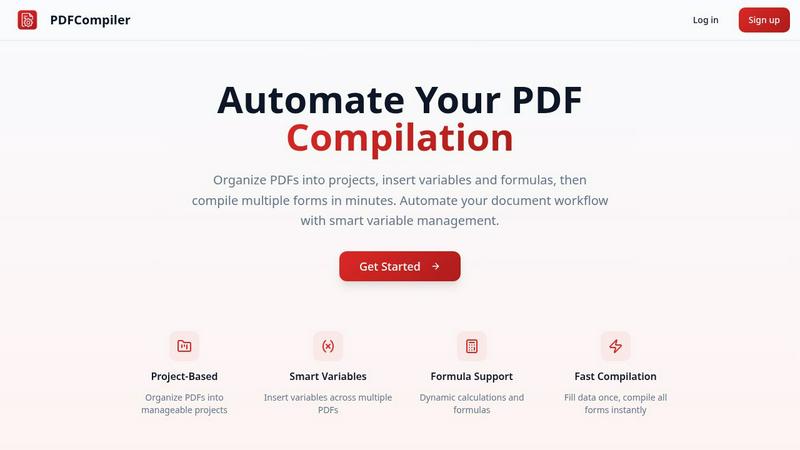
Effortlessly automate your PDF workflow by entering data once to instantly populate multiple forms with ease.
Last updated: February 28, 2026
Visual Comparison
documentorium

PDF Compiler
Feature Comparison
documentorium
Guided Forms
Documentorium offers guided forms that lead users through the document creation process, making it easier to fill out necessary information. This feature eliminates the guesswork usually associated with creating business documents, ensuring that all relevant information is captured accurately.
Professionally Designed Templates
With over 200 templates tailored for 26 different trades, Documentorium provides a wide array of professionally designed documents. Each template is built with trade-specific fields, meaning users can create quotes, invoices, and contracts that are not only functional but also visually appealing.
Instant PDF Generation
One of the standout features of Documentorium is its ability to generate clean, print-ready PDFs in seconds. This allows users to quickly produce professional documents that can be shared with clients immediately, enhancing efficiency and saving valuable time.
Document History and Prefill Options
Documentorium keeps a complete history of all documents created, allowing users to revisit and reuse previous documents easily. This feature, combined with the prefill option, means that users can streamline their workflow by generating new documents based on past entries, significantly reducing repetitive tasks.
PDF Compiler
Configurable Fields
PDF Compiler allows users to define a variety of fields in their documents, including text inputs, dates, variables, selections, and even Excel-style formulas. This flexibility ensures that all necessary data can be efficiently captured and managed, catering to the unique requirements of each project.
Minimal Input
One of the standout features of PDF Compiler is its ability to minimize user input. Users only need to enter essential data once, and the software automatically populates all linked documents with the appropriate information, adhering to the predefined configurations. This not only saves time but also reduces the likelihood of data entry errors.
Data Linking
With PDF Compiler, any updates made to a field automatically propagate across all PDFs within the project. This means that users can make changes to a single data point, and the software will ensure that all related documents reflect those updates, maintaining consistency and accuracy throughout the entire set.
Automated Workflows
The software enables users to generate complete document sets in mere minutes. With its dynamic calculations and formatting capabilities, PDF Compiler streamlines the entire process of document preparation, allowing users to compile all necessary forms instantly, ready for submission, sharing, or printing.
Use Cases
documentorium
Quick Quote Generation
Imagine a busy day on the job where a client requests a quote on the spot. With Documentorium, tradespeople can quickly generate a professional quote using guided forms, ensuring that they capture all necessary details while impressing the client with their efficiency.
Streamlined Invoicing
After completing a job, the last thing a tradesperson wants to do is spend hours creating an invoice. Documentorium simplifies this process by providing tailored invoice templates that can be completed and sent to clients within minutes, ensuring prompt payment and customer satisfaction.
Comprehensive Service Reports
For service technicians who need to document their work, Documentorium makes it easy to create detailed service reports. These reports can include observations, findings, and recommendations, all formatted in a professional manner that clients will appreciate.
Effortless Proposal Creation
Whether bidding for a new project or pitching a service, Documentorium's proposal templates help tradespeople craft compelling and informative proposals that stand out. The guided forms ensure that all critical information is included, making it easier to win new contracts.
PDF Compiler
Tender and Proposal Documentation
In scenarios where organizations frequently prepare tenders and proposals, PDF Compiler excels by automating the completion of these documents. By reducing repetitive data entry, teams can create professional proposals swiftly, ensuring they meet tight deadlines without compromising quality.
Financial and Administrative Reports
For finance and admin teams tasked with generating comprehensive reports, PDF Compiler simplifies the process. The ability to link data across multiple PDFs means that any adjustments made to core figures will automatically update all related reports, enhancing both accuracy and efficiency.
Multi-Document Workflows
Any workflow that involves multiple documents requiring repetitive data entry can benefit from PDF Compiler. Whether it's contracts, invoices, or project documentation, the software streamlines the compilation process, saving time and ensuring consistency across all documents.
Compliance and Regulatory Filings
Organizations that must adhere to strict compliance and regulatory standards find PDF Compiler invaluable. By automating the completion of required forms and ensuring that all data is accurate and up-to-date, businesses can minimize risks associated with manual entry and ensure adherence to legal obligations.
Overview
About documentorium
Documentorium is a game-changer for tradespeople seeking efficiency and professionalism in their documentation. Built specifically for electricians, plumbers, contractors, HVAC technicians, roofers, and various service professionals, this no-nonsense document engine allows users to create polished business documents without the hassle of starting from scratch. With access to over 200 guided templates organized across 26 trade categories, users can effortlessly generate quotes, estimates, invoices, work orders, bids, contracts, service reports, inspection reports, proposals, warranties, change orders, and much more. Each template is tailored with fields specific to your trade, ensuring that every document is relevant and professional. The user-friendly platform provides instant PDF generation in seconds, allowing tradespeople to save time and maintain a streamlined workflow. Documentorium not only simplifies the documentation process but also empowers service professionals to present their services with confidence and clarity.
About PDF Compiler
PDF Compiler is an innovative tool designed to automate the completion of PDF forms across multiple documents, significantly enhancing efficiency and accuracy in various workflows. This software caters to professionals and organizations that deal with repetitive data entry tasks, such as proposal teams, financial analysts, and administrative personnel. The primary value proposition of PDF Compiler lies in its ability to reduce manual input, ensuring consistency and minimizing the risk of errors. Unlike traditional PDF editors, PDF Compiler excels in handling data propagation, complex formulas, and field references throughout an entire document set. By streamlining the compilation process, users can focus on high-value tasks while the software takes care of the tedious details, ultimately resulting in faster project completions and enhanced productivity.
Frequently Asked Questions
documentorium FAQ
Can I cancel anytime?
Yes, you can cancel your subscription at any time from your account. Your access remains active until the end of the billing period, ensuring you won't face any penalties or lock-in fees.
What happens when my trial ends?
When your trial ends, your existing documents remain intact. However, to create new documents, you will need to activate your subscription. Rest assured, no data is deleted when the trial expires.
Do I lose my documents if I don't subscribe?
No, your documents are saved in your history. You can always view and download them at your convenience. Subscribing simply allows you to create and edit new documents.
How does Documentorium help with efficiency?
Documentorium significantly enhances efficiency by providing guided forms and instant document generation. This means tradespeople can spend less time on paperwork and more time focusing on their actual work, leading to improved productivity.
PDF Compiler FAQ
How does PDF Compiler ensure data accuracy?
PDF Compiler eliminates manual entry errors by allowing users to enter data only once. Changes to linked fields automatically propagate across all related documents, ensuring that all information remains consistent and accurate.
Can I customize the fields in my PDF documents?
Yes, PDF Compiler offers configurable fields, allowing users to define the types of data they need, including text, dates, variables, selections, and formulas. This customization ensures that each document meets specific project requirements.
Is there a limit to the number of PDFs I can compile at once?
No, PDF Compiler is designed to handle multiple PDFs within a single project. Users can organize their documents efficiently and compile all forms simultaneously, regardless of the number of files involved.
Is a demo available for PDF Compiler?
Absolutely! Users can try an interactive demo with sample documents to experience the automated compilation process firsthand. No account is required to see the power of PDF Compiler in action.
Alternatives
documentorium Alternatives
documentorium is a straightforward document engine designed specifically for tradespeople such as electricians, plumbers, contractors, HVAC technicians, and roofers. It allows users to create a variety of professional business documents quickly and efficiently, eliminating the hassle of starting from a blank page. With over 200 guided templates across 26 trade categories, documentorium stands out in the productivity and management sector. Users often seek alternatives to documentorium for various reasons, including pricing concerns, the desire for additional features, or the need for specific platform compatibility. When choosing an alternative, it's crucial to consider factors such as the range of templates available, ease of use, and how well the tool caters to the specific needs of your trade. The right choice should enhance your productivity while providing the necessary functionality for your business operations.
PDF Compiler Alternatives
PDF Compiler is a powerful tool designed for automating PDF form completion, falling within the realm of business productivity and task management solutions. By allowing users to enter data just once and having it populate across multiple PDFs, PDF Compiler streamlines workflows that involve repetitive data entry, making it invaluable for tasks like tender documentation and financial reporting. However, users often seek alternatives due to various factors such as pricing, specific feature sets, or compatibility with different operating systems. When choosing an alternative, it's essential to consider aspects like ease of use, the ability to handle complex data linking, automation capabilities, and the overall scalability of the solution to meet your unique needs.