Looktara vs PhotoWeather
Side-by-side comparison to help you choose the right tool.

Looktara
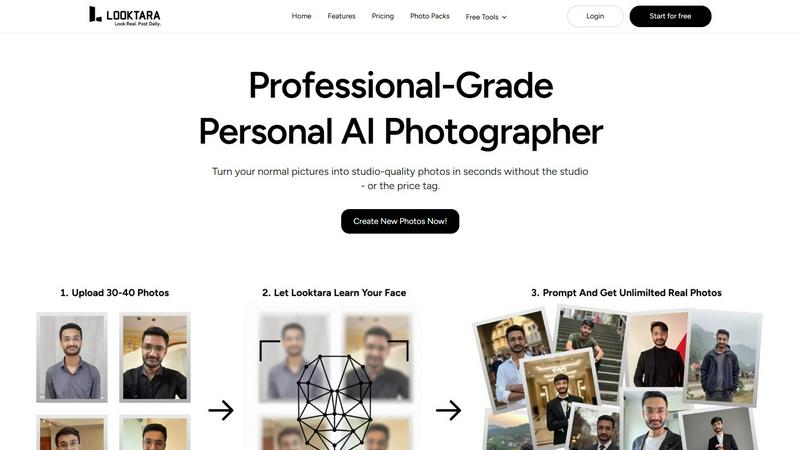
Looktara trains your personal AI to create authentic, professional photos on demand.
Last updated: February 28, 2026

PhotoWeather
Get real-time alerts for perfect photography conditions tailored to your favorite spots with PhotoWeather.
Last updated: February 28, 2026
Visual Comparison
Looktara
PhotoWeather

Feature Comparison
Looktara
Private AI Model Training
This is the foundational magic. Looktara doesn't slap a generic filter on a stock face. You upload around 30 photos of yourself, and the system builds a private, encrypted model that learns your specific likeness. This process, taking about 10 minutes, ensures every image generated is deeply personalized, capturing your authentic expressions and avoiding the uncanny valley effect that makes other AI photos look so off-putting.
Context-Aware Prompt Generation
Once your model is trained, you become the creative director. Simply type a text prompt describing exactly what you need. Want a confident headshot against a modern office backdrop? A warm, casual photo for a newsletter? A dynamic shot for a speaking engagement thumbnail? You describe the scene, style, and mood, and Looktara interprets it, placing the real you into that context. This level of creative control is what sets it apart from preset, one-size-fits-all solutions.
Platform-Optimized Styling
A single, static headshot doesn't work everywhere. Looktara is built with this nuance in mind. It empowers you to generate images styled for the specific vibe of each platform—authoritative and polished for LinkedIn, authentic and engaging for Instagram, or friendly and approachable for a dating profile. It’s one consistent you, expertly adapted to fit the context, which is a game-changer for personal branding.
Integrated Free Editing Tools
Beyond generation, Looktara provides a suite of handy utilities to polish your photos, making it a one-stop shop. Need to remove a distracting background, blur a face for privacy, crop, resize, or compress an image for a specific platform? These tools are built right in, saving you from juggling multiple apps and ensuring your final image is perfectly ready for publication.
PhotoWeather
Ready-Made Templates
PhotoWeather offers a selection of ready-made templates designed specifically for photographers. These templates cover various conditions like fog, golden hour, aurora visibility, and storm intensity. By using these presets, photographers can quickly set up alerts tailored to their shooting style without the need for complex configurations.
Powerful Rule Builder
With over 80 parameters to choose from, the rule builder allows photographers to customize their alerts based on specific weather conditions. Users can combine parameters using AND/OR/NOT logic, such as selecting for "Golden hour + 20-60% clouds + wind < 7 m/s." This level of granularity ensures that users receive alerts that truly match their photographic goals.
Smart Notifications
PhotoWeather's smart notification system keeps users informed with daily digests, timely reminders before ideal conditions arise, and updates when forecasts change. Additionally, the calendar sync feature integrates these opportunities directly into the user's calendar, making planning seamless and efficient.
Trusted Forecast Sources
PhotoWeather aggregates data from top-tier meteorological services such as ECMWF, NOAA, and Météo-France, ensuring users receive reliable and accurate weather information. This trustworthiness is crucial for photographers who need to make go/no-go calls based on evolving weather conditions.
Use Cases
Looktara
Refreshing Your Professional Headshots
Gone are the days of using a five-year-old LinkedIn photo. Professionals can generate a suite of fresh, on-brand headshots in minutes. Need one with a serious boardroom vibe, another with a collaborative team energy, and a third for a "About Me" page? With Looktara, you can create a diverse portfolio of professional images that reflect different facets of your role and personality, all while maintaining perfect consistency.
Creating Consistent Social Media Content
For creators, influencers, and entrepreneurs, visual consistency is key. Looktara allows you to generate a steady stream of authentic photos of yourself for stories, posts, and profile updates. Whether it's a "behind-the-scenes" shot, a celebratory milestone post, or a thoughtful portrait for a caption, you can ensure you're always presenting a cohesive, high-quality personal brand without ever needing to stage a photoshoot.
Sourcing Authentic Marketing Imagery
Small business owners and solopreneurs often struggle with stock photos that feel fake or hiring models for campaigns. With Looktara, you can become the authentic face of your own brand. Generate images of yourself using your product, offering a service, or simply conveying the trusted authority of your business, creating genuine marketing assets that resonate far more deeply with customers.
Crafting Personalized Dating Profile Photos
Dating profiles thrive on authentic, recent, and varied photos. Looktara solves the awkward "selfie" or "friend-photo" dilemma by allowing you to generate natural-looking photos of yourself in different settings and styles—from a smart-casual coffee shop shot to a relaxed outdoors image. This helps present a well-rounded, genuine, and appealing profile.
PhotoWeather
Landscape Photography
Landscape photographers can leverage PhotoWeather to set alerts for specific conditions like misty mornings or dramatic cloud formations. By focusing on their favorite locations and desired weather parameters, they enhance their chances of capturing breathtaking landscapes.
Astrophotography
For astrophotographers, understanding the night sky's conditions is essential. PhotoWeather helps users set alerts for astronomical events, such as when the moon is below the horizon or when low cloud coverage allows for clearer stargazing, ensuring they never miss a celestial opportunity.
Wildlife Photography
Wildlife photographers can benefit from customized alerts for conditions that favor animal activity, such as overcast days or specific wind conditions. By receiving timely notifications, they can position themselves in the right spot at the right time for optimal shots.
Event Photography
Whether capturing outdoor weddings or festivals, event photographers can utilize PhotoWeather to ensure they are prepared for changing weather conditions. By setting alerts for rain or wind, they can make informed decisions about equipment and locations in advance.
Overview
About Looktara
Looktara isn't just another AI photo app; it's the personal photographer you've always wanted but could never justify hiring full-time. Forget the awkward, plastic-skinned avatars that plague other generators. This tool is a revelation for anyone who understands that their face is their brand. The core proposition is brilliantly simple yet powerful: you train a private, encrypted AI model on yourself using about 30 photos. In roughly 10 minutes, it learns your unique essence—your smile, your expressions, the way you carry yourself. From that moment, you have a studio-grade creative partner on demand. Need a new headshot? Don't book a photographer, just type a prompt. Describe the scene, the mood, the professional vibe you're going for, and in about 5 seconds, Looktara generates a photo that is context-aware and unmistakably you. It’s built for the modern professional, creator, or entrepreneur who needs a consistent, high-quality visual identity across platforms without the exorbitant cost, scheduling headaches, and inflexibility of traditional photoshoots. This is about authentic, scalable personal branding, finally made effortless.
About PhotoWeather
PhotoWeather is a revolutionary tool designed specifically for outdoor photographers who want to capture the best moments nature has to offer. Unlike traditional weather apps that require constant checking, PhotoWeather intelligently monitors weather conditions 24/7, sending users alerts tailored to their photography needs. Whether you are after the mystical beauty of sunrise fog, the intensity of a dramatic storm, or the ethereal glow of a golden-hour cloud break, PhotoWeather ensures you never miss a photographic opportunity. With a user-friendly interface, it caters to landscape, astrophotography, and wildlife photography enthusiasts, enabling them to set precise conditions for alerts. Its powerful rule builder and smart notifications empower photographers to focus on their craft rather than fret over weather forecasts. In an era where timing is crucial for capturing stunning images, PhotoWeather stands out as an indispensable companion for any serious photographer.
Frequently Asked Questions
Looktara FAQ
How many photos do I need to train my AI model?
You'll need to upload approximately 30 photos of yourself. The key is variety: include different angles, expressions (smiling, serious, neutral), and lighting conditions. This diverse set helps the AI learn a comprehensive and accurate version of your likeness, ensuring the highest quality and most natural-looking generated images.
Is my personal data and image model secure?
Absolutely. According to Looktara, your uploaded photos are used to train a private AI model that is encrypted and unique to you. The company emphasizes that this model is yours alone, suggesting a strong commitment to data privacy and security, which is crucial when dealing with sensitive biometric data like your facial likeness.
Can I control the style and background of the generated photos?
Yes, this is one of Looktara's core strengths. You have full creative control via text prompts. You describe the desired scene (e.g., "modern office," "cozy cafe," "studio with soft light"), style ("professional," "casual," "confident"), and any specific details. The AI then generates a photo placing your learned likeness into that specific context.
How long does it take to generate a new photo?
Once your personal AI model is trained (which takes about 10 minutes), generating a new photo is remarkably fast. Based on the provided content, you can expect to receive your context-aware, personalized image in roughly 5 seconds after submitting your text prompt.
PhotoWeather FAQ
How do I get started?
To get started with PhotoWeather, simply sign up for a free account. You can add your favorite shooting locations, create custom alerts using templates or the rule builder, and start receiving notifications tailored to your photography goals.
How accurate are the forecasts?
PhotoWeather sources its forecasts from leading meteorological services like ECMWF, NOAA, and Météo-France. This ensures a high level of accuracy, giving photographers confidence in the alerts they receive and the conditions they can expect.
Can I create my own rules?
Yes, PhotoWeather features a powerful rule builder that allows you to create custom alerts based on over 80 weather parameters. This flexibility lets you tailor your alerts to meet your specific photography needs, giving you complete control over what conditions you want to be notified about.
Do you support calendar sync?
Absolutely! PhotoWeather integrates seamlessly with your calendar, allowing you to add photo opportunities as auto-updating events. This feature helps you stay organized and ready for upcoming shoots based on the conditions you care about.
Alternatives
Looktara Alternatives
Looktara is a specialized AI tool in the generative art category, designed to act as your personal AI photographer. It creates authentic, professional photos of you on demand by training a private model on your own images. This solves the need for consistent, high-quality personal branding visuals without the traditional photoshoot. Users often explore alternatives for various reasons. Some might be seeking a different pricing model or a free tier to start. Others may need features beyond personal photo generation, like editing existing images or creating entirely fictional characters. Platform compatibility, such as a dedicated mobile app, or a desire for less niche, more generalized AI art tools can also drive the search. When evaluating other options, focus on a few key areas. Prioritize tools that respect your privacy and data security, especially when handling personal photos. Consider the output quality and consistency—does it avoid the uncanny valley? Finally, assess the creative control you have. Can you easily guide the style and context to match your professional or personal needs?
PhotoWeather Alternatives
PhotoWeather is a specialized app designed for photographers, alerting users to optimal weather conditions for capturing stunning images, whether it's golden hour, fog, or auroras. As photographers seek to make the most of fleeting moments, many find themselves looking for alternatives due to factors like pricing, additional features, or compatibility with their preferred devices. When searching for a suitable substitute, consider aspects such as user interface, alert customization, location support, and the range of weather parameters you can monitor. When evaluating alternatives, prioritize features that align with your photography goals, such as specific weather conditions, ease of use, and the ability to set personalized notifications. A robust rule builder and smart notification system can make a significant difference in ensuring you never miss an opportunity to capture that perfect shot.