OGimagen vs Quickfix AI
Side-by-side comparison to help you choose the right tool.

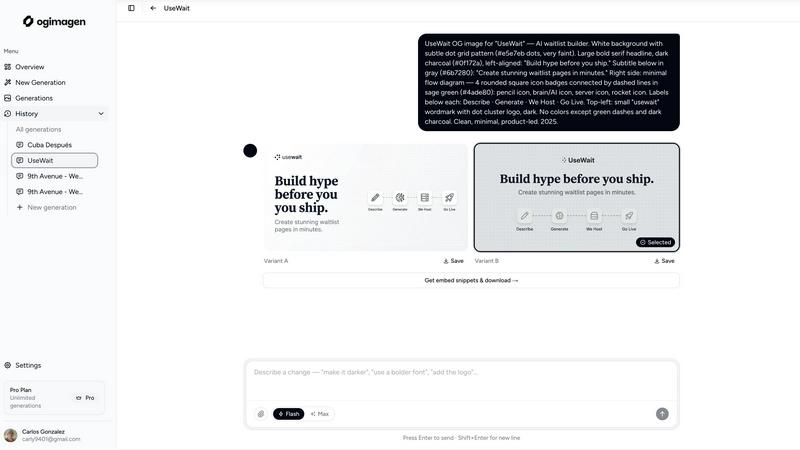
OGImagen instantly creates beautiful, platform-perfect social media images and meta tags from your content.
Last updated: March 11, 2026

Quickfix AI
Quickfix AI instantly diagnoses your computer's health and explains it in plain English.
Last updated: March 1, 2026
Visual Comparison
OGimagen
Quickfix AI
Feature Comparison
OGimagen
AI-Powered, Platform-Perfect Generation
OGimagen's core magic is its AI engine that transforms your text into visually engaging social cards. You input your content, and it instantly generates two unique design variants. Crucially, it doesn't just create one image; it automatically outputs three perfectly sized versions (1200x630 for OG, 1200x600 for Twitter, 1200x627 for LinkedIn) from a single generation. This ensures pixel-perfect presentation everywhere your link is shared, from Facebook and Discord to X and LinkedIn, without you ever worrying about aspect ratios or specifications.
Framework-Specific Meta Tag Snippets
This is the killer feature for developers. After generation, OGimagen doesn't leave you hanging with just image files. It provides ready-to-paste code snippets for your specific tech stack. Free users get the standard HTML, but the Pro plan unlocks tailored snippets for all the modern frameworks: Next.js (both App and Pages Router), Astro, SvelteKit, Remix, and more. It handles the entire openGraph and twitter:card metadata object structure, saving you from tedious manual coding and potential errors.
MCP Integration for Editor Workflow
For the ultimate streamlined workflow, OGimagen's Pro plan offers MCP (Model Context Protocol) integration. This is a game-changer. You can connect OGimagen directly to your editor—like Cursor, Windsurf, or Claude Code—and generate images, list past generations, and fetch embed snippets without ever leaving your coding environment. It turns the task of creating social previews from a context-switching hassle into a seamless, in-line command, dramatically boosting productivity.
Global CDN Hosting & Management
Every image you generate is automatically hosted on a fast, global Cloudflare CDN, ensuring quick load times for your previews worldwide. The platform also manages the lifecycle for you. Plans include CDN hosting for specific durations (45 days for Starter, 90 days for Growth, permanent for Pro), removing the burden of image storage and delivery from your own infrastructure. You just generate, copy the snippet, and ship.
Quickfix AI
Comprehensive One-Click System Scan
This is the heart of the experience. With a single click on "Start Scan," Quickfix AI dives deep into every critical subsystem of your computer. It doesn't just skim the surface; it analyzes CPU load patterns, memory pressure, GPU utilization, storage health and capacity, battery degradation, network connection status, and core security settings like firewall status. All this data is gathered, processed, and presented in a unified, visually intuitive dashboard in under 60 seconds. It's the ultimate shortcut to knowing exactly what's happening under the hood.
Plain-English AI Explanations & Recommendations
This is the killer feature that sets Quickfix AI apart. Once your diagnostic report is ready, you can literally chat with the AI about your findings. Ask "Why is my Mac running slow?" and it will parse the entire report to give you a specific, understandable answer, like pinpointing that Chrome is using 45% of your CPU. It reads the technical diagnostics so you don't have to, offering clear explanations and practical, step-by-step recommendations to fix issues or optimize performance, with zero technical knowledge required.
Remote Diagnostics via Sharing Code
A game-changer for IT support teams or anyone helping friends and family. Instead of trying to guide someone through screenshots or confusing instructions, you can simply send them a secure link. They run the Quickfix AI agent on their machine, which generates a unique sharing code. You enter that code on your end, and voila—you can instantly view their full diagnostic report remotely. This eliminates the guesswork and allows for accurate, efficient troubleshooting from anywhere in the world.
Holistic Health & Performance Dashboard
Quickfix AI consolidates all vital statistics into one beautifully designed, easy-to-read interface. You don't need to jump between five different system tools. See your CPU, Memory, and GPU usage percentages at a glance. Monitor your disk space and health. Check your battery's remaining capacity and cycle count. Verify your upload/download speeds and security protection status. This dashboard provides immediate, actionable insight into your system's overall wellness, making proactive maintenance simple.
Use Cases
OGimagen
Bloggers and Content Creators
For anyone publishing articles, tutorials, or newsletters, OGimagen is a lifesaver. Instead of creating a custom graphic for every single post, you can generate a unique, on-brand OG image in seconds. This ensures every link shared to social media looks professional and enticing, directly helping to improve click-through rates from timelines and feeds without investing hours in design work.
SaaS and Product Launch Teams
When launching a new feature, product, or landing page, first impressions are critical. OGimagen allows teams to quickly generate high-quality, consistent social previews that reflect their brand identity. The ability to attach logos and use brand colors ensures every shared link reinforces brand recognition, making marketing shares and community posts look polished and credible.
Developers Building Side Projects
Indie hackers and developers building MVPs need to move fast and look professional. OGimagen eliminates the design bottleneck. With its MCP integration, a developer can stay in their editor, generate a perfect social image for their new project's homepage, and get the exact code for their framework instantly. It's the fastest way to go from code to a shareable, attractive product link.
Marketing and Social Media Managers
Marketing teams managing multiple campaigns or social accounts can use OGimagen to maintain a consistent visual standard across all shared content. The ability to quickly iterate with different title/description combos and get two AI variants allows for A/B testing of what visual style attracts more clicks, all while ensuring technical compliance across every social platform's specifications.
Quickfix AI
The Anxious Troubleshooter
Your computer is making weird noises, running painfully slow, or just "doesn't feel right." Instead of spiraling into worry or searching forums for hours, you run Quickfix AI. In a minute, it tells you if your drive is failing, your memory is maxed out, or a background process is hogging resources. It transforms vague dread into a clear, understandable problem with suggested solutions, giving you peace of mind and a path forward.
The Power User & Tech Enthusiast
Gamers, developers, and content creators who push their hardware need to monitor performance bottlenecks. Quickfix AI provides the deep insights needed to optimize setups. Is a thermal throttle causing frame drops? Is the RAM speed the limiting factor? The tool offers the granular data and AI analysis to fine-tune systems for peak efficiency, ensuring your hardware is working as hard as you are.
The IT Support Professional
For IT teams, time is money. Quickfix AI revolutionizes the first line of support. Instead of lengthy back-and-forth emails trying to diagnose a user's issue, support staff can send a secure link, get a sharing code, and instantly access a full diagnostic report. This allows for accurate, remote diagnosis before a ticket is even escalated, dramatically reducing resolution times and improving user satisfaction.
The Family Tech Helper
We've all been the "tech person" for a parent or friend. Now, instead of trying to decipher their descriptions over the phone, you guide them to download and run Quickfix AI. They share the code with you, and you can immediately see if their hard drive is full, their Wi-Fi is weak, or their antivirus is disabled. You can provide precise, confident help without needing to be physically present, saving everyone time and frustration.
Overview
About OGimagen
Let's be honest: creating compelling Open Graph images is a chore that most developers and content creators dread. It's the last step before hitting publish, often done in a rush with a clunky design tool, resulting in a bland, forgettable link preview. OGimagen is the antidote to that entire tedious process. This brilliant tool uses AI to generate stunning, production-ready social card images in seconds. You simply provide a title, description, and a few brand cues, and it delivers not one, but two AI-crafted variants, perfectly optimized for every major platform—OG, Twitter, and LinkedIn. But where it truly shines, in my opinion, is its developer-first mindset. It doesn't just give you pretty pictures; it hands you the exact meta tag snippets for your framework (Next.js, Astro, SvelteKit, you name it) ready to copy-paste into your code. It's built for anyone who wants their shared links to look professional and clickable, from solo bloggers and indie hackers to marketing teams at scaling startups, eliminating the need for any design skill or complex software.
About Quickfix AI
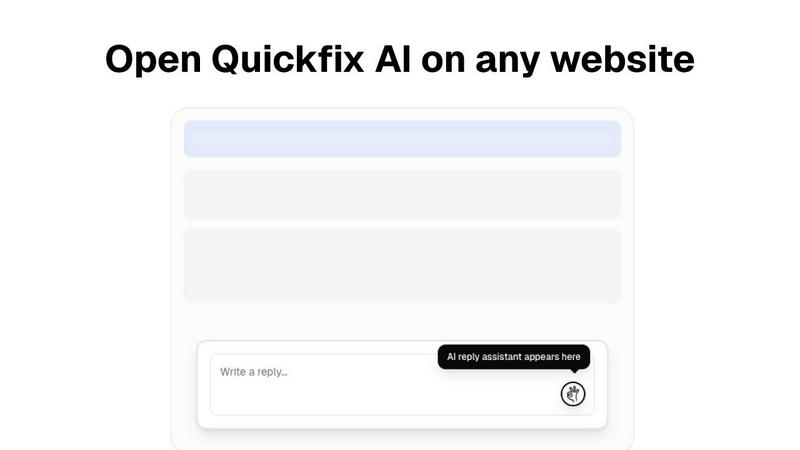
Let's clear up the confusion right away. The initial description provided is for a completely different product—a browser extension for writing replies. The actual Quickfix AI, based on its website, is a brilliant, no-nonsense system diagnostics tool. This is the software you wish came pre-installed on every computer. In essence, Quickfix AI is an AI-powered desktop application that performs a comprehensive health check on your Windows PC or Mac in under a minute. It demystifies your machine's inner workings, translating complex technical data into plain English insights and actionable recommendations. Forget wading through confusing Task Manager stats or system logs. This tool is built for anyone who's ever wondered, "Why is my computer so slow?" or needed to help someone else troubleshoot remotely. Its core value is profound clarity: it gives you the power to understand your system's performance, security, and health at a glance, whether you're a complete novice or a seasoned IT pro. It turns anxiety-inducing tech problems into solvable puzzles.
Frequently Asked Questions
OGimagen FAQ
What is the difference between the Starter, Growth, and Pro plans?
The Starter plan is a one-time purchase for 10 generations, perfect for a small project. Growth, also one-time, offers 25 generations and longer CDN hosting. The Pro plan is a monthly subscription that is the full, powerful experience: 50 generations per month, permanent CDN hosting, access to all framework snippets (not just HTML), and the invaluable MCP integration for your code editor. For serious builders, Pro is the obvious choice.
What happens when my CDN hosting expires?
When your hosting period ends (e.g., after 45 days on the Starter plan), the images are removed from the CDN. This means the links in your meta tags will break, and social platforms will no longer display your custom preview. You can prevent this by upgrading to a plan with longer hosting (Growth) or permanent hosting (Pro), or by downloading and self-hosting the image files before they expire.
What is MCP integration and why is it useful?
MCP (Model Context Protocol) lets different tools talk to your AI-assisted code editor. OGimagen's MCP integration means you can control it directly from editors like Cursor or Windsurf. You can generate a new image via a command, list your past generations, and insert the correct meta tag snippet—all without opening a browser. It's a massive productivity boost, keeping you in a state of flow.
Which frameworks are supported for meta tag snippets?
Free users receive a standard HTML meta tag snippet. Pro users unlock comprehensive support for all major modern frameworks. This includes Next.js (for both the App Router and the older Pages Router), Astro, SvelteKit, and Remix. The tool provides the exact, correct syntax for each, so you never have to adapt the code manually.
Quickfix AI FAQ
Is Quickfix AI free?
Yes, the core diagnostic functionality of Quickfix AI appears to be free to download and use. You can run the comprehensive system scan, view your report, and chat with the AI for explanations and recommendations without any cost. The website mentions "Pricing" and "Enterprise" sections, suggesting there may be premium tiers or team features for advanced use, but the fundamental tool is accessible for personal use.
Is my data secure?
Absolutely. Based on the website's emphasis on privacy (with links to a Privacy Policy and Data Processing Agreement), Quickfix AI is designed with security in mind. The diagnostic data is processed to generate your report, and the remote sharing feature uses a unique, one-time code for secure access. Your system information isn't stored or used beyond providing you with the immediate analysis and insights.
Do I need technical knowledge?
Not at all. This is the entire point of Quickfix AI. It is explicitly built for users with no technical knowledge. The AI is there to translate complex system information into plain English. You just need to click "Scan" and then ask questions like you would ask a person. The tool handles the technical heavy lifting for you.
What platforms are supported?
Quickfix AI is a cross-platform tool. It is available for both Windows and macOS. The website provides separate download buttons for "Download for Windows" and "Also available for macOS," confirming full support for the two major desktop operating systems, covering a vast majority of personal and professional computers.
Alternatives
OGimagen Alternatives
OGimagen is a specialized AI-powered dev tool designed to generate beautiful Open Graph images. It automates the creation of production-ready social cards, helping developers and content creators ensure their shared links look professional and engaging across all social platforms. People often seek alternatives for a variety of practical reasons. Cost is a major factor, as budget constraints can push users to look for free or more affordable tiers. Others might need specific integrations with their existing tech stack, more granular design control, or a different set of AI capabilities that better match their workflow. When evaluating other options, focus on a few key areas. Consider the quality and consistency of the AI-generated visuals, the flexibility of the templates or customization tools, and how seamlessly the tool integrates into your publishing pipeline. The goal is to find a solution that saves you time without compromising on the visual impact of your social previews.
Quickfix AI Alternatives
Quickfix AI is a browser extension in the productivity category that uses AI to instantly generate replies for emails, support tickets, and social media. It’s a clever tool for anyone looking to cut down on repetitive typing and speed up their digital communication. People often seek alternatives for a few key reasons. Maybe the pricing doesn’t fit their budget, or they need specific features like deeper integration with certain business software. Others might be looking for a different user experience or a tool that operates as a standalone app rather than a browser extension. When evaluating other options, focus on what truly matters for your workflow. Consider the core AI quality—does it produce genuinely useful and context-aware text? Check compatibility with the platforms you use daily. Also, look at the value proposition: does the tool save you meaningful time, and is its cost justified by the productivity boost it provides?