Rallied AI vs StreamVox - AI Live Translator
Side-by-side comparison to help you choose the right tool.

Rallied AI
Rallied is an AI technician that autonomously resolves L1 and L2 tickets for MSPs, freeing your best engineers for real project work.
Last updated: April 4, 2026

StreamVox is my go-to AI translator for real-time subtitles on calls, games, and media, breaking language barriers instantly.
Last updated: April 4, 2026
Visual Comparison
Rallied AI
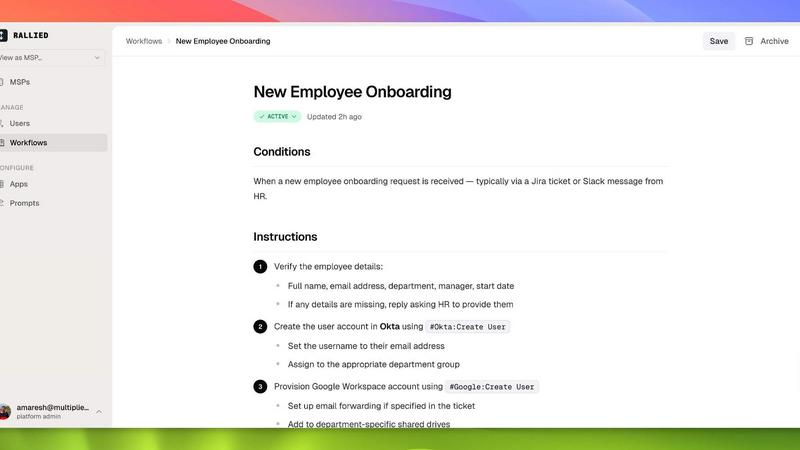
StreamVox - AI Live Translator

Feature Comparison
Rallied AI
Autonomous Ticket Resolution
Rallied doesn't just triage or suggest—it executes. When a ticket comes in for a common issue like a locked account or VPN access problem, it connects to the relevant system (e.g., Entra ID), performs the corrective action, confirms the resolution, updates the ticket with an internal note, and messages the end-user directly. This full-cycle automation is what sets it apart from tools that merely create more work for your human techs.
Natural Language Chat Interface
You can communicate with Rallied directly in Slack or Microsoft Teams as if it were another technician on your team. Need to onboard a new hire? Just message Rallied the details. It will handle the M365 license, create the AD account, add security groups, deploy the RMM agent, and update the PSA. This conversational interface makes delegating routine work incredibly intuitive and fast.
Intelligent Triage & Dispatch
For tickets that require human intervention, Rallied acts as a super-efficient dispatcher. It asks the end-user clarifying questions, accurately categorizes and prioritizes the ticket, pulls relevant documentation from IT Glue or Hudu, and routes it to the correct technician or queue with all necessary information pre-filled. This dramatically reduces triage time and context-switching for your team.
Broad Ecosystem Integration
Rallied is built to plug into the real-world MSP tech stack. It offers native connections to major PSAs like ConnectWise and Autotask, RMMs like Datto and Ninja, identity providers like Entra ID and Okta, and documentation tools. This deep integration is the foundation that allows it to perform actual work, not just observe it.
StreamVox - AI Live Translator
Per-App Audio Isolation & Bidirectional Capture
This is, hands down, the killer feature that makes StreamVox professional-grade. You're not just capturing all your PC's audio in a messy blob. You can tell StreamVox to listen ONLY to Zoom, or ONLY to Chrome, or ONLY to Discord. This means crystal-clear translation from your meeting without your game's soundtrack or email pings interfering. Even better, it works bidirectionally: you can translate both the audio coming from your system (others speaking) and the audio from your microphone (your speech translated for others), making it a true two-way communication bridge.
The "Invisible" Smart Overlay
StreamVox's overlay is a masterclass in user-centric design. It's a transparent window that stays on top of any full-screen application, from games to video players. You have granular control over its appearance: adjust font size from a subtle 12px to a massive 72px, change text color for better contrast, and crucially, dial in the opacity. You can make it nearly invisible, letting you focus on the video content, or fully opaque for maximum readability. It's this level of customization that transforms it from a utility into an elegant part of your viewing experience.
Extensive Language Support & UI Localization
With support for 49+ input languages and 49+ AI-powered target languages, the translation network is truly comprehensive, covering nearly every major global language. But StreamVox goes a step further by localizing its own interface into 12 languages. This thoughtful detail means a user in Japan or Brazil can navigate the app's settings comfortably in their native tongue, lowering the barrier to entry and making the tool genuinely accessible worldwide. It's a sign of a product built for a global audience from the ground up.
Phone Link Integration & Teleprompter Mode
This feature feels like magic. By linking your iPhone or Android phone to your PC via Microsoft's Phone Link app, StreamVox can provide live subtitles for your mobile phone calls directly on your desktop screen. It's an incredibly clever workaround for translating live telephone conversations. The Teleprompter mode, often an overlooked gem, takes this further by presenting the text in a centered, scrolling format with adjustable transparency, perfect for presentations or reading translated speech more naturally.
Use Cases
Rallied AI
Freeing Up Senior Engineers from L1/L2 Work
Your L2 and L3 engineers are your margin generators for project work and complex issues. Every minute they spend on a password reset is profit walking out the door. Rallied autonomously handles hundreds of these simple tickets monthly, giving your best people back 50-100 hours of billable or strategic time.
Scaling Operations Without Hiring
Hiring and training a new L1 technician is a $50k+ investment with a long ramp-up time. For growing MSPs with increasing ticket volume but frozen headcount, Rallied acts as an instantly proficient, always-on junior technician that can shoulder the repetitive ticket load, allowing you to scale service delivery without the traditional hiring lag and cost.
Streamlining Employee Onboarding/Offboarding
New hire and departure processes are tedious, multi-step, and prone to human error. Rallied automates the entire workflow from a single request: provisioning licenses, creating accounts, configuring security groups, deploying agents, and updating records for onboarding, and reversing it all for secure, scheduled offboarding.
Replacing Failed "Suggestion-Only" AI Tools
Many MSPs have tried platforms like Pia or Rewst, only to find they require a full-time administrator, months of setup, and still only recommend actions instead of taking them. Rallied is built as a direct response to this failure, focusing on fast deployment, zero dedicated admin overhead, and guaranteed execution of fixes.
StreamVox - AI Live Translator
International Business & Remote Meetings
For anyone in a globalized workplace, StreamVox is a non-negotiable productivity booster. Join a Zoom, Teams, or Google Meet call with colleagues from five different countries and follow the conversation in real-time with live subtitles in your language. The per-app capture ensures only the meeting audio is translated, and the low latency keeps the conversation flowing naturally, making cross-cultural collaboration feel effortless and inclusive.
Gaming & Live Streaming on Global Servers
Gamers, this is your secret weapon. Dive into multiplayer games on European or Asian servers and understand the team's strategy in voice chat instantly. For streamers, it opens up your content to a worldwide audience by providing live translation of your commentary. The line-by-line display mode is perfect for the fast-paced chat of a live game, ensuring you never miss a crucial call-out because of a language gap.
Consuming Foreign Media & Entertainment
Become a truly global viewer. Watch Spanish telenovelas, Korean dramas, Japanese anime, or German documentaries on Netflix, YouTube, or Twitch without waiting for official (or often non-existent) subtitles. Simply play the video in its native app or browser, and StreamVox's transparent overlay will provide instant translation on top of the video player, liberating you from the constraints of officially subtitled content.
Translating Mobile Phone Calls on Your Desktop
This use case is uniquely powerful. By connecting your smartphone via Phone Link, you can have a phone call with someone speaking another language and see the live transcription and translation on your large PC monitor. It turns a potentially stressful international call into a manageable, text-aided conversation. It's perfect for personal calls with family abroad or for business calls where every detail matters.
Overview
About Rallied AI
Let's cut to the chase: if you're an MSP owner drowning in low-level tickets while your best engineers waste their talent on password resets, you need to read this. Rallied AI isn't another chatbot that just suggests next steps; it's a fully autonomous AI technician built specifically for MSPs. It connects directly to your entire stack—your PSA (like ConnectWise or Halo), your RMM, M365, Entra ID, documentation platforms, and more—and it actually does the work. It resolves common L1 and L2 tickets like account unlocks, password resets, and mailbox permissions from start to finish, then updates the ticket and notifies the user. You can interact with it like a real coworker in Slack or Microsoft Teams, or simply let it work silently in your PSA. The value proposition is brutally simple: stop the margin bleed from your high-cost engineers doing low-value work, eliminate the need to hire another L1 tech, and get an AI solution that deploys in a week, not a quarter. This is the tool for MSPs who have been burned by overly complex, "suggestion-only" AI platforms that require a full-time admin.
About StreamVox - AI Live Translator
StreamVox is the definitive real-time AI translator for Windows, and frankly, it's the tool I wish I'd had years ago. It solves a universal problem: the language barrier in digital audio. This ingenious software listens to ANY audio source on your PC—be it a Zoom call, a Discord chat, an in-game voice channel, a YouTube video, or a Netflix film—and instantly overlays live, translated subtitles directly onto your screen. Its core value proposition is breathtakingly simple: understand everything you hear, in real-time, in your preferred language. It's built for a globalized digital citizen: remote workers collaborating with international teams, gamers joining foreign servers, polyglots consuming media, and anyone who has ever felt left out of a conversation because of language. What sets StreamVox apart is its surgical precision. Unlike clunky screen recorders, it can capture audio from specific applications only, ignoring system notifications and other background noise. Combined with a privacy-first promise that your audio is never stored, and an incredibly customizable, always-on-top overlay, StreamVox doesn't just translate; it seamlessly integrates translation into your existing digital workflow, making language barriers feel like a problem of the past.
Frequently Asked Questions
Rallied AI FAQ
What if it breaks something?
You maintain complete control through granular permissions. You define exactly what Rallied can do autonomously versus where it must ask a human for approval first. As your confidence in its performance grows, you can gradually expand its autonomous scope. It's designed to work within guardrails you set.
We've tried AI tools before and they failed. How is this different?
The key difference is execution versus suggestion. Other tools often act as fancy triage systems that create more steps. Rallied is connected to your core systems with the permissions to do the work. Furthermore, it deploys in a week, not months, and doesn't require a dedicated full-time employee to manage or train it continuously.
How long does implementation take?
Rallied promises a stark contrast to the industry norm. Instead of a multi-month, five-figure "forward deployed engineer" project, they aim to connect to your stack and go live within the same week of your kickoff call, with no implementation fee. A 30-day free trial includes tuning and edge-case handling.
What kind of tickets can it actually resolve?
Rallied specializes in autonomous resolution for common, repetitive L1 and L2 tickets. The prime examples from their materials include password resets, Active Directory/Entra ID account unlocks, mailbox permission changes, VPN access issues, and group membership modifications. It also excels at full workflow automation for onboarding and offboarding.
StreamVox - AI Live Translator FAQ
Is my audio data private and secure with StreamVox?
Absolutely, and this is a cornerstone of their design. StreamVox operates with a strict privacy-first philosophy. Your audio is processed in real-time by the AI translation engine and is never stored on their servers or your local machine. Once the translation is generated and displayed, the audio data is discarded. This ensures your sensitive meeting conversations, private calls, or any other audio remain completely confidential.
What are the system requirements for StreamVox?
StreamVox is designed for modern Windows systems. You will need a PC running Windows 10 or Windows 11 (64-bit versions only). A stable internet connection is required for the AI translation processing. While not explicitly listed, a reasonable amount of RAM and a modern processor will ensure the smoothest, lowest-latency experience, especially when running alongside other demanding applications like games or video conferencing software.
How does the "Per-App Capture" feature actually work?
This smart feature uses your Windows audio subsystem to isolate sound from individual applications. When you select an app (like Discord or Chrome) in StreamVox's settings, the tool hooks into that specific app's audio stream. It then captures only that audio for translation, completely ignoring all other sounds from your system, such as music players, notification sounds, or other browser tabs. This results in dramatically cleaner and more accurate transcriptions and translations.
Can I try StreamVox for free before committing to a paid plan?
Yes, and their free tier is notably generous. The Free Starter plan offers 20 minutes of translation time per day, forever, with access to all 49+ languages and core features like system and microphone capture. This gives you ample opportunity to test the software in real-world scenarios—like a short meeting or a gaming session—to experience its accuracy and low latency before deciding if a Pro subscription with higher monthly usage limits is right for your needs.
Alternatives
Rallied AI Alternatives
Rallied AI is a specialized AI technician built for Managed Service Providers. It falls squarely into the category of AI-powered IT automation and ticket resolution software. By connecting to your PSA and other tools, it autonomously handles L1 and L2 tickets, either through chat in Slack/Teams or by working directly in the ticketing system. Users often seek alternatives for a few key reasons. The price point might not fit a smaller MSP's budget, or the feature set could be overkill for their specific needs. Some teams might require deeper integration with a particular PSA that isn't supported, or they might prefer a different user interface or deployment model than what Rallied offers. When evaluating alternatives, focus on core capabilities. You need a solution that genuinely understands MSP workflows and can integrate with your critical stack—your PSA is non-negotiable. Look for strong autonomous resolution rates for common tickets, a natural chat interface your team will actually use, and clear reporting that proves the AI's ROI by showing reduced ticket volume and technician time saved.
StreamVox - AI Live Translator Alternatives
StreamVox - AI Live Translator is a Windows application that provides real-time AI subtitles and translation for any audio on your computer, from video calls and games to media playback. It falls into the category of real-time communication and accessibility software, designed to break down language barriers instantly. Users often explore alternatives for a variety of reasons. Some may need a solution for a different operating system like macOS or Linux, while others might require a specific feature not offered. Budget is another common driver, as individual needs can range from occasional use to heavy, professional demand, making the search for the right fit essential. When evaluating other options, key considerations include platform compatibility, the range of supported languages, and the accuracy of the translation engine. Also crucial are the audio capture methods—whether it can isolate specific apps—and the flexibility of the subtitle display. Ultimately, the best choice depends on your specific use case, technical environment, and how much you're willing to invest.