
SimpleDraw vs vaethat
Side-by-side comparison to help you choose the right tool.

SimpleDraw
Effortlessly create precise floor plans and layouts online with SimpleDraw, your free tool for accurate scale drawings.
Last updated: March 1, 2026

vaethat
Vaethat elevates your architectural renders with effortless AI enhancements for stunning clarity and detail retention.
Last updated: February 28, 2026
Visual Comparison
SimpleDraw
vaethat

Feature Comparison
SimpleDraw
Accurate Measurements & Scale Drawing
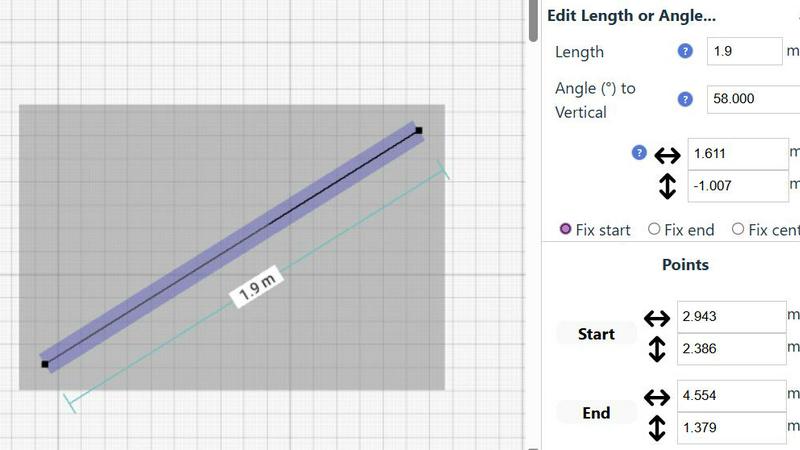
SimpleDraw ensures that your drawings maintain precise measurements with smart alignment features. This guarantees that your designs are not just visually appealing but also accurately scaled, which is crucial for effective planning and visualization.
Specialized Floor Plan Creator
The dedicated Floor Plan Mode allows users to create intricate floor plans complete with walls, doors, windows, and furniture. This feature is particularly beneficial for those who need a detailed representation of their spaces without the complexities of traditional CAD software.
Smart Alignment System
This feature assists users in placing lines and points exactly where they want them. By simply directing your mouse, SimpleDraw helps position elements accurately, making it easier for users to achieve their desired layouts with minimal effort.
Comprehensive Measurement System
SimpleDraw offers a robust measurement system that allows users to choose between metric or standard US units. Dynamic contextual measurements are displayed as you work, ensuring that you can create your drawings with the utmost precision and clarity.
vaethat
AI Render Upscaling
Vaethat’s AI render upscaling feature increases the resolution and sharpness of 3D architectural renders while maintaining clean and consistent geometry. This ensures that users can showcase their designs in high quality, capturing every intricate detail without losing the essence of the original render.
Detail Refinement
With detail refinement, Vaethat enhances fine textures, edges, and small architectural elements, resulting in a crisper and more polished look. This feature is essential for professionals aiming to present their work with the utmost clarity, ensuring that even the most subtle details stand out.
Material and Lighting Enhancement
The material and lighting enhancement feature boosts the perceived realism of renders by improving material definition, contrast, and lighting balance. This results in images that not only look visually appealing but also accurately reflect the intended atmosphere of the architectural project.
Noise and Artifact Cleanup
Vaethat excels in noise and artifact cleanup, effectively reducing common rendering artifacts that can detract from the quality of an image. By producing cleaner, presentation-ready images, this feature is vital for professionals preparing visuals for client presentations, portfolios, or marketing materials.
Use Cases
SimpleDraw
Kitchen & Bathroom Floor Plans
Planning a renovation? SimpleDraw allows you to create accurate kitchen and bathroom layouts, helping you visualize potential designs before beginning the actual work. This foresight can save time and resources during renovations.
Room Layouts & Furniture Planning
Designing your living room, bedroom, or office is made simple with SimpleDraw. You can experiment with different furniture arrangements to see what fits best before making a purchase, ensuring your space is both functional and aesthetically pleasing.
House & Apartment Plans
For real estate agents or homeowners, SimpleDraw enables the creation of complete floor plans for homes or rental listings. This feature is invaluable for space planning and presenting properties effectively.
Community-Driven Development
SimpleDraw thrives on user feedback, making it adaptable to the needs of its community. Join the Discord server to share ideas and suggestions for new features, ensuring that the tool evolves according to real user experiences and requirements.
vaethat
Architectural Presentations
Architects can use Vaethat to upscale their 3D renders, ensuring that their presentations to clients are visually striking and professionally polished. This enhances the chances of securing approvals and positive feedback.
Portfolio Development
For architectural visualizers, Vaethat can significantly improve the quality of portfolio images. By enhancing renders, users can create a standout portfolio that showcases their skills and the quality of their work, attracting potential clients and employers.
Marketing Materials
Vaethat is ideal for creating high-quality images for marketing materials, such as brochures or social media posts. The enhanced visuals can help convey the design’s intent and appeal more effectively to prospective buyers or stakeholders.
Project Documentation
During project documentation phases, Vaethat allows professionals to present clear and detailed images that accurately represent the final design. This is crucial for ensuring that all stakeholders are aligned on the project vision and details.
Overview
About SimpleDraw
SimpleDraw is an innovative online tool tailored for anyone looking to create precise and accurate scale drawings. Whether you're embarking on DIY projects, planning home renovations, or engaging in artistic pursuits that require visual precision, SimpleDraw is here to simplify your process. This free-to-use platform stands out by eliminating the need for complicated downloads or registrations, allowing users to dive right into their projects seamlessly. The interface is designed to be user-friendly, catering to beginners while providing the advanced features that seasoned professionals expect. The main value proposition of SimpleDraw is its ability to streamline the process of drawing accurate scale layouts, empowering users to visualize their ideas effectively and efficiently. With functionalities that range from detailed floor plans to technical drawings, SimpleDraw has established itself as the go-to solution for anyone aiming to translate spatial concepts into tangible designs.
About vaethat
Vaethat is an innovative AI-powered tool specifically designed for architectural visualization professionals. By leveraging advanced artificial intelligence, Vaethat enhances and upscales 3D renders, bringing clarity, sharpness, and an unprecedented level of realism to architectural images. This product caters to architects, designers, and visualizers who need to present their work in the best possible light without the hassle of complex editing processes. The main value proposition of Vaethat lies in its ability to streamline the enhancement workflow, allowing users to focus on creativity rather than technicalities. With features tailored for the unique requirements of architectural visualization, Vaethat not only preserves the original design intent but also amplifies the visual richness and detail of renders, making it an indispensable tool for professionals in the field.
Frequently Asked Questions
SimpleDraw FAQ
Is SimpleDraw really free to use?
Yes, SimpleDraw is completely free to use. You can start drawing immediately without the need for any downloads or registrations.
Do I need CAD experience to use SimpleDraw?
Not at all! SimpleDraw is designed to be user-friendly, making it accessible for beginners while also offering advanced features that experienced users will appreciate.
Can I save my designs on SimpleDraw?
Currently, SimpleDraw focuses on providing a seamless drawing experience in-browser. While saving options may be limited, users can easily take screenshots or export their designs for personal use.
How does the smart alignment system work?
The smart alignment system uses visual indicators to assist users in placing lines and points accurately. It adapts to the user's zoom level and can also guide placement, ensuring precision in your drawings.
vaethat FAQ
How does the AI render enhancer calculate credits?
Vaethat calculates credits based on the number of images processed and the complexity of enhancements applied. Users can easily track their credits within the platform, ensuring transparency and accessibility.
Can I use the archviz AI upscaler with V-Ray, Lumion, Enscape, 3ds Max, and SketchUp?
Yes, Vaethat is compatible with various architectural visualization tools including V-Ray, Lumion, Enscape, 3ds Max, and SketchUp. This versatility makes it a valuable addition to any workflow.
What makes this AI post-production tool different from manual editing?
Unlike manual editing, which can be time-consuming and require extensive skill, Vaethat offers a streamlined process that allows users to achieve high-quality results quickly and efficiently. The AI technology automates enhancements while preserving design intent.
Can I upgrade or downgrade my AI enhancement plan anytime?
Yes, Vaethat offers flexible subscription plans that allow users to upgrade or downgrade based on their needs. This ensures that professionals can adapt their usage according to project demands without any hassle.
Alternatives
SimpleDraw Alternatives
SimpleDraw is an innovative online tool designed for creating precise scale drawings and floor plans, making it suitable for DIY enthusiasts, architects, and anyone in between. As a free-to-use platform, it removes the barriers of complicated installations and registrations, appealing to a broad audience. However, users often seek alternatives due to factors such as the need for advanced features, specific platform compatibility, or even pricing considerations. When searching for an alternative, consider key aspects like user interface, functionality, and whether the tool meets your specific drawing requirements, ensuring it aligns with your creative vision.
vaethat Alternatives
Vaethat is an AI-powered tool specifically designed for architectural visualization professionals, enabling them to upscale and enhance 3D renders. This innovative platform focuses on improving the clarity, sharpness, and overall realism of architectural images, making it an essential asset in the design tools category. Users often seek alternatives to Vaethat for various reasons, including pricing structures, specific feature sets, or compatibility with different platforms. When exploring alternatives, it's crucial to consider aspects like ease of use, the range of enhancements offered, and the ability to maintain design integrity while achieving desired results. --- [{"question": "What is vaethat?", "answer": "Vaethat is an AI-powered tool designed for enhancing and upscaling 3D architectural renders."}, {"question": "Who is vaethat for?", "answer": "Vaethat is primarily aimed at architectural visualization professionals looking to improve the quality of their 3D renders."}, {"question": "Is vaethat free?", "answer": "The content provided does not specify whether Vaethat is free; users should check the official website for pricing details."}, {"question": "What are the main features of vaethat?", "answer": "Vaethat features AI render upscaling, detail refinement, material and lighting enhancement, noise and artifact cleanup, and a simple upload-and-export flow."}]