
PDF Compiler vs Tailride
Side-by-side comparison to help you choose the right tool.

PDF Compiler
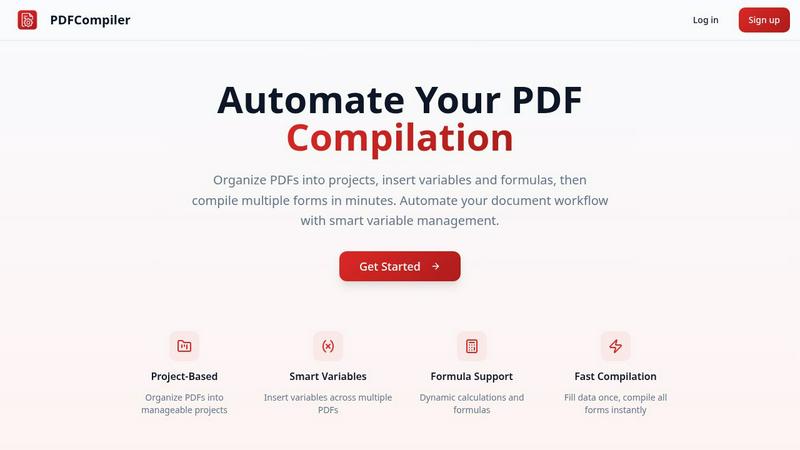
Effortlessly automate your PDF workflow by entering data once to instantly populate multiple forms with ease.
Last updated: February 28, 2026

Tailride
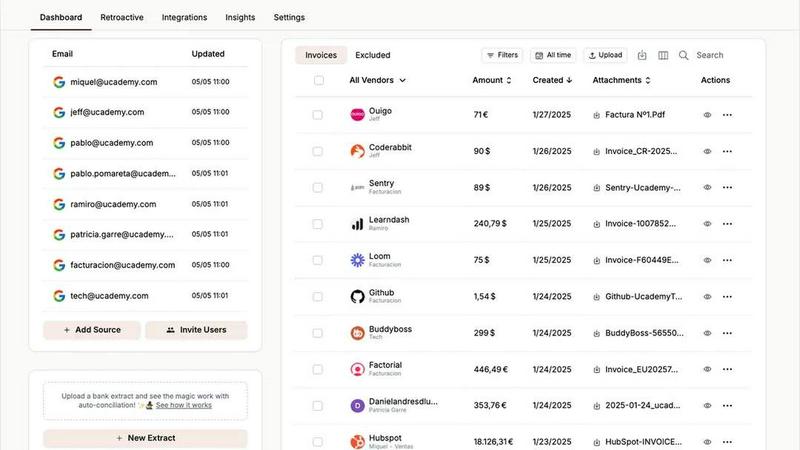
Tailride automates invoice chaos by scanning your inbox and portals, saving accountants hundreds of hours.
Last updated: February 28, 2026
Visual Comparison
PDF Compiler
Tailride
Feature Comparison
PDF Compiler
Configurable Fields
PDF Compiler allows users to define a variety of fields in their documents, including text inputs, dates, variables, selections, and even Excel-style formulas. This flexibility ensures that all necessary data can be efficiently captured and managed, catering to the unique requirements of each project.
Minimal Input
One of the standout features of PDF Compiler is its ability to minimize user input. Users only need to enter essential data once, and the software automatically populates all linked documents with the appropriate information, adhering to the predefined configurations. This not only saves time but also reduces the likelihood of data entry errors.
Data Linking
With PDF Compiler, any updates made to a field automatically propagate across all PDFs within the project. This means that users can make changes to a single data point, and the software will ensure that all related documents reflect those updates, maintaining consistency and accuracy throughout the entire set.
Automated Workflows
The software enables users to generate complete document sets in mere minutes. With its dynamic calculations and formatting capabilities, PDF Compiler streamlines the entire process of document preparation, allowing users to compile all necessary forms instantly, ready for submission, sharing, or printing.
Tailride
Inbox Scanning & Monitoring
This is Tailride's killer feature and my personal favorite. It establishes a native, secure connection to your email inbox (and your team's inboxes) to continuously monitor for incoming invoices. It doesn't matter if the invoice is a PDF attachment, a scanned image, embedded in the email body, or hidden behind a download link—Tailride finds it, extracts the key data, and files it away. This completely eliminates the archaic practice of forwarding emails to a generic "invoices@" address and gives you total visibility into your company's incoming bills. The peace of mind of knowing nothing is slipping through the cracks is invaluable.
Chrome Extension for Online Portals
Why log into twenty different platforms just to download invoices? Tailride's brilliant Chrome extension cuts this tedious process down to a single click. Need an invoice from Amazon Ads, Meta Ads, Notion, ChatGPT, or Adobe? Just navigate to the portal, click the Tailride button, and it's instantly captured and sent for processing. This feature alone can save hours per month and is a game-changer for businesses that rely on multiple SaaS tools and online services. It turns a fragmented chore into a trivial task.
Intelligent AI Processing & Rules
Once documents are captured, Tailride's AI doesn't just read them—it understands them. It extracts vendor names, dates, amounts, and taxes with impressive accuracy. But the real magic is in the customizable AI rules. You can teach Tailride to automatically categorize invoices based on vendor, amount, or keywords, and route them to specific folders in Google Drive or to the correct client file in your accounting stack. This transforms raw data into structured, actionable information ready for bookkeeping and reconciliation.
Bank Reconciliation & Missing Document Detection
This feature is what elevates Tailride from a document fetcher to a true accounting assistant. It doesn't just collect invoices; it helps you make sense of them. Tailride can match bank transactions with the extracted invoices, highlighting what's been paid and, crucially, identifying missing documents for transactions that lack a corresponding invoice. This turns the monthly reconciliation nightmare into a streamlined, guided process, ensuring your books are always complete and audit-ready.
Use Cases
PDF Compiler
Tender and Proposal Documentation
In scenarios where organizations frequently prepare tenders and proposals, PDF Compiler excels by automating the completion of these documents. By reducing repetitive data entry, teams can create professional proposals swiftly, ensuring they meet tight deadlines without compromising quality.
Financial and Administrative Reports
For finance and admin teams tasked with generating comprehensive reports, PDF Compiler simplifies the process. The ability to link data across multiple PDFs means that any adjustments made to core figures will automatically update all related reports, enhancing both accuracy and efficiency.
Multi-Document Workflows
Any workflow that involves multiple documents requiring repetitive data entry can benefit from PDF Compiler. Whether it's contracts, invoices, or project documentation, the software streamlines the compilation process, saving time and ensuring consistency across all documents.
Compliance and Regulatory Filings
Organizations that must adhere to strict compliance and regulatory standards find PDF Compiler invaluable. By automating the completion of required forms and ensuring that all data is accurate and up-to-date, businesses can minimize risks associated with manual entry and ensure adherence to legal obligations.
Tailride
For Fast-Growing Startups & SMEs
If your company is scaling, your financial paperwork is scaling exponentially faster. Tailride is absolutely mandatory here. It automates the entire accounts payable capture process across your team, ensuring that no invoice from any department gets lost. You achieve 100% capture rate, eliminate manual data entry, and save hundreds of hours every single month, allowing your team to focus on growth, not administrative drudgery.
For Accountants & Bookkeeping Firms
For accountants managing multiple clients, Tailride is a force multiplier. Instead of chasing clients for missing invoices or dealing with messy email forwards, you can invite clients to connect their inboxes. You get a clean, organized, and real-time feed of all their financial documents directly into your preferred system (QuickBooks, Xero). It makes client onboarding smoother, quarter-ends less stressful, and frankly, makes you a happier, more efficient service provider.
For Managing Physical Receipts & Employee Expenses
Paper receipts are the bane of modern finance. Tailride elegantly solves this with its Telegram/WhatsApp bot. Employees can simply take a picture of a physical receipt and send it to the bot. Tailride processes it just like a digital invoice and adds it to the central dashboard. This creates a simple, unified system for tracking all expenses, digital and physical, without forcing anyone to learn new software.
For Historical Data Cleanup and Audits
Need to find all invoices from the past year for an audit or tax filing? Manually searching an inbox is a special kind of hell. With Tailride, you can perform a retroactive scan for any custom date range—this month, last quarter, all of 2024. It will find, extract, and organize all past invoices in minutes, turning a week-long digging project into a task that takes less time than your morning coffee.
Overview
About PDF Compiler
PDF Compiler is an innovative tool designed to automate the completion of PDF forms across multiple documents, significantly enhancing efficiency and accuracy in various workflows. This software caters to professionals and organizations that deal with repetitive data entry tasks, such as proposal teams, financial analysts, and administrative personnel. The primary value proposition of PDF Compiler lies in its ability to reduce manual input, ensuring consistency and minimizing the risk of errors. Unlike traditional PDF editors, PDF Compiler excels in handling data propagation, complex formulas, and field references throughout an entire document set. By streamlining the compilation process, users can focus on high-value tasks while the software takes care of the tedious details, ultimately resulting in faster project completions and enhanced productivity.
About Tailride
Let's be brutally honest: accounting is a necessary evil that sucks the life out of productive work. Manually chasing down invoices from emails, portals, and chatty colleagues is a soul-crushing time sink. Enter Tailride, the AI-powered accounting automation platform that doesn't just help—it completely redefines the workflow. This isn't another simple receipt-scanning app; it's a full-scale automation engine designed for business owners, finance teams, and accountants who are tired of the administrative chaos. Its core genius lies in its proactive, native approach. Instead of you forwarding documents, Tailride plugs directly into your company's email inboxes (Gmail, Outlook, IMAP) and actively monitors them, automatically detecting and extracting invoices and receipts from emails, attachments, and even URLs. It then processes them with intelligent document recognition, categorizes them with customizable AI rules, and seamlessly syncs everything to your accounting software like QuickBooks and Xero or to Google Drive. The result? You move from reactive invoice hunting to a state of organized, automated bliss where all financial documents are captured, categorized, and reconciled without you lifting a finger. For fast-growing companies and the accountants who serve them, Tailride isn't just a tool; it's the foundation for a sane, scalable financial operation.
Frequently Asked Questions
PDF Compiler FAQ
How does PDF Compiler ensure data accuracy?
PDF Compiler eliminates manual entry errors by allowing users to enter data only once. Changes to linked fields automatically propagate across all related documents, ensuring that all information remains consistent and accurate.
Can I customize the fields in my PDF documents?
Yes, PDF Compiler offers configurable fields, allowing users to define the types of data they need, including text, dates, variables, selections, and formulas. This customization ensures that each document meets specific project requirements.
Is there a limit to the number of PDFs I can compile at once?
No, PDF Compiler is designed to handle multiple PDFs within a single project. Users can organize their documents efficiently and compile all forms simultaneously, regardless of the number of files involved.
Is a demo available for PDF Compiler?
Absolutely! Users can try an interactive demo with sample documents to experience the automated compilation process firsthand. No account is required to see the power of PDF Compiler in action.
Tailride FAQ
Is Tailride secure? Do you read my emails?
Yes, Tailride is built with security as a cornerstone. It establishes a native, encrypted connection to your email provider (like Google or Microsoft). It uses secure protocols to scan for and extract only invoice and receipt data. Your raw emails never leave your inbox or your control, and Tailride does not read or store personal correspondence. It's focused solely on document processing.
What email providers does Tailride work with?
Tailride works with virtually all email clients. It offers seamless native integration with Gmail and Outlook, and also supports any email service that provides IMAP access. This means it can connect to custom domain emails hosted on services like Zoho, iCloud, or private servers, making it incredibly versatile for businesses of all types.
Can I use Tailride for personal receipts?
While Tailride is powerfully built for business accounting automation, its core functionality works perfectly for individuals who want to automate personal expense tracking. You can connect your personal inbox, use the Chrome extension on shopping sites, and send personal receipts via the mobile bot to keep everything organized for tax time or budgeting.
How does the Chrome extension work with online portals?
The Tailride Chrome extension is a lightweight add-on that adds a button to your browser. When you are logged into a supported platform (like Amazon Business, Meta Ads Manager, etc.), you can click the Tailride button on any page listing invoices or transactions. The extension will securely communicate with the webpage to identify and extract the available invoice data and send it directly to your Tailride account for processing.
Alternatives
PDF Compiler Alternatives
PDF Compiler is a powerful tool designed for automating PDF form completion, falling within the realm of business productivity and task management solutions. By allowing users to enter data just once and having it populate across multiple PDFs, PDF Compiler streamlines workflows that involve repetitive data entry, making it invaluable for tasks like tender documentation and financial reporting. However, users often seek alternatives due to various factors such as pricing, specific feature sets, or compatibility with different operating systems. When choosing an alternative, it's essential to consider aspects like ease of use, the ability to handle complex data linking, automation capabilities, and the overall scalability of the solution to meet your unique needs.
Tailride Alternatives
Tailride is an AI-powered accounting automation platform that specializes in extracting and processing invoices and receipts from emails and web portals. It falls squarely into the category of financial operations software, designed to save businesses from the tedious manual work of data entry. Users often seek alternatives for a variety of reasons. Perhaps Tailride's pricing tier doesn't align with a startup's budget, or a larger enterprise needs deeper integration with a specific ERP system. Others might prioritize different core features, like multi-currency support or a more robust mobile experience, leading them to explore the competitive landscape. When evaluating other options, focus on the core automation capabilities. Look for strong AI extraction accuracy, the breadth of platform and accounting software integrations, and the flexibility of automation rules. Security and data handling policies are also non-negotiable, as this software will have access to sensitive financial documents.